System Settings
The SYSTEM tab in EXPERT SETTINGS configures system resource allocation, deployment settings, and infrastructure parameters for machine learning experiments. This tab allows you to customize how Driverless AI utilizes system resources, manages GPU and CPU allocation, and handles remote deployment configurations.
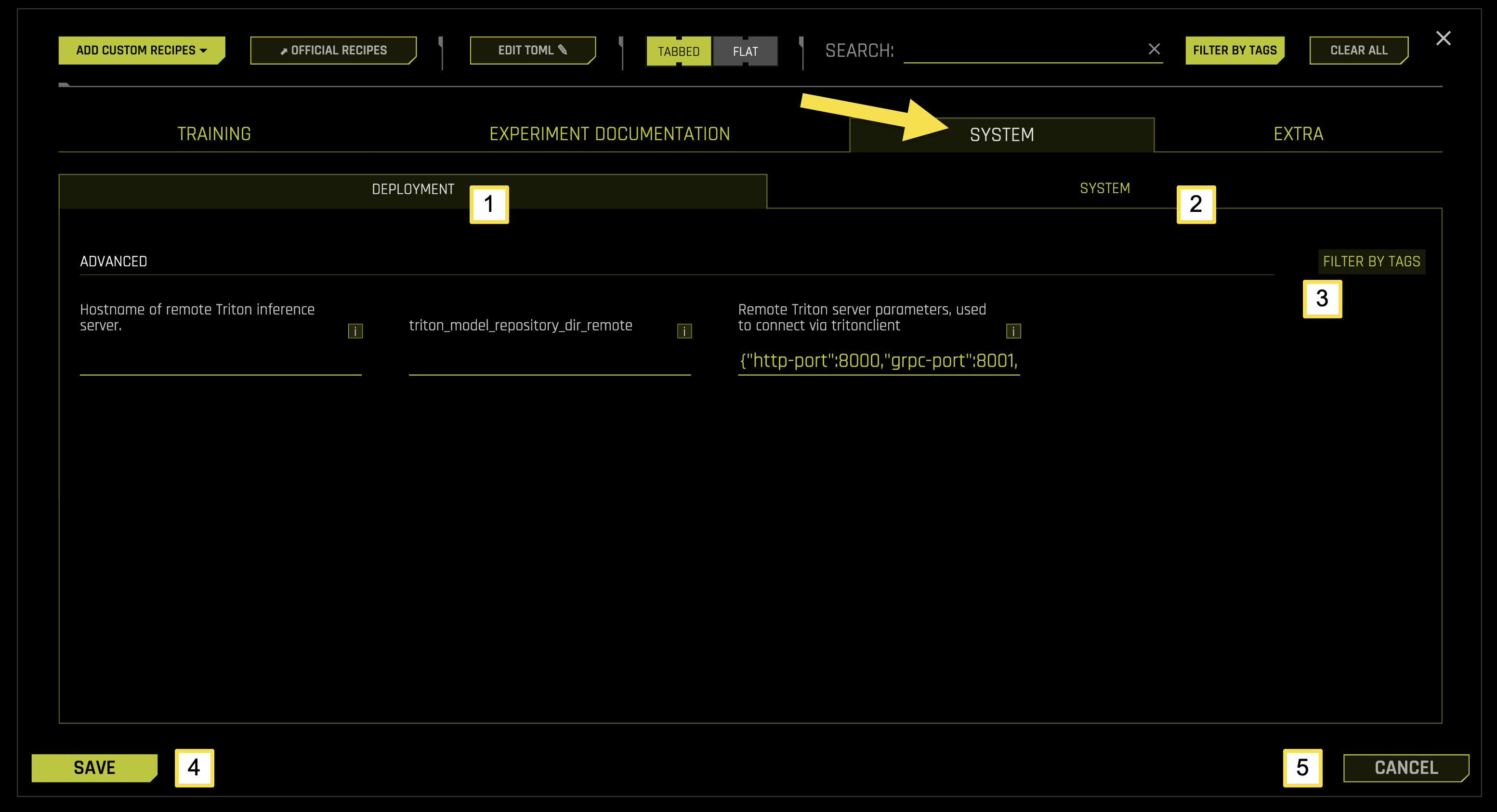
System Tab Sub-Categories
The SYSTEM tab is organized into two main sub-categories, each focusing on specific aspects of system configuration and resource management for machine learning experiments.
To access these settings, navigate to EXPERT SETTINGS > SYSTEM tab from the Experiment Setup page.
The following table describes the actions you can take from the SYSTEM page:
Sub-Category |
Description |
|---|---|
[1] Deployment |
Configure remote Triton inference server settings, connection parameters, and deployment configurations |
[2] System |
Configure system resource allocation, CPU and GPU settings, memory management, and performance optimization |
[3] Filter by Tags |
Filter and organize system settings using custom tags and labels |
[4] Save |
Save all system configuration changes |
[5] Cancel |
Cancel changes and revert to previous configuration settings |
Deployment
The Deployment sub-tab manages remote Triton inference server configurations, connection parameters, and deployment settings for your experiments.
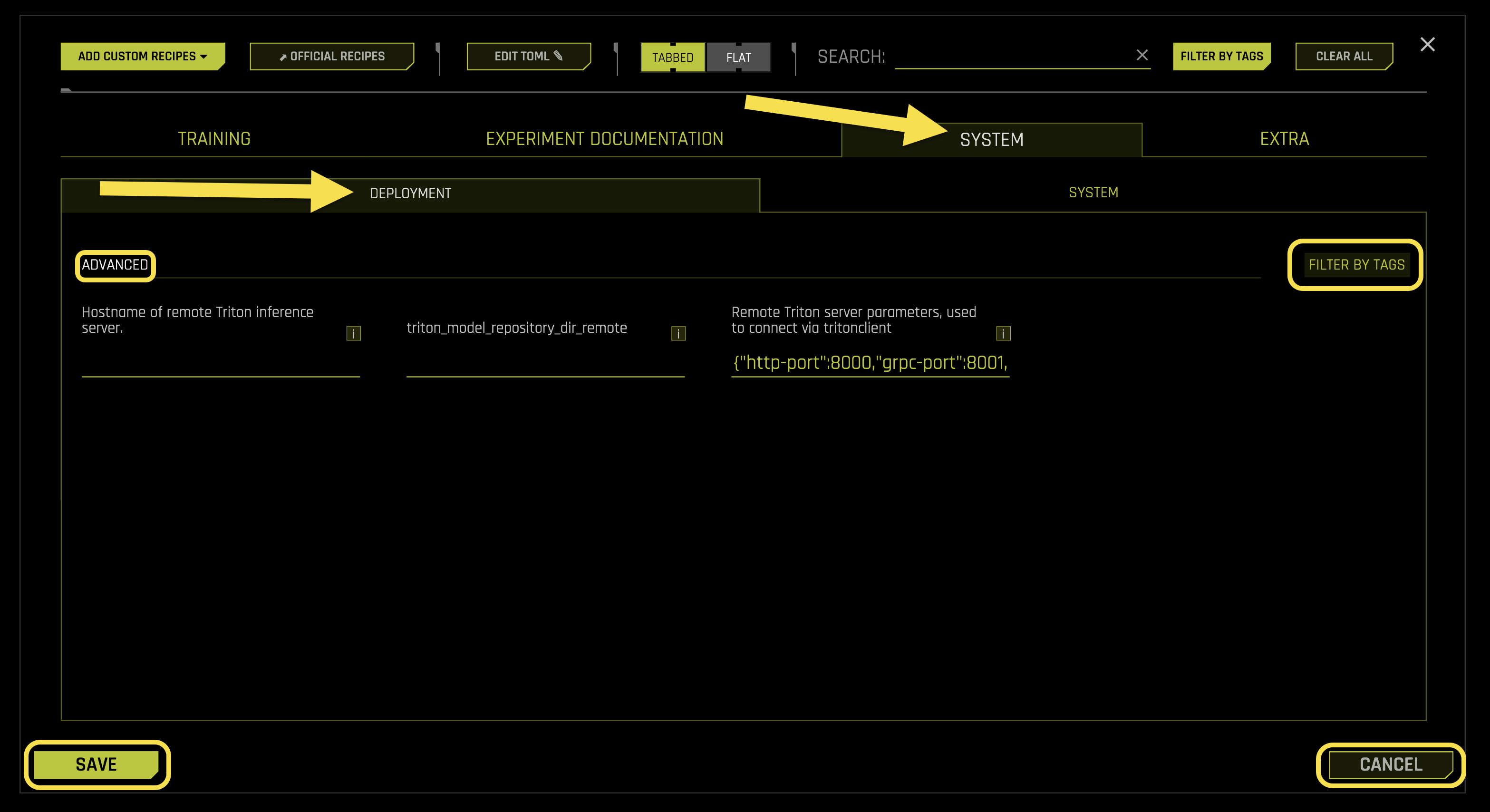
Advanced Settings:
- Hostname of remote Triton inference server
What it does: Specifies the hostname or IP address of the remote Triton inference server
Purpose: Enables connection to remote Triton servers for model deployment and inference operations
Format: Hostname, IP address, or fully qualified domain name (FQDN)
Empty value: Uses local Triton server (default)
Requires: String value (default: 《》)
- triton_model_repository_dir_remote
What it does: Sets the remote directory path for Triton model repository
Purpose: Specifies where model artifacts are stored on the remote Triton server
Format: Remote directory path accessible by Triton server
Use case: Required for remote model deployment and management operations
Requires: String path (default: 《》)
- Remote Triton server parameters, used to connect via tritonclient
What it does: Configures connection parameters for remote Triton server communication
Purpose: Defines ports, protocols, and connection settings for Triton client communication
- Default configuration:
http-port: 8000 (HTTP API port)
grpc-port: 8001 (gRPC API port)
metrics-port: 8002 (Metrics collection port)
model-control-mode: 《explicit》 (Model loading control)
Format: JSON dictionary with connection parameters
Requires: JSON object (default: {《http-port》:8000,》grpc-port》:8001,》metrics-port》:8002,》model-control-mode》:》explicit》})
System
The System sub-tab configures system resource allocation, CPU and GPU settings, memory management, and performance optimization for your experiments.
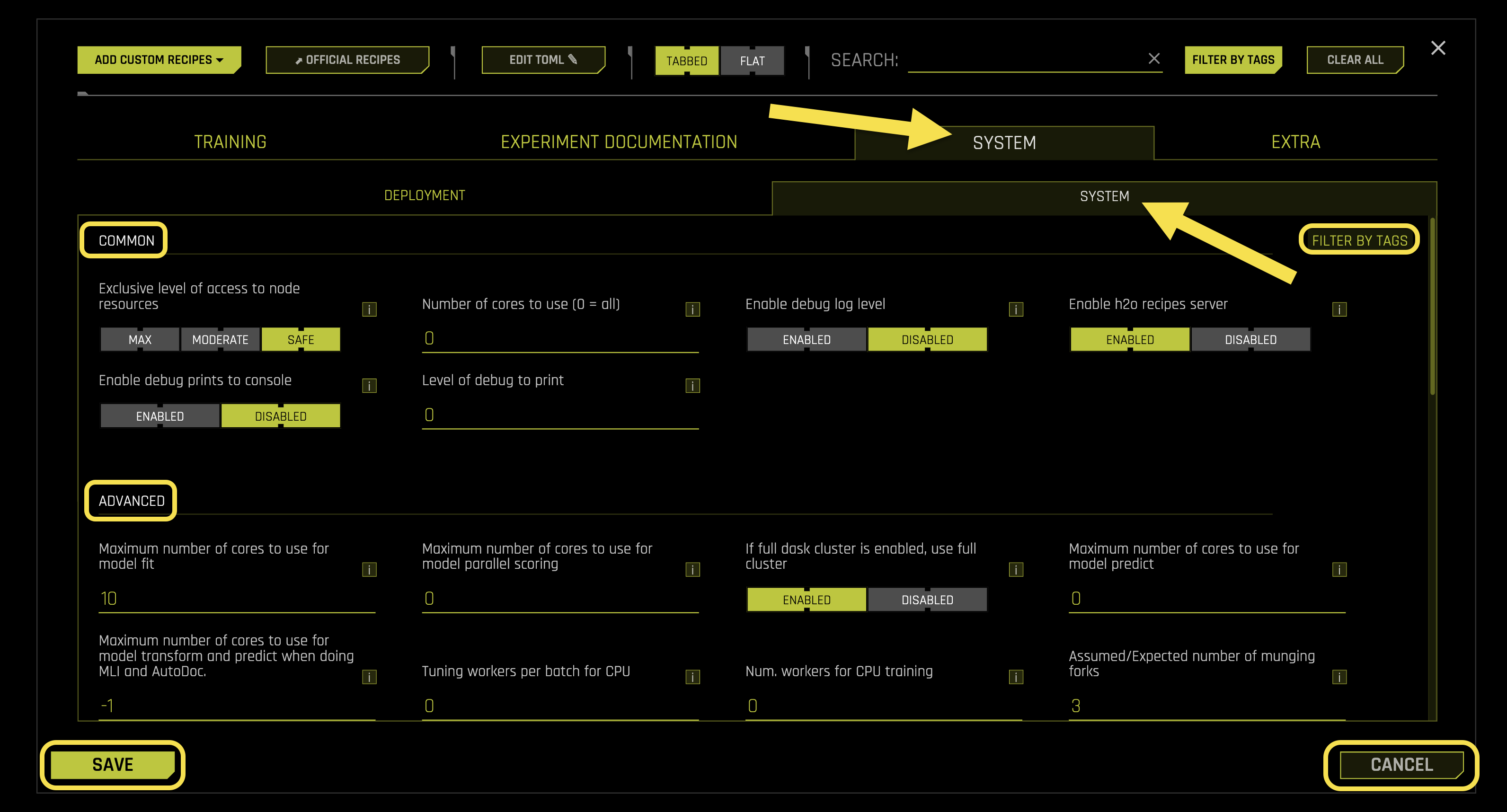
Common Settings:
- Exclusive level of access to node resources
What it does: Controls the level of exclusive access to node resources during experiments
Purpose: Manages resource contention and ensures consistent performance
- Available options:
safe: Assumes other experiments might be running on the same node (default)
moderate: Assumes no other experiments or tasks are running on the same node, but uses only physical core count
max: Assumes no other processes are running on the node except this experiment
Use case: Useful for high-priority experiments requiring dedicated system resources
Requires: String selection (default: safe)
- Number of cores to use (0 = all)
What it does: Sets the maximum number of CPU cores to use for experiment processing
Purpose: Controls CPU resource allocation and prevents system overload
Auto mode (0): Uses all available CPU cores
Custom value: Limits CPU usage to specified number of cores
Requires: Integer value (default: 0)
- Enable debug log level
What it does: Controls whether to enable detailed debug logging for system operations
Purpose: Provides comprehensive logging information for troubleshooting and monitoring
- Available options:
Enabled: Enables detailed debug logging
Disabled: Uses standard logging level (default)
Requires: Boolean toggle (default: Disabled)
- Enable h2o recipes server
What it does: Controls whether to enable the H2O recipes server for custom recipe management
Purpose: Allows integration with external H2O recipe repositories and custom transformations
- Available options:
Enabled: Starts H2O recipes server (default)
Disabled: Uses local recipe management only
Requires: Boolean toggle (default: Enabled)
- Enable debug prints to console
What it does: Controls whether to display debug information directly in the console output
Purpose: Provides real-time debugging information during experiment execution
- Available options:
Enabled: Prints debug information to console
Disabled: Sends debug information to log files only (default)
Requires: Boolean toggle (default: Disabled)
- Level of debug to print
What it does: Sets the verbosity level of debug information printed to console
Purpose: Controls the amount of debugging detail displayed
- Levels:
0: Minimal debug information (default)
1: Standard debug information
2: Detailed debug information
3: Comprehensive debug information
Requires: Integer value (default: 0)
Advanced Settings:
- Maximum number of cores to use for model fit
What it does: Sets the maximum number of CPU cores dedicated to model training
Purpose: Optimizes model training performance and resource utilization
Performance: More cores generally improve training speed, especially for large datasets
Requires: Integer value (default: 10)
- Maximum number of cores to use for model parallel scoring
What it does: Sets the maximum number of CPU cores for parallel prediction scoring
Purpose: Optimizes prediction throughput for batch inference operations
Auto mode (0): Uses automatic core allocation
Custom value: Limits parallel scoring to specified number of cores
Requires: Integer value (default: 0)
- Maximum number of cores to use for model predict
What it does: Sets the maximum number of CPU cores for prediction operations
Purpose: Controls resource allocation during inference and prediction phases
Auto mode (0): Uses automatic core allocation
Custom value: Limits prediction operations to specified number of cores
Requires: Integer value (default: 0)
- Maximum number of cores to use for model transform and predict when doing MLI and AutoDoc
What it does: Sets CPU core allocation for model interpretability and documentation operations
Purpose: Optimizes performance during MLI (Model Lineage and Interpretability) and AutoDoc generation
Note: MLI provides model explainability and AutoDoc generates experiment documentation
Auto mode (-1): Uses automatic core allocation
Custom value: Limits MLI and AutoDoc operations to specified number of cores
Requires: Integer value (default: -1)
- Tuning workers per batch for CPU
What it does: Sets the number of worker processes per batch during CPU-based hyperparameter tuning
Purpose: Optimizes hyperparameter optimization performance on CPU resources
Auto mode (0): Uses automatic worker allocation
Custom value: Specifies number of workers per tuning batch
Requires: Integer value (default: 0)
- Num. workers for CPU training
What it does: Sets the number of worker processes for CPU-based model training
Purpose: Controls parallel training performance and resource utilization
Auto mode (0): Uses automatic worker allocation
Custom value: Specifies number of training workers
Requires: Integer value (default: 0)
- Assumed/Expected number of munging forks
What it does: Sets the expected number of data preprocessing (munging) processes
Purpose: Optimizes data preprocessing performance and resource planning
Performance: More forks can improve data preprocessing speed on multi-core systems
Requires: Integer value (default: 3)
- Max. threads for datatable munging
What it does: Sets the maximum number of threads for datatable data preprocessing operations
Purpose: Controls threading for efficient data manipulation and transformation
Performance: More threads can improve munging performance on multi-core systems
Note: datatable is a high-performance data manipulation library
Requires: Integer value (default: 4)
- Max. threads for datatable reading/writing
What it does: Sets the maximum number of threads for datatable file I/O operations
Purpose: Optimizes data loading and saving performance
Performance: More threads can improve I/O throughput for large datasets
Note: datatable is a high-performance data manipulation library
Requires: Integer value (default: 4)
- Max. workers for final model building
What it does: Sets the maximum number of worker processes for final model construction
Purpose: Controls resource allocation during the final model building phase
Auto mode (0): Uses automatic worker allocation
Custom value: Limits final model building to specified number of workers
Requires: Integer value (default: 0)
- Max. workers for final per-model munging
What it does: Sets the maximum number of workers for per-model data preprocessing
Purpose: Optimizes data preprocessing performance for individual models
Auto mode (0): Uses automatic worker allocation
Custom value: Limits per-model munging to specified number of workers
Requires: Integer value (default: 0)
- Max. Num. of threads to use for datatable and OpenBLAS for munging and model training (0 = all, -1 = auto)
What it does: Sets the maximum number of threads for datatable and OpenBLAS operations during munging and training
Purpose: Controls threading for optimized mathematical operations and data processing
Note: OpenBLAS is an optimized Basic Linear Algebra Subprograms library
Auto mode (-1): Uses automatic thread allocation
All mode (0): Uses all available threads
Custom value: Limits threading to specified number of threads
Requires: Integer value (default: -1)
- Max. Num. of threads to use for datatable read and write of files (0 = all, -1 = auto)
What it does: Sets the maximum number of threads for datatable file I/O operations
Purpose: Optimizes file reading and writing performance
Note: datatable is a high-performance data manipulation library
Auto mode (-1): Uses automatic thread allocation
All mode (0): Uses all available threads
Custom value: Limits I/O threading to specified number of threads
Requires: Integer value (default: -1)
- Max. Num. of threads to use for datatable stats and OpenBLAS (0 = all, -1 = auto)
What it does: Sets the maximum number of threads for datatable statistical operations and OpenBLAS computations
Purpose: Controls threading for statistical calculations and mathematical operations
Note: OpenBLAS is an optimized Basic Linear Algebra Subprograms library
Auto mode (-1): Uses automatic thread allocation
All mode (0): Uses all available threads
Custom value: Limits statistical threading to specified number of threads
Requires: Integer value (default: -1)
- #GPUs/Experiment (-1 = autodetect or all)
What it does: Sets the number of GPUs to allocate per experiment
Purpose: Controls GPU resource allocation across experiments
Auto mode (-1): Automatically detects and uses all available GPUs
Custom value: Limits experiment to specified number of GPUs
Requires: Integer value (default: -1)
- Num Cores/GPU
What it does: Sets the number of CPU cores to allocate per GPU
Purpose: Optimizes CPU-GPU resource pairing for balanced performance
Auto mode (-2): Uses automatic CPU-GPU core allocation
Custom value: Specifies CPU cores per GPU
Requires: Integer value (default: -2)
- #GPUs/Model (-1 = all)
What it does: Sets the number of GPUs to allocate per individual model
Purpose: Controls GPU resource allocation for model training and inference
Auto mode (-1): Uses all available GPUs for each model
Custom value: Limits each model to specified number of GPUs
Requires: Integer value (default: 1)
- Num. of GPUs for isolated prediction/transform
What it does: Sets the number of GPUs dedicated to isolated prediction and transformation operations
Purpose: Reserves GPU resources for specific prediction and transformation tasks
Isolation: Prevents resource contention with other operations
Requires: Integer value (default: 0)
- GPU starting ID (0..visible #GPUs - 1)
What it does: Sets the starting GPU device ID for GPU allocation
Purpose: Allows selection of specific GPU devices for experiments
Auto mode (-1): Uses automatic GPU device selection
Custom value: Starts GPU allocation from specified device ID
Requires: Integer value (default: -1)
- Whether to reduce features when model fails
What it does: Controls whether to automatically reduce features when model training fails
Purpose: Enables automatic recovery from memory or resource-related model failures
Note: Primarily useful for GPU out-of-memory (OOM) scenarios
- Available options:
auto: Automatically enables/disables based on reproducibility settings (default)
on: Always reduces features when models fail
off: Stops experiment when models fail
Requires: String selection (default: Auto)
- Number of repeats for models used for feature selection during failure recovery
What it does: Sets the number of retry attempts for models during feature selection failure recovery
Purpose: Controls retry behavior when feature selection models fail
Recovery: Helps ensure successful feature selection during failure recovery
Note: More repeats can lead to higher accuracy but increase processing time
Requires: Integer value (default: 1)
- Fraction of features treated as anchor for feature selection during failure recovery
What it does: Sets the fraction of features to use as anchor features during failure recovery
Purpose: Provides stable reference features for feature selection recovery
Stability: Anchor features help maintain selection consistency during recovery
Note: Each repeat gets new anchor features for better coverage
Requires: Float value (default: 0.1)
- Errors from XGBoost that trigger reduction of features
What it does: Specifies XGBoost error messages that trigger automatic feature reduction
Purpose: Enables automatic recovery from XGBoost-specific memory and configuration errors
Note: Primarily useful for GPU out-of-memory scenarios
Default errors: Memory allocation, out of memory, device allocator, configuration, and memory request errors
Format: List of error message patterns
Requires: List of strings (default: [《Memory allocation error on worker》,》out of memory》,》XGBDefaultDeviceAllocatorImpl》,》invalid configuration argument》,》Requested memory》])
- Errors from LightGBM that trigger reduction of features
What it does: Specifies LightGBM error messages that trigger automatic feature reduction
Purpose: Enables automatic recovery from LightGBM-specific memory errors
Note: Primarily useful for GPU out-of-memory scenarios
Default errors: Out of host memory errors
Format: List of error message patterns
Requires: List of strings (default: [《Out of Host Memory》])
- Whether to use GPUs for LightGBM
What it does: Controls whether to enable GPU acceleration for LightGBM models
Purpose: Enables GPU-accelerated training for LightGBM when available
Note: LightGBM does not significantly benefit from GPUs compared to other tools like XGBoost
- Available options:
auto: Automatically determines GPU usage (default)
on: Uses GPU acceleration for LightGBM
off: Uses CPU-only LightGBM training
Requires: String selection (default: Auto)
- Enable detailed traces
What it does: Controls whether to enable detailed execution traces for debugging
Purpose: Provides comprehensive execution flow information for troubleshooting
Note: Detailed traces are available in the GUI Trace section
- Available options:
Enabled: Enables detailed execution traces
Disabled: Uses standard execution logging (default)
Requires: Boolean toggle (default: Disabled)
- Enable logging of system information for each experiment
What it does: Controls whether to log detailed system information for each experiment
Purpose: Provides system resource usage and performance metrics for analysis
Note: Same information is already logged in system logs
- Available options:
Enabled: Logs comprehensive system information (default)
Disabled: Uses minimal system logging
Requires: Boolean toggle (default: Enabled)
- Whether to skip failures of transformers
What it does: Controls whether to continue experiments when transformer components fail
Purpose: Enables fault tolerance for transformer failures
Note: Failed features are pruned from the individual, but experiment continues if other features remain
- Available options:
Enabled: Skips failed transformers and continues experiment (default)
Disabled: Stops experiment on transformer failure
Requires: Boolean toggle (default: Enabled)
- Whether to skip failures of models
What it does: Controls whether to continue experiments when model training fails
Purpose: Enables fault tolerance for model failures
Note: Failures are logged based on the detailed_skip_failure_messages_level setting
- Available options:
Enabled: Skips failed models and continues experiment (default)
Disabled: Stops experiment on model failure
Requires: Boolean toggle (default: Enabled)
- Whether to skip failures of scorers
What it does: Controls whether to continue experiments when scorer components fail
Purpose: Enables fault tolerance for scorer failures
Note: Default is True to avoid failing final model building due to a single scorer failure
- Available options:
Enabled: Skips failed scorers and continues experiment (default)
Disabled: Stops experiment on scorer failure
Requires: Boolean toggle (default: Enabled)
- Whether to skip runtime data recipe failures
What it does: Controls whether to continue experiments when runtime data recipes fail
Purpose: Enables fault tolerance for data recipe failures
Note: Default is False because runtime data recipes are one-time operations expected to work
- Available options:
Enabled: Skips failed data recipes and continues experiment
Disabled: Stops experiment on data recipe failure (default)
Requires: Boolean toggle (default: Disabled)
- Level to log (0=simple message 1=code line plus message 2=detailed stack traces) for skipped failures
What it does: Sets the logging detail level for skipped failure events
Purpose: Controls the amount of debugging information logged for fault tolerance events
Note: Full failures always go to disk as stack files
- Log levels:
0: Simple failure messages
1: Code line and failure message (default)
2: Detailed stack traces
Requires: Integer value (default: 1)
- Whether to notify about failures of transformers or models or other recipe failures
What it does: Controls whether to send notifications about component failures
Purpose: Enables alerting for failure events during experiments
Note: Shows high-level notifications in the GUI in addition to logging
- Available options:
Enabled: Sends notifications for component failures (default)
Disabled: Logs failures without notifications
Requires: Boolean toggle (default: Enabled)
- Factor to reduce estimated memory usage by
What it does: Sets the factor by which to reduce estimated memory usage
Purpose: Provides memory usage estimation adjustment for resource planning
Usage: Helps prevent memory over-allocation and system crashes
Note: Larger values use less memory (1 uses most memory)
Requires: Float value (default: 2)
- Memory use per transformer per input data size
What it does: Sets the memory usage multiplier for transformers based on input data size
Purpose: Provides memory estimation for transformer operations
Planning: Helps with resource allocation and memory management
Note: Can be increased if final model munging uses too much memory due to parallel operations
Requires: Float value (default: 5)
Time Series Settings:
- Timeout in seconds for time-series properties detection in UI
What it does: Sets the maximum time allowed for time-series property detection in the user interface
Purpose: Prevents UI freezing during complex time-series analysis operations
Timeout: Automatically stops detection if time limit is exceeded
Note: Prevents UI from becoming unresponsive during complex time-series analysis
Requires: Float value (default: 30.0)