Training Settings
The TRAINING tab under EXPERT SETTINGS in Driverless AI offers detailed options for configuring and customizing the model training process. These settings enable you to fine-tune key elements of how DAI constructs, trains, and optimizes machine learning models for your experiments.
Training settings are organized into seven main sub-categories, each focusing on specific aspects of the training pipeline.
To access these settings, navigate to EXPERT SETTINGS > TRAINING tab from the EXPERIMENT SETUP page.
Refer to the table below for the actions you can take from the TRAINING page:
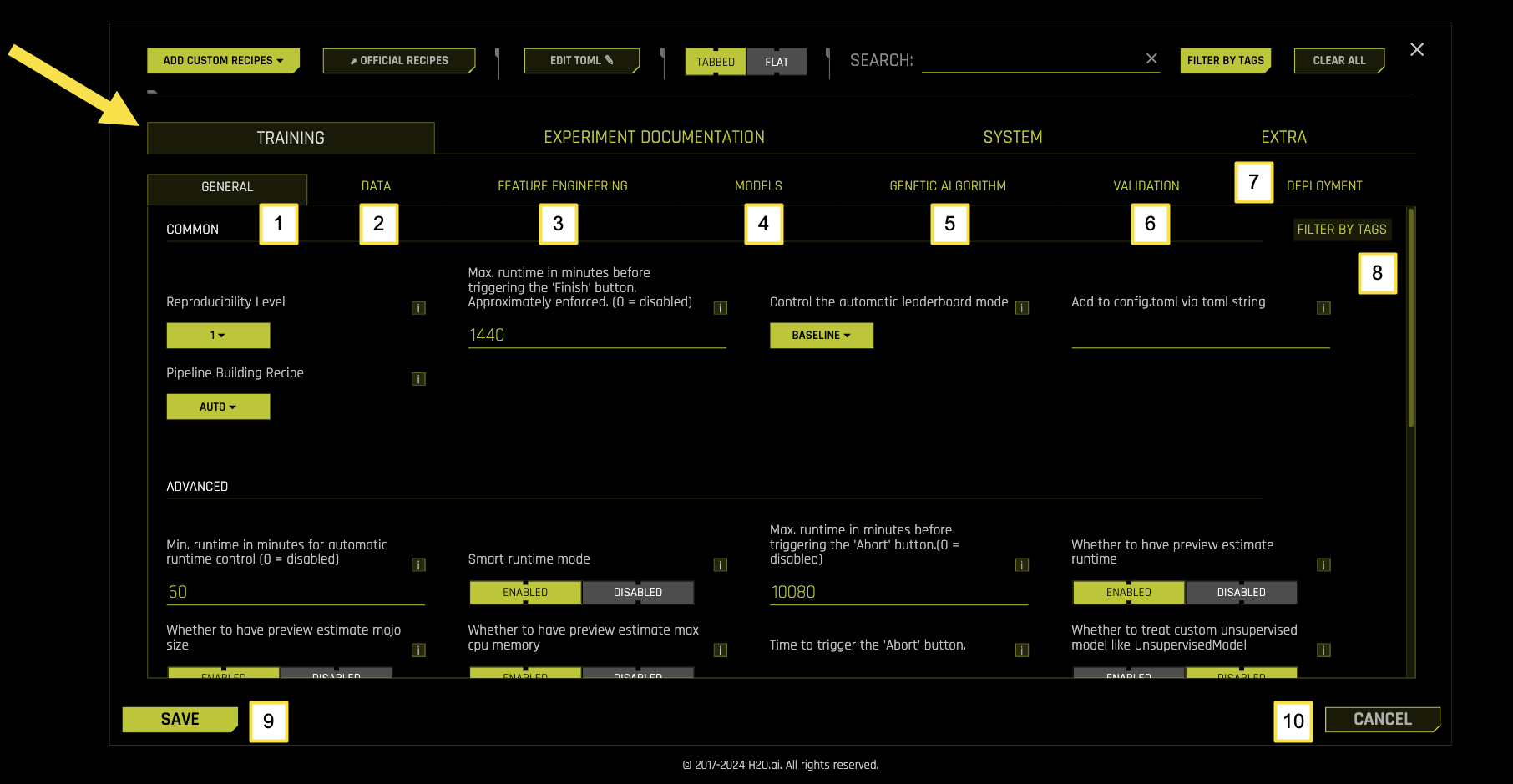
Training Sub-Categories
Sub-Category |
Description |
|---|---|
[1] General |
Core training parameters including reproducibility, pipeline building, runtime controls, and leaderboard behavior |
[2] Data |
Data preprocessing, sampling, validation, and handling settings |
[3] Feature Engineering |
Feature generation, selection, and transformation configurations |
[4] Models |
Model selection, hyperparameter tuning, and algorithm-specific settings |
[5] Genetic Algorithm |
Optimization parameters for feature engineering and model selection |
[6] Validation |
Cross-validation, holdout validation, and model evaluation settings |
[7] Deployment |
Model deployment, MOJO generation, and scoring pipeline configurations |
[8] Filter by Tags |
Filter and organize training settings using custom tags and labels |
[9] Save |
Save the current training configuration settings |
[10] Cancel |
Cancel changes and return to the previous configuration |
참고
Changes to Training settings are applied when you launch the experiment. Some settings may affect experiment runtime and resource usage.
General
The General sub-tab contains core training parameters that control fundamental aspects of the experiment pipeline, reproducibility, and runtime behavior in Driverless AI (DAI).
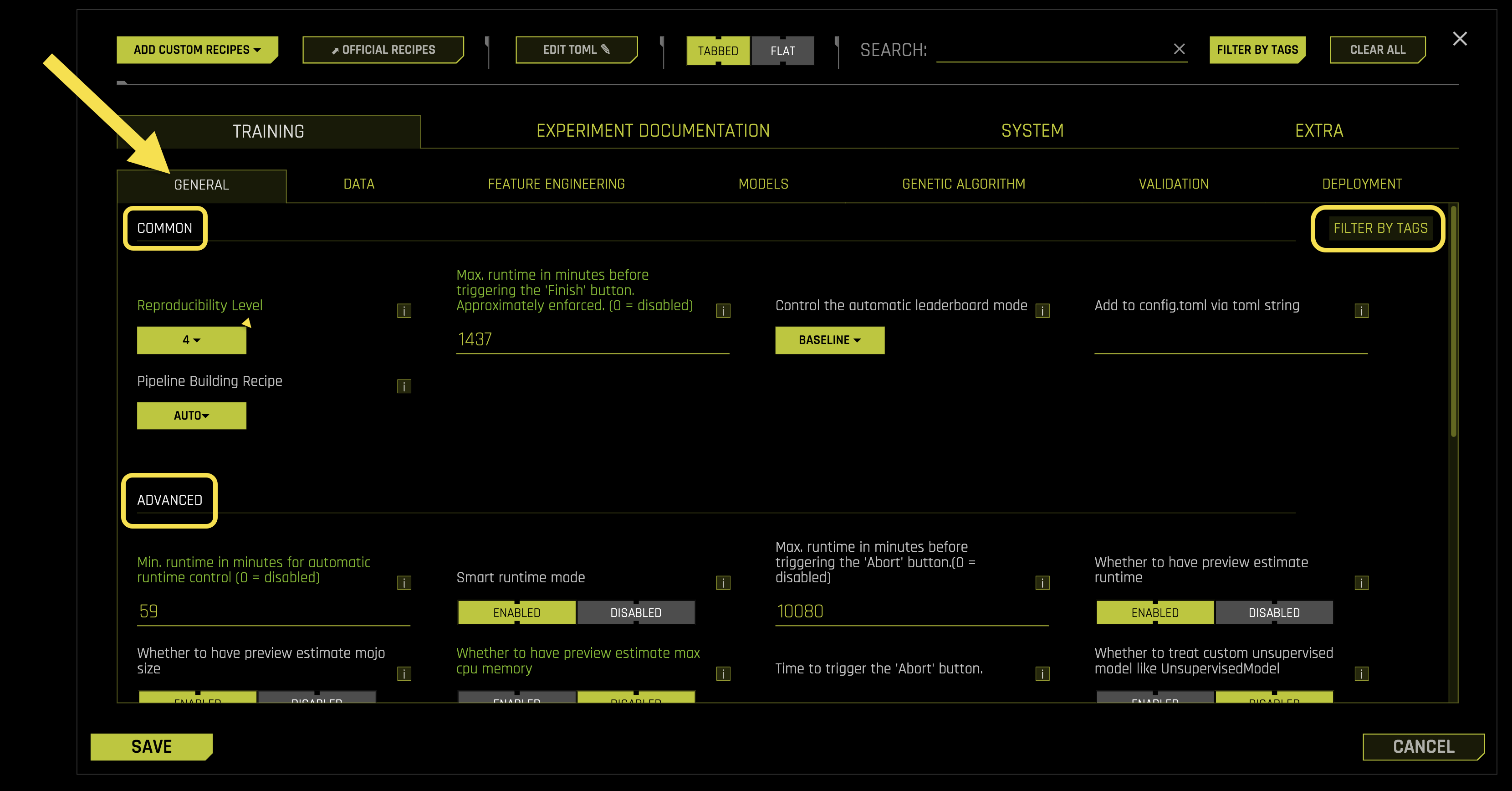
Common Settings:
- Reproducibility Level
Controls how reproducible your experiments are when using the same data and inputs
How to enable: Check the 《Reproducible》 checkbox in the GUI or set a random seed via the APIs
- Supported levels:
1: Same Operating System (O/S), Central Processing Unit (CPU), and Graphics Processing Unit (GPU)
2: Same O/S and CPU/GPU architecture (different specific hardware allowed)
3: Same O/S and CPU architecture, no GPU required
4: Same O/S only (best effort)
Requires: Integer value (1-4, default: 1)
- Max. runtime in minutes before triggering the 〈Finish〉 button. Approximately enforced. (0 = disabled)
- What it does: If the experiment runs longer than this time limit, Driverless AI will:
Stop feature engineering and model tuning immediately
Build the final modeling pipeline
Create deployment artifacts
Note: This setting ignores model score convergence and predetermined iterations
Limitation: Only works when not in reproducible mode
Requires: Integer value (minutes, default: 1440, 0 = disabled)
- Control the automatic leaderboard mode
What it does: Controls how the leaderboard is automatically populated with models
- Available options:
〈baseline〉: Uses exemplar set with baseline models
〈random〉: Tests 10 random seeds
〈line〉: Creates good model with all features
〈line_all〉: Like 〈line〉 but enables all models/transformers
〈product〉: Performs Cartesian product exploration
Requires: String selection (default: 《baseline》)
- Add to config.toml via toml string
What it does: Allows you to set any configuration parameter using TOML (Tom’s Obvious Minimal Language) format
When to use: When a parameter isn’t available in Expert Mode but you want per-experiment control
Format: Enter TOML parameters as strings separated by newlines
Important: This setting overrides all other configuration choices
Example:
max_runtime_minutes = 120
accuracy = 8
time = 5
Requires: TOML string format
- Pipeline Building Recipe
What it does: Selects a predefined configuration template that overrides GUI settings
- Available recipes:
〈auto〉: Let Driverless AI choose the best recipe
〈compliant〉: Focus on interpretable, compliant models
〈monotonic_gbm〉: Use Gradient Boosting Machines with monotonic constraints
〈kaggle〉: Optimized for Kaggle competitions
〈nlp_model〉: For Natural Language Processing tasks
〈nlp_transformer〉: Advanced NLP with transformers
〈image_model〉: For image classification tasks
〈image_transformer〉: Advanced image processing with transformers
〈unsupervised〉: For unsupervised learning tasks
〈gpus_max〉: Maximize GPU utilization
〈more_overfit_protection〉: Enhanced overfitting protection
〈feature_store_mojo〉: Optimized for feature store deployment
Requires: String selection (default: 《auto》)
Advanced Settings:
- Min. runtime in minutes for automatic runtime control (0 = disabled)
What it does: Automatically sets the maximum runtime based on runtime estimates when preview estimates are enabled
How it works: If set to a non-zero value, Driverless AI will automatically adjust max_runtime_minutes using runtime estimates
To disable: Set to zero to prevent automatic runtime constraints
Requires: Integer value (minutes, default: 60, 0 = disabled)
- Smart runtime mode
What it does: Adjusts the maximum runtime based on the final number of base models
How it works: Helps ensure the entire experiment stops before the time limit by triggering the start of the final model at the right time
Requires: Boolean toggle (default: Enabled)
- Max. runtime in minutes before triggering the 〈Abort〉 button. (0 = disabled)
What it does: Automatically stops the experiment if it runs longer than this time limit
What happens when triggered: Driverless AI saves experiment artifacts created so far for summary and log zip files, but stops creating new artifacts
Requires: Integer value (minutes, default: 10080, 0 = disabled)
- Whether to have preview estimate runtime
What it does: Uses a model trained on many experiments to estimate how long your experiment will take
Limitation: May provide inaccurate estimates for experiment types not included in the training data
Requires: Boolean toggle (default: Enabled)
- Whether to have preview estimate MOJO size
What it does: Uses a model trained on many experiments to estimate the size of the MOJO (Model Object, Optimized) file
Limitation: May provide inaccurate estimates for experiment types not included in the training data
Requires: Boolean toggle (default: Enabled)
- Whether to have preview estimate max CPU memory
What it does: Uses a model trained on many experiments to estimate the maximum CPU memory usage
Limitation: May provide inaccurate estimates for experiment types not included in the training data
Requires: Boolean toggle (default: Enabled)
- Time to trigger the 〈Abort〉 button
What it does: Sets a specific date and time when the experiment should automatically stop
- Time formats accepted:
Date/time string in format: YYYY-MM-DD HH:MM:SS (default timezone: UTC)
Integer seconds since January 1, 1970 00:00:00 UTC (Unix timestamp)
Note: This is separate from the maximum runtime setting above
Requires: Time string or integer (empty by default)
- Whether to treat custom unsupervised model like Unsupervised Model
What it does: Controls how custom unsupervised models are configured
When enabled: You must specify each scorer, pretransformer, and transformer in the expert panel (like supervised experiments)
When disabled: Custom unsupervised models assume the model itself specifies these components
Requires: Boolean toggle (default: Disabled)
- Kaggle username
What it does: Your Kaggle username for automatic submission and scoring of test set predictions
How to get credentials: Visit Kaggle API credentials for setup instructions
Requires: String (empty by default)
- Kaggle key
What it does: Your Kaggle API key for automatic submission and scoring of test set predictions
How to get credentials: Visit Kaggle API credentials for setup instructions
Requires: String (empty by default)
- Kaggle submission timeout in seconds
What it does: Sets the maximum time to wait for Kaggle API calls to return scores for predictions
Requires: Integer value (seconds, default: 120)
- Random seed
What it does: Sets the seed for the random number generator to make experiments reproducible
How it works: Combined with the Reproducibility Level setting above, ensures consistent results
How to enable: Check the 《Reproducible》 checkbox in the GUI or set via the API
Requires: Integer value (default: 1234)
- Min. DAI iterations
What it does: Sets the minimum number of Driverless AI iterations before stopping the feature evolution process
Purpose: Acts as a safeguard against suboptimal early convergence
How it works: Driverless AI must run for at least this many iterations before deciding to stop, even if the score isn’t improving
Requires: Integer value (default: 0)
- Offset for default accuracy knob
What it does: Adjusts the default accuracy knob setting up or down
When to use negative values: If default models are too complex (set to -1, -2, etc.)
When to use positive values: If default models are not accurate enough (set to 1, 2, etc.)
Requires: Integer value (default: 0)
- Offset for default time knob
What it does: Adjusts the default time knob setting up or down
When to use negative values: If default experiments are too slow (set to -1, -2, etc.)
When to use positive values: If default experiments finish too fast (set to 1, 2, etc.)
Requires: Integer value (default: 0)
- Offset for default interpretability knob
What it does: Adjusts the default interpretability knob setting up or down
When to use negative values: If default models are too simple (set to -1, -2, etc.)
When to use positive values: If default models are too complex (set to 1, 2, etc.)
Requires: Integer value (default: 0)
- last_recipe
What it does: Internal helper that remembers if the recipe was changed
Note: This is an advanced setting for internal use
Requires: String (empty by default)
- recipe_dict
What it does: Dictionary to control recipes for each experiment and custom recipes
Use case: Pass hyperparameters to custom recipes
Example format: {〈key1〉: 2, 〈key2〉: 〈value2〉}
Requires: Dictionary format (default: {})
- mutation_dict
What it does: Dictionary to control mutation parameters for the genetic algorithm
Use case: Fine-tune genetic algorithm mutation behavior
Example format: {〈key1〉: 2, 〈key2〉: 〈value2〉}
Requires: Dictionary format (default: {})
- Whether to validate recipe names
What it does: Validates recipe names provided in included lists (like included_models)
When disabled: Logs warnings to server logs and ignores invalid recipe names
Requires: Boolean toggle (default: Enabled)
- Timeout in minutes for testing acceptance of each recipe
What it does: Sets the maximum time to wait for recipe acceptance testing
What happens on timeout: The recipe is rejected if acceptance testing is enabled and times out
Advanced option: You can set timeout for specific recipes using the class’s staticmethod function called acceptance_test_timeout
Note: This timeout doesn’t include time to install required packages
Requires: Float value (minutes, default: 20.0)
- Recipe Activation List
What it does: Lists recipes (organized by type) that are applicable for the experiment
Use case: Especially useful for 《experiment with same params》 where you want to use the same recipe versions as the parent experiment
Format: {《transformers》:[],》models》:[],》scorers》:[],》data》:[],》individuals》:[]}
Requires: Dictionary format (default: {《transformers》:[],》models》:[],》scorers》:[],》data》:[],》individuals》:[]})
Time Series:
- Whether to disable time-based limits when reproducible is set
What it does: Controls whether to disable time limits when reproducibility is enabled
The problem: When reproducible mode is set, experiments may take arbitrarily long for the same dials, features, and models
When disabled: Allows experiment to complete after fixed time while keeping model and feature building reproducible and seeded
Trade-off: Overall experiment behavior may not be reproducible if later iterations would have been used in final model building
When to enable: If you need every seeded experiment with the same setup to generate the exact same final model, regardless of duration
Requires: Boolean toggle (default: Enabled)
- Control the automatic time-series leaderboard mode
What it does: Controls how the time-series leaderboard is automatically populated
- Available options:
〈diverse〉: Explores a diverse set of models built using various expert settings
〈sliding_window〉: Creates a separate model for each (gap, horizon) pair
Requires: String selection (default: 《diverse》)
- Number of periods per model if time_series_leaderboard_mode is 〈sliding_window〉
What it does: Fine-control to limit the number of models built in 〈sliding_window〉 mode
Effect: Larger values lead to fewer models being built
Requires: Integer value (default: 1)
Data
The Data sub-tab manages data preprocessing, sampling strategies, validation methods, and data handling configurations in Driverless AI.
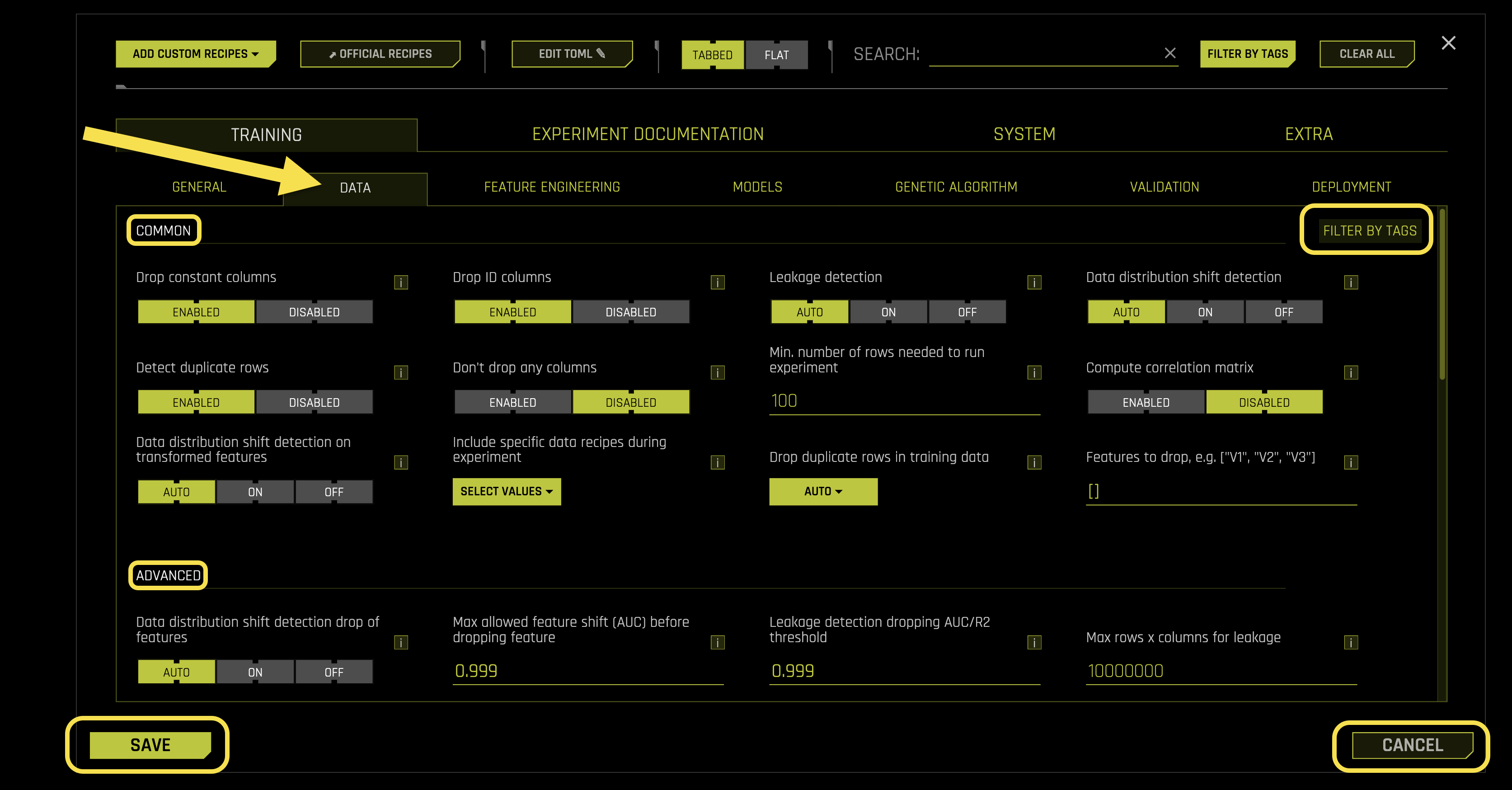
Common Settings:
- Drop constant columns
What it does: Removes columns that have the same value in all rows
Why it helps: Constant columns provide no information for machine learning
Requires: Boolean toggle (default: Enabled)
- Drop ID columns
What it does: Removes columns that appear to be unique identifiers (like customer IDs, transaction IDs)
Why it helps: ID columns can cause overfitting and don’t generalize to new data
Requires: Boolean toggle (default: Enabled)
- Leakage detection
What it does: Checks for data leakage, which occurs when future information accidentally appears in training data
How it works: Uses LightGBM (Light Gradient Boosting Machine) model for detection when possible
Fold column handling: If you have a fold column, leakage detection works without using it
Time series note: This option is automatically disabled for time-series experiments
Requires: String selection (default: 《auto》, options: 《auto》, 《on》, 《off》)
- Data distribution shift detection
What it does: Detects when the statistical distribution of data changes between training and validation/test sets
Why it matters: Distribution shift can cause models to perform poorly on new data
How it works: Uses LightGBM model to detect shifts when possible
Requires: String selection (default: 《auto》, options: 《auto》, 《on》, 《off》)
- Detect duplicate rows
What it does: Identifies duplicate rows in training, validation, and testing datasets
When it runs: After type detection and column dropping, just before the experiment starts
Important: This is informational only - to actually drop duplicate rows, use the 《Drop duplicate rows in training data》 setting below
Performance: Uses sampling for large datasets to avoid memory issues
Requires: Boolean toggle (default: Enabled)
- Don’t drop any columns
What it does: Prevents Driverless AI from dropping any columns (original or derived)
When to use: When you want to keep all columns regardless of their characteristics
Requires: Boolean toggle (default: Disabled)
- Min. number of rows needed to run experiment
What it does: Sets the minimum number of rows required to run experiments
Why it matters: Ensures enough data to create statistically reliable models and avoid small-data failures
Warning: Values lower than 100 might not work properly
Requires: Integer value (default: 100)
- Compute correlation matrix
What it does: Creates correlation matrices for training, validation, and test data and saves them as PDF files
Output: Generates both table and heatmap visualizations saved to disk
Performance warning: Currently single-threaded and becomes very slow with many columns
Requires: Boolean toggle (default: Disabled)
- Data distribution shift detection on transformed features
What it does: Detects distribution shifts in the final model’s transformed features between training and test data
Why it matters: Helps identify if feature transformations are causing distribution changes
How it works: Uses LightGBM model for detection when possible
Requires: String selection (default: 《auto》, options: 《auto》, 《on》, 《off》)
- Include specific data recipes during experiment
What it does: Allows you to include custom data processing recipes during the experiment
Two types of data recipes: * Pre-experiment: Adds new datasets or modifies data outside the experiment (via file/URL) * Run-time: Modifies data during the experiment and Python scoring
This setting applies to: Run-time data recipes (the 2nd type)
Important requirements: Run-time recipes must preserve the same column names for: target, weight_column, fold_column, time_column, and time group columns
Note: Pre-experiment recipes can create any new data but won’t be part of the scoring package
Requires: List format (default: [])
- Drop duplicate rows in training data
What it does: Removes duplicate rows from training data at the start of the experiment
When it runs: At the beginning of Driverless AI, using only the columns you specify
Time limit: Process is limited by drop_duplicate_rows_timeout seconds
- Available options:
〈auto〉: Let Driverless AI decide (default: off)
〈weight〉: Convert duplicates into a weight column
〈drop〉: Remove duplicate rows
〈off〉: Do not drop duplicates
Requires: String selection (default: 《auto》)
- Features to drop, e.g. [《V1》, 《V2》, 《V3》]
What it does: Allows you to specify columns to drop in bulk
Why it’s useful: You can copy-paste large lists instead of selecting each column individually in the GUI
Example: [《V1》, 《V2》, 《V3》] will drop columns named V1, V2, and V3
Requires: List format (default: [])
Advanced Settings:
- Data distribution shift detection drop of features
What it does: Automatically removes features that show high distribution shift between training and test data
Time series note: Automatically disabled for time series experiments
Requires: String selection (default: 《auto》, options: 《auto》, 《on》, 《off》)
- Max allowed feature shift (AUC) before dropping feature
What it does: Sets the threshold for dropping features that show high distribution shift
How it works: Drops features (except ID, text, date/datetime, time, weight columns) when their shift metrics exceed this value
Metrics used: AUC (Area Under Curve), GINI coefficient, or Spearman correlation
AUC explanation: Measures how well a binary classifier can predict whether a feature value belongs to training or test data
Requires: Float value (default: 0.999)
- Leakage detection dropping AUC/R2 threshold
What it does: Sets the threshold for dropping features that show data leakage
How it works: Drops features when their leakage metrics exceed this value
Metrics used: AUC (Area Under Curve) for classification, R² (R-squared) for regression, GINI coefficient, or Spearman correlation
Fold column note: If you have a fold column, features won’t be dropped because leakage testing works without using the fold column
Requires: Float value (default: 0.999)
- Max rows x columns for leakage
What it does: Sets the maximum dataset size (rows × columns) before triggering sampling for leakage checks
Why it’s needed: Large datasets are sampled to avoid memory issues during leakage detection
Sampling method: Uses stratified sampling to maintain data distribution
Requires: Integer value (default: 10000000)
- Enable Wide Rules
What it does: Enables special rules to handle 《wide》 datasets (where number of columns > number of rows)
When to use: Wide datasets can cause memory and performance issues with standard algorithms
Force enable: Setting to 《on》 forces these rules regardless of dataset dimensions
Requires: String selection (default: 《auto》, options: 《auto》, 《on》, 《off》)
- Wide rules factor
What it does: Sets the threshold for automatically enabling wide dataset rules
How it works: If columns > (wide_factor × rows), then wide rules are enabled (when set to 《auto》)
Automatic feature: For datasets where columns > rows, Random Forest is always enabled
Requires: Float value (default: 5.0)
- Max. allowed fraction of uniques for integer and categorical cols
What it does: Sets the maximum fraction of unique values allowed for integer and categorical columns
Why it matters: Columns with too many unique values are treated as ID columns and dropped
Default behavior: Columns with >95% unique values are considered IDs and removed
Requires: Float value (default: 0.95)
- Allow treating numerical as categorical
What it does: Allows numerical columns to be treated as categorical when appropriate
When it’s useful: Integer columns that represent codes (like 1=Male, 2=Female) rather than true numerical values
Why it’s restrictive to disable: Even columns with few categorical levels that happen to be numerical won’t be encoded as categorical
Requires: Boolean toggle (default: Enabled)
- Max. number of unique values for int/float to be categoricals
What it does: Sets the maximum number of unique values for integer/real columns to be treated as categorical
Testing scope: Only applies to the first portion of data (for performance reasons)
Requires: Integer value (default: 50)
- Max. number of unique values for int/float to be categoricals if violates Benford’s Law
What it does: Sets the maximum unique values for columns that violate Benford’s Law
Benford’s Law: A statistical law that describes the distribution of leading digits in many real-world datasets
When it applies: For numerical features that violate Benford’s Law (appear ID-like but aren’t entirely IDs)
Testing scope: Only applies to the first portion of data (for performance reasons)
Requires: Integer value (default: 10000)
- Max. fraction of numeric values to be non-numeric (and not missing) for a column to still be considered numeric
What it does: Allows columns with some non-numeric values to still be treated as numeric
When it helps: Useful for minor data quality issues during experimentation
Production warning: Values > 0 are not recommended for production use
What happens: Non-numeric values are replaced with missing values, so some information is lost
To disable: Set to a negative value
Requires: Float value (default: 0.0)
- Threshold for string columns to be treated as text (0.0 - text, 1.0 - string)
What it does: Determines whether string columns are treated as text (for NLP) or categorical variables
How it works: Uses internal heuristics to score how 《text-like》 a string column is
- Threshold behavior:
Higher values (closer to 1.0): Favor treating strings as categorical variables
Lower values (closer to 0.0): Favor treating strings as text for NLP processing
Override option: Set string_col_as_text_min_relative_cardinality=0.0 to force text treatment despite low unique count
Requires: Float value (default: 0.3)
- Number of pipeline layers
What it does: Sets the number of full pipeline layers in the experiment
Note: This doesn’t include the preprocessing layer when pretransformers are included
Requires: Integer value (default: 1)
- Whether to do hyperopt for leakage/shift
What it does: Enables hyperparameter tuning during leakage/shift detection
When it works: Only active if num_inner_hyperopt_trials_prefinal > 0
When it’s useful: Can help find non-trivial leakage/shift patterns, but usually not necessary
Requires: Boolean toggle (default: Disabled)
- Whether to do hyperopt for leakage/shift for each column
What it does: Enables hyperparameter tuning for each individual column during leakage/shift detection
When it works: Only active if num_inner_hyperopt_trials_prefinal > 0
Requires: Boolean toggle (default: Disabled)
- Max. num. of rows x num. of columns for feature evolution data splits (not for final pipeline)
What it does: Sets the maximum dataset size for feature evolution (the process that determines which features will be derived)
Applies to: Both training and validation/holdout splits during feature evolution
Accuracy dependency: The actual value used depends on your accuracy settings
Requires: Integer value (default: 300000000)
- Max. num. of rows x num. of columns for reducing training data set (for final pipeline)
What it does: Sets the maximum dataset size for training the final pipeline
Purpose: Controls memory usage during final model training
Requires: Integer value (default: 1000000000)
- Limit validation size
What it does: Automatically limits validation data size to control memory usage
How it works: Uses different size limits for feature evolution and final model training
Feature evolution: Uses feature_evolution_data_size (shown as max_rows_feature_evolution in logs)
Final model: Uses final_pipeline_data_size and max_validation_to_training_size_ratio_for_final_ensemble
Requires: Boolean toggle (default: Enabled)
- Max number of columns to check for redundancy in training dataset
What it does: Limits the number of columns checked for redundancy to avoid performance issues
How it works: If the dataset has more columns than this limit, only the first N columns are checked
To disable: Set to 0
Requires: Integer value (default: 1000)
- Limit of dataset size in rows x cols for data when detecting duplicate rows
What it does: Sets the maximum dataset size for duplicate row detection
How it works: If > 0, uses this as the sampling size for duplicate detection
To check all data: Set to 0 to perform checks on datasets of any size
Requires: Integer value (default: 10000000)
- Leakage feature detection AUC/R2 threshold
What it does: Sets the threshold for triggering per-feature leakage detection
How it works: When leakage detection is enabled, if AUC (R² for regression) on original data exceeds this value, per-feature leakage detection is triggered
Requires: Float value (default: 0.95)
- Leakage features per feature detection AUC/R2 threshold
What it does: Sets the threshold for showing features that may have leakage
How it works: Shows features where AUC (R² for regression) for individual feature prediction exceeds this value
Feature dropping: Features are dropped if their AUC/R² exceeds the drop_features_leakage_threshold_auc setting
Requires: Float value (default: 0.8)
Image:
- Image download timeout in seconds
What it does: Sets the maximum time to wait for image downloads when images are provided by URL
Requires: Integer value (seconds, default: 60)
- Max allowed fraction of missing values for image column
What it does: Sets the maximum fraction of missing values allowed for a string column to be considered as image paths
Purpose: Helps identify which string columns contain image URIs
Requires: Float value (default: 0.1)
- Min. fraction of images that need to be of valid types for image column to be used
What it does: Sets the minimum fraction of image URIs that must have valid file extensions for a column to be treated as image data
File types: Valid endings are defined by string_col_as_image_valid_types
Requires: Float value (default: 0.8)
NLP:
- Fraction of text columns out of all features to be considered a text-dominated problem
What it does: Sets the threshold for considering a dataset as text-dominated based on the fraction of text columns
Purpose: Helps Driverless AI determine when to apply NLP-specific processing
Requires: Float value (default: 0.3)
- Fraction of text per all transformers to trigger that text dominated
What it does: Sets the threshold for triggering text-dominated processing based on the fraction of text transformers
Purpose: Additional criterion for determining when to apply NLP-specific processing
Requires: Float value (default: 0.3)
- string_col_as_text_min_relative_cardinality
What it does: Sets the minimum fraction of unique values for string columns to be considered as text (rather than categorical)
Purpose: Helps distinguish between text data and categorical data
Requires: Float value (default: 0.1)
- string_col_as_text_min_absolute_cardinality
What it does: Sets the minimum number of unique values for string columns to be considered as text
Purpose: Absolute threshold for text classification (used if relative threshold isn’t met)
Requires: Integer value (default: 10000)
Feature Engineering
The Feature Engineering sub-tab configures feature generation, selection algorithms, and transformation settings in Driverless AI.
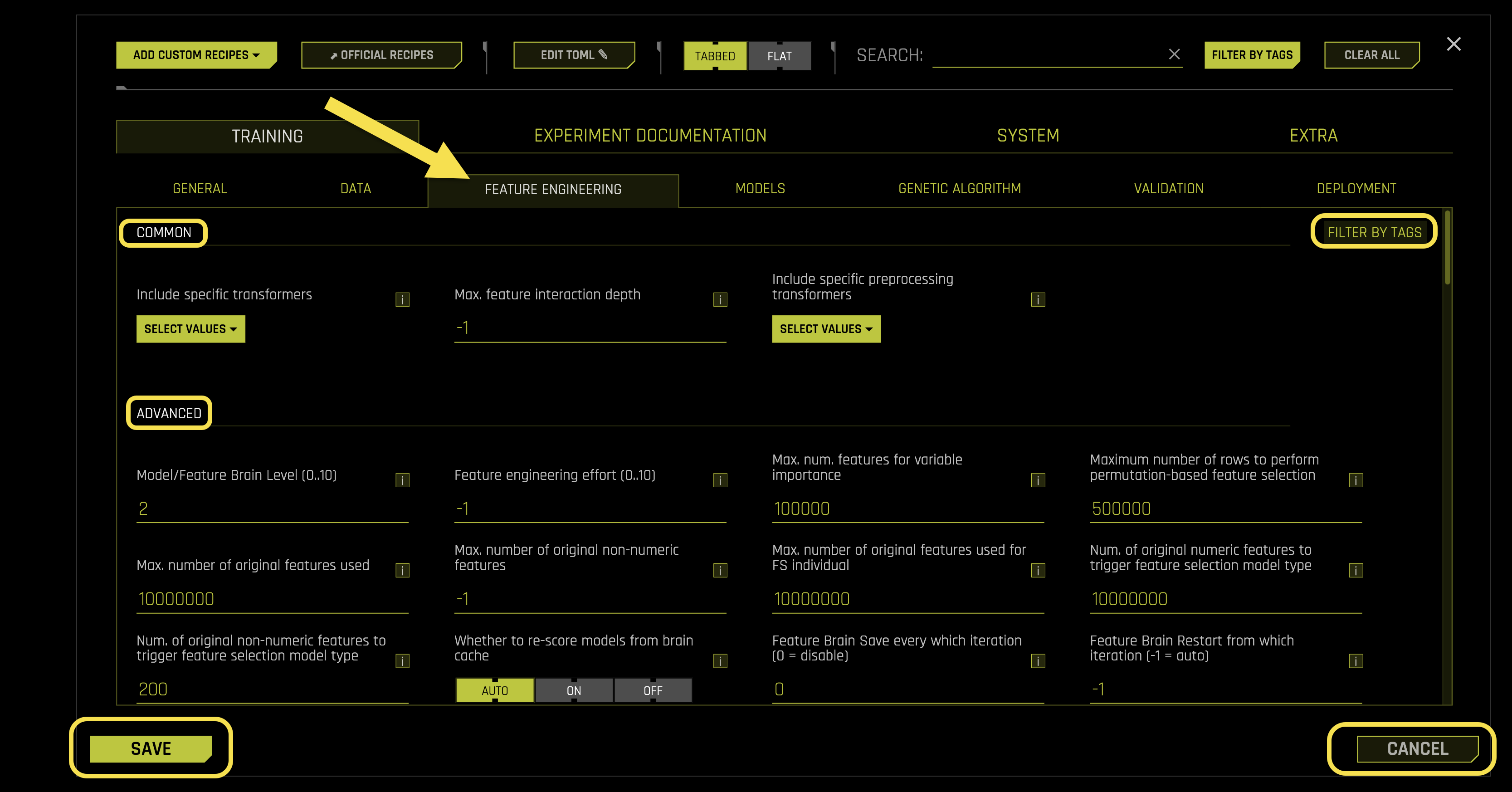
Configuration Options:
Common Settings:
- Include specific transformers
What it does: Selects specific transformers (feature engineering algorithms) to use during the experiment
How transformers work: They derive new features from original features using various mathematical and statistical techniques
Example transformers: OriginalTransformer, CatOriginalTransformer, NumCatTETransformer, CVTargetEncodeF, NumToCatTETransformer, ClusterTETransformer
Note: This doesn’t affect preprocessing transformers (controlled by included_pretransformers)
Requires: List format (default: [])
- Max. feature interaction depth
What it does: Controls how many features can be combined together to create new features
Why it matters: Feature interactions (like feature1 + feature2 or feature1 × feature2) can improve predictive performance
How it works: Sets the maximum number of features that can be combined at once to create a single new feature
Mixed feature types: For transformers using both numeric and categorical features, this constrains each type separately, not the total
Trade-off: Higher values may create more predictive models but take longer to process
Auto mode: Set to -1 for automatic selection
Requires: Integer value (default: -1)
- Include specific preprocessing transformers
What it does: Selects transformers to run before the main feature engineering layer
How it works: Preprocessing transformers take original features and create new features that become input for the main transformer layer. In order to do a time series experiment with the GUI/client auto-selecting groups, periods, etc. the dataset must have time column and groups prepared ahead of experiment by user or via a one-time data recipe.
Flexibility: Any BYOR (Bring Your Own Recipe) transformer or native Driverless AI transformer can be used
Example use cases: Interactions, string concatenations, date extractions as preprocessing steps
Pipeline flow: Preprocessing → Main transformers → Final features
Requires: List format (default: [])
Advanced Settings:
- Model/Feature Brain Level (0..10)
What it does: Controls the use of H2O.ai Brain - a local caching system that reuses results from previous experiments
Benefits: Generates more useful features and models by learning from past experiments
Checkpointing: Also controls checkpointing for paused or interrupted experiments
- Cache matching criteria: Driverless AI uses cached results when:
Column names and types match
Experiment type is similar
Classes and class labels exactly match
Basic time series choices match
Cache interpretability is equal or lower
Requires: Integer value (0-10, default: 2)
- Feature engineering effort (0..10)
What it does: Controls how much computational effort to spend on feature engineering
Auto mode (-1): Automatically chooses effort level (usually 5, but 1 for wide datasets)
- Effort levels:
0: Keep only numeric features, focus on model tuning
1: Keep numeric features + frequency-encoded categoricals, focus on model tuning
2: Like level 1 but no text features, some feature tuning before evolution
3: Like level 5 but only tuning during evolution, mixed feature/model tuning
4: Like level 5, slightly more focused on model tuning
5: Default - balanced feature and model tuning
6-7: Like level 5, slightly more focused on feature engineering
Requires: Integer value (-1 to 10, default: -1)
- Max. num. features for variable importance
What it does: Sets the maximum number of features to display in importance tables
Interpretability interaction: When interpretability > 1, features with lower importance than this threshold are automatically removed
Feature pruning: Less important features are pruned to improve model performance
Performance warning: Higher values can reduce performance and increase disk usage for datasets with >100k columns
Requires: Integer value (default: 100000)
- Maximum number of rows to perform permutation-based feature selection
What it does: Sets the maximum number of rows to use for permutation-based feature importance calculations
Sampling method: Uses stratified random sampling to reduce large datasets to this size
Purpose: Controls computational cost while maintaining statistical validity
Requires: Integer value (default: 500000)
- Max. number of original features used
What it does: Limits the number of original columns selected for feature engineering
Selection method: Based on how well target encoding (or frequency encoding) works on categorical and numeric features
Purpose: Reduces final model complexity by selecting only the best original features
Process: Best features are selected first, then used for feature evolution and modeling
Requires: Integer value (default: 10000000)
- Max. number of original non-numeric features
What it does: Limits the number of non-numeric (categorical) columns selected for feature engineering
Feature selection trigger: When exceeded, feature selection is performed on all features
Auto mode (-1): Uses default settings, but can be increased up to 10x for small datasets
Requires: Integer value (default: -1)
- Max. number of original features used for FS individual
What it does: Similar to max_orig_cols_selected, but creates a special genetic algorithm individual with reduced original columns
Purpose: Adds diversity to the genetic algorithm by including individuals with fewer original features
Requires: Integer value (default: 10000000)
- Num. of original numeric features to trigger feature selection model type
What it does: Similar to max_orig_numeric_cols_selected, but for special genetic algorithm individuals
Genetic algorithm: Creates a separate individual using feature selection by permutation importance on original features
Requires: Integer value (default: 10000000)
- Num. of original non-numeric features to trigger feature selection model type
What it does: Similar to max_orig_nonnumeric_cols_selected, but for special genetic algorithm individuals
Genetic algorithm: Creates a separate individual using feature selection by permutation importance on original features
Requires: Integer value (default: 200)
- Whether to re-score models from brain cache
What it does: Controls whether to re-score models from the H2O.ai Brain cache
- Options:
〈auto〉: Smartly keeps scores to avoid re-processing steps
〈on〉: Always re-score models
〈off〉: Never re-score models
Requires: String selection (default: 《auto》, options: 《auto》, 《on》, 《off》)
- Feature Brain Save every which iteration (0 = disable)
What it does: Controls how often to save feature brain iterations for checkpointing
How it works: Saves every N iterations where N is this value, enabling restart/refit from specific iterations
To disable: Set to 0
Requires: Integer value (default: 0)
- Feature Brain Restart from which iteration (-1 = auto)
What it does: Chooses which iteration to restart from when doing restart or re-fit operations
Auto mode (-1): Uses the last best iteration
- Usage steps:
Run an experiment with feature_brain_iterations_save_every_iteration=1 (or another number)
Identify which iteration brain dump you want to restart/refit from
Restart/Refit from the original experiment, setting which_iteration_brain to that number
Important: If restarting from a tuning iteration, this pulls in the entire scored tuning population for feature evolution
Requires: Integer value (default: -1)
- Max. number of engineered features (-1 = auto)
What it does: Limits the maximum number of engineered features allowed per model
Gene control: Controls the number of genes (transformer instances) before features are scored
Pruning behavior: If pruning occurs before scoring, genes are randomly sampled; if after scoring, aggregated gene importances are used
Includes: All possible transformers, including original transformer for numeric features
Auto mode (-1): No restrictions except internally-determined memory and interpretability limits
Requires: Integer value (default: -1)
- Max. number of genes (transformer instances) (-1 = auto)
What it does: Sets the maximum number of genes (transformer instances) per model
Ensemble handling: Applies to each model within the final ensemble if applicable
Includes: All possible transformers, including original transformer for numeric features
Auto mode (-1): No restrictions except internally-determined memory and interpretability limits
Requires: Integer value (default: -1)
- Min. number of genes (transformer instances) (-1 = auto)
What it does: Sets the minimum number of genes (transformer instances) per model
Purpose: Ensures models have at least this many transformer instances
Requires: Integer value (default: -1)
- Limit features by interpretability
What it does: Controls whether to limit feature counts based on the interpretability setting
How it works: Uses features_allowed_by_interpretability to automatically limit features when interpretability is set
Requires: Boolean toggle (default: Enabled)
- Fixed feature interaction depth
What it does: Sets a fixed number of columns to use for each transformer instead of random sampling
Default behavior (0): Uses random sampling from min to max columns
Fixed mode: Choose a specific number of columns to use consistently
Use all columns: Set to match the number of columns to use all available columns (if allowed by transformer)
Hybrid mode (-n): Uses 50% random sampling and 50% fixed selection of n features
Requires: Integer value (default: 0)
- Select target transformation of the target for regression problems
What it does: Chooses how to transform the target variable for regression problems
- Available transformations:
〈auto〉: Let Driverless AI choose automatically
〈identity〉: No transformation (default)
〈identity_noclip〉: No transformation, no clipping
〈center〉: Center the data (subtract mean)
〈standardize〉: Standardize (z-score normalization)
〈unit_box〉: Box-Cox transformation
〈log〉: Logarithmic transformation
〈log_noclip〉: Logarithmic without clipping
〈square〉: Square transformation
〈sqrt〉: Square root transformation
〈double_sqrt〉: Double square root transformation
〈inverse〉: Inverse transformation
〈anscombe〉: Anscombe transformation
〈logit〉: Logit transformation
〈sigmoid〉: Sigmoid transformation
Requires: String selection (default: 《auto》)
- Select all allowed target transformations of the target for regression problems when doing target transformer tuning
What it does: Specifies which target transformations to test during target transformer tuning
When it’s used: Only when target_transformer=〉auto〉 and accuracy >= tune_target_transform_accuracy_switch
Purpose: Allows Driverless AI to automatically select the best target transformation from this list
Requires: List format (default: [〈identity〉, 〈identity_noclip〉, 〈center〉, 〈standardize〉, 〈unit_box〉, 〈log〉, 〈square〉, 〈sqrt〉, 〈double_sqrt〉, 〈anscombe〉, 〈logit〉, 〈sigmoid〉])
- Enable Target Encoding (auto disables for time series)
What it does: Controls whether target encoding techniques are enabled
Target encoding explained: Feature transformations that use target variable information to represent categorical features (CV target encoding, weight of evidence, etc.)
Time series note: Automatically disabled for time series experiments
Requires: String selection (default: 《auto》, options: 《auto》, 《on》, 《off》)
- Enable outer CV for Target Encoding
What it does: Enables outer cross-fold validation for target encoding when GINI coefficient issues are detected
When it triggers: When GINI coefficient flips sign or shows inconsistent signs between training and validation data
How it helps: Uses fold-averaging of lookup tables instead of global lookup tables when GINI performance is poor
Requires: Boolean toggle (default: Enabled)
- Enable outer CV for Target Encoding with overconfidence protection
What it does: Adds overconfidence protection to outer cross-fold validation for target encoding
How it works: Increases the number of outer folds or aborts target encoding when GINI coefficients are inconsistent between training and validation data
Purpose: Prevents overfitting by ensuring consistent performance across different data splits
Requires: String selection (default: 《auto》, options: 《auto》, 《on》, 《off》)
- Enable Lexicographical Label Encoding
What it does: Enables lexicographical (alphabetical) label encoding for categorical features
How it works: Assigns numerical values to categorical labels based on alphabetical order
Requires: String selection (default: 《off》, options: 《auto》, 《on》, 《off》)
- Enable Isolation Forest Anomaly Score Encoding
What it does: Enables Isolation Forest anomaly score encoding for anomaly detection features
Purpose: Creates features that help identify unusual or anomalous data points
Requires: String selection (default: 《off》, options: 《auto》, 《on》, 《off》)
- Enable One HotEncoding (auto enables only for GLM)
What it does: Controls whether one-hot encoding is enabled for categorical features
Auto behavior: Only applied for small datasets and GLM (Generalized Linear Model) algorithms
Requires: String selection (default: 《auto》, options: 《auto》, 《on》, 《off》)
- binner_cardinality_limiter
What it does: Limits the total number of bins created by all BinnerTransformers
Scaling: The limit is scaled by accuracy, interpretability, and dataset size settings
Unlimited: Set to 0 for no limits
Requires: Integer value (default: 50)
- Enable BinnerTransformer for simple numeric binning (auto enables only for GLM/FTRL/TensorFlow/GrowNet)
What it does: Enables simple binning of numeric features for linear models
Auto behavior: Only enabled for GLM/FTRL/TensorFlow/GrowNet algorithms, time-series, or when interpretability >= 6
Why it helps: Exposes more signal for features that aren’t linearly correlated with the target
Interpretability advantage: More interpretable than NumCatTransformer and NumToCatTransformer (which also do target encoding)
Time series support: Works with time series data
Requires: String selection (default: 《auto》, options: 《auto》, 《on》, 《off》)
- Select methods used to find bins for Binner Transformer
What it does: Chooses the method for determining bin boundaries in numeric features
- Available methods:
〈tree〉: Uses XGBoost to find optimal split points
〈quantile〉: Uses quantile-based binning (equal-sized bins)
Fallback behavior: May fall back to quantile-based if too many classes or insufficient unique values
Requires: List format (default: [《tree》], options: [《tree》, 《quantile》])
- Enable automatic reduction of number of bins for Binner Transformer
What it does: Automatically reduces the number of bins during numeric feature binning
Applies to: Both tree-based and quantile-based binning methods
Purpose: Optimizes bin count for better model performance
Requires: Boolean toggle (default: Enabled)
- Select encoding schemes for Binner Transformer
What it does: Chooses how to encode numeric values within bins (one column per bin, plus one for missing values)
- Available schemes:
〈piecewise_linear〉: 0 left of bin, 1 right of bin, linear growth 0→1 inside bin
〈binary〉: 1 inside bin, 0 outside bin
Missing values: Always encoded as binary (0 or 1)
Benefits: Both schemes help models detect non-linear patterns that they might otherwise miss
Requires: List format (default: [《piecewise_linear》, 《binary》], options: [《piecewise_linear》, 《binary》])
- Include Original feature value as part of output of Binner Transformer
What it does: Includes the original feature value as an output feature alongside the binned features
Why it helps: Ensures BinnerTransformer never has less signal than OriginalTransformer
Use case: Important when transformers can be chosen exclusively
Requires: Boolean toggle (default: Enabled)
- Num. Estimators for Isolation Forest Encoding
What it does: Sets the number of trees (estimators) used for Isolation Forest anomaly score encoding
Trade-off: More estimators improve accuracy but increase computational cost
Requires: Integer value (default: 200)
- one_hot_encoding_cardinality_threshold
What it does: Enables one-hot encoding for categorical columns with fewer than this many unique values
Binning limit: One-hot encoding bins are limited to no more than 100 anyway
To disable: Set to 0
Requires: Integer value (default: 50)
- one_hot_encoding_cardinality_threshold_default_use
What it does: Sets the default number of levels to use one-hot encoding instead of other encodings
Automatic reduction: Reduced to 10x less (minimum 2 levels) when OHE columns exceed 500
Note: Total number of bins is reduced for larger datasets independently of this setting
Requires: Integer value (default: 40)
- text_as_categorical_cardinality_threshold
What it does: Treats text columns as categorical columns if cardinality (unique values) is <= this value
To disable: Set to 0 to treat text columns only as text
Requires: Integer value (default: 1000)
- numeric_as_categorical_cardinality_threshold
What it does: Treats numeric columns as categorical columns if cardinality > this value (when num_as_cat is true)
To allow all: Set to 0 to treat all numeric columns as categorical if num_as_cat is True
Requires: Integer value (default: 2)
- numeric_as_ohe_categorical_cardinality_threshold
What it does: Treats numeric columns as categorical for possible one-hot encoding if cardinality > this value (when num_as_cat is true)
To allow all: Set to 0 to treat all numeric columns as categorical for one-hot encoding if num_as_cat is True
Requires: Integer value (default: 2)
- Features to group by, e.g. [《G1》, 《G2》, 《G3》]
What it does: Controls which columns to group by for the CVCatNumEncode Transformer
Auto behavior: Empty list means Driverless AI automatically searches all columns (randomly or by variable importance)
How it works: CVCatNumEncode Transformer groups by these categorical columns and computes numerical aggregations
Requires: List format (default: [])
- Sample from features to group by
What it does: Controls whether to sample from the specified features to group by
- Options:
Enabled: Sample from the given features
Disabled: Always group by all specified features
Requires: Boolean toggle (default: Disabled)
- Aggregation functions (non-time-series) for group by operations
What it does: Specifies which aggregation functions to use for groupby operations in CVCatNumEncode Transformer
Related settings: Works with cols_to_group_by and sample_cols_to_group_by
Available functions: mean, sd (standard deviation), min, max, count
Requires: List format (default: [《mean》, 《sd》, 《min》, 《max》, 《count》], options: [《mean》, 《sd》, 《min》, 《max》, 《count》])
- Number of folds to obtain aggregation when grouping
What it does: Controls how many folds to use for out-of-fold aggregations in CVCatNumEncode Transformer
Trade-off: More folds reduce overfitting but see less data in each fold
Requires: Integer value (default: 5)
- Features to force in, e.g. [《G1》, 《G2》, 《G3》]
What it does: Forces specific columns to be included in the experiment
How it works: Forced features are handled by the most interpretable transformer and never removed (though model may assign 0 importance)
Default transformers: OriginalTransformer for numeric, CatOriginalTransformer for categorical, etc.
Requires: List format (default: [])
- Required GINI relative improvement for Interactions
What it does: Sets the minimum GINI improvement required for InteractionTransformer to return interactions
How it works: If GINI improvement is not better than this threshold compared to original features, the interaction is not returned
Noisy data: Decrease this value if you have noisy data but still want interactions
Requires: Float value (default: 0.5)
- Number of transformed Interactions to make
What it does: Sets the number of transformed interactions to create from many generated trial interactions
Selection: Chooses the best interactions from all generated trials
Requires: Integer value (default: 5)
- Lowest allowed variable importance at interpretability 10
What it does: Sets the minimum variable importance threshold for features at interpretability level 10
Feature dropping: Features below this threshold are dropped (with possible replacement)
Scaling: This setting also determines the overall scale for lower interpretability settings
Adjustment: Lower this value if you’re okay with many weak features or see performance drops due to weak feature removal
Requires: Float value (default: 0.001)
- Whether to take minimum (True) or mean (False) of delta improvement in score when aggregating feature selection scores across multiple folds/depths
What it does: Controls how to aggregate feature selection scores across multiple folds/depths
- Options:
True (minimum): Takes the minimum score (more pessimistic, ignores optimistic scores)
False (mean): Takes the average score across folds/depths
Delta improvement: Original metric minus shuffled feature metric (or negative if minimizing)
Tree methods: Multiple depths may be fitted - only features kept for all depths are retained regardless of this setting
Data size variation: If interpretability >= fs_data_vary_for_interpretability, half data is used as another fit - only features kept for all data sizes are retained
Small data note: Disabled for small data since arbitrary slices can lead to disjoint important features
Requires: Boolean toggle (default: Enabled)
Image Settings:
- Enable Image Transformer for processing of image data
What it does: Controls whether to use pretrained deep learning models for image data processing
How it works: Converts image URIs (jpg, png, etc.) to numeric representations using ImageNet-pretrained models
GPU requirement: If no GPUs are found, must be set to 〈on〉 to enable
Requires: String selection (default: 《auto》, options: 《auto》, 《on》, 《off》)
- Supported ImageNet pretrained architectures for Image Transformer
What it does: Specifies which ImageNet pretrained architectures to use for Image V2 Transformer
Internet requirement: Non-default architectures require internet access to download from H2O S3 buckets
Download all models: Get DAI image models and unzip in image_pretrained_models_dir
Available options: efficientnet_b0, tf_efficientnetv2, convnextv2, regnety, levit, etc
Requires: List format (default: [《levit》], options: [《efficientnet_b0》, 《tf_efficientnetv2》, 《convnextv2》, 《regnety》, 《levit》])
- Dimensionality of feature space created by Image Transformer
What it does: Sets the dimensionality of the feature space created by Image V2 Transformer
Available dimensions: 10, 25, 50, 100, 200, 300
Requires: List format (default: [100], options: [10, 25, 50, 100, 200, 300])
- Enable fine-tuning of pretrained models used for Image Transformer
What it does: Controls whether to fine-tune the pretrained models used for Image V2 Transformer
Purpose: Allows models to adapt to your specific image data
Requires: Boolean toggle (default: Disabled)
- Number of epochs for fine-tuning used for Image Transformer
What it does: Sets the number of training epochs for fine-tuning Image V2 Transformer models
Requires: Integer value (default: 2)
- List of augmentations for fine-tuning used for Image Transformer
What it does: Specifies image augmentations to apply during fine-tuning of ImageNet pretrained models
Documentation: Details about individual augmentations at Albumentations documentation
Exception: Does not apply to tf_efficientnetv2 (uses recommended transformers from Hugging Face)
Available options: Blur, CLAHE, Downscale, GaussNoise, GridDropout, HorizontalFlip, HueSaturationValue, ImageCompression, OpticalDistortion, RandomBrightnessContrast, RandomRotate90, ShiftScaleRotate, VerticalFlip
Requires: List format (default: [《HorizontalFlip》], options: [《Blur》, 《CLAHE》, 《Downscale》, 《GaussNoise》, 《GridDropout》, 《HorizontalFlip》, 《HueSaturationValue》, 《ImageCompression》, 《OpticalDistortion》, 《RandomBrightnessContrast》, 《RandomRotate90》, 《ShiftScaleRotate》, 《VerticalFlip》])
- Batch size for Image Transformer. Automatic: -1
What it does: Sets the batch size for Image V2 Transformer processing
Automatic mode: Set to -1 for automatic batch size selection
Requires: Integer value (default: -1)
- Path to pretrained Image models. It is used to load the pretrained models if there is no Internet access.
What it does: Sets the local path to pretrained Image models for offline use
When it’s used: Loads models locally when there’s no internet access
Requires: String path (default: 《./pretrained/image/》)
- Enable GPU(s) for faster transformations of Image Transformer.
What it does: Controls whether to use GPU(s) for faster image transformations with Image V2 Transformer
Performance benefit: Can lead to significant speedups when GPUs are available
Requires: Boolean toggle (default: Enabled)
NLP Settings:
- Enable word-based CNN TensorFlow transformers for NLP
What it does: Controls whether to use Word-based CNN (Convolutional Neural Network) models as transformers for NLP
How it works: Uses out-of-fold predictions from Word-based CNN Torch models when Torch is enabled
Requires: String selection (default: 《auto》, options: 《auto》, 《on》, 《off》)
- Enable word-based BiGRU TensorFlow transformers for NLP
What it does: Controls whether to use Word-based Bi-GRU (Bidirectional Gated Recurrent Unit) models as transformers for NLP
How it works: Uses out-of-fold predictions from Word-based Bi-GRU Torch models when Torch is enabled
Requires: String selection (default: 《auto》, options: 《auto》, 《on》, 《off》)
- Enable character-based CNN TensorFlow transformers for NLP
What it does: Controls whether to use Character-level CNN models as transformers for NLP
How it works: Uses out-of-fold predictions from Character-level CNN Torch models when Torch is enabled
Requires: String selection (default: 《auto》, options: 《auto》, 《on》, 《off》)
- Enable PyTorch transformers for NLP
What it does: Controls whether to use pretrained PyTorch models (BERT Transformer) for NLP tasks
How it works: Fits a linear model on top of pretrained embeddings
Requirements: Internet connection required; GPU(s) highly recommended
Default behavior: 〈auto〉 means disabled; set to 〈on〉 to enable
Text column handling: Reduce string_col_as_text_min_relative_cardinality closer to 0.0 and string_col_as_text_threshold closer to 0.0 to force string columns to be treated as text despite low unique counts
Requires: String selection (default: 《auto》, options: 《auto》, 《on》, 《off》)
- Max number of rows to use for fitting the linear model on top of the pretrained embeddings.
What it does: Limits the number of rows used for fitting the linear model on pretrained embeddings
Performance consideration: More rows can slow down the fitting process
Recommendation: Use values less than 100,000
Requires: Integer value (default: 50000)
- Max. TensorFlow epochs for NLP
What it does: Sets the maximum number of training epochs for TensorFlow models used to create NLP features
Requires: Integer value (default: 2)
- Accuracy above enable TensorFlow NLP by default for all models
What it does: Sets the minimum accuracy level to automatically enable TensorFlow NLP models for text-dominated problems
How it works: When TensorFlow NLP transformers are set to 〈auto〉, this determines when to add all enabled models at experiment start
Mutation behavior: At lower accuracy levels, TensorFlow NLP transformations are only created as mutations
Override: If TensorFlow NLP is set to 〈on〉, this parameter is ignored
Requires: Integer value (default: 5)
- Path to pretrained embeddings for TensorFlow NLP models. If empty, will train from scratch.
What it does: Specifies the path to pretrained embeddings for TensorFlow NLP models
Path options: Local file system path or S3 location (s3://)
Training from scratch: If empty, models will train from scratch
Example: Download and unzip GloVe word embeddings
Example path: /path/on/server/to/glove.6B.300d.txt
Requires: String path (default: 《》)
- S3 access key Id to use when tensorflow_nlp_pretrained_embeddings_file_path is set to an S3 location.
What it does: Sets the S3 access key ID for downloading pretrained embeddings from S3
When it’s used: Only when tensorflow_nlp_pretrained_embeddings_file_path points to an S3 location
Requires: String (default: 《》)
- S3 secret access key to use when tensorflow_nlp_pretrained_embeddings_file_path is set to an S3 location.
What it does: Sets the S3 secret access key for downloading pretrained embeddings from S3
When it’s used: Only when tensorflow_nlp_pretrained_embeddings_file_path points to an S3 location
Requires: String (default: 《》)
- For TensorFlow NLP, allow training of unfrozen pretrained embeddings (in addition to fine-tuning of the rest of the graph)
What it does: Controls whether to train all neural network weights, including pretrained embedding layer weights
Enabled: All weights are trained (embedding layer + rest of graph)
Disabled: Embedding layer is frozen, but other weights are fine-tuned
Requires: Boolean toggle (default: Disabled)
- Tokenize single characters.
What it does: Controls whether to create tokens from single alphanumeric characters in Text (Count and TF/IDF) transformers
Enabled: Creates tokens from single characters (e.g., 〈Street 3〉 → 〈Street〉 and 〈3〉)
Disabled: Requires 2+ alphanumeric characters for tokens (e.g., 〈Street 3〉 → 〈Street〉)
Requires: Boolean toggle (default: Enabled)
- Max size of the vocabulary for text transformers.
What it does: Sets the maximum vocabulary size (in tokens) for Tfidf/Count/Comatrix text transformers (not CNN/BERT)
Multiple values: First value used for initial models, remaining values used during parameter tuning and feature evolution
Performance recommendation: Values smaller than 10,000 for speed
Reasonable choices: 100, 1000, 5000, 10000, 50000, 100000, 500000
Computational note: If force_enable_text_comatrix_preprocess is True, only selective top vocabularies are used due to complexity
Requires: List format (default: [1000, 5000])
Time Series Settings:
- Time-series lag-based recipe
What it does: Enables time series lag-based recipe with lag transformers
When disabled: Uses the same train-test gap and periods but no lag transformers are enabled
Limited transformations: Without lag transformers, feature transformations are quite limited
Alternative approach: Consider setting enable_time_unaware_transformers to true to treat the problem more like an IID (Independent and Identically Distributed) type problem
Requires: Boolean toggle (default: Enabled)
- Generate holiday features
What it does: Automatically generates is-holiday features from date columns
Purpose: Creates binary features indicating whether each date is a holiday
Requires: Boolean toggle (default: Enabled)
- Country code(s) for holiday features
What it does: Specifies which countries〉 holidays to include in holiday features
Available countries: UnitedStates, UnitedKingdom, EuropeanCentralBank, Germany, Mexico, Japan
Requires: List format (default: [《UnitedStates》, 《UnitedKingdom》, 《EuropeanCentralBank》, 《Germany》, 《Mexico》, 《Japan》])
- Whether to sample lag sizes
What it does: Controls whether to sample from a set of possible lag sizes for each lag-based transformer
How it works: Samples from lag sizes (e.g., lags=[1, 4, 8]) up to max_sampled_lag_sizes lags
Benefits: Reduces overall model complexity and size, especially when many columns are unavailable for prediction
Requires: Boolean toggle (default: Disabled)
- Number of sampled lag sizes. -1 for auto.
What it does: Sets the maximum number of lag sizes to sample when sample_lag_sizes is enabled
How it works: Samples from lag sizes (e.g., lags=[1, 4, 8]) up to this maximum for each lag-based transformer
Auto mode (-1): Uses the same value as feature interaction depth controlled by max_feature_interaction_depth
Benefits: Helps reduce overall model complexity and size
Requires: Integer value (default: -1)
- Time-series lags override, e.g. [7, 14, 21]
What it does: Overrides the default lag values to be used in time series analysis
- Format options:
[7, 14, 21] - Use this exact list
21 - Produce lags from 1 to 21
21:3 - Produce lags from 1 to 21 in steps of 3
5-21 - Produce lags from 5 to 21
5-21:3 - Produce lags from 5 to 21 in steps of 3
Requires: List format (default: [])
- Lags override for features that are not known ahead of time
What it does: Overrides lag values specifically for features that are not known ahead of time
Format options: Same as Time-series lags override (exact list, range, or step patterns)
Use case: For features where future values are not available at prediction time
Requires: List format (default: [])
- Lags override for features that are known ahead of time
What it does: Overrides lag values specifically for features that are known ahead of time
Format options: Same as Time-series lags override (exact list, range, or step patterns)
Use case: For features where future values are available at prediction time
Requires: List format (default: [])
- Smallest considered lag size (-1 = auto)
What it does: Sets the smallest lag size to consider in time series analysis
Auto mode (-1): Automatically determines the smallest lag size
Requires: Integer value (default: -1)
- Enable feature engineering from time column
What it does: Controls whether to enable feature engineering based on the selected time column
Example: Creates features like Date~weekday from the time column
Requires: Boolean toggle (default: Enabled)
- Allow integer time column as numeric feature
What it does: Controls whether to use integer time column as a numeric feature
Warning: Using numeric timestamps as input features can cause models to memorize actual timestamps instead of learning generalizable patterns
Recommendation: Keep disabled for time series recipes to avoid overfitting to specific time values
Requires: Boolean toggle (default: Disabled)
- Allowed date and date-time transformations
What it does: Specifies which date and date-time transformations are allowed
- Available transformations:
Date: year, quarter, month, week, weekday, day, dayofyear, num
Time: hour, minute, second
Feature naming: Features appear as 《get_》 + transformation name in Driverless AI
Overfitting warning: 〈num〉 is a direct numeric value representing floating point time, which can cause overfitting on IID problems (disabled by default)
Requires: List format (default: [《year》, 《quarter》, 《month》, 《week》, 《weekday》, 《day》, 《dayofyear》, 《hour》, 《minute》, 《second》])
- Auto filtering of date and date-time transformations
What it does: Automatically filters out date transformations that would create unseen values in the future
Purpose: Prevents overfitting by avoiding transformations that don’t generalize to future data
Requires: Boolean toggle (default: Enabled)
- Consider time groups columns as standalone features
What it does: Controls whether to treat time groups columns (tgc) as standalone features
Separation: 〈time_column〉 is treated separately via 〈Enable feature engineering from time column〉
Target encoding: tgc_allow_target_encoding independently controls whether time column groups are target encoded
Feature type control: Use allowed_coltypes_for_tgc_as_features for per-feature-type control
Requires: Boolean toggle (default: Enabled)
- Which tgc feature types to consider as standalone features
What it does: Specifies which time groups columns (tgc) feature types to consider as standalone features
When it applies: Only when 《Consider time groups columns as standalone features》 is enabled
Available types: [《numeric》, 《categorical》, 《ohe_categorical》, 《datetime》, 《date》, 《text》]
Separation: 〈time_column〉 is treated separately via 〈Enable feature engineering from time column〉
Lag-based override: If lag-based time series recipe is disabled, all tgc are allowed as features
Requires: List format (default: [《numeric》, 《categorical》, 《ohe_categorical》, 《datetime》, 《date》, 《text》])
- Enable time unaware transformers
What it does: Controls whether to enable transformers (clustering, truncated SVD) that are normally disabled for time series
Overfitting risk: These transformers can leak information across time within each fold, potentially causing overfitting
Requires: String selection (default: 《auto》, options: 《auto》, 《on》, 《off》)
- Always group by all time groups columns for creating lag features
What it does: Controls whether to use all time groups columns when creating lag features
Alternative: When disabled, samples from time groups columns instead of using all
Requires: Boolean toggle (default: Enabled)
- Target encoding of time groups
What it does: Controls whether to allow target encoding of time groups
When useful: Helpful when there are many groups
Independence: allow_tgc_as_features independently controls if tgc are treated as normal features
- Options:
〈auto〉: Choose CV by default
〈CV〉: Enable out-of-fold and CV-in-CV encoding
〈simple〉: Simple memorized targets per group
〈off〉: Disable target encoding
Requirement: Only relevant for time series experiments with at least one time column group apart from the time column
Requires: String selection (default: 《auto》, options: 《auto》, 《CV》, 《simple》, 《off》)
- Auto-Tune time column groups as features and target encoding
What it does: Automatically tries both feature treatment and target encoding approaches for time column groups during tuning
When it applies: If allow_tgc_as_features is true or tgc_allow_target_encoding is true
Benefits: Safer than forcing one approach - lets the system determine which works better
Requires: Boolean toggle (default: Enabled)
- Dropout mode for lag features
What it does: Controls dropout mode for lag features to achieve equal missing value ratios between train and validation/test
- Available modes:
〈off〉: No dropout
〈independent〉: Simple feature-wise dropout
〈dependent〉: Takes lag-size dependencies per sample/row into account
Requires: String selection (default: 《dependent》, options: 《off》, 《dependent》, 《independent》)
- Probability to create non-target lag features (-1.0 = auto)
What it does: Sets the normalized probability of choosing to lag non-target features relative to target features
Auto mode (-1.0): Automatically determines the probability
Requires: Float value (default: -1.0)
- Probability for new time-series transformers to use default lags (-1.0 = auto)
What it does: Sets the probability for new Lags/EWMA transformers to use default lag values
Default lags: Determined by frequency/gap/horizon, independent of data
Auto mode (-1.0): Automatically determines the probability
Requires: Float value (default: -1.0)
- Probability of exploring interaction-based lag transformers (-1.0 = auto)
What it does: Sets the unnormalized probability of choosing lag time-series transformers based on interactions
Auto mode (-1.0): Automatically determines the probability
Requires: Float value (default: -1.0)
- Probability of exploring aggregation-based lag transformers (-1.0 = auto)
What it does: Sets the unnormalized probability of choosing lag time-series transformers based on aggregations
Auto mode (-1.0): Automatically determines the probability
Requires: Float value (default: -1.0)
- Time series centering or detrending transformation
What it does: Applies centering or detrending transformation to remove trends from the target signal
How it works: Fits trend model parameters, removes trend from target signal, fits pipeline on residuals
Prediction: Adds the trend back to predictions
Compatibility: Can be cascaded with 〈Time series lag-based target transformation〉, but mutually exclusive with regular target transformations
Robust variants: Use RANSAC for higher tolerance to outliers
SEIR model: The Epidemic transformer uses the SEIR model (see SEIR model on Wikipedia)
Requires: String selection (default: 《none》, options: 《none》, 《centering (fast)》, 《centering (robust)》, 《linear (fast)》, 《linear (robust)》, 《logistic》, 《epidemic》)
- Custom bounds for SEIRD epidemic model parameters
What it does: Sets custom bounds for the SEIRD epidemic model parameters used for target de-trending per time series group
Target requirement: The target column must correspond to I(t) - infected cases as a function of time
Process: For each training split and time series group, the SEIRD model is fitted to the target signal by optimizing free parameters
Residuals: SEIRD model value is subtracted from training response, residuals passed to feature engineering pipeline
Prediction: SEIRD model value is added back to residual predictions from the pipeline
Important: Careful selection of bounds for parameters N, beta, gamma, delta, alpha, rho, lockdown, beta_decay, beta_decay_rate is crucial for good results
Requires: Dictionary format (default: {})
- Which SEIRD model component the target column corresponds to: I: Infected, R: Recovered, D: Deceased.
What it does: Specifies which SEIRD model component the target column represents
- Available components:
〈I〉: Infected cases
〈R〉: Recovered cases
〈D〉: Deceased cases
Requires: String selection (default: 《I》, options: 《I》, 《R》, 《D》)
- Time series lag-based target transformation
What it does: Applies lag-based target transformation for time series
Compatibility: Can be cascaded with 〈Time series centering or detrending transformation〉, but mutually exclusive with regular target transformations
- Available options:
〈none〉: No transformation
〈difference〉: Difference transformation
〈ratio〉: Ratio transformation
Requires: String selection (default: 《none》, options: 《none》, 《difference》, 《ratio》)
- Lag size used for time series target transformation
What it does: Sets the lag size used for time series target transformation (see 〈Time series lag-based target transformation〉)
Auto mode (-1): Uses smallest valid value = prediction periods + gap (automatically adjusted by Driverless AI if too small)
Requires: Integer value (default: -1)
Models
The Models sub-tab configures machine learning algorithms, ensemble settings, and model-specific parameters.
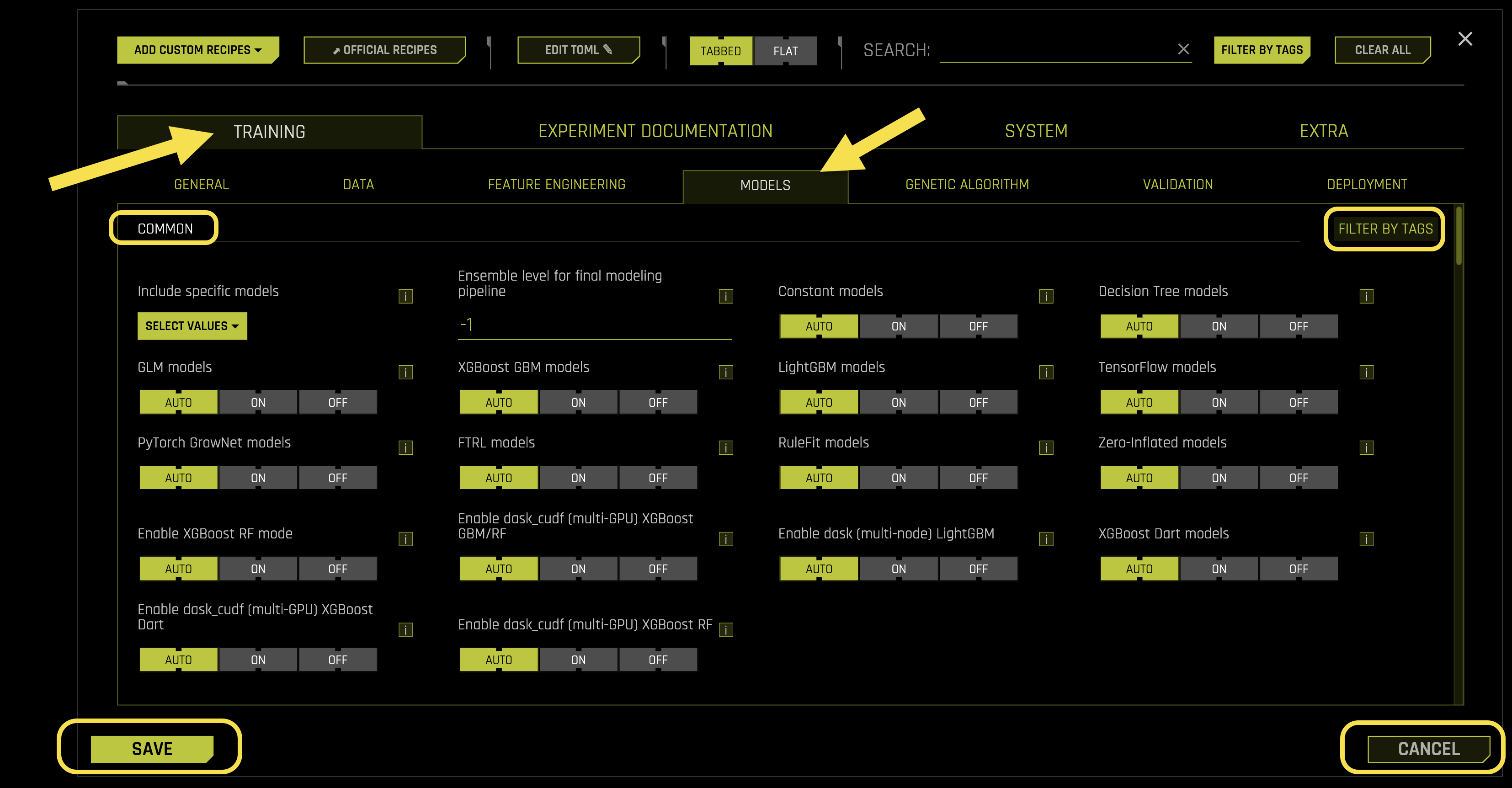
Common Settings:
- Include specific models
What it does: Controls which specific machine learning models to include in the experiment
Leakage detection: By default, LightGBM Model is used for leakage detection when possible
Fold column behavior: If a fold column is used, leakage checking works without using the fold column
Model selection: When models are turned off in Model Expert Settings, only models selected with included_models are used
Time series note: This option is always disabled for time-series experiments
Requires: List format (default: [])
- Ensemble level for final modeling pipeline
What it does: Controls the ensemble strategy for the final modeling pipeline
Auto mode (-1): Automatically determines based on ensemble_accuracy_switch, accuracy, data size, etc.
- Ensemble levels:
0: No ensemble - only final single model with validated iteration/tree count
1: 1 model with multiple ensemble folds (cross-validation)
≥2: Multiple models with multiple ensemble folds (cross-validation)
Requires: Integer value (default: -1)
- Constant models
What it does: Controls whether to enable constant (baseline) models
Purpose: Provides a simple baseline for comparison
Requires: String selection (default: 《auto》, options: 《auto》, 《on》, 《off》)
- Decision Tree models
What it does: Controls whether to enable Decision Tree models
Auto behavior: Disabled unless only non-constant model is chosen
Requires: String selection (default: 《auto》, options: 《auto》, 《on》, 《off》)
- GLM models
What it does: Controls whether to enable GLM (Generalized Linear Model) models
Purpose: Linear models with various link functions for different data types
Requires: String selection (default: 《auto》, options: 《auto》, 《on》, 《off》)
- XGBoost GBM models
What it does: Controls whether to enable XGBoost GBM (Gradient Boosting Machine) models
Purpose: High-performance gradient boosting for structured data
Requires: String selection (default: 《auto》, options: 《auto》, 《on》, 《off》)
- LightGBM models
What it does: Controls whether to enable LightGBM (Light Gradient Boosting Machine) models
Purpose: Fast gradient boosting with low memory usage
Requires: String selection (default: 《auto》, options: 《auto》, 《on》, 《off》)
- TensorFlow models
What it does: Controls whether to enable TensorFlow models
Requires: String selection (default: 《auto》, options: 《auto》, 《on》, 《off》)
- PyTorch GrowNet models
What it does: Controls whether to enable PyTorch-based GrowNet models
Purpose: Deep neural network models using PyTorch framework
Requires: String selection (default: 《auto》, options: 《auto》, 《on》, 《off》)
- FTRL models
What it does: Controls whether to enable FTRL (Follow The Regularized Leader) models
Purpose: Online learning algorithm for large-scale machine learning
Requires: String selection (default: 《auto》, options: 《auto》, 《on》, 《off》)
- RuleFit models
What it does: Controls whether to enable RuleFit models
Status: Beta version with no MOJO support
Purpose: Combines decision trees and linear models for interpretable rules
Requires: String selection (default: 《auto》, options: 《auto》, 《on》, 《off》)
- Zero-Inflated models
What it does: Controls whether to enable Zero-Inflated models
Purpose: Specialized models for count data with excess zeros
Requires: String selection (default: 《auto》, options: 《auto》, 《on》, 《off》)
- Enable XGBoost RF mode
What it does: Controls whether to enable XGBoost Random Forest mode
Purpose: Uses Random Forest algorithm within XGBoost framework
Requires: String selection (default: 《auto》, options: 《auto》, 《on》, 《off》)
- XGBoost Dart models
What it does: Controls whether to enable XGBoost Dart models
Purpose: DART (Dropouts meet Multiple Additive Regression Trees) for better generalization
Requires: String selection (default: 《auto》, options: 《auto》, 《on》, 《off》)
Advanced Settings:
- Threshold for interpretability above which to enable automatic monotonicity constraints for tree models
What it does: Sets the interpretability threshold for enabling automatic monotonicity constraints in tree models
How it works: When interpretability setting is equal to or above this threshold, automatic monotonicity constraints are applied
Purpose: Ensures models behave predictably by enforcing monotonic relationships between features and target
Requires: Integer value (default: 7)
- Control amount of logging when calculating automatic monotonicity constraints (if enabled)
What it does: Controls the verbosity of logging when calculating automatic monotonicity constraints
Logging levels: * 〈off〉: No logging * 〈low〉: Shows only monotonicity constraint direction * 〈medium〉: Shows correlation of positively and negatively constrained features * 〈high〉: Shows all correlation values
Requires: String selection (default: 《medium》, options: 《off》, 《low》, 《medium》, 《high》)
- Correlation beyond which triggers monotonicity constraints (if enabled)
What it does: Sets the correlation threshold for triggering monotonicity constraints
How it works: Uses Pearson correlation coefficient between features and target to determine constraint direction
Enforcement: Above threshold = positive monotonicity, below negative threshold = negative monotonicity
Supported models: XGBoost GBM, LightGBM, and Decision Tree models
Activation: Enabled when interpretability >= threshold AND monotonicity_constraints_dict is not provided
Requires: Float value (default: 0.1)
- Whether to drop features that have no monotonicity constraint applied (e.g., due to low correlation with target).
What it does: Controls whether to drop features without monotonicity constraints from the model
When enabled: Only monotonic features with +1/-1 constraints are passed to models
When disabled: All features are included in the model regardless of constraints
Activation: Only active when interpretability >= threshold OR monotonicity_constraints_dict is provided
Requires: Boolean toggle (default: Disabled)
- Manual override for monotonicity constraints
What it does: Allows manual specification of monotonicity constraints for specific features
- Constraint values:
1: Positive monotonicity (feature increases → target increases)
-1: Negative monotonicity (feature increases → target decreases)
0: No constraint (feature disabled)
True: Automatic handling based on correlation
False: Same as 0 (no constraint)
Automatic behavior: Features not listed are handled automatically based on interpretability threshold
Example: {〈PAY_0〉: -1, 〈PAY_2〉: -1, 〈AGE〉: -1, 〈BILL_AMT1〉: 1, 〈PAY_AMT1〉: -1}
Requires: Dictionary format (default: {})
- Include specific individuals
What it does: Specifies custom individuals (model configurations) to use in the experiment
Purpose: Allows fine-grained control over specific model combinations
Requires: List format (default: [])
- Generate python code for individual
What it does: Controls whether to create the experiment AutoDoc after the experiment ends
Purpose: Generates Python code documentation for reproducibility
Requires: String selection (default: 《auto》, options: 《auto》, 《on》, 《off》)
- Generate json code for individual
What it does: Controls whether to create the experiment AutoDoc after the experiment ends
Purpose: Generates JSON configuration documentation for reproducibility
Requires: String selection (default: 《auto》, options: 《auto》, 《on》, 《off》)
- Max. Num. genes for example auto-generated individual
What it does: Sets the maximum number of genes (transformers) for auto-generated example individual
Output: Creates example_indiv.py file in the summary zip file
Purpose: Provides a template for custom individual creation
Requires: Integer value (default: 100)
- Min. Num. genes for example auto-generated individual
What it does: Sets the minimum number of genes (transformers) for auto-generated example individual
Output: Creates example_indiv.py file in the summary zip file
Purpose: Provides a template for custom individual creation
Requires: Integer value (default: 100)
- Enable Optuna XGBoost Pruning callback
What it does: Controls whether to enable Optuna’s XGBoost pruning callback to abort unpromising runs
Note: Not applied when tuning learning rate
Purpose: Improves hyperparameter optimization efficiency by stopping poor trials early
Requires: Boolean toggle (default: Enabled)
- Enable Optuna LightGBM Pruning callback
What it does: Controls whether to enable Optuna’s LightGBM pruning callback to abort unpromising runs
Note: Not applied when tuning learning rate
Purpose: Improves hyperparameter optimization efficiency by stopping poor trials early
Requires: Boolean toggle (default: Enabled)
- LightGBM Boosting types
What it does: Specifies which boosting types to enable for LightGBM
- Available types:
〈gbdt〉: Gradient Boosted Decision Trees (standard boosting)
〈rf_early_stopping〉: Random Forest with early stopping
〈rf〉: Random Forest without early stopping
〈dart〉: Drop-out boosted trees without early stopping
Requires: List selection (default: [〈gbdt〉], options: [〈gbdt〉, 〈rf_early_stopping〉, 〈rf〉, 〈dart〉])
- LightGBM multiclass balancing
What it does: Controls automatic class weighting for imbalanced multiclass problems
Trade-off: May worsen probabilities but improves confusion-matrix based scorers for rare classes
Benefit: No need to manually calibrate probabilities or fine-tune label creation process
Requires: String selection (default: 《auto》, options: 《auto》, 《on》, 《off》)
- LightGBM categorical support
What it does: Controls LightGBM categorical feature support
Limitations: Runs in CPU mode even if GPUs are enabled, and no MOJO is built
Purpose: Native handling of categorical features without encoding
Requires: Boolean toggle (default: Disabled)
- LightGBM linear_tree mode
What it does: Controls LightGBM linear_tree handling
Limitations: Only CPU mode currently, no L1 regularization for MAE objective, and no MOJO build
Purpose: Uses linear models in tree leaves for better performance on linear relationships
Requires: Boolean toggle (default: Disabled)
- LightGBM extra trees mode
What it does: Controls LightGBM extra trees mode
Purpose: Uses extremely randomized trees for additional regularization
Requires: Boolean toggle (default: Disabled)
- Method to use for monotonicity constraints for LightGBM
What it does: Specifies the method for implementing monotonicity constraints in LightGBM
- Available methods:
〈basic〉: Basic monotonicity constraint implementation
〈intermediate〉: Intermediate constraint handling with more sophisticated logic
〈advanced〉: Advanced constraint implementation with optimized performance
Requires: String selection (default: 《basic》, options: 《basic》, 《intermediate》, 《advanced》)
- LightGBM Monotone Penalty
What it does: Controls penalty for monotone splits in LightGBM trees
How it works: Forbids monotone splits on the first x levels of the tree (rounded down)
Penalty function: Continuous, increasing function based on the penalization parameter
Purpose: Provides fine-grained control over monotonicity constraint enforcement
Requires: Float value (default: 0.0)
- LightGBM CUDA support
What it does: Controls whether to use LightGBM CUDA implementation instead of OpenCL
Hardware requirement: CUDA with LightGBM only supported for Pascal+ GPUs (compute capability ≥6.0)
Purpose: Accelerates training using GPU instead of CPU
Requires: Boolean toggle (default: Disabled)
- Whether to show constant models in iteration panel even when not best model
What it does: Controls whether to display constant models in the iteration panel
Purpose: Allows monitoring of baseline models even when they’re not performing best
Use case: Useful for comparing model performance against simple baselines
Requires: Boolean toggle (default: Disabled)
- Select XGBoost regression objectives.
What it does: Specifies which objectives are allowed for XGBoost regression models
Purpose: Controls the loss function used during training and optimization
Sampling: Default reg:squarederror appears 3 times in the sample list for balanced selection
Important: logistic, tweedie, gamma, and poisson objectives only valid for targets with positive values
Key distinction: Objective = regularized loss function for training, Metric = non-regularized metric for validation
Requires: List selection (default: [〈reg:squarederror〉], options: [〈reg:squarederror〉, 〈reg:logistic〉, 〈count:poisson〉, 〈survival:cox〉, 〈reg:gamma〉, 〈reg:tweedie〉])
- Select XGBoost regression metrics.
What it does: Specifies which metrics are allowed for XGBoost regression models
Purpose: Controls the evaluation metrics used for model selection and validation
Sampling: Default rmse and mae appear twice in the sample list for balanced selection
Important: tweedie, gamma, and poisson metrics only valid for targets with positive values
Requires: List selection (default: [〈rmse〉, 〈mae〉], options: [〈rmse〉, 〈mae〉, 〈mape〉, 〈binary〉, 〈huber〉, 〈fair〉, 〈quantile〉, 〈gamma〉, 〈tweedie〉, 〈poisson〉])
- Select XGBoost binary metrics.
What it does: Specifies which metrics are allowed for XGBoost binary classification models
Purpose: Controls the evaluation metrics used for binary classification tasks
Sampling: All metrics are evenly sampled for balanced selection
Requires: List selection (default: [〈logloss〉, 〈auc〉, 〈aucpr〉, 〈error〉], options: [〈logloss〉, 〈auc〉, 〈aucpr〉, 〈error〉])
- Select LightGBM regression objectives.
What it does: Specifies which objectives are allowed for LightGBM regression models
Purpose: Controls the loss function used during LightGBM training
Sampling: Default mse appears twice in the sample list if selected
Binary objective: 《binary》 refers to logistic regression
Parameter tuning: For quantile/huber/fair objectives with non-normalized data, use params_lightgbm to specify alpha (quantile/huber) or fairc (fair) values
Loss types: mse = L2 loss (same as rmse), mae = L1 loss
Important: tweedie, gamma, and poisson objectives only valid for targets with positive values
Requires: List selection (default: [《mse》, 《mae》], options: [《mse》, 《mae》, 《mape》, 《binary》, 《huber》, 《fair》, 《quantile》, 《gamma》, 《tweedie》, 《poisson》])
- Select LightGBM regression metrics.
What it does: Specifies which metrics are allowed for LightGBM regression models
Purpose: Controls the evaluation metrics used for LightGBM model selection
Sampling: Default rmse appears three times in the sample list if selected
Parameter tuning: For huber/fair metrics with non-normalized data, use params_lightgbm to specify alpha (huber/quantile) or fairc (fair) values
Important: tweedie, gamma, and poisson metrics only valid for targets with positive values
Requires: List selection (default: [《rmse》, 《mae》], options: [《rmse》, 《mae》, 《mape》, 《binary》, 《huber》, 《fair》, 《quantile》, 《gamma》, 《tweedie》, 《poisson》])
- Select LightGBM binary objectives.
What it does: Specifies which objectives are allowed for LightGBM binary classification models
Purpose: Controls the loss function used for binary classification tasks
Sampling: All objectives are evenly sampled for balanced selection
Requires: List selection (default: [《binary》, 《xentropy》], options: [《binary》, 《xentropy》])
- Select LightGBM binary metrics.
What it does: Specifies which metrics are allowed for LightGBM binary classification models
Purpose: Controls the evaluation metrics used for binary classification tasks
Sampling: All metrics are evenly sampled for balanced selection
Requires: List selection (default: [《binary_logloss》, 《binary_error》], options: [《binary_logloss》, 《binary_error》])
- Select LightGBM multiclass metrics.
What it does: Specifies which metrics are allowed for LightGBM multiclass classification models
Purpose: Controls the evaluation metrics used for multiclass classification tasks
Sampling: All metrics are evenly sampled if selected
Requires: List selection (default: [《multi_logloss》, 《multi_error》], options: [《multi_logloss》, 《multi_error》])
- tweedie_variance_power parameters
What it does: Specifies tweedie_variance_power parameters to try for XGBoost and LightGBM models when tweedie objective is used
Purpose: Controls the variance power parameter for Tweedie distribution
Usage: First value is used as default, others are tried during optimization
Requires: List format (default: [1.5, 1.2, 1.9])
- huber parameters
What it does: Specifies Huber loss parameters to try for LightGBM models when huber objective is used
Purpose: Controls the delta parameter for Huber loss (transition point between quadratic and linear loss)
Usage: First value is used as default, others are tried during optimization
Requires: List format (default: [0.9, 0.3, 0.5, 0.6, 0.7, 0.8, 0.1, 0.99])
- fair c parameters
What it does: Specifies Fair loss parameters to try for LightGBM models when fair objective is used
Purpose: Controls the c parameter for Fair loss (controls transition from quadratic to linear)
Usage: First value is used as default, others are tried during optimization
Requires: List format (default: [1.0, 0.1, 0.5, 0.9])
- poisson_max_delta_step parameters
What it does: Specifies poisson max_delta_step parameters to try for LightGBM models when poisson objective is used
Purpose: Controls the maximum delta step for Poisson regression optimization
Usage: First value is used as default, others are tried during optimization
Requires: List format (default: [0.7, 0.9, 0.5, 0.2])
- quantile alpha parameters
What it does: Specifies quantile alpha parameters to try for LightGBM models when quantile objective is used
Purpose: Controls the quantile level (0.5 = median, 0.9 = 90th percentile, etc.)
Usage: First value is used as default, others are tried during optimization
Requires: List format (default: [0.9, 0.95, 0.99, 0.6])
- default reg_lambda regularization parameter
What it does: Sets the default L2 regularization parameter for GLM models
Purpose: Controls the strength of L2 regularization to prevent overfitting
Impact: Higher values = more regularization = simpler models
Requires: Float value (default: 0.0004)
- params_lightgbm
What it does: Allows manual override of Driverless AI parameters for LightGBM models
Purpose: Provides fine-grained control over LightGBM-specific parameters
Important: Use 〈eval_metric〉 instead of 〈metric〉 for LightGBM
Example: {〈objective〉: 〈binary〉, 〈n_estimators〉: 100, 〈max_leaves〉: 64, 〈random_state〉: 1234}
Avoid: System-level parameters like 〈n_gpus〉, 〈gpu_id〉, 〈n_jobs〉, 〈booster〉
Caution: Avoid overriding 〈objective〉 unless you understand the implications
Requires: Dictionary format (default: {})
- params_xgboost
What it does: Allows manual override of Driverless AI parameters for XGBoost models
Purpose: Provides fine-grained control over XGBoost-specific parameters
Compatibility: Similar parameters to LightGBM since LightGBM parameters are transcribed from XGBoost equivalents
Example: {〈n_estimators〉: 100, 〈max_leaves〉: 64, 〈max_depth〉: 0, 〈random_state〉: 1234}
Requires: Dictionary format (default: {})
- params_xgboost_rf
What it does: Allows manual override of Driverless AI parameters for XGBoost Random Forest models
Purpose: Provides fine-grained control over XGBoost Random Forest-specific parameters
Requires: Dictionary format (default: {})
- params_dart
What it does: Allows manual override of Driverless AI parameters for XGBoost DART models
Purpose: Provides fine-grained control over XGBoost DART-specific parameters
Requires: Dictionary format (default: {})
- Parameters for TensorFlow
What it does: Allows manual override of Driverless AI parameters for TensorFlow models
Purpose: Provides fine-grained control over TensorFlow-specific parameters
Requires: Dictionary format (default: {})
- params_gblinear
What it does: Allows manual override of Driverless AI parameters for XGBoost GLM models
Purpose: Provides fine-grained control over XGBoost GLM-specific parameters
Requires: Dictionary format (default: {})
- params_decision_tree
What it does: Allows manual override of Driverless AI parameters for Decision Tree models
Purpose: Provides fine-grained control over Decision Tree-specific parameters
Important: Use XGBoost equivalent parameters unless unique LightGBM parameter is needed
Important: Use 〈eval_metric〉 instead of 〈metric〉 for Decision Trees
Requires: Dictionary format (default: {})
- params_rulefit
What it does: Allows manual override of Driverless AI parameters for RuleFit models
Purpose: Provides fine-grained control over RuleFit-specific parameters
Status: RuleFit is in beta version with no MOJO support
Requires: Dictionary format (default: {})
- params_ftrl
What it does: Allows manual override of Driverless AI parameters for FTRL models
Purpose: Provides fine-grained control over FTRL-specific parameters
Requires: Dictionary format (default: {})
- params_grownet
What it does: Allows manual override of Driverless AI parameters for GrowNet models
Purpose: Provides fine-grained control over GrowNet-specific parameters
Requires: Dictionary format (default: {})
- Mode to handle params_tune_ tomls
What it does: Controls whether to adjust GBM trees, learning rate, and early_stopping_rounds for GBM models
Auto mode: Changes trees/LR/stopping if tune_learning_rate=false and early stopping is supported
Requirements: Model must be GBM or from custom individual with parameter in adjusted_params
On mode: Enables parameter adjustment from tuning-evolution into final model
Off mode: Disables any parameter adjustment from tuning-evolution into final model
Requires: String selection (default: 《auto》, options: 《auto》, 《on》, 《off》)
- Adjust trees/LR
What it does: Controls whether to adjust GBM trees, learning rate, and early_stopping_rounds for GBM models
Auto mode (True): Changes trees/LR/stopping if tune_learning_rate=false and early stopping is supported
Requirements: Model must be GBM or from custom individual with parameter in adjusted_params
Disable mode (False): Disables any parameter adjustment from tuning-evolution into final model
Important: Setting to false is required when changing params_lightgbm or params_tune_lightgbm to preserve tuning-evolution values
Learning rate tuning: Set tune_learning_rate to true to tune learning_rate, else it will be fixed to a single value
Requires: Boolean toggle (default: Enabled)
- params_tune_lightgbm
What it does: Allows manual override of Driverless AI parameters for LightGBM model tuning
Purpose: Provides fine-grained control over LightGBM hyperparameter tuning
Requires: Dictionary format (default: {})
- params_tune_xgboost
What it does: Allows manual override of Driverless AI parameters for XGBoost model tuning
Purpose: Provides fine-grained control over XGBoost hyperparameter tuning
Requires: Dictionary format (default: {})
- params_tune_xgboost_rf
What it does: Allows manual override of Driverless AI parameters for XGBoost Random Forest tuning
Purpose: Provides fine-grained control over XGBoost Random Forest hyperparameter tuning
Requires: Dictionary format (default: {})
- params_tune_decision_tree
What it does: Allows manual override of Driverless AI parameters for Decision Tree tuning
Purpose: Provides fine-grained control over Decision Tree hyperparameter tuning
Requires: Dictionary format (default: {})
- params_tune_dart
What it does: Allows manual override of Driverless AI parameters for XGBoost DART tuning
Purpose: Provides fine-grained control over XGBoost DART hyperparameter tuning
Requires: Dictionary format (default: {})
- params_tune_tensorflow
What it does: Allows manual override of Driverless AI parameters for TensorFlow tuning
Purpose: Provides fine-grained control over TensorFlow hyperparameter tuning
Requires: Dictionary format (default: {})
- params_tune_gblinear
What it does: Allows manual override of Driverless AI parameters for XGBoost GLM tuning
Purpose: Provides fine-grained control over XGBoost GLM hyperparameter tuning
Requires: Dictionary format (default: {})
- params_tune_rulefit
What it does: Allows manual override of Driverless AI parameters for RuleFit tuning
Purpose: Provides fine-grained control over RuleFit hyperparameter tuning
Requires: Dictionary format (default: {})
- params_tune_ftrl
What it does: Allows manual override of Driverless AI parameters for FTRL tuning
Purpose: Provides fine-grained control over FTRL hyperparameter tuning
Requires: Dictionary format (default: {})
- params_tune_grownet
What it does: Allows manual override of Driverless AI parameters for GrowNet tuning
Purpose: Provides fine-grained control over GrowNet hyperparameter tuning
Requires: Dictionary format (default: {})
- Max. number of trees/iterations
What it does: Sets the maximum number of GBM trees or GLM iterations
Purpose: Controls model complexity - can be reduced for lower accuracy and/or higher interpretability
Early stopping: Usually chooses fewer iterations than the maximum
Override: Ignored if fixed_max_nestimators is > 0
Requires: Integer value (default: 3000)
- Fixed max. number of trees/iterations (-1 = auto mode)
What it does: Sets a fixed maximum number of GBM trees or GLM iterations
Override behavior: If > 0, ignores max_nestimators and disables automatic reduction
Disables: Automatic reduction due to lower accuracy or higher interpretability
Early stopping: Usually chooses fewer iterations than the fixed maximum
Auto mode (-1): Uses automatic determination
Requires: Integer value (default: -1)
- n_estimators list to sample from for model mutations for models that do not use early stopping
What it does: Specifies n_estimators values to sample from for models without early stopping
Applies to: * LightGBM dart mode and normal rf mode (no early stopping) * XGBoost Dart mode
Sampling: Default parameters use first value, mutations sample from entire list
Requires: List format (default: [50, 100, 150, 200, 250, 300])
- Minimum learning rate for final ensemble GBM models
What it does: Sets the lower limit on learning rate for final ensemble GBM models
Problem it solves: When max trees/iterations is insufficient, no early stopping triggers and performance suffers
Solutions: Increase this minimum learning rate OR increase max number of trees/iterations
Requires: Float value (default: 0.01)
- Maximum learning rate for final ensemble GBM models
What it does: Sets the upper limit on learning rate for final ensemble GBM models
Purpose: Prevents learning rates from becoming too high and causing instability
Requires: Float value (default: 0.05)
- Reduction factor for max. number of trees/iterations during feature evolution
What it does: Sets the factor by which max_nestimators is reduced for tuning and feature evolution
Purpose: Controls computational efficiency during feature engineering phase
Impact: Lower values = faster feature evolution, higher values = more thorough tuning
Requires: Float value (default: 0.2)
- Min. learning rate for feature engineering GBM models
What it does: Sets the lower limit on learning rate for feature engineering GBM models
Purpose: Ensures stable training during feature engineering phase
Requires: Float value (default: 0.05)
- Max. learning rate for feature engineering GBM models
What it does: Sets the upper limit on learning rate for feature engineering GBM models
Override capability: Set to smaller value to override min_learning_rate and min_learning_rate_final
Purpose: Prevents learning rates from becoming too high during feature engineering
Requires: Float value (default: 0.5)
- Whether to lock tree parameters to final model values
What it does: Controls whether to lock learning rate, tree count, and early stopping rounds for GBM algorithms
Purpose: Ensures consistent parameter values between tuning and final model phases
Locked parameters: Learning rate, tree count, early stopping rounds
Requires: Boolean toggle (default: Disabled)
- Whether to tune learning rate even for GBM algorithms with early stopping
What it does: Controls whether to tune learning rate for GBM algorithms during hyperparameter optimization
Scope: Only applies when not doing just single final model
Optuna benefit: May help isolate optimal learning rate when tuning with Optuna
Requires: Boolean toggle (default: Disabled)
- Max. number of epochs for TensorFlow / FTRL
What it does: Sets the maximum number of epochs for TensorFlow and FTRL models
Purpose: Controls training duration for deep learning models
Requires: Integer value (default: 50)
- Max. tree depth (and Max. max_leaves as 2**max_max_depth)
What it does: Sets the maximum tree depth and corresponding max_leaves limit
Calculation: max_leaves = 2^max_max_depth (exponential relationship)
Purpose: Controls model complexity and prevents overfitting
Requires: Integer value (default: 12)
- Max. max_bin for tree features
What it does: Sets the maximum max_bin for tree features
Purpose: Controls the granularity of feature binning in tree models
Impact: Higher values = more granular splits, lower values = coarser splits
Requires: Integer value (default: 256)
- Max. number of rules for RuleFit (-1 for all)
What it does: Sets the maximum number of rules to be used for RuleFit models
Auto mode (-1): Uses all available rules
Status: RuleFit is in beta version with no MOJO support
Requires: Integer value (default: -1)
- Type of ensemble meta learner. Blender is recommended for most use cases.
What it does: Specifies the model type to combine base model predictions in final pipeline
- Available options:
〈blender〉: Linear blend with non-negative weights that add to 1 (recommended)
〈extra_trees〉: Tree model for non-linear combination (experimental, requires cross_validate_meta_learner)
〈neural_net〉: Neural net model for non-linear combination (experimental, requires cross_validate_meta_learner)
Requires: String selection (default: 《blender》, options: 《blender》, 《extra_trees》, 《neural_net》)
- Number of default simple models during tuning phase (-1 = auto)
What it does: Sets the number of models to use as SEQUENCE instead of random features/parameters
Auto mode (-1): Uses at least one default individual per model class tuned
Purpose: Ensures baseline models are included in tuning process
Requires: Integer value (default: -1)
- Number of extra models during tuning phase (-1 = auto)
What it does: Sets the number of additional models to add during tuning for edge cases
Examples: Time series with no target encoding on time column groups
Auto mode (-1): Adds additional models to protect against overfitting on high-gain training features
Requires: Integer value (default: -1)
- Num. in tuning
What it does: Specifies the number of tuning instances for different model configurations
Purpose: Controls the granularity of model configuration tuning
Requires: Dictionary format (default: {})
- Max. size of validation data relative to training data (for final pipeline), otherwise will sample
What it does: Sets the maximum size of validation data relative to training data for final pipeline
Sampling: If exceeded, validation data will be sampled to meet this limit
Purpose: Controls memory usage and computational efficiency
Requires: Float value (default: 2.0)
- Perform stratified sampling for binary classification if the target is more imbalanced than this.
What it does: Sets the threshold for triggering stratified sampling in binary classification
Purpose: Automatically applies stratified sampling when class imbalance exceeds this threshold
Requires: Float value (default: 0.01)
- Sampling method for imbalanced binary classification problems
What it does: Controls the sampling method used for imbalanced binary classification problems
Purpose: Handles class imbalance through various sampling techniques
Requires: String selection (default: 《auto》, options: 《auto》, 《on》, 《off》)
- Threshold for minimum number of rows in original training data to allow imbalanced sampling techniques. For smaller data, will disable imbalanced sampling, no matter what imbalance_sampling_method is set to.
What it does: Sets the minimum dataset size required to enable imbalanced sampling techniques
Safety mechanism: For datasets smaller than this threshold, imbalanced sampling is disabled regardless of other settings
Purpose: Prevents sampling techniques from being applied to datasets too small to benefit
Requires: Integer value (default: 100000)
- Ratio of majority to minority class for imbalanced binary classification to trigger special sampling techniques if enabled
What it does: Sets the class ratio threshold for triggering special sampling techniques
Purpose: Activates specialized sampling methods when class imbalance exceeds this ratio
Requires: Float value (default: 5.0)
- Ratio of majority to minority class for heavily imbalanced binary classification to only enable special sampling techniques if enabled
What it does: Sets the class ratio threshold for heavily imbalanced datasets
Purpose: Restricts special sampling techniques to only heavily imbalanced datasets above this ratio
Requires: Float value (default: 25.0)
- Number of bags for sampling methods for imbalanced binary classification (if enabled). -1 for automatic.
What it does: Sets the number of bags for sampling methods in imbalanced binary classification
Auto mode (-1): Automatically determines the optimal number of bags
Purpose: Controls the number of sampling iterations for handling class imbalance
Requires: Integer value (default: -1)
- Hard limit on number of bags for sampling methods for imbalanced binary classification.
What it does: Sets the hard limit on number of bags for imbalanced binary classification sampling
Purpose: Prevents excessive computational overhead from too many sampling bags
Requires: Integer value (default: 10)
- Hard limit on number of bags for sampling methods for imbalanced binary classification during feature evolution phase.
What it does: Sets the hard limit on number of bags during feature evolution phase
Purpose: Controls computational resources during feature engineering to maintain efficiency
Requires: Integer value (default: 3)
- Max. size of data sampled during imbalanced sampling (in terms of dataset size)
What it does: Sets the maximum size of data sampled during imbalanced sampling relative to original dataset
Purpose: Controls memory usage and computational efficiency during sampling
Requires: Float value (default: 1.0)
- Target fraction of minority class after applying under/over-sampling techniques. -1.0 for automatic
What it does: Sets the target fraction of minority class after applying sampling techniques
Auto mode (-1.0): Automatically determines the optimal minority class fraction
Purpose: Controls the balance achieved by under/over-sampling methods
Requires: Float value (default: -1.0)
- Max. number of automatic FTRL interactions terms for 2nd, 3rd, 4th order interactions terms (each)
What it does: Sets the maximum number of automatic FTRL interaction terms for each interaction order
Scope: Applies to 2nd, 3rd, and 4th order interaction terms separately
Purpose: Controls the complexity of FTRL model interactions
Requires: Integer value (default: 10000)
- booster_for_fs_permute
What it does: Specifies the booster type for feature selection permutation testing
Purpose: Controls which algorithm is used for permutation-based feature importance
Requires: String selection (default: 《auto》, options: 《auto》, 《on》, 《off》)
- model_class_name_for_fs_permute
What it does: Specifies the model class name for feature selection permutation testing
Purpose: Controls which model class is used for permutation-based feature importance
Requires: String selection (default: 《auto》, options: 《auto》, 《on》, 《off》)
- switch_from_tree_to_lgbm_if_can
What it does: Controls whether to automatically switch from tree models to LightGBM when possible
Purpose: Optimizes model selection by preferring LightGBM over basic tree models
Requires: Boolean toggle (default: Enabled)
- default_booster
What it does: Sets the default booster algorithm to use
Purpose: Specifies the primary algorithm for model training
Available options: lightgbm, xgboost, glm, decision_tree, tensorflow, grownet, ftrl, rulefit, constant
Requires: String selection (default: 《lightgbm》, options: 《lightgbm》, 《xgboost》, 《glm》, 《decision_tree》, 《tensorflow》, 《grownet》, 《ftrl》, 《rulefit》, 《constant》)
- default_model_class_name
What it does: Sets the default model class name to use
Purpose: Specifies the primary model class for training
Available options: LightGBMModel, XGBoostGBMModel, GLMModel, DecisionTreeModel, TensorFlowModel, GrowNetModel, FTRLModel, RuleFitModel, ConstantModel
Requires: String selection (default: 《LightGBMModel》, options: 《LightGBMModel》, 《XGBoostGBMModel》, 《GLMModel》, 《DecisionTreeModel》, 《TensorFlowModel》, 《GrowNetModel》, 《FTRLModel》, 《RuleFitModel》, 《ConstantModel》)
- Num. classes above which include Tensorflow
What it does: Sets the number of classes threshold for including TensorFlow models
Purpose: Automatically includes TensorFlow models for multiclass problems above this threshold
Requires: Integer value (default: 5)
- Num. classes above which to exclusively use TensorFlow
What it does: Sets the number of classes threshold for exclusively using TensorFlow models
Purpose: Uses only TensorFlow models for multiclass problems above this threshold
Requires: Integer value (default: 10)
- Max. absolute delta between training and validation scores for tree models.
What it does: Sets the maximum absolute difference between training and validation scores for tree models
Purpose: Monitors for overfitting by tracking score differences
Requires: Float value (default: 0.0)
- Max. relative delta between training and validation scores for tree models.
What it does: Sets the maximum relative difference between training and validation scores for tree models
Purpose: Monitors for overfitting by tracking relative score differences
Requires: Float value (default: 0.0)
- Do lambda search for GLM
What it does: Controls whether to search for optimal lambda parameter for XGBoost GLM
Auto behavior: Disabled if training data exceeds final_pipeline_data_size or for multiclass experiments
Restriction: Always disabled for ensemble_level = 0
Performance note: Can be slow for little payoff compared to grid search
Requires: String selection (default: 《auto》, options: 《auto》, 《on》, 《off》)
- Do lambda search for GLM by exact eval metric
What it does: Controls whether to search for optimal lambda using exact evaluation metric
Purpose: Provides more precise lambda optimization for GLM models
Requires: Boolean toggle (default: Disabled)
- Early stopping threshold
What it does: Sets the early stopping threshold for model training
Purpose: Prevents overfitting by stopping training when improvement stagnates
Requires: Float value (default: -2.0)
- Whether to blend ensembles in link space (applies to classification only)
What it does: Controls whether to blend ensembles in link space for classification problems
Purpose: Improves ensemble performance by blending in the appropriate space
Scope: Only applies to classification problems
Requires: Boolean toggle (default: Enabled)
Image Settings:
- Search parameter overrides for image auto
What it does: Allows manual override of automatic image auto search parameters
Default behavior: Time dial controls search space (higher time = more options)
Override capability: Any keys in this dictionary override automatic choices
Example: {〈augmentation〉: [〈safe〉], 〈crop_strategy〉: [〈Resize〉], 〈optimizer〉: [〈AdamW〉], 〈dropout〉: [0.1], 〈epochs_per_stage〉: [5], 〈warmup_epochs〉: [0], 〈mixup〉: [0.0], 〈cutmix〉: [0.0], 〈global_pool〉: [〈avg〉], 〈learning_rate〉: [3e-4]}
Overfit protection options: 〈augmentation〉: [《safe》, 《semi_safe》, 《hard》], 〈crop_strategy〉: [《Resize》, 《RandomResizedCropSoft》, 《RandomResizedCropHard》], 〈dropout〉: [0.1, 0.3, 0.5]
Global pool options: avgmax (sum of AVG and MAX), catavgmax (concatenation of AVG and MAX)
Requires: Dictionary format (default: {})
- Architectures for image auto
What it does: Specifies which architectures to consider for image auto models
Default behavior: Accuracy dial controls architectures if left empty
Ordering: Options in the list are ordered by complexity
Purpose: Allows fine-grained control over model architecture selection
Requires: List format (default: [])
- Minimum image size
What it does: Sets the minimum image size for processing
Upscaling: Images smaller than this are upscaled to the minimum
Default: 64 pixels, but can be as small as 32 given pooling layers used
Requires: Integer value (default: 64, minimum: 32)
- Number of models in final ensemble
What it does: Sets the number of models in the final image ensemble
Auto mode (0): Automatic based on time dial: min(1, time//2)
Purpose: Controls ensemble size for image models
Requires: Integer value (default: 0, minimum: 0)
- Number of models in search space
What it does: Sets the number of models to consider in the image auto search space
Auto mode (0): Automatic based on time dial: max(4 * (time - 1), 2)
Purpose: Controls the breadth of model exploration during hyperparameter search
Requires: Integer value (default: 0, minimum: 0)
- Number of stages for hyperparameter search
What it does: Sets the number of stages for hyperparameter search in image auto
Auto mode (0): Automatic based on time dial: time + 1 if time < 6 else time - 1
Purpose: Controls the depth of hyperparameter search stages
Requires: Integer value (default: 0, minimum: 0)
- Number of iterations for successive halving
What it does: Sets the number of iterations for successive halving optimization
Auto mode (0): Automatic based on time dial or number of models and stages
Dependencies: Uses image_auto_num_models and image_auto_num_stages settings
Requires: Integer value (default: 0, minimum: 0)
- Image downscale ratio to use for training
What it does: Sets the image downscale ratio for training efficiency
Auto mode (0.0): Automatic based on current stage (stage 0: half, stage 1: 3/4, stage 2: full)
Manual override: 1.0 = always use full image, 0.5 = use half image
Purpose: Balances training speed vs. image quality
Requires: Float value (default: 0.0, minimum: 0.0)
- Maximum number of cores to use for image auto model parallel data management
What it does: Controls the maximum number of cores for image auto model parallel data management
Disable: Set to 0 to disable multiprocessing
Purpose: Controls computational resources for image processing
Requires: Integer value (default: 10)
NLP Settings:
- Enable PyTorch models for NLP
What it does: Controls whether to use pretrained PyTorch models and fine-tune them for NLP tasks
Default behavior: 〈auto〉 means disabled, set to 〈on〉 to enable
Requirements: Internet connection required
Limitations: Only uses the first text column, can be slow to train
Recommendation: GPU(s) are highly recommended for performance
Text column forcing: Set string_col_as_text_min_relative_cardinality=0.0 to force string column treatment as text
Requires: String selection (default: 《auto》, options: 《auto》, 《on》, 《off》)
- Select which pretrained PyTorch NLP model(s) to use.
What it does: Specifies which pretrained PyTorch NLP models to use
MOJO warning: Non-default models might have no MOJO support
Requirements: Internet connection, only applies when PyTorch models are set to 〈on〉
Available models: bert-base-uncased, distilbert-base-uncased, bert-base-multilingual-cased, xlnet-base-cased, xlm-mlm-enfr-1024
Requires: List selection (default: [《bert-base-uncased》, 《distilbert-base-uncased》, 《bert-base-multilingual-cased》], options: [《bert-base-uncased》, 《distilbert-base-uncased》, 《bert-base-multilingual-cased》, 《xlnet-base-cased》, 《xlm-mlm-enfr-1024》])
- Number of epochs for fine-tuning of PyTorch NLP models.
What it does: Sets the number of epochs for fine-tuning PyTorch NLP models
Trade-off: Larger values can increase accuracy but take longer to train
Auto mode (-1): Automatically determines the optimal number of epochs
Requires: Integer value (default: -1)
- Batch size for PyTorch NLP models. -1 for automatic.
What it does: Sets the batch size for PyTorch NLP models
Memory impact: Larger models and batch sizes use more memory
Auto mode (-1): Automatically determines optimal batch size
Requires: Integer value (default: -1)
- Maximum sequence length (padding length) for PyTorch NLP models. -1 for automatic.
What it does: Sets the maximum sequence length (padding length) for PyTorch NLP models
Memory impact: Larger models and padding lengths use more memory
Auto mode (-1): Automatically determines optimal sequence length
Requires: Integer value (default: -1)
- Path to pretrained PyTorch NLP models. If empty, will get models from S3
What it does: Specifies the path to pretrained PyTorch NLP models
Path options: Local filesystem (/path/on/server/to/bert_models_folder), URL, or S3 location (s3://)
Download instructions: Get all models from BERT models
Example: pytorch_nlp_pretrained_models_dir=/path/on/server/to/bert_models_folder
Requires: String format (default: 《》)
- S3 access key Id to use when pytorch_nlp_pretrained_models_dir is set to an S3 location.
What it does: Sets the S3 access key ID for accessing pretrained models from S3
Purpose: Authentication for S3-based model storage
Requires: String format (default: 《》)
- S3 secret access key to use when pytorch_nlp_pretrained_models_dir is set to an S3 location.
What it does: Sets the S3 secret access key for accessing pretrained models from S3
Purpose: Authentication for S3-based model storage
Requires: String format (default: 《》)
Time Series Settings:
- Lower limit on interpretability setting for time-series experiments, implicitly enforced.
What it does: Sets the lower limit on interpretability setting for time-series experiments
Generalization benefit: Values of 5 or more can improve generalization by more aggressive dropping of least important features
Disable: Set to 1 to disable this enforcement
Purpose: Ensures adequate interpretability for time-series models
Requires: Integer value (default: 5)
Unsupervised Settings:
- Max. number of exemplars for unsupervised Aggregator experiments
What it does: Sets the maximum number of exemplars for unsupervised Aggregator experiments
Purpose: Attempts to create at most this many exemplars (actual rows behaving like cluster centroids)
Algorithm: Applies to the Aggregator algorithm in unsupervised experiment mode
Requires: Integer value (default: 100)
- Min. number of clusters for unsupervised clustering experiments
What it does: Sets the minimum number of clusters for unsupervised clustering experiments
Purpose: Attempts to create at least this many clusters
Algorithm: Applies to clustering algorithms in unsupervised experiment mode
Requires: Integer value (default: 2)
- Max. number of clusters for unsupervised clustering experiments
What it does: Sets the maximum number of clusters for unsupervised clustering experiments
Purpose: Attempts to create no more than this many clusters
Algorithm: Applies to clustering algorithms in unsupervised experiment mode
Requires: Integer value (default: 10)
Genetic Algorithm
The Genetic Algorithm sub-tab configures development and optimization parameters for feature engineering and model selection.
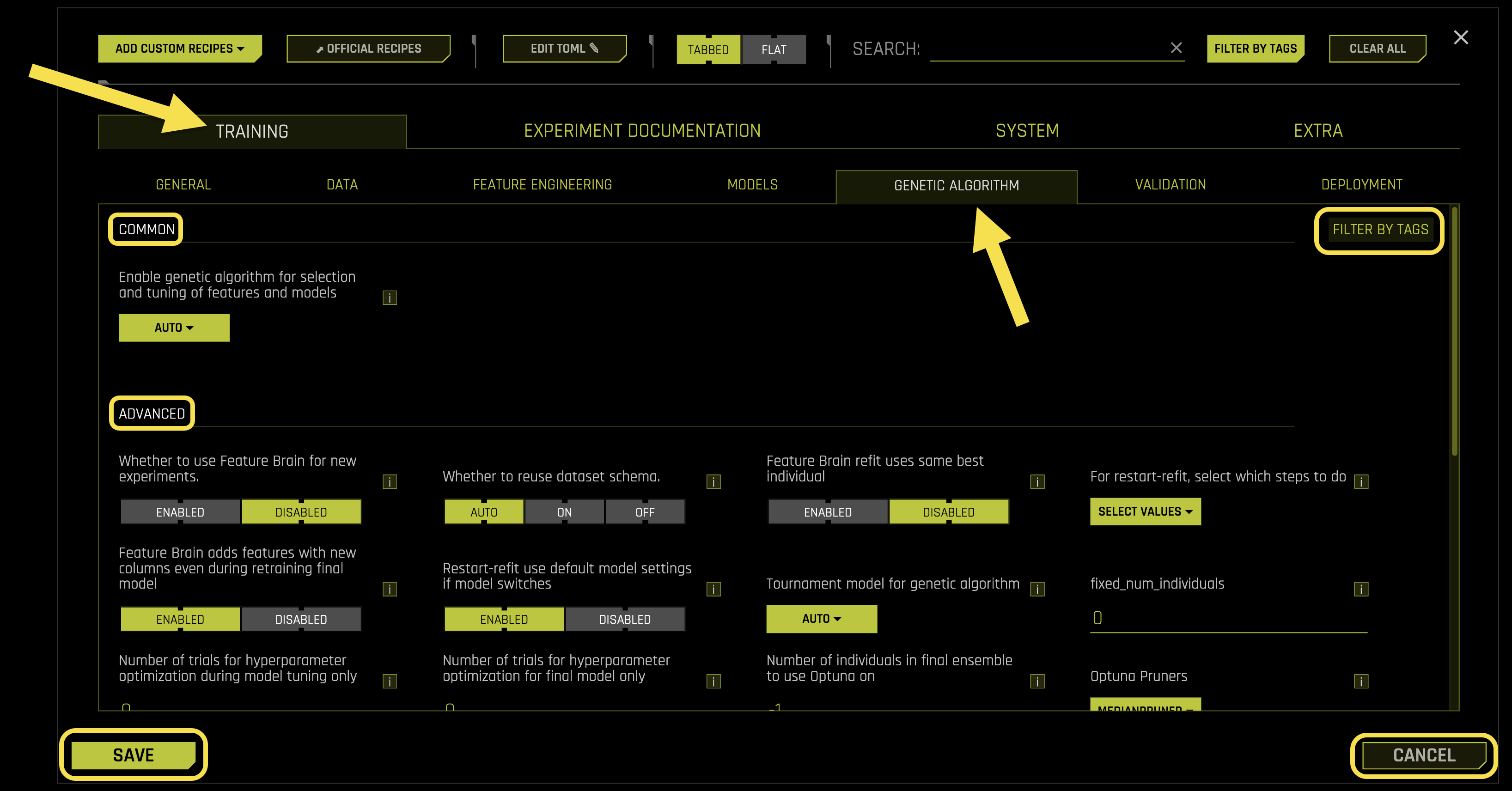
Common Settings:
- Enable genetic algorithm for selection and tuning of features and models
What it does: Controls whether to use genetic algorithm for evolutionary optimization of features and models
- Available options:
〈auto〉: Automatically determined based on experiment requirements
〈on〉: Enabled with standard genetic algorithm
〈Optuna〉: Uses Optuna hyperparameter optimization framework
〈off〉: Disabled - no evolutionary optimization
Purpose: Automatically evolves better feature combinations and model configurations
Requires: String selection (default: 《auto》, options: 《auto》, 《on》, 《Optuna》, 《off》)
Advanced Settings:
- Whether to use Feature Brain for new experiments.
What it does: Controls whether to use Feature Brain results even when running new experiments
Purpose: Leverages previously learned feature patterns to accelerate new experiments
Feature Brain: A system that learns and reuses beneficial feature engineering patterns across experiments
Requires: Boolean toggle (default: Disabled)
- Whether to reuse dataset schema.
What it does: Controls whether to reuse dataset schema from previous experiments
Purpose: Maintains consistency in data processing and feature engineering across experiments
Benefits: Faster setup and consistent data handling for similar datasets
Requires: Boolean toggle (default: Enabled)
- Feature Brain refit uses same best individual
What it does: Controls whether to use the same best individual (highest-scored model and features) during refit
Behavior: Uses the same features regardless of scoring changes, with new engineered features applied to new original features
Example: If refitting with 1 extra column and interpretability=1, final model uses same features plus one more engineered feature for the new column
Purpose: Maintains feature consistency while adapting to new data
Requires: Boolean toggle (default: Disabled)
- For restart-refit, select which steps to do
What it does: Specifies which steps to perform during restart-refit operations
- Available steps:
〈orig_feature_selection〉: Original feature selection process
〈shift_detection〉: Data distribution shift detection
〈leakage_detection〉: Data leakage detection
Impact: These steps may change features slightly (due to random seeds if not in reproducible mode)
Default behavior: Restart-refit avoids these steps assuming data and setup haven’t changed significantly
Override: If check_distribution_shift is forced to 〈on〉, this option is ignored
Requires: List format (default: [], options: [《orig_feature_selection》, 《shift_detection》, 《leakage_detection》])
- Feature Brain adds features with new columns even during retraining final model
What it does: Controls whether to add features with new columns during final model retraining
Behavior: When disabled, ignores any new columns in the data during retraining
Purpose: Controls adaptation to new data columns during model updates
Requires: Boolean toggle (default: Enabled)
- Restart-refit use default model settings if model switches
What it does: Controls whether to use default model settings if the model type changes during restart-refit
Purpose: Determines how to handle model type changes during experiment restarts
Requires: Boolean toggle (default: Disabled)
- Tournament model for genetic algorithm
What it does: Specifies the tournament style for genetic algorithm competition
- Available styles:
〈uniform〉: Random selection (good for exploration)
〈model〉: Individuals with same model type compete (good when multiple models perform well)
〈feature〉: Individuals with similar feature types compete (good for target encoding, frequency encoding, etc.)
〈fullstack〉: Choose among optimal model and feature types
Winner preservation: 〈model〉 and 〈feature〉 styles preserve at least one winner for each type (2 total individuals of each type after mutation)
Selection method: Round robin approach chooses best scores among each model type
Optuna behavior: When enable_genetic_algorithm==〉Optuna〉, every individual is self-mutated without tournaments
Requires: String selection (default: 《auto》, options: 《auto》, 《fullstack》, 《feature》, 《model》, 《uniform》)
- fixed_num_individuals
What it does: Sets a fixed number of individuals in the genetic algorithm (if > 0)
Purpose: Useful for comparing different hardware configurations
Calculation: To preserve 3 individuals in GA race, choose 6 (need 1 mutatable loser per surviving individual)
Requires: Integer value (default: 0)
- Number of trials for hyperparameter optimization during model tuning only
What it does: Sets the number of trials for hyperparameter optimization during model tuning phase
Auto mode (0): No hyperparameter optimization during tuning
Benefits: Tunes without feature engineering overhead for faster optimization
Warning: Can overfit on single fold during tuning/evolution; CV averaging of fold hyperparameters may lead to unexpected results
Requires: Integer value (default: 0)
- Number of trials for hyperparameter optimization for final model only
What it does: Sets the number of trials for hyperparameter optimization for the final model
Auto mode (0): No hyperparameter optimization for final model
Purpose: Fine-tunes hyperparameters specifically for the final model
Requires: Integer value (default: 0)
- Number of individuals in final ensemble to use Optuna on
What it does: Sets how many individuals in the final ensemble to use Optuna optimization on
Auto mode (-1): Uses Optuna on all individuals
Purpose: Controls the scope of Optuna hyperparameter optimization
Requires: Integer value (default: -1)
- Optuna Pruners
What it does: Specifies Optuna pruners for hyperparameter optimization
Purpose: Controls which pruning strategies to use during Optuna optimization
- Available options:
〈MedianPruner〉: Prunes trials based on median performance (default)
〈PercentilePruner〉: Prunes trials based on percentile performance
〈SuccessiveHalvingPruner〉: Prunes trials using successive halving algorithm
〈HyperbandPruner〉: Prunes trials using Hyperband algorithm
〈ThresholdPruner〉: Prunes trials based on performance thresholds
〈None〉: Disables pruning
Requires: String selection (default: 《MedianPruner》, options: 《MedianPruner》, 《PercentilePruner》, 《SuccessiveHalvingPruner》, 《HyperbandPruner》, 《ThresholdPruner》, 《None》)
- Optuna Samplers
What it does: Specifies Optuna samplers for hyperparameter optimization
Purpose: Controls which sampling strategies to use during Optuna optimization
- Available options:
〈TPESampler〉: Tree-structured Parzen Estimator (default)
〈RandomSampler〉: Random sampling strategy
〈CmaEsSampler〉: Covariance Matrix Adaptation Evolution Strategy
〈NSGAIISampler〉: Non-dominated Sorting Genetic Algorithm II
〈MOTPESampler〉: Multi-objective Tree-structured Parzen Estimator
Requires: String selection (default: 《TPESampler》, options: 《RandomSampler》, 《TPESampler》, 《CmaEsSampler》, 《NSGAIISampler》, 《MOTPESampler》)
- Number of models during tuning phase (-1 = auto)
What it does: Sets the number of models to use during the tuning phase
Auto mode (-1): Automatically determines the optimal number
Purpose: Controls computational resources during model tuning
Requires: Integer value (default: -1)
- Type of mutation strategy
What it does: Specifies the mutation strategy type for the genetic algorithm
Purpose: Controls how individuals are modified during evolution
Options: Sample mode is default, with tendency to sample transformer parameters. Batched mode tends to do multiple types of the same transformation together. Full mode does even more types of the same transformation together.
Requires: String selection (default: 《auto》)
- Probability to add transformers
What it does: Sets the unnormalized probability to add genes or transformer instances during mutation
Process: Each generation attempts various mutations (adding genes, mutating hyperparameters, pruning genes/features)
Purpose: Controls the rate of feature engineering additions during evolution
Requires: Float value (default: 0.5)
- Probability to add best shared transformers
What it does: Sets the unnormalized probability to add transformers with beneficial attributes from other individuals
Condition: Only applies when prob_add_genes is triggered
Purpose: Promotes successful transformer patterns across the population
Requires: Float value (default: 0.5)
- Probability to prune transformers
What it does: Sets the unnormalized probability to prune genes or transformer instances during mutation
Purpose: Controls the rate of feature engineering removals during evolution
Requires: Float value (default: 0.5)
- Probability to mutate model parameters
What it does: Sets the unnormalized probability to change model hyperparameters during mutation
Purpose: Controls the rate of model configuration changes during evolution
Requires: Float value (default: 0.25)
- Probability to prune weak features
What it does: Sets the unnormalized probability to prune features with low variable importance
Difference: Prunes individual features rather than entire transformer instances (unlike prob_prune_genes)
- Fallback behavior: When prob_prune_genes=0.0, prob_prune_by_features=0.0, and prob_prune_by_top_features=0.0, features are only pruned if they are:
Inconsistent with the genome
Inconsistent with column data types
Had no signal (for interactions and cv_in_cv for target encoding)
Transformation failed
Requires: Float value (default: 0.25)
- Probability to prune strong features
What it does: Sets the unnormalized probability to prune features with high variable importance
Purpose: Removes high-gain features that have negative validation performance
Use case: Prevents overfitting when features have high gain but poor validation scores
Requires: Float value (default: 0.25)
- Number of high gain features to prune each mutation
What it does: Sets the maximum number of high gain features to prune for each mutation call
Purpose: Controls the behavior of prob_prune_by_top_features to limit pruning intensity
Requires: Integer value (default: 1)
- Probability to prune pretransformers
What it does: Sets the probability to prune pretransformers (transformers in layers except the last layer that connects to model)
Similar to: prob_prune_genes but specifically for pretransformers
Purpose: Controls pruning of intermediate layer transformers
Requires: Float value (default: 0.5)
- Probability to prune weak pretransformer features
What it does: Sets the probability to prune weak features from pretransformers
Similar to: prob_prune_by_features but specifically for pretransformers
Purpose: Controls pruning of low-importance features from intermediate layers
Requires: Float value (default: 0.25)
- Probability to prune strong pretransformer features
What it does: Sets the probability to prune strong features from pretransformers
Similar to: prob_prune_by_top_features but specifically for pretransformers
Purpose: Controls pruning of high-importance features from intermediate layers
Requires: Float value (default: 0.25)
- config.toml items stored in individual to overwrite
What it does: Specifies which config.toml items stored in individuals can be overwritten during genetic algorithm
Default items: prob_perturb_xgb, prob_add_genes, prob_addbest_genes, prob_prune_genes, prob_prune_by_features, prob_prune_by_top_features, prob_prune_pretransformer_genes, prob_prune_pretransformer_by_features, prob_prune_pretransformer_by_top_features
Purpose: Allows individuals to have different mutation probabilities during evolution
Requires: List format (default: [《prob_perturb_xgb》, 《prob_add_genes》, 《prob_addbest_genes》, 《prob_prune_genes》, 《prob_prune_by_features》, 《prob_prune_by_top_features》, 《prob_prune_pretransformer_genes》, 《prob_prune_pretransformer_by_features》, 《prob_prune_pretransformer_by_top_features》])
- Enable detailed scored features info
What it does: Controls whether to enable detailed information about scored features during genetic algorithm
Purpose: Provides comprehensive feature scoring details for debugging and analysis
Requires: Boolean toggle (default: Disabled)
- Enable detailed scored model info
What it does: Controls whether to enable detailed information about scored models during genetic algorithm
Purpose: Provides comprehensive model scoring details for debugging and analysis
Requires: Boolean toggle (default: Disabled)
- Enable detailed logs for timing and types of features produced
What it does: Controls whether to enable detailed logs for timing and types of features produced during genetic algorithm
Purpose: Provides comprehensive logging for performance analysis and feature type tracking
Requires: Boolean toggle (default: Disabled)
Validation
The Validation sub-tab manages cross-validation, holdout validation, and model evaluation settings.
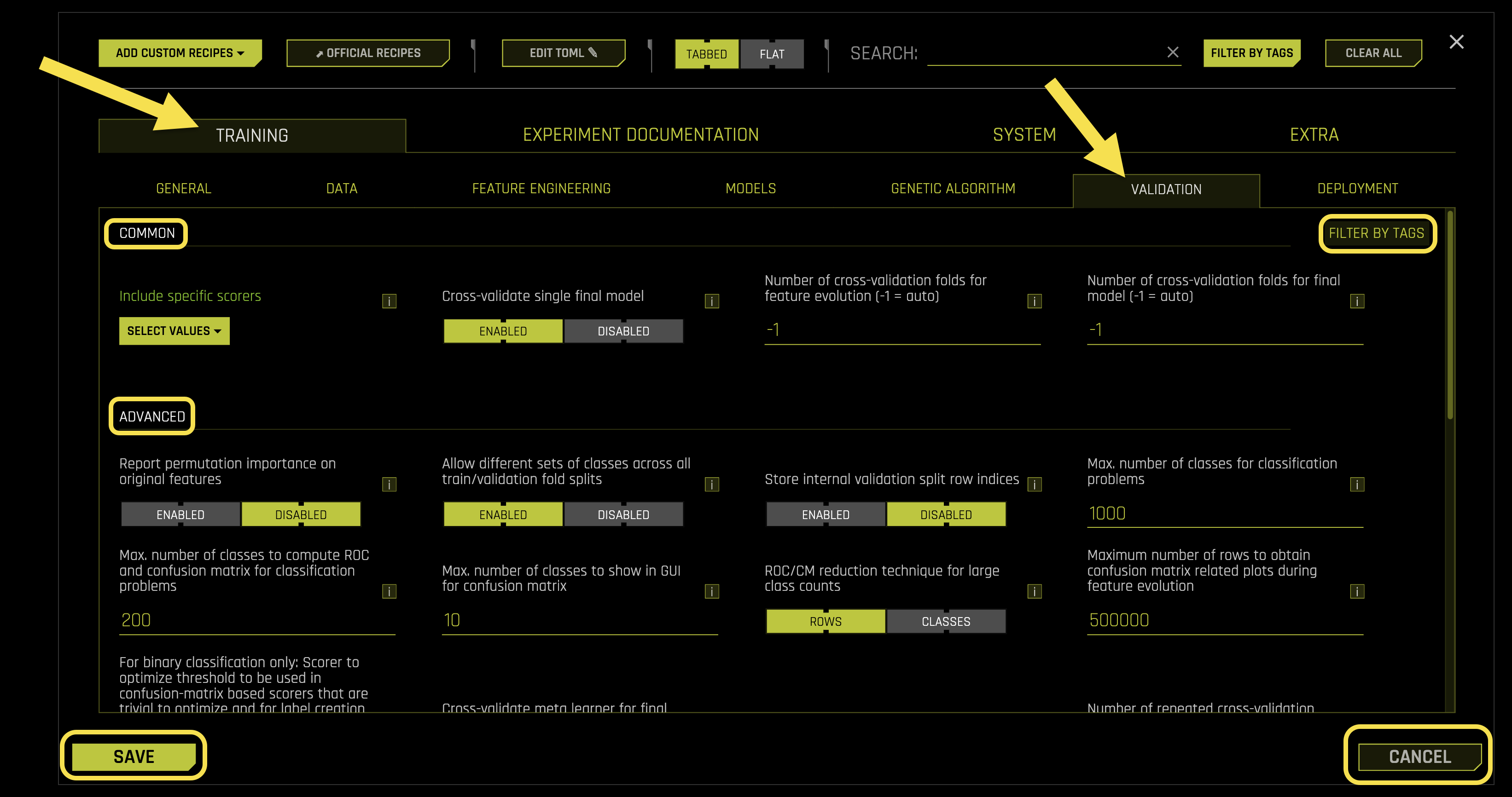
Common Settings:
- Include specific scorers
What it does: Selects specific scorers to use for model evaluation during the experiment
Purpose: Controls which performance metrics are used to evaluate and compare models
Common scorers: AUC, RMSE, Accuracy, F1, MCC, LogLoss
Scope: Only affects final model evaluation, not preprocessing or feature engineering scorers
Requires: List format (default: [])
- Cross-validate single final model
What it does: Controls whether to use cross-validation to determine optimal parameters for the single final model
Purpose: Ensures the final model has optimal hyperparameters through systematic validation
Process: Uses multiple folds to find the best parameter combination for the final model
Requires: Boolean toggle (default: Enabled)
- Number of cross-validation folds for feature evolution (-1 = auto)
What it does: Sets the fixed number of cross-validation folds for feature evolution phase
Purpose: Controls how many data splits are used during feature engineering and selection
Auto mode (-1): Automatically determines optimal number of folds
Note: Actual number of splits may be less and is determined at experiment runtime
Requires: Integer value (default: -1)
- Number of cross-validation folds for final model (-1 = auto)
What it does: Sets the fixed number of cross-validation folds for the final model evaluation
Purpose: Controls how many data splits are used for final model training and validation
Auto mode (-1): Automatically determines optimal number of folds
Note: Actual number of splits may be less and is determined at experiment runtime
Requires: Integer value (default: -1)
Advanced Settings:
- Report permutation importance on original features
What it does: Controls whether to compute and report permutation feature importance on original features
Output: Creates files with pattern fs_*.json or fs_*.tab.txt in logs and summary zip
Process: Computes feature importance using a single untuned model (typically LightGBM) with simple features
Feature encoding: Uses frequency encoding or target encoding for categorical features
- Automatic actions:
Drops low-importance features if there are many original features
Creates feature selection model if interpretability is high enough
- Permutation importance calculation:
Transform categoricals to frequency or target encoding
Fit model on multiple folds with varying data sizes and hyperparameters
For each feature, shuffle its data and predict
Compute score on shuffled predictions
Calculate difference between unshuffled and shuffled scores (delta)
Normalize delta by maximum to get variable importance
Requires: Boolean toggle (default: Disabled)
- Allow different sets of classes across all train/validation fold splits
What it does: Controls whether to allow different sets of classes across all train/validation fold splits
Purpose: Enables flexible class handling when different folds may have different class distributions
Use case: Useful when data has imbalanced or missing classes across different time periods or groups
Requires: Boolean toggle (default: Enabled)
- Store internal validation split row indices
What it does: Includes pickles of (train_idx, valid_idx) tuples for all internal validation folds
Output: Stores numpy row indices for original training data in experiment summary zip
Purpose: Provides debugging information about how data was split for validation
Requires: Boolean toggle (default: Disabled)
- Max. number of classes for classification problems
What it does: Sets the maximum number of classes allowed for classification problems
Purpose: Prevents excessive computational overhead from high-cardinality categorical targets
Performance impact: High class counts make processes time-consuming and increase memory requirements
Requires: Integer value (default: 1000)
- Max. number of classes to compute ROC and confusion matrix for classification problems
What it does: Sets the maximum number of classes for ROC and confusion matrix computation
Purpose: Prevents excessive computation time for high-cardinality problems
Behavior: Beyond this limit, roc_reduce_type reduction technique is applied
Performance note: Too many classes can take longer than model building time
Requires: Integer value (default: 200)
- Max. number of classes to show in GUI for confusion matrix
What it does: Sets the maximum number of classes to display in GUI confusion matrix
Purpose: Controls visual display to prevent GUI clutter and truncation
Behavior: Shows first max_num_classes_client_and_gui labels
GUI limitation: Beyond 6 classes, diagnostics launched from GUI are visually truncated
Configuration: Changes in config.toml require server restart; expert settings control experiment plots
Requires: Integer value (default: 10)
- ROC/CM reduction technique for large class counts
What it does: Specifies the reduction technique for ROC and confusion matrix when class count exceeds max_num_classes_compute_roc
Purpose: Manages computational efficiency for high-cardinality classification problems
- Available options:
〈rows〉: Reduces by sampling rows (default)
〈classes〉: Reduces by sampling classes
Requires: String selection (default: 《rows》, options: 《rows》, 《classes》)
- Maximum number of rows to obtain confusion matrix related plots during feature evolution
What it does: Sets the maximum number of rows to use for confusion matrix related plots during feature evolution
Purpose: Controls computational resources and memory usage during feature engineering
Performance: Limits data size to prevent excessive computation time and memory consumption
Requires: Integer value (default: 500000)
- For binary classification only: Scorer to optimize threshold to be used in confusion-matrix based scorers that are trivial to optimize and for label creation in MOJO/Python scorers.
What it does: Selects the scorer to optimize the binary probability threshold for confusion matrix-based scorers
Purpose: Optimizes threshold for precision, recall, false positive rate, false discovery rate, false omission rate, true negative rate, false negative rate, and negative predictive value
- Available options:
〈AUTO〉: Syncs with experiment scorer, falls back to F1 (default)
〈F1〉: Use F1 score (good when target class matters more)
〈MCC〉: Use Matthews Correlation Coefficient (good when all classes are equally important)
〈F05〉: Use F0.5 score (emphasizes precision)
〈F2〉: Use F2 score (emphasizes recall)
Additional use: Optimized threshold also used for label creation in MOJO/Python scorers
Requires: String selection (default: 《AUTO》, options: 《AUTO》, 《F05》, 《F1》, 《F2》, 《MCC》)
- Cross-validate meta learner for final ensemble.
What it does: Controls whether to cross-validate the meta learner for the final ensemble
Purpose: Ensures the meta learner (blender) has optimal parameters for combining individual models
Process: Uses cross-validation to find the best meta learner configuration
Requires: Boolean toggle (default: Disabled)
- Force only first fold for models
What it does: Controls whether to force only the first fold for models during training
Purpose: Enables quick experimental runs regardless of dataset size
- Available options:
〈auto〉: Automatically determined (default)
〈on〉: Forces only first fold (useful for quick runs)
〈off〉: Uses all available folds
Requires: String selection (default: 《auto》, options: 《auto》, 《on》, 《off》)
- Number of repeated cross-validation folds. 0 is auto.
What it does: Sets the number of repeated cross-validation folds for feature evolution and final models
Purpose: Controls the robustness of validation by repeating the cross-validation process
Auto mode (0): Automatically determines optimal number of repetitions
Requires: Integer value (default: 0)
- Perform stratified sampling for regression problems (using binning).
What it does: Controls whether to use stratified sampling for validation fold creation in regression problems
Purpose: Ensures balanced representation across target value ranges
Process: Uses binning to create strata for stratified sampling
Alternative: When disabled, performs random sampling
Requires: Boolean toggle (default: Disabled)
- Whether to enable bootstrap sampling for validation and test scores.
What it does: Controls whether to enable bootstrap sampling for validation and test scores
Purpose: Provides error bars to validation and test scores based on bootstrap mean standard error
Process: Creates multiple bootstrap samples to estimate score uncertainty
Requires: Boolean toggle (default: Enabled)
- Whether to allow stabilization of features using variable importance for time-series
What it does: Controls whether to allow feature stabilization using variable importance for time-series experiments
Purpose: Avoids setting stabilize_varimp=false and stabilize_fs=false for time series experiments
Use case: Enables feature stabilization when beneficial for time-series feature selection
Requires: Boolean toggle (default: Disabled)
- Whether to take minimum (True) or mean (False) of variable importance when have multiple folds/repeats.
What it does: Controls how to aggregate variable importance across multiple folds/repeats
Purpose: Stabilizes feature selection by the genetic algorithm using consistent importance measures
- Available options:
True (minimum): Takes minimum importance across folds (default)
False (mean): Takes mean importance across folds
Time series behavior: Default disabled for time series due to diverse behavior in each split
Override: Set allow_stabilize_varimp_for_ts=true for improved feature selection with highly shifted variables not handled by lag transformers
Requires: Boolean toggle (default: Enabled)
- Whether to speed up calculation of Time-Series Holdout Predictions
What it does: Controls whether to speed up time-series holdout predictions for back-testing on training data
Purpose: Accelerates MLI and metrics calculation for time-series experiments
Trade-off: Can be slightly less accurate for improved speed
Requires: Boolean toggle (default: Disabled)
- Whether to speed up calculation of Shapley values for Time-Series Holdout Predictions
What it does: Controls whether to speed up Shapley values calculation for time-series holdout predictions
Purpose: Accelerates MLI computation for time-series experiments
Trade-off: Can be slightly less accurate for improved speed
Requires: Boolean toggle (default: Enabled)
- Generate Shapley values for Time-Series Holdout Predictions at the time of experiment
What it does: Controls whether to generate Shapley values for holdout predictions during experiment runtime
Purpose: Creates Shapley values for holdout predictions using moving windows (useful for MLI)
Process: Uses moving windows to compute Shapley values on training data
Performance: Can be slow but provides comprehensive MLI insights
Alternative: When disabled, MLI generates Shapley values on demand
Requires: Boolean toggle (default: Enabled)
Time Series Settings:
- Larger validation splits for lag-based recipe
What it does: Controls whether to create larger validation splits not bound to forecast horizon length
Purpose: Enables more comprehensive validation for time-series models
Benefit: Provides better model evaluation by using larger validation datasets
Requires: Boolean toggle (default: Enabled)
- Maximum ratio of training data samples used for validation (-1 = auto)
What it does: Sets the maximum ratio of training data samples used for validation across splits
Purpose: Controls validation data size when larger validation splits are created
Auto mode (-1): Automatically determines optimal validation ratio
Requires: Float value (default: -1)
- Fixed-size train timespan across splits
What it does: Controls whether to keep a fixed-size train timespan across time-based splits
Purpose: Ensures consistent training data size across all validation splits
Benefit: Leads to roughly the same amount of train samples in every split
Requires: Boolean toggle (default: Disabled)
- Custom validation splits for time-series experiments
What it does: Allows custom definition of training and validation splits using timestamps
Purpose: Enables precise control over time-series validation periods
Format: Provide date/datetime timestamps in same format as time column: 《tr_start1, tr_end1, va_start1, va_end1, …, tr_startN, tr_endN, va_startN, va_endN》
Example: 《2020-01-01, 2020-06-30, 2020-07-01, 2020-12-31》
Requires: String value (default: 《》)
- Number of time-based splits for internal model validation (-1 = auto)
What it does: Sets the fixed number of time-based splits for internal model validation
Purpose: Controls the number of temporal validation periods for model evaluation
Auto mode (-1): Automatically determines optimal number of splits
Note: Actual number of splits may be less and is determined at experiment runtime
Requires: Integer value (default: -1)
- Maximum overlap between two time-based splits.
What it does: Sets the maximum overlap allowed between two time-based splits
Purpose: Controls temporal overlap between consecutive validation periods
Range: 0.0 (no overlap) to 1.0 (complete overlap)
Requires: Float value (default: 0.5)
- Generate Time-Series Holdout Predictions
What it does: Controls whether to generate holdout predictions for time-series experiments
Purpose: Enables backtesting and validation on historical data for time-series models
Benefit: Provides comprehensive model evaluation using temporal validation
Requires: Boolean toggle (default: Enabled)
- Maximum number of splits used for creating final time-series model’s holdout predictions
What it does: Sets the maximum number of splits for creating final time-series model’s holdout/backtesting predictions
Purpose: Controls computational resources for holdout prediction generation
Auto mode (-1): Uses the same number of splits as during model validation (default)
Related setting: Use 〈time_series_validation_splits〉 to control time-based splits for model validation
Requires: Integer value (default: -1)
- Method to create rolling test set predictions
What it does: Specifies the method to create rolling test set predictions when forecast horizon is shorter than test set time span
Purpose: Controls how predictions are generated across multiple time periods in test data
- Available options:
〈tta〉: Test Time Augmentation (default) - faster but potentially less accurate
〈refit〉: Successive refitting of the final pipeline - more accurate but slower
Requires: String selection (default: 《tta》, options: 《tta》, 《refit》)
- Fast TTA for internal validation (feature evolution and holdout predictions)
What it does: Controls whether to apply TTA in one pass for internal validation split predictions
Purpose: Accelerates internal validation by avoiding rolling window approach
Performance impact: Setting to 〈False〉 leads to significantly longer runtimes
Trade-off: Speed vs. accuracy for internal validation predictions
Requires: Boolean toggle (default: Enabled)
- Fast TTA for test set predictions
What it does: Controls whether to apply TTA in one pass for test set predictions
Purpose: Accelerates test set prediction generation by avoiding rolling window approach
Scope: Only applies when forecast horizon is shorter than test set time span
Performance impact: Setting to 〈False〉 leads to significantly longer runtimes
Trade-off: Speed vs. accuracy for test set predictions
Requires: Boolean toggle (default: Enabled)
- Power of recency weight for TS splits
What it does: Sets the power to weight time-series model scores by split number
Purpose: Controls how much emphasis to place on more recent validation splits
Formula: Score_weight = split_number^power
Values: 0.0 (equal weight), positive values (emphasize recent), negative values (emphasize early)
Requires: Float value (default: 0.0)
Deployment
The Deployment sub-tab configures model deployment, MOJO generation, and scoring pipeline settings.
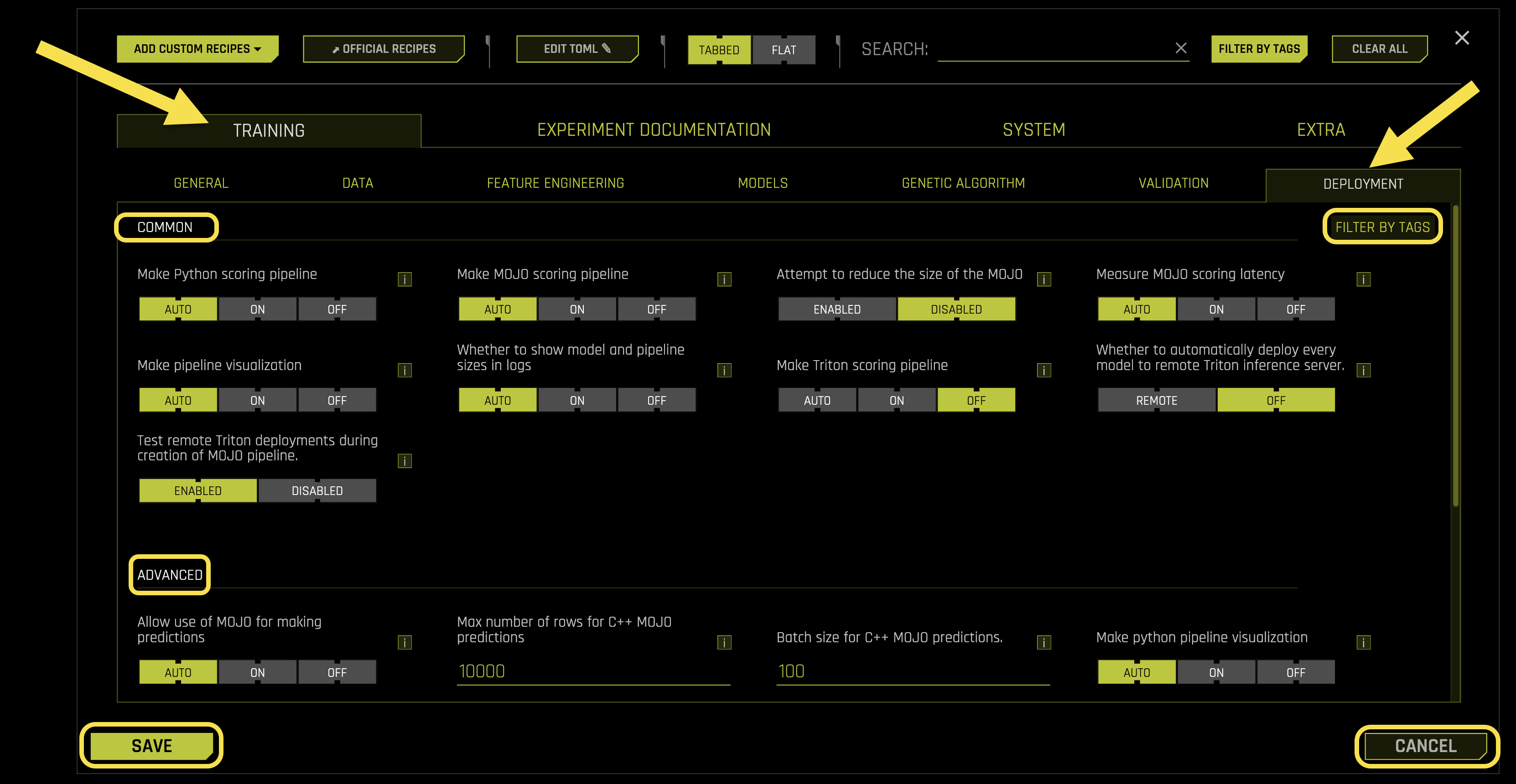
Common Settings:
- Make Python scoring pipeline
What it does: Controls whether to create the Python scoring pipeline at the end of each experiment
Purpose: Generates a deployable Python pipeline for model predictions
Benefits: Enables standalone Python deployment without Driverless AI environment
Requires: String selection (default: 《auto》, options: 《auto》, 《on》, 《off》)
- Make MOJO scoring pipeline
What it does: Controls whether to create the MOJO (Model Object, Optimized) scoring pipeline
Purpose: Generates a high-performance C++/Java deployment artifact
MOJO: Optimized model format for fast, low-latency predictions in production
- Available options:
〈auto〉: Attempts to create MOJO if possible without dropping capabilities (default)
〈on〉: Forces MOJO creation, may drop some models, transformers, or custom recipes
〈off〉: Disables MOJO generation
Requires: String selection (default: 《auto》, options: 《auto》, 《on》, 《off》)
- Attempt to reduce the size of the MOJO
What it does: Controls whether to attempt to reduce MOJO size for smaller memory footprint during scoring
Purpose: Optimizes MOJO for deployment in memory-constrained environments
Process: Reduces settings like interaction depth to minimize MOJO size
Trade-off: Size reduction may affect model predictive accuracy
Requires: Boolean toggle (default: Disabled)
- Measure MOJO scoring latency
What it does: Controls whether to measure MOJO scoring latency during MOJO creation
Purpose: Provides performance metrics for MOJO deployment planning
Benefits: Helps assess MOJO performance before production deployment
Requires: String selection (default: 《auto》, options: 《auto》, 《on》, 《off》)
- Make pipeline visualization
What it does: Controls whether to create pipeline visualization at the end of each experiment
Purpose: Generates visual representation of the complete ML pipeline
Content: Shows input features, transformers, model, and model outputs
Special feature: MOJO-capable tree models display the first tree structure
Requires: String selection (default: 《auto》, options: 《auto》, 《on》, 《off》)
- Whether to show model and pipeline sizes in logs
What it does: Controls whether to display model and pipeline sizes in experiment logs
Purpose: Provides size information for deployment planning and resource estimation
Auto behavior: Disabled when more than 10 base models+folds (assumes size is not a concern)
Requires: String selection (default: 《auto》, options: 《auto》, 《on》, 《off》)
- Make Triton scoring pipeline
What it does: Controls whether to create a C++ MOJO-based Triton scoring pipeline
Purpose: Generates Triton inference server deployment artifacts for high-performance serving
Triton: NVIDIA’s inference server for deploying ML models at scale
- Available options:
〈auto〉: Attempts to create Triton pipeline if possible without dropping capabilities
〈on〉: Forces Triton creation, may drop some models, transformers, or custom recipes
〈off〉: Disables Triton pipeline generation (default)
Prerequisites: Requires make_mojo_scoring_pipeline != 《off》
Requires: String selection (default: 《off》, options: 《auto》, 《on》, 《off》)
- Whether to automatically deploy every model to remote Triton inference server.
What it does: Controls whether to automatically deploy models to remote Triton inference server
Purpose: Enables automatic deployment to remote Triton servers for production serving
- Available options:
〈remote〉: Automatically deploys to remote Triton server
〈off〉: Disables automatic remote deployment (default)
Requires: String selection (default: 《off》, options: 《remote》, 《off》)
- Test remote Triton deployments during creation of MOJO pipeline.
What it does: Controls whether to test remote Triton deployments during MOJO pipeline creation
Purpose: Validates remote Triton deployment functionality during pipeline generation
Prerequisites: Requires triton_host_remote configuration and make_triton_scoring_pipeline enabled
Benefits: Ensures remote deployment works before production use
Requires: Boolean toggle (default: Enabled)
Advanced Settings:
- Allow use of MOJO for making predictions
What it does: Controls whether to use MOJO for fast, low-latency predictions after experiment completion
Purpose: Enables high-performance prediction serving using optimized MOJO runtime
Applications: AutoDoc, Diagnostics, Predictions, MLI, and standalone Python scoring via scorer.zip
- Available options:
〈auto〉: Uses MOJO only if row count ≤ mojo_for_predictions_max_rows (default)
〈on〉: Always uses MOJO when available
〈off〉: Disables MOJO usage
Performance note: For larger datasets, Python backend may be faster due to vectorized libraries
Requires: String selection (default: 《auto》, options: 《auto》, 《on》, 《off》)
- Max number of rows for C++ MOJO predictions
What it does: Sets the maximum number of rows for C++ MOJO predictions
Purpose: Controls when to use MOJO vs. Python backend for optimal performance
- Performance characteristics:
Small datasets: Single-threaded C++ MOJO runtime provides significantly faster scoring
Large datasets: Python backend may be faster due to vectorized operations
Usage: Applied when enable_mojo=True is passed to predict API and MOJO exists
Default behavior: MLI/AutoDoc automatically set enable_mojo=True
Scope: Only used when mojo_for_predictions is set to 〈auto〉
Requires: Integer value (default: 10000)
- Batch size for C++ MOJO predictions.
What it does: Sets the batch size (in rows) for C++ MOJO predictions
Purpose: Controls memory usage and scoring performance for MOJO predictions
Usage conditions: Only applies when enable_mojo=True and MOJO is applicable (≤ mojo_for_predictions_max_rows)
Performance trade-off: Larger batch sizes = faster scoring but more memory usage
Requires: Integer value (default: 100)
- Make python pipeline visualization
What it does: Controls whether to create Python pipeline visualization at the end of each experiment
Purpose: Generates visual representation of the Python scoring pipeline
Benefits: Helps understand Python pipeline structure and data flow
Requires: String selection (default: 《auto》, options: 《auto》, 《on》, 《off》)
- Timeout in seconds to wait for MOJO creation at end of experiment.
What it does: Sets the timeout for MOJO creation at the end of experiments
Purpose: Prevents experiments from hanging indefinitely during MOJO generation
Recovery: If timeout occurs, MOJO can still be created from GUI or R/Python clients (timeout doesn’t apply there)
Requires: Float value (default: 1800.0)
- Timeout in seconds to wait for MOJO visualization creation at end of experiment.
What it does: Sets the timeout for MOJO visualization creation at the end of experiments
Purpose: Prevents experiments from hanging during MOJO visualization generation
Behavior: If visualization times out, MOJO is still created within mojo_building_timeout limit
Requires: Float value (default: 600.0)
- Number of parallel workers to use during MOJO creation (-1 = all cores)
What it does: Sets the number of parallel workers to use during MOJO creation
Purpose: Controls computational resources for MOJO generation
Auto mode (-1): Uses all available CPU cores (default)
Performance: More workers = faster MOJO creation but higher CPU usage
Requires: Integer value (default: -1)
- Compute prediction intervals
What it does: Controls whether to compute empirical prediction intervals based on holdout predictions
Purpose: Provides uncertainty estimates for model predictions
Benefits: Enables confidence assessment and risk analysis for predictions
Process: Uses holdout validation predictions to estimate prediction uncertainty
Requires: Boolean toggle (default: Enabled)
- Confidence level for prediction intervals
What it does: Sets the confidence level for prediction intervals
Purpose: Controls the width of prediction intervals (uncertainty bounds)
Range: 0.0 to 1.0 (e.g., 0.9 = 90% confidence interval)
Interpretation: Higher values = wider intervals = more conservative uncertainty estimates
Requires: Float value (default: 0.9)
- Output labels for predictions created during the experiment for classification problems.
What it does: Controls whether to append predicted target class labels to prediction outputs
Purpose: Provides both probabilities and predicted class labels in a single output
Output format: Adds extra column with predicted target class after per-class probabilities
- Classification methods:
Multiclass: Uses argmax (highest probability class)
Binary: Uses threshold defined by 〈threshold_scorer〉 expert setting
Scope: Controls training, validation, and test set predictions created by experiment
Note: MOJO, scoring pipeline, and client APIs have their own versions of this parameter
Requires: Boolean toggle (default: Disabled)
- MOJO types to test at end of experiment
What it does: Specifies which MOJO runtimes to test during mini acceptance tests
Purpose: Validates MOJO functionality across different runtime environments
Available options: C++ and Java runtimes
Testing: Performs basic functionality tests to ensure MOJO works correctly
Requires: List selection (default: [〈C++〉, 〈Java〉], options: [〈C++〉, 〈Java〉])
- Create MOJO for feature engineering pipeline only (no predictions)
What it does: Controls whether to create MOJO for feature engineering pipeline without prediction capabilities
Purpose: Generates MOJO that can transform features but doesn’t include the final model
Use case: Useful for feature preprocessing in separate pipelines or custom model deployment
Requires: Boolean toggle (default: Disabled)
- Replaces target encoding features with concatenated input features.
What it does: Replaces target encoding features with their input columns in MOJO
Purpose: Simplifies MOJO by removing target encoding complexity
Example: Changes CVTE_Age:Income:Zip to Age:Income:Zip
Prerequisites: Only available when make_mojo_scoring_pipeline_for_features_only is enabled
Benefits: Reduces MOJO complexity and potential deployment issues
Requires: Boolean toggle (default: Disabled)
- Generate transformation when making predictions
What it does: Controls whether to generate transformed features during prediction without final model
Purpose: Enables feature transformation pipeline without prediction generation
Process: Uses pipeline to transform input features, bypassing the final model
Use case: Useful for feature engineering validation or custom prediction workflows
Requires: Boolean toggle (default: Disabled)