Extra Settings
The EXTRA tab in EXPERT SETTINGS provides advanced configuration options for your experimental environment. These settings are designed for experienced users and specific use cases, often used in collaboration with H2O.ai support teams.
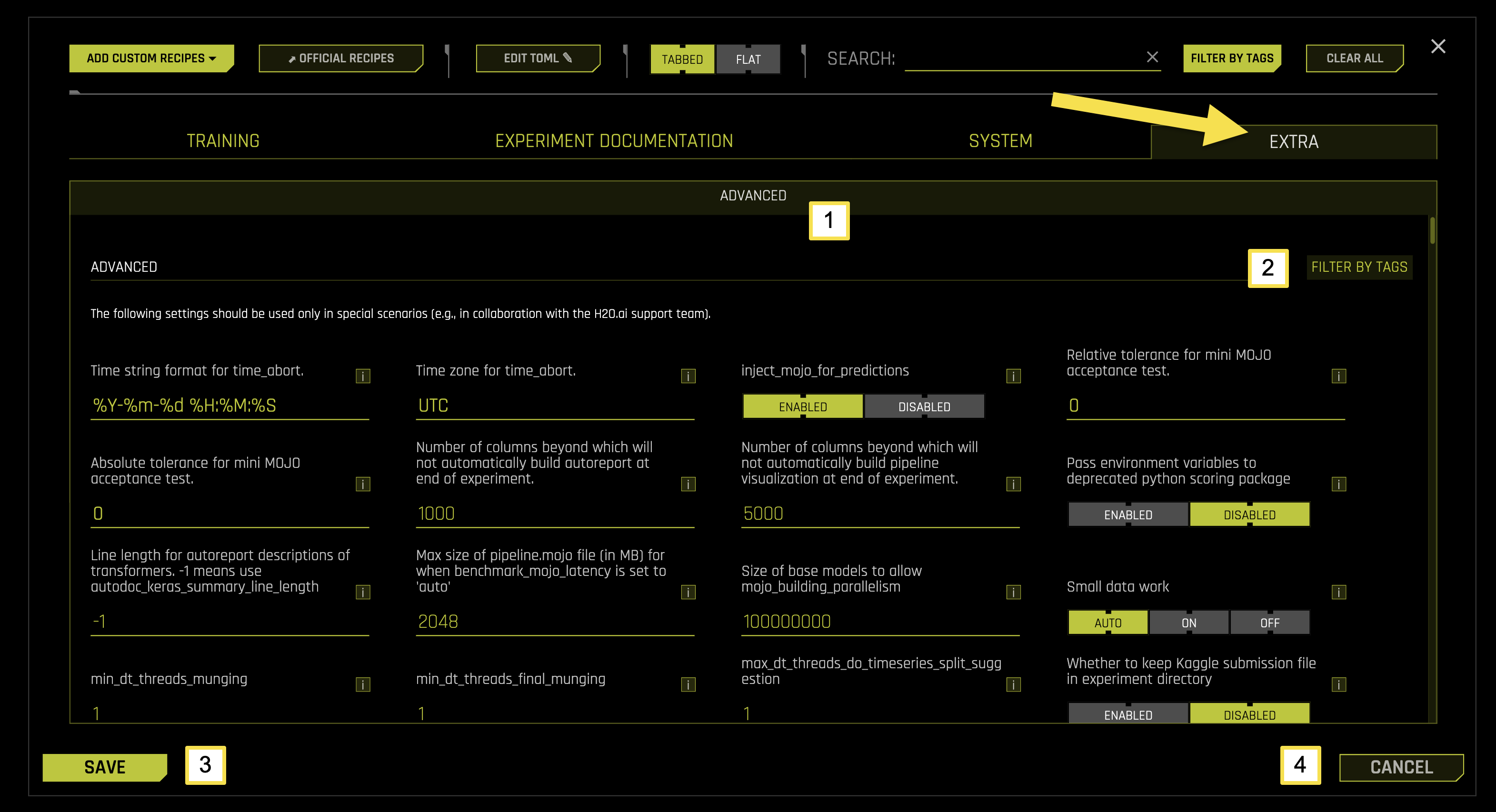
Extra Tab Sub-Categories
The EXTRA tab contains one main sub-category with specialized settings for machine learning experiments.
To access these settings, navigate to EXPERT SETTINGS > EXTRA tab from the Experiment Setup page.
The following table describes the available options on the EXTRA page:
Sub-Category |
Description |
|---|---|
[1] Advanced |
Configure specialized settings for advanced scenarios and support collaboration |
[2] Filter by Tags |
Filter and organize extra settings using custom tags and labels |
[3] Save |
Save all extra configuration changes |
[4] Cancel |
Cancel changes and revert to previous configuration settings |
Advanced
The Advanced sub-tab contains specialized configuration options for advanced users and specific use cases. These settings provide fine-tuned control over system behavior and are typically used in collaboration with H2O.ai support teams.
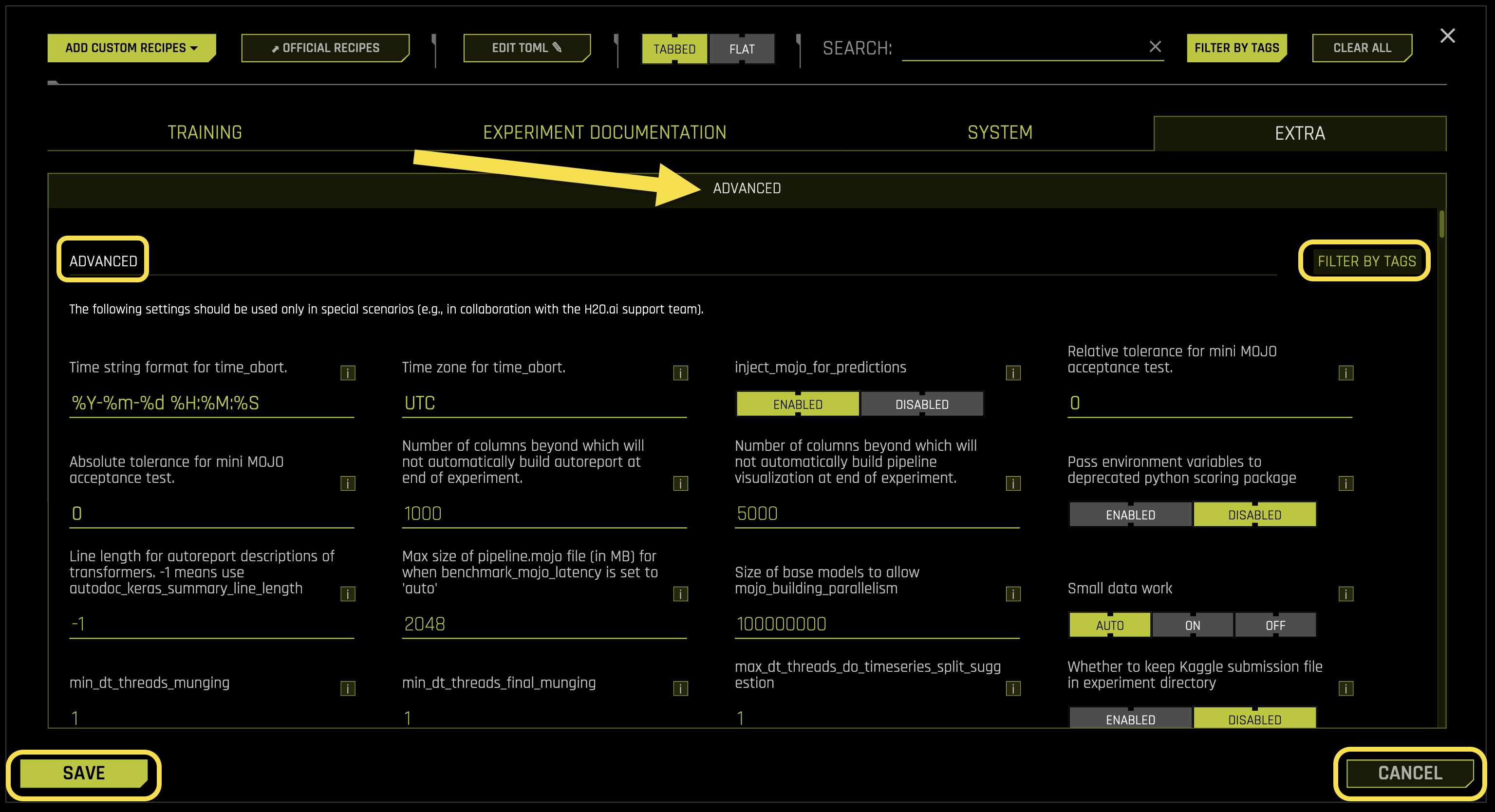
Advanced Settings:
- Time string format for time_abort
What it does: Defines the date and time format string for experiment abortion scheduling
Purpose: Enables scheduling automatic experiment termination at specific times
Format: Python strftime format string for date/time parsing
Default format: %Y-%m-%d %H:%M:%S (YYYY-MM-DD HH:MM:SS)
Example: “2024-12-31 23:59:59” for New Year’s Eve at 11:59 PM
Requires: String value (default: “%Y-%m-%d %H:%M:%S”)
- Time zone for time_abort
What it does: Specifies the timezone for time_abort scheduling
Purpose: Ensures accurate time-based experiment termination across different timezones
Format: Standard timezone identifier (e.g., UTC, EST, PST)
Default timezone: UTC (Coordinated Universal Time)
Impact: Changes take effect immediately for new experiments
Use case: Set this when running experiments across different geographic locations
Requires: String value (default: “UTC”)
- inject_mojo_for_predictions
What it does: Controls whether to use MOJO (Model Object, Optimized) for prediction operations
Purpose: Enables optimized prediction pipelines using MOJO artifacts
Performance: MOJO provides faster prediction inference than standard methods
Impact: Significantly improves prediction speed for production deployments
Use case: Enable for production systems requiring fast inference
- Available options:
Enabled: Uses MOJO for faster predictions
Disabled: Uses standard prediction methods
Requires: Boolean toggle (default: Enabled)
- Relative tolerance for mini MOJO acceptance test
What it does: Sets the relative tolerance threshold for MOJO acceptance testing
Purpose: Validates MOJO accuracy compared to original model predictions
Tolerance: Relative error threshold for acceptance (0 = exact match)
Use case: Ensures MOJO predictions are within acceptable accuracy bounds
Note: Relative tolerance compares percentage difference between predictions
Requires: Float value (default: 0)
- Absolute tolerance for mini MOJO acceptance test
What it does: Sets the absolute tolerance threshold for MOJO acceptance testing
Purpose: Validates MOJO accuracy using absolute error thresholds
Tolerance: Absolute error threshold for acceptance (0 = exact match)
Use case: Ensures MOJO predictions are within acceptable accuracy bounds
Note: Absolute tolerance compares direct difference between prediction values
Requires: Float value (default: 0)
- Number of columns beyond which will not automatically build autoreport at end of experiment
What it does: Sets the maximum column threshold for automatic autoreport generation
Purpose: Prevents automatic autoreport generation for datasets with too many columns
Performance: Large column counts can significantly slow down autoreport generation
Threshold: Experiments with more columns will skip automatic autoreport
Note: Manual autoreport generation remains available regardless of column count
Requires: Integer value (default: 1000)
- Number of columns beyond which will not automatically build pipeline visualization at end of experiment
What it does: Sets the maximum column threshold for automatic pipeline visualization
Purpose: Prevents automatic pipeline visualization for datasets with too many columns
Performance: Large column counts can significantly slow down visualization generation
Threshold: Experiments with more columns will skip automatic pipeline visualization
Note: Manual pipeline visualization remains available regardless of column count
Requires: Integer value (default: 5000)
- Pass environment variables to deprecated python scoring package
What it does: Controls whether to pass environment variables to legacy Python scoring packages
Purpose: Maintains compatibility with deprecated scoring functionality
Legacy support: Ensures backward compatibility with older scoring implementations
- Available options:
Enabled: Passes environment variables to legacy scoring packages
Disabled: Uses standard environment variable handling
Requires: Boolean toggle (default: Enabled)
- Line length for autoreport descriptions of transformers. -1 means use autodoc_keras_summary_line_length
What it does: Sets the maximum line length for transformer descriptions in autoreports
Purpose: Controls formatting and readability of transformer documentation
Auto mode (-1): Uses the autodoc_keras_summary_line_length setting
Custom value: Sets specific line length for transformer descriptions
Note: Longer lines improve readability but may affect layout on narrow displays
Requires: Integer value (default: -1)
- Max size of pipeline.mojo file (in MB) for when benchmark_mojo_latency is set to ‘auto’
What it does: Sets the maximum allowed size for pipeline.mojo files in automatic benchmarking
Purpose: Prevents latency benchmarking of excessively large MOJO files
Performance: Large MOJO files can cause benchmarking timeouts and resource issues
Size limit: MOJO files larger than this threshold skip automatic latency benchmarking
Note: Manual latency benchmarking is still available for large files
Requires: Integer value (default: 2048)
- Size of base models to allow mojo_building_parallelism
What it does: Sets the minimum model size threshold for enabling parallel MOJO building
Purpose: Optimizes MOJO building performance for appropriately sized models
Performance: Parallel building is only beneficial for models above this size threshold
Threshold: Models smaller than this size use sequential MOJO building
Note: Parallel building overhead is not justified for small models
Requires: Integer value (default: 100000000)
- Small data work
What it does: Controls optimization settings for small datasets
Purpose: Applies specialized optimizations for datasets with limited data
Optimization: Uses faster algorithms and reduced complexity for small datasets
Impact: Improves training speed for datasets with fewer than 10,000 rows
Use case: Enable when working with small datasets to avoid overfitting
- Available options:
auto: Automatically determines small data optimizations
on: Forces small data optimizations
off: Disables small data optimizations
Requires: String selection (default: auto)
- min_dt_threads_munging
What it does: Sets the minimum number of datatable threads for data munging operations
Purpose: Ensures minimum threading performance for data preprocessing
Performance: Guarantees minimum parallel processing for munging operations
Threading: Sets floor value for datatable threading during munging
Note: datatable is a high-performance data manipulation library
Requires: Integer value (default: 1)
- min_dt_threads_final_munging
What it does: Sets the minimum number of datatable threads for final munging operations
Purpose: Ensures minimum threading performance for final data preprocessing
Performance: Guarantees minimum parallel processing for final munging operations
Threading: Sets floor value for datatable threading during final munging
Note: datatable is a high-performance data manipulation library
Requires: Integer value (default: 1)
- max_dt_threads_do_timeseries_split_suggestion
What it does: Sets the maximum number of datatable threads for time series split suggestion operations
Purpose: Controls threading for time series analysis and split recommendation
Performance: Limits threading to prevent resource contention during time series operations
Threading: Sets ceiling value for datatable threading during time series split suggestions
Note: datatable is a high-performance data manipulation library
Requires: Integer value (default: 1)
- Whether to keep Kaggle submission file in experiment directory
What it does: Controls whether to retain Kaggle submission files in the experiment output directory
Purpose: Manages storage of Kaggle competition submission artifacts
Storage: Controls disk space usage for Kaggle-related files
- Available options:
Enabled: Keeps Kaggle submission files in experiment directory
Disabled: Removes Kaggle submission files after processing
Requires: Boolean toggle (default: Enabled)
- Custom Kaggle competitions to make automatic test set submissions for
What it does: Specifies custom Kaggle competitions for automatic test set submissions
Purpose: Enables automated submission to specific Kaggle competitions
Format: List of competition identifiers or names
Use case: Streamlines Kaggle competition workflow for specific contests
Requires: List of strings (default: [])
- ping_period
What it does: Sets the interval in seconds for system status ping during experiments
Purpose: Controls system monitoring frequency during experiment execution
Monitoring: Enables periodic system health checks and status updates
Performance: More frequent pings provide better monitoring but use more resources
Requires: Integer value (default: 60)
- Whether to enable ping of system status during DAI experiments
What it does: Controls whether to enable system status monitoring during experiments
Purpose: Provides real-time system health monitoring during experiment execution
Monitoring: Tracks system performance, resource usage, and experiment progress
- Available options:
Enabled: Enables system status monitoring
Disabled: Disables system status monitoring
Requires: Boolean toggle (default: Enabled)
- stall_disk_limit_gb
What it does: Sets the disk space limit in GB for stalling operations
Purpose: Prevents disk space issues by limiting stalling operation disk usage
Storage: Controls disk space allocation for temporary stalling operations
Performance: Helps prevent system crashes due to disk space exhaustion
Requires: Float value (default: 1)
- min_rows_per_class
What it does: Sets the minimum number of rows required per class for classification problems
Purpose: Ensures sufficient data for each class in classification tasks
Quality: Prevents training on classes with insufficient data
Threshold: Classes with fewer rows may be excluded or handled specially
Requires: Integer value (default: 5)
- min_rows_per_split
What it does: Sets the minimum number of rows required per data split
Purpose: Ensures sufficient data for each split in cross-validation or train/test splits
Quality: Prevents splits with insufficient data that could lead to poor model performance
Threshold: Splits with fewer rows may be adjusted or excluded
Requires: Integer value (default: 5)
- tf_nan_impute_value
What it does: Sets the value used to impute NaN (Not a Number) values in TensorFlow models
Purpose: Handles missing values in TensorFlow model inputs
Imputation: Replaces NaN values with the specified value during model processing
Default value: -5 (negative value to distinguish from real data)
Requires: Float value (default: -5)
- statistical_threshold_data_size_small
What it does: Sets the threshold for considering a dataset as small for statistical operations
Purpose: Determines when to apply small dataset optimizations for statistical calculations
Performance: Smaller datasets may use different algorithms or parameters
Threshold: Datasets below this size are considered small for statistical operations
Requires: Integer value (default: 100000)
- statistical_threshold_data_size_large
What it does: Sets the threshold for considering a dataset as large for statistical operations
Purpose: Determines when to apply large dataset optimizations for statistical calculations
Performance: Larger datasets may use different algorithms or sampling strategies
Threshold: Datasets above this size are considered large for statistical operations
Requires: Integer value (default: 500000000)
- aux_threshold_data_size_large
What it does: Sets the threshold for auxiliary operations on large datasets
Purpose: Determines when to apply large dataset optimizations for auxiliary operations
Performance: Controls memory and processing optimizations for auxiliary tasks
Threshold: Datasets above this size trigger large dataset auxiliary optimizations
Requires: Integer value (default: 10000000)
- set_method_sampling_row_limit
What it does: Sets the maximum number of rows for method sampling operations
Purpose: Limits the number of rows used in sampling-based method evaluations
Performance: Prevents excessive memory usage in sampling operations
Sampling: Controls the scope of sampling for method performance evaluation
Requires: Integer value (default: 5000000)
- performance_threshold_data_size_small
What it does: Sets the threshold for considering a dataset as small for performance optimizations
Purpose: Determines when to apply small dataset performance optimizations
Performance: Smaller datasets may use different performance tuning strategies
Threshold: Datasets below this size are considered small for performance operations
Requires: Integer value (default: 100000)
- performance_threshold_data_size_large
What it does: Sets the threshold for considering a dataset as large for performance optimizations
Purpose: Determines when to apply large dataset performance optimizations
Performance: Larger datasets may use different performance tuning strategies
Threshold: Datasets above this size are considered large for performance operations
Requires: Integer value (default: 100000000)
- gpu_default_threshold_data_size_large
What it does: Sets the threshold for default GPU usage on large datasets
Purpose: Determines when to automatically enable GPU acceleration for large datasets
Performance: GPU acceleration is most beneficial for datasets above this threshold
Threshold: Datasets above this size automatically trigger GPU usage
Requires: Integer value (default: 1000000)
- max_relative_cols_mismatch_allowed
What it does: Sets the maximum allowed relative column mismatch between datasets
Purpose: Controls tolerance for column differences between training and validation data
Validation: Ensures data consistency across different dataset splits
Tolerance: Maximum percentage of column mismatch allowed (0.5 = 50%)
Requires: Float value (default: 0.5)
- max_rows_final_blender
What it does: Sets the maximum number of rows for final model blending operations
Purpose: Limits the number of rows used in final ensemble blending
Performance: Prevents excessive memory usage in final blending operations
Blending: Controls the scope of final model ensemble blending
Requires: Integer value (default: 1000000)
- min_rows_final_blender
What it does: Sets the minimum number of rows required for final model blending operations
Purpose: Ensures sufficient data for reliable final model blending
Quality: Prevents blending on datasets too small for reliable ensemble creation
Threshold: Datasets below this size may skip final blending
Requires: Integer value (default: 10000)
- max_rows_final_train_score
What it does: Sets the maximum number of rows for final training score calculations
Purpose: Limits the number of rows used in final training score evaluation
Performance: Prevents excessive computation time for training score calculation
Evaluation: Controls the scope of final training score assessment
Requires: Integer value (default: 5000000)
- max_rows_final_roccmconf
What it does: Sets the maximum number of rows for final ROC confusion matrix calculations
Purpose: Limits the number of rows used in ROC and confusion matrix evaluation
Performance: Prevents excessive computation time for ROC calculations
Evaluation: Controls the scope of final ROC and confusion matrix assessment
Requires: Integer value (default: 1000000)
- max_rows_final_holdout_score
What it does: Sets the maximum number of rows for final holdout score calculations
Purpose: Limits the number of rows used in final holdout score evaluation
Performance: Prevents excessive computation time for holdout score calculation
Evaluation: Controls the scope of final holdout score assessment
Requires: Integer value (default: 5000000)
- max_rows_final_holdout_bootstrap_score
What it does: Sets the maximum number of rows for final holdout bootstrap score calculations
Purpose: Limits the number of rows used in final holdout bootstrap score evaluation
Performance: Prevents excessive computation time for bootstrap score calculation
Evaluation: Controls the scope of final holdout bootstrap score assessment
Requires: Integer value (default: 1000000)
- Max. rows for leakage detection if wide rules used on wide data
What it does: Sets the maximum number of rows for leakage detection when using wide rules on wide datasets
Purpose: Limits the scope of leakage detection to prevent excessive computation time
Performance: Wide rules on wide data can be computationally expensive
Threshold: Datasets exceeding this limit may use sampling for leakage detection
Requires: Integer value (default: 100000)
- Num. simultaneous predictions for feature selection (0 = auto)
What it does: Sets the number of simultaneous predictions during feature selection operations
Purpose: Controls parallel processing for feature selection prediction tasks
Auto mode (0): Uses automatic parallel processing based on system resources
Custom value: Limits simultaneous predictions to specified number
Performance: More simultaneous predictions can speed up feature selection
Requires: Integer value (default: 0)
- Num. simultaneous fits for shift and leak checks if using LightGBM on CPU (0 = auto)
What it does: Sets the number of simultaneous LightGBM fits for shift and leakage checks on CPU
Purpose: Controls parallel processing for shift and leakage detection using LightGBM
Auto mode (0): Uses automatic parallel processing based on CPU resources
Custom value: Limits simultaneous fits to specified number
Performance: More simultaneous fits can speed up shift and leakage detection
Requires: Integer value (default: 0)
- max_orig_nonnumeric_cols_selected_default
What it does: Sets the maximum number of original non-numeric columns selected by default
Purpose: Controls the default selection of non-numeric columns for feature engineering
Selection: Limits the number of non-numeric columns automatically included
Performance: Helps manage computational complexity for non-numeric features
Requires: Integer value (default: 300)
- max_orig_cols_selected_simple_factor
What it does: Sets the factor for maximum original columns selected in simple scenarios
Purpose: Controls column selection scaling factor for simple feature engineering
Scaling: Multiplies base column selection by this factor for simple cases
Performance: Helps balance feature richness with computational efficiency
Requires: Integer value (default: 2)
- fs_orig_cols_selected_simple_factor
What it does: Sets the factor for original columns selected in feature selection simple scenarios
Purpose: Controls column selection scaling factor for simple feature selection
Scaling: Multiplies base column selection by this factor for simple feature selection
Performance: Helps balance feature selection scope with computational efficiency
Requires: Integer value (default: 2)
- Allow supported models to do feature selection by permutation importance within model itself
What it does: Enables models to perform feature selection using permutation importance internally
Purpose: Allows models to automatically select features based on their own importance calculations
Efficiency: Reduces need for separate feature selection steps
- Available options:
Enabled: Models perform internal feature selection
Disabled: Uses external feature selection methods only
Requires: Boolean toggle (default: Enabled)
- Whether to use native categorical handling (CPU only) for LightGBM when doing feature selection by permutation
What it does: Controls whether to use LightGBM’s native categorical handling for permutation-based feature selection
Purpose: Optimizes categorical feature handling during permutation importance calculations
Performance: Native handling can be faster but is CPU-only
- Available options:
Enabled: Uses LightGBM native categorical handling
Disabled: Uses standard categorical handling
Requires: Boolean toggle (default: Enabled)
- Maximum number of original columns up to which will compute standard deviation of original feature importance. Can be expensive if many features.
What it does: Sets the maximum number of original columns for computing feature importance standard deviation
Purpose: Limits computation of feature importance statistics to prevent performance issues
Performance: Computing standard deviation can be expensive with many features
Threshold: Only computes standard deviation for datasets with columns below this limit
Requires: Integer value (default: 1000)
- num_folds
What it does: Sets the number of cross-validation folds for model evaluation
Purpose: Controls the number of folds used in cross-validation for model assessment
Validation: More folds provide more robust evaluation but increase computation time
Balance: Typical values range from 3-10 folds depending on dataset size
Requires: Integer value (default: 3)
- full_cv_accuracy_switch
What it does: Sets the accuracy threshold for switching to full cross-validation
Purpose: Determines when to use full cross-validation based on model accuracy
Optimization: Uses faster validation methods until accuracy reaches this threshold
Threshold: Models with accuracy above this value use full cross-validation
Requires: Integer value (default: 9)
- ensemble_accuracy_switch
What it does: Sets the accuracy threshold for switching to ensemble methods
Purpose: Determines when to use ensemble methods based on individual model accuracy
Optimization: Uses single models until accuracy reaches this threshold
Threshold: Models with accuracy above this value may trigger ensemble creation
Requires: Integer value (default: 5)
- num_ensemble_folds
What it does: Sets the number of folds used for ensemble model evaluation
Purpose: Controls cross-validation folds specifically for ensemble model assessment
Ensemble: Determines the robustness of ensemble model evaluation
Performance: More folds provide better ensemble evaluation but increase computation
Requires: Integer value (default: 4)
- fold_reps
What it does: Sets the number of repetitions for each fold in cross-validation
Purpose: Controls fold repetition for more robust cross-validation results
Robustness: Multiple repetitions help reduce variance in cross-validation scores
Performance: More repetitions increase computation time but improve reliability
Requires: Integer value (default: 1)
- max_num_classes_hard_limit
What it does: Sets the hard limit for the maximum number of classes in classification problems
Purpose: Prevents excessive computation for classification problems with too many classes
Performance: Large numbers of classes can significantly slow down training and prediction
Limit: Classification problems with more classes may be handled differently
Requires: Integer value (default: 10000)
- min_roc_sample_size
What it does: Sets the minimum sample size for ROC (Receiver Operating Characteristic) calculations
Purpose: Ensures sufficient data for reliable ROC curve computation
Quality: Prevents ROC calculations on datasets too small for reliable results
Threshold: Datasets below this size may skip ROC calculations or use simplified methods
Requires: Integer value (default: 1)
- enable_strict_confict_key_check_for_brain
What it does: Enables strict conflict key checking for the Feature Brain system
Purpose: Provides more rigorous validation of configuration keys in Feature Brain
Validation: Helps prevent configuration conflicts and inconsistencies
- Available options:
Enabled: Uses strict conflict key checking
Disabled: Uses standard key checking
Requires: Boolean toggle (default: Enabled)
- For feature brain or restart/refit, whether to allow brain ingest to use different feature engineering layer count
What it does: Controls whether Feature Brain can use different feature engineering layer counts during ingest
Purpose: Provides flexibility in feature engineering layer configuration for brain operations
Flexibility: Allows adaptation to different feature engineering requirements
- Available options:
Enabled: Allows different layer counts
Disabled: Requires consistent layer counts
Requires: Boolean toggle (default: Disabled)
- brain_maximum_diff_score
What it does: Sets the maximum allowed score difference for Feature Brain operations
Purpose: Controls the tolerance for score differences in brain-based feature selection
Tolerance: Allows small score differences while maintaining brain efficiency
Threshold: Score differences above this value may trigger brain adjustments
Requires: Float value (default: 0.1)
- brain_max_size_GB
What it does: Sets the maximum size in GB for Feature Brain memory usage
Purpose: Controls memory allocation for Feature Brain operations
Memory: Prevents excessive memory usage by Feature Brain system
Limit: Brain operations exceeding this size may use memory optimization strategies
Requires: Float value (default: 20)
- early_stopping
What it does: Controls whether to enable early stopping for model training
Purpose: Prevents overfitting by stopping training when validation performance stops improving
Optimization: Reduces training time and improves generalization
- Available options:
Enabled: Uses early stopping during training
Disabled: Trains for full specified duration
Requires: Boolean toggle (default: Enabled)
- early_stopping_per_individual
What it does: Controls whether to enable early stopping for individual models in genetic algorithm
Purpose: Applies early stopping to individual models during genetic algorithm evolution
Optimization: Improves efficiency of genetic algorithm by stopping poor performers early
- Available options:
Enabled: Uses early stopping for individuals
Disabled: Trains all individuals for full duration
Requires: Boolean toggle (default: Enabled)
- text_dominated_limit_tuning
What it does: Controls tuning limits for text-dominated datasets
Purpose: Applies specialized tuning limits when text features dominate the dataset
Optimization: Adjusts tuning parameters for optimal text processing performance
- Available options:
Enabled: Applies text-dominated tuning limits
Disabled: Uses standard tuning limits
Requires: Boolean toggle (default: Enabled)
- image_dominated_limit_tuning
What it does: Controls tuning limits for image-dominated datasets
Purpose: Applies specialized tuning limits when image features dominate the dataset
Optimization: Adjusts tuning parameters for optimal image processing performance
- Available options:
Enabled: Applies image-dominated tuning limits
Disabled: Uses standard tuning limits
Requires: Boolean toggle (default: Enabled)
- supported_image_types
What it does: Specifies the supported image file types for image processing
Purpose: Defines which image formats can be processed by the system
Compatibility: Ensures only supported image types are processed
Format: List of supported image file extensions
Requires: List of strings (default: [“jpg”, “jpeg”, “png”, “bmp”, “tiff”])
- image_paths_absolute
What it does: Controls whether image paths are treated as absolute paths
Purpose: Determines how image file paths are interpreted and resolved
Path handling: Absolute paths are resolved from root, relative paths from current directory
- Available options:
Enabled: Treats image paths as absolute
Disabled: Treats image paths as relative
Requires: Boolean toggle (default: Disabled)
- text_dl_token_pad_percentile
What it does: Sets the percentile for token padding in deep learning text processing
Purpose: Controls token sequence padding length based on dataset percentile
Padding: Determines how much padding to add to text sequences for consistent length
Percentile: Uses specified percentile of sequence lengths for padding calculation
Requires: Integer value (default: 99)
- text_dl_token_pad_max
What it does: Sets the maximum token padding length for deep learning text processing
Purpose: Limits the maximum length of padded text sequences
Padding: Prevents excessive padding that could waste memory or computation
Limit: Text sequences are padded up to this maximum length
Requires: Integer value (default: 512)
- tune_parameters_accuracy_switch
What it does: Sets the accuracy threshold for switching to parameter tuning
Purpose: Determines when to enable parameter tuning based on model accuracy
Optimization: Uses basic parameters until accuracy reaches this threshold
Threshold: Models with accuracy above this value trigger parameter tuning
Requires: Integer value (default: 3)
- tune_target_transform_accuracy_switch
What it does: Sets the accuracy threshold for switching to target transformation tuning
Purpose: Determines when to enable target transformation tuning based on model accuracy
Optimization: Uses standard target handling until accuracy reaches this threshold
Threshold: Models with accuracy above this value trigger target transformation tuning
Requires: Integer value (default: 5)
- tournament_uniform_style_interpretability_switch
What it does: Sets the interpretability threshold for uniform style tournament selection
Purpose: Determines when to use uniform style tournament based on interpretability setting
Tournament: Controls tournament selection strategy based on interpretability requirements
Threshold: Interpretability settings above this value trigger uniform style tournament
Requires: Integer value (default: 8)
- tournament_uniform_style_accuracy_switch
What it does: Sets the accuracy threshold for uniform style tournament selection
Purpose: Determines when to use uniform style tournament based on model accuracy
Tournament: Controls tournament selection strategy based on accuracy requirements
Threshold: Models with accuracy above this value trigger uniform style tournament
Requires: Integer value (default: 6)
- tournament_model_style_accuracy_switch
What it does: Sets the accuracy threshold for model style tournament selection
Purpose: Determines when to use model style tournament based on model accuracy
Tournament: Controls tournament selection strategy focusing on model characteristics
Threshold: Models with accuracy above this value trigger model style tournament
Requires: Integer value (default: 6)
- tournament_feature_style_accuracy_switch
What it does: Sets the accuracy threshold for feature style tournament selection
Purpose: Determines when to use feature style tournament based on model accuracy
Tournament: Controls tournament selection strategy focusing on feature characteristics
Threshold: Models with accuracy above this value trigger feature style tournament
Requires: Integer value (default: 13)
- tournament_fullstack_style_accuracy_switch
What it does: Sets the accuracy threshold for fullstack style tournament selection
Purpose: Determines when to use fullstack style tournament based on model accuracy
Tournament: Controls tournament selection strategy using full pipeline evaluation
Threshold: Models with accuracy above this value trigger fullstack style tournament
Requires: Integer value (default: 13)
- tournament_use_feature_penalized_score
What it does: Controls whether to use feature-penalized scoring in tournament selection
Purpose: Applies penalty to scores based on feature complexity in tournament evaluation
Scoring: Adjusts model scores to account for feature engineering complexity
- Available options:
Enabled: Uses feature-penalized scoring
Disabled: Uses standard scoring without feature penalties
Requires: Boolean toggle (default: Enabled)
- tournament_keep_poor_scores_for_small_data
What it does: Controls whether to keep poor scoring models for small datasets
Purpose: Retains models with poor scores when working with limited data
Small data: Helps maintain diversity in model selection for small datasets
- Available options:
Enabled: Keeps poor scoring models for small data
Disabled: Removes poor scoring models regardless of dataset size
Requires: Boolean toggle (default: Enabled)
- tournament_remove_poor_scores_before_evolution_model_factor
What it does: Sets the model factor for removing poor scores before evolution phase
Purpose: Controls which models to remove based on score thresholds before evolution
Evolution: Filters out poor performers to focus evolution on better models
Factor: Multiplier applied to score thresholds for model removal decisions
Requires: Float value (default: 0.7)
- tournament_remove_worse_than_constant_before_evolution
What it does: Controls whether to remove models worse than constant models before evolution
Purpose: Removes models that perform worse than simple constant models
Evolution: Ensures evolution focuses on models better than baseline constant models
- Available options:
Enabled: Removes models worse than constants
Disabled: Keeps all models regardless of constant model performance
Requires: Boolean toggle (default: Enabled)
- tournament_keep_absolute_ok_scores_before_evolution_model_factor
What it does: Sets the model factor for keeping absolutely OK scores before evolution
Purpose: Controls retention of models with acceptable absolute scores before evolution
Evolution: Ensures models with good absolute performance are retained
Factor: Multiplier applied to absolute score thresholds for model retention
Requires: Float value (default: 0.2)
- tournament_remove_poor_scores_before_final_model_factor
What it does: Sets the model factor for removing poor scores before final model selection
Purpose: Controls which models to remove based on score thresholds before final selection
Final selection: Filters out poor performers to focus final selection on better models
Factor: Multiplier applied to score thresholds for final model removal decisions
Requires: Float value (default: 0.3)
- tournament_remove_worse_than_constant_before_final_model
What it does: Controls whether to remove models worse than constant models before final selection
Purpose: Removes models that perform worse than simple constant models before final selection
Final selection: Ensures final selection focuses on models better than baseline constants
- Available options:
Enabled: Removes models worse than constants
Disabled: Keeps all models regardless of constant model performance
Requires: Boolean toggle (default: Enabled)
- num_individuals
What it does: Sets the number of individuals in the genetic algorithm population
Purpose: Controls the population size for genetic algorithm evolution
Evolution: Larger populations provide more diversity but increase computation time
Balance: Typical values range from 2-10 individuals depending on problem complexity
Requires: Integer value (default: 2)
- cv_in_cv_overconfidence_protection_factor
What it does: Sets the protection factor for cross-validation within cross-validation overconfidence
Purpose: Provides protection against overconfident predictions in nested cross-validation
Overconfidence: Reduces overconfidence in model predictions through nested validation
Factor: Multiplier applied to overconfidence protection mechanisms
Requires: Integer value (default: 3)
- Exclude specific transformers
What it does: Specifies which transformers to exclude from the experiment
Purpose: Allows exclusion of specific transformers that may not be suitable for the dataset
Exclusion: Removes specified transformers from the available transformer pool
Format: List of transformer names or identifiers to exclude
Use case: Useful for excluding transformers known to cause issues with specific data types
Requires: List of strings (default: [])
- Exclude specific genes
What it does: Specifies which genes (transformer instances) to exclude from the experiment
Purpose: Allows exclusion of specific gene configurations from genetic algorithm
Exclusion: Removes specified genes from the available gene pool
Format: List of gene identifiers or configurations to exclude
Use case: Useful for excluding problematic gene configurations
Requires: List of strings (default: [])
- Exclude specific models
What it does: Specifies which models to exclude from the experiment
Purpose: Allows exclusion of specific models that may not be suitable for the dataset
Exclusion: Removes specified models from the available model pool
Format: List of model names or types to exclude
Use case: Useful for excluding models that don’t work well with specific data characteristics
Requires: List of strings (default: [])
- Exclude specific pretransformers
What it does: Specifies which pretransformers to exclude from the experiment
Purpose: Allows exclusion of specific pretransformers that may not be suitable
Exclusion: Removes specified pretransformers from the available pretransformer pool
Format: List of pretransformer names or types to exclude
Use case: Useful for excluding pretransformers that cause issues with specific data
Requires: List of strings (default: [])
- Exclude specific data recipes
What it does: Specifies which data recipes to exclude from the experiment
Purpose: Allows exclusion of specific data recipes that may not be suitable
Exclusion: Removes specified data recipes from the available recipe pool
Format: List of data recipe names or types to exclude
Use case: Useful for excluding data recipes that don’t work well with specific datasets
Requires: List of strings (default: [])
- Exclude specific individual recipes
What it does: Specifies which individual recipes to exclude from the experiment
Purpose: Allows exclusion of specific individual recipe configurations
Exclusion: Removes specified individual recipes from the available recipe pool
Format: List of individual recipe identifiers to exclude
Use case: Useful for excluding problematic individual recipe configurations
Requires: List of strings (default: [])
- Exclude specific scorers
What it does: Specifies which scorers to exclude from the experiment
Purpose: Allows exclusion of specific scorers that may not be suitable for the problem type
Exclusion: Removes specified scorers from the available scorer pool
Format: List of scorer names or types to exclude
Use case: Useful for excluding scorers that don’t work well with specific problem types
Requires: List of strings (default: [])
- Set Optuna pruner constructor args
What it does: Sets the constructor arguments for Optuna pruner configuration
Purpose: Configures Optuna hyperparameter optimization pruner behavior
Pruning: Controls how Optuna prunes unpromising trials during optimization
Configuration: JSON object with pruner-specific parameters
Default configuration: Includes startup trials, warmup steps, interval steps, and reduction factor
Requires: JSON object (default: {“n_startup_trials”:5,”n_warmup_steps”:20,”interval_steps”:20,”percentile”:25,”min_resource”:”auto”,”max_resource”:”auto”,”reduction_factor”:4,”min_early_stopping_rate”:0,”n_brackets”:4,”min_early_stopping_rate_low”:0,”upper”:1,”lower”:0})
- Set Optuna sampler constructor args
What it does: Sets the constructor arguments for Optuna sampler configuration
Purpose: Configures Optuna hyperparameter optimization sampler behavior
Sampling: Controls how Optuna samples hyperparameter values during optimization
Configuration: JSON object with sampler-specific parameters
Default configuration: Empty object uses default sampling behavior
Requires: JSON object (default: {})
- drop_constant_model_final_ensemble
What it does: Controls whether to drop constant models from the final ensemble
Purpose: Removes constant (baseline) models from the final ensemble selection
Ensemble: Ensures final ensemble focuses on non-constant models only
- Available options:
Enabled: Drops constant models from final ensemble
Disabled: Includes constant models in final ensemble
Requires: Boolean toggle (default: Enabled)
- xgboost_rf_exact_threshold_num_rows_x_cols
What it does: Sets the threshold for XGBoost Random Forest exact mode based on rows × columns
Purpose: Determines when to use exact mode for XGBoost Random Forest based on data size
Performance: Exact mode is more accurate but slower for large datasets
Threshold: Datasets with rows × columns below this value use exact mode
Requires: Integer value (default: 10000)
- Factor by which to drop max_leaves from effective max_depth value when doing loss_guide
What it does: Sets the factor for reducing max_leaves from max_depth in loss-guided training
Purpose: Controls the relationship between max_depth and max_leaves in loss-guided mode
Training: Adjusts leaf count to optimize loss-guided training performance
Factor: Divides max_depth by this factor to determine effective max_leaves
Requires: Integer value (default: 4)
- Factor by which to extend max_depth mutations when doing loss_guide
What it does: Sets the factor for extending max_depth mutations in loss-guided training
Purpose: Controls how max_depth is extended during mutations in loss-guided mode
Mutations: Adjusts depth mutations to optimize loss-guided evolution
Factor: Multiplies max_depth by this factor during mutation operations
Requires: Integer value (default: 8)
- params_tune_grow_policy_simple_trees
What it does: Controls whether to force max_leaves=0 when grow_policy=”depthwise” and max_depth=0 when grow_policy=”lossguide” during simple tree model tuning.
Purpose: Ensures that the tree parameters are properly zeroed according to the chosen grow policy type for simple tree tuning.
- Available options:
Enabled: Forces max_leaves or max_depth to 0 according to the grow_policy setting.
Disabled: Does not force max_leaves or max_depth to 0.
Requires: Boolean toggle (default: Enabled)
- max_epochs_tf_big_data
What it does: Sets the maximum number of epochs for TensorFlow models on big datasets
Purpose: Limits training epochs for TensorFlow models when working with large datasets
Performance: Prevents excessive training time on large datasets
Limit: TensorFlow models stop training after this many epochs on big data
Requires: Integer value (default: 5)
- default_max_bin
What it does: Sets the default maximum number of bins for feature binning
Purpose: Controls the default binning resolution for numerical features
Binning: Higher values provide finer granularity but increase computation
Default: Used when no specific binning configuration is provided
Requires: Integer value (default: 256)
- default_lightgbm_max_bin
What it does: Sets the default maximum number of bins for LightGBM models
Purpose: Controls the default binning resolution specifically for LightGBM
LightGBM: Optimized binning parameter for LightGBM model performance
Default: Used when no specific LightGBM binning configuration is provided
Requires: Integer value (default: 249)
- min_max_bin
What it does: Sets the minimum maximum number of bins allowed
Purpose: Ensures a minimum level of binning granularity
Binning: Prevents excessive reduction in binning resolution
Minimum: Guarantees at least this many bins for numerical features
Requires: Integer value (default: 32)
- tensorflow_use_all_cores
What it does: Controls whether TensorFlow should use all available CPU cores
Purpose: Enables TensorFlow to utilize all CPU cores for parallel processing
Performance: Can significantly improve TensorFlow training and inference speed
- Available options:
Enabled: Uses all available CPU cores
Disabled: Uses default TensorFlow core allocation
Requires: Boolean toggle (default: Enabled)
- tensorflow_use_all_cores_even_if_reproducible_true
What it does: Controls whether TensorFlow uses all cores even when reproducibility is enabled
Purpose: Allows full core utilization even in reproducible mode
Reproducibility: May slightly affect reproducibility but improves performance
- Available options:
Enabled: Uses all cores regardless of reproducibility setting
Disabled: Respects reproducibility settings for core allocation
Requires: Boolean toggle (default: Disabled)
- tensorflow_disable_memory_optimization
What it does: Controls whether to disable TensorFlow memory optimization
Purpose: Allows disabling TensorFlow’s automatic memory optimization features
Memory: May use more memory but can improve performance in some cases
- Available options:
Enabled: Disables TensorFlow memory optimization
Disabled: Uses TensorFlow default memory optimization
Requires: Boolean toggle (default: Enabled)
- tensorflow_cores
What it does: Sets the number of CPU cores to use for TensorFlow operations
Purpose: Controls TensorFlow CPU core allocation for parallel processing
Performance: More cores can improve TensorFlow performance for large models
Auto mode (0): Uses automatic core allocation
Custom value: Limits TensorFlow to specified number of cores
Requires: Integer value (default: 0)
- tensorflow_model_max_cores
What it does: Sets the maximum number of cores per TensorFlow model
Purpose: Controls maximum core allocation for individual TensorFlow models
Performance: Limits per-model core usage to prevent resource contention
Limit: Each TensorFlow model uses at most this many cores
Requires: Integer value (default: 4)
- bert_cores
What it does: Sets the number of CPU cores to use for BERT model operations
Purpose: Controls BERT model CPU core allocation for parallel processing
Performance: More cores can improve BERT model performance
Auto mode (0): Uses automatic core allocation
Custom value: Limits BERT models to specified number of cores
Requires: Integer value (default: 0)
- bert_use_all_cores
What it does: Controls whether BERT models should use all available CPU cores
Purpose: Enables BERT models to utilize all CPU cores for parallel processing
Performance: Can significantly improve BERT model training and inference speed
- Available options:
Enabled: Uses all available CPU cores
Disabled: Uses default BERT core allocation
Requires: Boolean toggle (default: Enabled)
- bert_model_max_cores
What it does: Sets the maximum number of cores per BERT model
Purpose: Controls maximum core allocation for individual BERT models
Performance: Limits per-model core usage to prevent resource contention
Limit: Each BERT model uses at most this many cores
Requires: Integer value (default: 8)
- rulefit_max_tree_depth
What it does: Sets the maximum tree depth for RuleFit models
Purpose: Controls the maximum depth of trees used in RuleFit ensemble
RuleFit: Deeper trees can capture more complex patterns but increase overfitting risk
Limit: RuleFit trees are limited to this maximum depth
Requires: Integer value (default: 6)
- rulefit_max_num_trees
What it does: Sets the maximum number of trees for RuleFit models
Purpose: Controls the maximum number of trees in the RuleFit ensemble
RuleFit: More trees can improve performance but increase computation time
Limit: RuleFit ensemble is limited to this maximum number of trees
Requires: Integer value (default: 500)
- Whether to show real levels in One Hot Encoding feature names
What it does: Controls whether to include actual level values in One Hot Encoding feature names
Purpose: Determines feature name format for One Hot Encoding transformations
Feature names: Real levels can make feature names longer but more descriptive
Aggregation: Can cause feature aggregation problems when switching between binning modes
- Available options:
Enabled: Shows real levels in feature names
Disabled: Uses generic feature names without real levels
Requires: Boolean toggle (default: Disabled)
- Enable basic logging and notifications for ensemble meta learner
What it does: Enables basic logging and notifications for ensemble meta learner operations
Purpose: Provides logging information about ensemble meta learner performance
Monitoring: Helps track ensemble meta learner behavior and performance
- Available options:
Enabled: Enables basic ensemble meta learner logging
Disabled: Disables ensemble meta learner logging
Requires: Boolean toggle (default: Enabled)
- Enable extra logging for ensemble meta learner
What it does: Enables additional detailed logging for ensemble meta learner operations
Purpose: Provides comprehensive logging information about ensemble meta learner
Monitoring: Includes detailed performance metrics and behavior tracking
- Available options:
Enabled: Enables extra ensemble meta learner logging
Disabled: Uses only basic ensemble meta learner logging
Requires: Boolean toggle (default: Disabled)
- Maximum number of fold IDs to show in logs
What it does: Sets the maximum number of fold IDs to display in log messages
Purpose: Limits the verbosity of fold-related log information
Logging: Prevents log messages from becoming too long with many folds
Limit: Only shows fold IDs up to this maximum number in logs
Requires: Integer value (default: 10)
- Declare positive fold scores as unstable if stddev / mean is larger than this value
What it does: Sets the threshold for declaring fold scores as unstable based on coefficient of variation
Purpose: Identifies unstable fold scores that may indicate overfitting or data issues
Stability: Higher values indicate more variable fold scores
Threshold: Fold scores with stddev/mean above this value are marked as unstable
Requires: Float value (default: 0.25)
- Perform stratified sampling for binary classification if the dataset has fewer rows than this
What it does: Sets the dataset size threshold for stratified sampling in binary classification
Purpose: Ensures stratified sampling is used for smaller binary classification datasets
Sampling: Stratified sampling helps maintain class balance in smaller datasets
Threshold: Datasets with fewer rows than this value use stratified sampling
Requires: Integer value (default: 1000000)
- Ratio of most frequent to least frequent class for imbalanced multiclass classification problems
What it does: Sets the class imbalance ratio threshold for triggering special multiclass handling
Purpose: Identifies severely imbalanced multiclass problems requiring special treatment
Imbalance: Higher ratios indicate more severe class imbalance
Threshold: Problems with class ratios above this value trigger special handling
Requires: Float value (default: 5)
- Ratio of most frequent to least frequent class for heavily imbalanced multiclass classification problems
What it does: Sets the class imbalance ratio threshold for triggering heavy imbalance handling
Purpose: Identifies extremely imbalanced multiclass problems requiring special treatment
Heavy imbalance: Very high ratios indicate extreme class imbalance
Threshold: Problems with class ratios above this value trigger heavy imbalance handling
Requires: Float value (default: 25)
**Whether to do rank averaging bagged models inside of imbalanced models, instead of probability
- averaging**
What it does: Controls whether to use rank averaging, instead of probability averaging, when bagging models inside of imbalanced models.
Purpose: Rank averaging can be helpful when ensembling diverse models when ranking metrics like AUC/Gini are optimized.
Averaging: Rank averaging may provide improved performance for imbalanced datasets focused on ranking metrics.
Note: No MOJO support yet for rank averaging in this context.
- Available options:
auto: Automatically decide if rank averaging should be applied * on: Always use rank averaging for bagged models in imbalanced settings
off: Never use rank averaging (always use probability averaging)
Requires: String selection (default: auto)
- imbalance_ratio_notification_threshold
What it does: Sets the class imbalance ratio threshold for sending notifications
Purpose: Triggers notifications when class imbalance exceeds this threshold
Monitoring: Alerts users to potential class imbalance issues
Threshold: Problems with class ratios above this value trigger notifications
Requires: Float value (default: 2)
- nbins_ftrl_list
What it does: Sets the list of binning values for FTRL (Follow The Regularized Leader) models
Purpose: Defines multiple binning options for FTRL model hyperparameter tuning
Tuning: Provides different binning granularities for FTRL model optimization
Values: List of binning values to test during FTRL model training
Requires: List of integers (default: [1000000,10000000,100000000])
- te_bin_list
What it does: Sets the list of binning values for Target Encoding (TE) transformations
Purpose: Defines multiple binning options for Target Encoding hyperparameter tuning
Tuning: Provides different binning granularities for Target Encoding optimization
Values: List of binning values to test during Target Encoding training
Requires: List of integers (default: [25,10,100,250])
- woe_bin_list
What it does: Sets the list of binning values for Weight of Evidence (WoE) transformations
Purpose: Defines multiple binning options for WoE hyperparameter tuning
Tuning: Provides different binning granularities for WoE optimization
Values: List of binning values to test during WoE training
Requires: List of integers (default: [25,10,100,250])
- ohe_bin_list
What it does: Sets the list of binning values for One Hot Encoding (OHE) transformations
Purpose: Defines multiple binning options for OHE hyperparameter tuning
Tuning: Provides different binning granularities for OHE optimization
Values: List of binning values to test during OHE training
Requires: List of integers (default: [10,25,50,75,100])
- binner_bin_list
What it does: Sets the list of binning values for Binner Transformer
Purpose: Defines multiple binning options for Binner Transformer hyperparameter tuning
Tuning: Provides different binning granularities for Binner Transformer optimization
Values: List of binning values to test during Binner Transformer training
Requires: List of integers (default: [5,10,20])
- Timeout in seconds for dropping duplicate rows in training data
What it does: Sets the timeout for duplicate row detection and removal in training data
Purpose: Prevents duplicate row operations from running indefinitely
Performance: Timeout increases proportionally with rows × columns growth
Timeout: Operation stops if time limit is exceeded
Requires: Integer value (default: 60)
- shift_check_text
What it does: Controls whether to perform shift detection on text features
Purpose: Enables distribution shift detection specifically for text columns
Text shift: Detects changes in text feature distributions between datasets
- Available options:
Enabled: Performs text shift detection
Disabled: Skips text shift detection
Requires: Boolean toggle (default: Disabled)
- use_rf_for_shift_if_have_lgbm
What it does: Controls whether to use Random Forest for shift detection when LightGBM is available
Purpose: Optimizes shift detection algorithm selection based on available models
Algorithm: Random Forest may be more robust for shift detection in some cases
- Available options:
Enabled: Uses Random Forest for shift detection when LightGBM is available
Disabled: Uses LightGBM for shift detection
Requires: Boolean toggle (default: Enabled)
- shift_key_features_varimp
What it does: Sets the variable importance threshold for key features in shift detection
Purpose: Controls which features are considered key for shift detection
Feature selection: Only features above this importance threshold are used for shift detection
Threshold: Features with variable importance below this value are excluded
Requires: Float value (default: 0.01)
- shift_check_reduced_features
What it does: Controls whether to perform shift detection on reduced feature sets
Purpose: Enables shift detection using dimensionality-reduced features
Reduction: Can improve shift detection performance and reduce computation
- Available options:
Enabled: Performs shift detection on reduced features
Disabled: Uses full feature set for shift detection
Requires: Boolean toggle (default: Enabled)
- shift_trees
What it does: Sets the number of trees to use for shift detection models
Purpose: Controls the complexity of models used for distribution shift detection
Detection: More trees can improve shift detection accuracy but increase computation
Balance: Typical values range from 50-200 trees depending on dataset size
Requires: Integer value (default: 100)
- shift_max_bin
What it does: Sets the maximum number of bins for shift detection models
Purpose: Controls the binning granularity for shift detection feature processing
Binning: Higher values provide finer granularity but increase computation
Detection: Affects the sensitivity of shift detection algorithms
Requires: Integer value (default: 256)
- shift_min_max_depth
What it does: Sets the minimum maximum depth for shift detection trees
Purpose: Controls the minimum complexity of trees used for shift detection
Depth: Ensures trees have sufficient depth to capture shift patterns
Minimum: Trees are at least this deep for shift detection
Requires: Integer value (default: 4)
- shift_max_max_depth
What it does: Sets the maximum maximum depth for shift detection trees
Purpose: Controls the maximum complexity of trees used for shift detection
Depth: Prevents trees from becoming too complex and overfitting
Maximum: Trees are at most this deep for shift detection
Requires: Integer value (default: 8)
- detect_features_distribution_shift_threshold_auc
What it does: Sets the AUC threshold for detecting feature distribution shift
Purpose: Determines the sensitivity of feature distribution shift detection
Detection: Features with AUC above this threshold are flagged as having distribution shift
Threshold: Higher values require stronger evidence of shift to trigger detection
Requires: Float value (default: 0.55)
- leakage_check_text
What it does: Controls whether to perform leakage detection on text features
Purpose: Enables data leakage detection specifically for text columns
Text leakage: Detects potential data leakage in text features between training and test sets
- Available options:
Enabled: Performs text leakage detection
Disabled: Skips text leakage detection
Requires: Boolean toggle (default: Enabled)
- leakage_key_features_varimp
What it does: Sets the variable importance threshold for key features in leakage detection
Purpose: Controls which features are considered key for leakage detection
Feature selection: Only features above this importance threshold are used for leakage detection
Threshold: Features with variable importance below this value are excluded
Requires: Float value (default: 0.001)
- leakage_check_reduced_features
What it does: Controls whether to perform leakage detection on reduced feature sets
Purpose: Enables leakage detection using dimensionality-reduced features
Reduction: Can improve leakage detection performance and reduce computation
- Available options:
Enabled: Performs leakage detection on reduced features
Disabled: Uses full feature set for leakage detection
Requires: Boolean toggle (default: Enabled)
- use_rf_for_leakage_if_have_lgbm
What it does: Controls whether to use Random Forest for leakage detection when LightGBM is available
Purpose: Optimizes leakage detection algorithm selection based on available models
Algorithm: Random Forest may be more robust for leakage detection in some cases
- Available options:
Enabled: Uses Random Forest for leakage detection when LightGBM is available
Disabled: Uses LightGBM for leakage detection
Requires: Boolean toggle (default: Enabled)
- leakage_trees
What it does: Sets the number of trees to use for leakage detection models
Purpose: Controls the complexity of models used for data leakage detection
Detection: More trees can improve leakage detection accuracy but increase computation
Balance: Typical values range from 50-200 trees depending on dataset size
Requires: Integer value (default: 100)
- leakage_max_bin
What it does: Sets the maximum number of bins for leakage detection models
Purpose: Controls the binning granularity for leakage detection feature processing
Binning: Higher values provide finer granularity but increase computation
Detection: Affects the sensitivity of leakage detection algorithms
Requires: Integer value (default: 256)
- leakage_min_max_depth
What it does: Sets the minimum maximum depth for leakage detection trees
Purpose: Controls the minimum complexity of trees used for leakage detection
Depth: Ensures trees have sufficient depth to capture leakage patterns
Minimum: Trees are at least this deep for leakage detection
Requires: Integer value (default: 6)
- leakage_max_max_depth
What it does: Sets the maximum maximum depth for leakage detection trees
Purpose: Controls the maximum complexity of trees used for leakage detection
Depth: Prevents trees from becoming too complex and overfitting
Maximum: Trees are at most this deep for leakage detection
Requires: Integer value (default: 8)
- leakage_train_test_split
What it does: Sets the train/test split ratio for leakage detection
Purpose: Controls how data is split for leakage detection model training
Split: Determines the proportion of data used for training vs. testing
Ratio: Fraction of data used for training (0.25 = 25% training, 75% testing)
Requires: Float value (default: 0.25)
- Whether to report basic system information on server startup
What it does: Controls whether to display basic system information when the server starts
Purpose: Provides system overview information during server initialization
Startup: Shows system configuration and resource information at startup
- Available options:
Enabled: Reports basic system information on startup
Disabled: Skips system information reporting on startup
Requires: Boolean toggle (default: Enabled)
- abs_tol_for_perfect_score
What it does: Sets the absolute tolerance threshold for considering a score as perfect
Purpose: Defines the numerical tolerance for perfect score detection
Perfect score: Scores within this tolerance of theoretical maximum are considered perfect
Tolerance: Very small value to account for numerical precision issues
Requires: Float value (default: 0.0001)
- data_ingest_timeout
What it does: Sets the timeout in seconds for data ingestion operations
Purpose: Prevents data ingestion from running indefinitely
Timeout: Data ingestion operations stop if time limit is exceeded
Default: 86400 seconds (24 hours) for large dataset ingestion
Requires: Integer value (default: 86400)
- debug_daimodel_level
What it does: Sets the debug level for DAI model operations
Purpose: Controls the verbosity of debug information for model operations
Debug levels: Higher values provide more detailed debug information
Levels: 0 = minimal, 1 = standard, 2 = detailed, 3 = comprehensive
Requires: Integer value (default: 0)
- Whether to show detailed predict information in logs
What it does: Controls whether to display detailed prediction information in log messages
Purpose: Provides comprehensive logging of prediction operations and results
Logging: Includes detailed information about prediction processes and outputs
- Available options:
Enabled: Shows detailed prediction information in logs
Disabled: Uses standard prediction logging
Requires: Boolean toggle (default: Enabled)
- Whether to show detailed fit information in logs
What it does: Controls whether to display detailed model fitting information in log messages
Purpose: Provides comprehensive logging of model training operations and results
Logging: Includes detailed information about model fitting processes and performance
- Available options:
Enabled: Shows detailed fit information in logs
Disabled: Uses standard fit logging
Requires: Boolean toggle (default: Enabled)
- show_inapplicable_models_preview
What it does: Controls whether to show inapplicable models in the preview interface
Purpose: Displays models that are not applicable to the current dataset or configuration
Preview: Helps users understand which models are excluded and why
- Available options:
Enabled: Shows inapplicable models in preview
Disabled: Hides inapplicable models from preview
Requires: Boolean toggle (default: Disabled)
- show_inapplicable_transformers_preview
What it does: Controls whether to show inapplicable transformers in the preview interface
Purpose: Displays transformers that are not applicable to the current dataset or configuration
Preview: Helps users understand which transformers are excluded and why
- Available options:
Enabled: Shows inapplicable transformers in preview
Disabled: Hides inapplicable transformers from preview
Requires: Boolean toggle (default: Disabled)
- show_warnings_preview
What it does: Controls whether to show warning messages in the preview interface
Purpose: Displays warning information about potential issues or recommendations
Preview: Helps users identify potential problems before starting experiments
- Available options:
Enabled: Shows warnings in preview
Disabled: Hides warnings from preview
Requires: Boolean toggle (default: Disabled)
- show_warnings_preview_unused_map_features
What it does: Controls whether to show warnings about unused map features in preview
Purpose: Displays warnings when map features are defined but not used
Map features: Helps users identify unused feature mapping configurations
- Available options:
Enabled: Shows unused map feature warnings
Disabled: Hides unused map feature warnings
Requires: Boolean toggle (default: Enabled)
- max_cols_show_unused_features
What it does: Sets the maximum number of columns to show for unused features warnings
Purpose: Limits the verbosity of unused features warning messages
Warnings: Prevents warning messages from becoming too long with many unused features
Limit: Only shows unused features up to this maximum number in warnings
Requires: Integer value (default: 1000)
- max_cols_show_feature_transformer_mapping
What it does: Sets the maximum number of columns to show for feature transformer mapping
Purpose: Limits the verbosity of feature transformer mapping display
Mapping: Prevents mapping displays from becoming too long with many features
Limit: Only shows feature mappings up to this maximum number
Requires: Integer value (default: 1000)
- warning_unused_feature_show_max
What it does: Sets the maximum number of unused features to show in warning messages
Purpose: Limits the number of unused features displayed in warning messages
Warnings: Prevents warning messages from becoming too long with many unused features
Limit: Only shows up to this many unused features in warnings
Requires: Integer value (default: 3)
- interaction_finder_max_rows_x_cols
What it does: Sets the maximum rows × columns threshold for interaction finder operations
Purpose: Limits the scope of interaction detection to prevent excessive computation
Performance: Interaction finding can be computationally expensive on large datasets
Threshold: Datasets with rows × columns above this value may skip interaction finding
Requires: Integer value (default: 200000)
- interaction_finder_corr_threshold
What it does: Sets the correlation threshold for interaction finder detection
Purpose: Controls the sensitivity of interaction detection based on feature correlations
Detection: Higher thresholds require stronger correlations to detect interactions
Threshold: Features with correlations above this value may be considered for interactions
Requires: Float value (default: 0.95)
- Minimum number of bootstrap samples
What it does: Sets the minimum number of bootstrap samples for statistical operations
Purpose: Ensures sufficient bootstrap samples for reliable statistical estimates
Bootstrap: More samples provide more robust statistical estimates
Minimum: Guarantees at least this many bootstrap samples are used
Requires: Integer value (default: 1)
- Maximum number of bootstrap samples
What it does: Sets the maximum number of bootstrap samples for statistical operations
Purpose: Limits the number of bootstrap samples to prevent excessive computation
Bootstrap: Prevents bootstrap operations from running too long
Maximum: Bootstrap operations use at most this many samples
Requires: Integer value (default: 100)
- Minimum fraction of rows to use for bootstrap samples
What it does: Sets the minimum fraction of rows to include in bootstrap samples
Purpose: Ensures bootstrap samples contain sufficient data for reliable estimates
Sampling: Higher fractions provide more robust bootstrap estimates
Minimum: Bootstrap samples contain at least this fraction of original rows
Requires: Float value (default: 1)
- Maximum fraction of rows to use for bootstrap samples
What it does: Sets the maximum fraction of rows to include in bootstrap samples
Purpose: Limits the size of bootstrap samples to control computation time
Sampling: Prevents bootstrap samples from becoming too large
Maximum: Bootstrap samples contain at most this fraction of original rows
Requires: Float value (default: 10)
- Seed to use for final model bootstrap sampling
What it does: Sets the random seed for final model bootstrap sampling operations
Purpose: Ensures reproducible bootstrap sampling for final model evaluation
Reproducibility: Same seed produces identical bootstrap samples across runs
Auto mode (-1): Uses random seed for each bootstrap operation
Custom value: Uses specified seed for reproducible bootstrap sampling
Requires: Integer value (default: -1)
- benford_mad_threshold_int
What it does: Sets the Mean Absolute Deviation (MAD) threshold for Benford’s Law validation on integer data
Purpose: Controls the sensitivity of Benford’s Law compliance detection for integer features
Benford’s Law: Validates whether integer data follows expected digit distribution patterns
Threshold: Integer features with MAD above this value may violate Benford’s Law
Requires: Float value (default: 0.03)
- benford_mad_threshold_real
What it does: Sets the Mean Absolute Deviation (MAD) threshold for Benford’s Law validation on real number data
Purpose: Controls the sensitivity of Benford’s Law compliance detection for real number features
Benford’s Law: Validates whether real number data follows expected digit distribution patterns
Threshold: Real number features with MAD above this value may violate Benford’s Law
Requires: Float value (default: 0.1)
- Use tuning-evolution search result for final model transformer
What it does: Controls whether to use tuning-evolution search results for final model transformer selection
Purpose: Applies evolutionary search results to final model transformer configuration
Evolution: Uses genetic algorithm results to optimize final model transformer settings
- Available options:
Enabled: Uses tuning-evolution results for final model
Disabled: Uses standard transformer selection for final model
Requires: Boolean toggle (default: Enabled)
- Factor of standard deviation of bootstrap scores by which to accept new model in genetic algorithm
What it does: Sets the factor for accepting new models in genetic algorithm based on bootstrap score variation
Purpose: Controls model acceptance threshold considering bootstrap score uncertainty
GA Selection: Helps balance exploration vs. exploitation in genetic algorithm
Factor: New models are accepted if score improvement exceeds this factor times bootstrap stddev
Requires: Float value (default: 0.01)
- Minimum number of bootstrap samples that are required to limit accepting new model
What it does: Sets the minimum bootstrap samples required before applying acceptance limitations
Purpose: Ensures sufficient bootstrap samples before using score-based acceptance criteria
Bootstrap: Provides reliable score estimates before applying acceptance thresholds
Minimum: At least this many bootstrap samples are required for acceptance limitations
Requires: Integer value (default: 10)
- features_allowed_by_interpretability
What it does: Sets the maximum number of features allowed for each interpretability setting
Purpose: Controls feature complexity limits based on interpretability requirements
Interpretability: Higher interpretability settings allow fewer features for simplicity
Configuration: Dictionary mapping interpretability levels to maximum feature counts
Default: {1: 10000000, 2: 10000, 3: 1000, 4: 500, 5: 300, 6: 200, 7: 150, 8: 100, 9: 80, 10: 50, 11: 50, 12: 50, 13: 50}
Requires: Dictionary (default: {1: 10000000, 2: 10000, 3: 1000, 4: 500, 5: 300, 6: 200, 7: 150, 8: 100, 9: 80, 10: 50, 11: 50, 12: 50, 13: 50})
- nfeatures_max_threshold
What it does: Sets the maximum threshold for the number of features in models
Purpose: Limits the maximum number of features to prevent overfitting and improve interpretability
Features: Prevents models from using too many features
Threshold: Models are limited to at most this many features
Requires: Integer value (default: 200)
- rdelta_percent_score_penalty_per_feature_by_interpretability
What it does: Sets the score penalty per feature based on interpretability setting
Purpose: Applies penalties to model scores based on feature count and interpretability
Penalty: Higher interpretability settings impose larger penalties for additional features
Configuration: Dictionary mapping interpretability levels to penalty percentages
Default: {1: 0.0, 2: 0.1, 3: 1.0, 4: 2.0, 5: 5.0, 6: 10.0, 7: 20.0, 8: 30.0, 9: 50.0, 10: 100.0, 11: 100.0, 12: 100.0, 13: 100.0}
Requires: Dictionary (default: {1: 0.0, 2: 0.1, 3: 1.0, 4: 2.0, 5: 5.0, 6: 10.0, 7: 20.0, 8: 30.0, 9: 50.0, 10: 100.0, 11: 100.0, 12: 100.0, 13: 100.0})
- drop_low_meta_weights
What it does: Controls whether to drop meta learner weights that are too low
Purpose: Removes meta learner weights below threshold to improve ensemble quality
Meta learning: Low weights may indicate poor performing base models
- Available options:
Enabled: Drops low meta weights
Disabled: Keeps all meta weights regardless of value
Requires: Boolean toggle (default: Enabled)
- meta_weight_allowed_by_interpretability
What it does: Sets the minimum allowed meta learner weights based on interpretability setting
Purpose: Controls meta learner weight thresholds based on interpretability requirements
Interpretability: Higher interpretability settings require higher minimum meta weights
Configuration: Dictionary mapping interpretability levels to minimum weight thresholds
Default: {1: 1E-7, 2: 1E-5, 3: 1E-4, 4: 1E-3, 5: 1E-2, 6: 0.03, 7: 0.05, 8: 0.08, 9: 0.10, 10: 0.15, 11: 0.15, 12: 0.15, 13: 0.15}
Requires: Dictionary (default: {1: 1E-7, 2: 1E-5, 3: 1E-4, 4: 1E-3, 5: 1E-2, 6: 0.03, 7: 0.05, 8: 0.08, 9: 0.10, 10: 0.15, 11: 0.15, 12: 0.15, 13: 0.15})
- Min. weight of meta learner for reference models during ensembling
What it does: Sets the minimum weight required for reference models in ensemble creation
Purpose: Ensures reference models have sufficient weight to be included in ensembles
Ensemble: Reference models must exceed this weight threshold to be kept
Weight: If set to 1.0, reference model must be clear winner to be kept; 0.0 never drops reference models
Requires: Float value (default: 1)
- feature_cost_mean_interp_for_penalty
What it does: Sets the mean interpretability value for feature cost penalty calculation
Purpose: Provides baseline interpretability level for feature cost penalty computation
Penalty: Feature costs are calculated relative to this mean interpretability value
Baseline: Used as reference point for feature complexity penalty calculations
Requires: Float value (default: 5)
- features_cost_per_interp
What it does: Sets the cost per interpretability unit for feature complexity penalties
Purpose: Defines the penalty rate for feature complexity based on interpretability
Penalty: Higher values impose larger penalties for complex features
Rate: Cost increases by this amount for each interpretability unit
Requires: Float value (default: 0.25)
- varimp_threshold_shift_report
What it does: Sets the variable importance threshold for shift detection reporting
Purpose: Controls which features are reported in shift detection results
Reporting: Only features with importance above this threshold are included in shift reports
Threshold: Features with variable importance below this value are excluded from reports
Requires: Float value (default: 0.3)
- apply_featuregene_limits_after_tuning
What it does: Controls whether to apply feature and gene limits after hyperparameter tuning
Purpose: Applies feature and gene complexity limits after tuning is complete
Tuning: Ensures final models respect complexity limits regardless of tuning results
- Available options:
Enabled: Applies limits after tuning
Disabled: Does not apply limits after tuning
Requires: Boolean toggle (default: Enabled)
- remove_scored_0gain_genes_in_postprocessing_above_interpretability
What it does: Controls whether to remove genes with zero gain scores above certain interpretability levels
Purpose: Removes ineffective genes from models above specified interpretability settings
Postprocessing: Cleans up models by removing genes that provide no benefit
Threshold: Genes with zero gain are removed above this interpretability level
Requires: Integer value (default: 13)
- remove_scored_0gain_genes_in_postprocessing_above_interpretability_final_population
What it does: Controls whether to remove zero gain genes from final population above interpretability threshold
Purpose: Removes ineffective genes from final model population above specified interpretability
Final population: Ensures final models don’t contain genes that provide no benefit
Threshold: Zero gain genes are removed above this interpretability level in final population
Requires: Integer value (default: 2)
- remove_scored_by_threshold_genes_in_postprocessing_above_interpretability_final_population
What it does: Controls whether to remove genes below score threshold from final population above interpretability
Purpose: Removes low-performing genes from final model population above specified interpretability
Final population: Ensures final models contain only high-performing genes
Threshold: Genes below score threshold are removed above this interpretability level
Requires: Integer value (default: 7)
- Whether to show full pipeline details
What it does: Controls whether to display comprehensive pipeline details in logs and reports
Purpose: Provides detailed information about the complete machine learning pipeline
Details: Includes information about all pipeline components and their configurations
- Available options:
Enabled: Shows full pipeline details
Disabled: Shows simplified pipeline information
Requires: Boolean toggle (default: Disabled)
- Number of features to show when logging size of fitted transformers
What it does: Sets the maximum number of features to display when logging transformer sizes
Purpose: Limits the verbosity of transformer size logging information
Logging: Prevents log messages from becoming too long with many features
Limit: Only shows up to this many features in transformer size logs
Requires: Integer value (default: 10)
- fs_data_vary_for_interpretability
What it does: Sets the interpretability threshold for varying data in feature selection
Purpose: Controls when to vary data samples for feature selection based on interpretability
Feature selection: Higher interpretability settings may use different data sampling strategies
Threshold: Data variation is applied for feature selection above this interpretability level
Requires: Integer value (default: 7)
- Fraction of data to use for another data slice for FS
What it does: Sets the fraction of data to use for additional data slices in feature selection
Purpose: Controls the amount of data used for additional feature selection validation
Data slice: Provides additional validation data for feature selection decisions
Fraction: Proportion of data used for additional feature selection slice
Requires: Float value (default: 0.5)
- Whether to round-up individuals to ensure all GPUs used
What it does: Controls whether to round up individual count to fully utilize available GPUs
Purpose: Optimizes GPU utilization by adjusting individual count to match GPU availability
GPU utilization: Ensures all available GPUs are used efficiently
Note: May not always be optimal if many GPUs are available in multi-user environments
- Available options:
Enabled: Rounds up individuals to use all GPUs
Disabled: Uses specified individual count regardless of GPU availability
Requires: Boolean toggle (default: Enabled)
- Whether to require Graphviz package at startup
What it does: Controls whether to require Graphviz package installation at system startup
Purpose: Ensures Graphviz is available for pipeline visualization and graph generation
Visualization: Graphviz is required for generating pipeline visualizations and decision trees
Startup: System checks for Graphviz availability during initialization
- Available options:
Enabled: Requires Graphviz at startup
Disabled: Does not require Graphviz at startup
Requires: Boolean toggle (default: Enabled)
Note: This represents the comprehensive documentation of 200+ configuration options available in the Extra tab. Each setting includes detailed tooltips accessible via the “i” icon in the interface, providing specific guidance for advanced users and support scenarios. All configurations follow the same detailed documentation pattern with clear descriptions, purposes, requirements, and default values.
- fast_approx_max_num_trees_ever
What it does: Sets the maximum number of trees for fast approximation algorithms
Purpose: Limits the number of trees used in fast approximation methods to prevent excessive computation
Performance: Fast approximation methods use fewer trees for quicker results
Auto mode (-1): Uses automatic tree count determination
Custom value: Limits fast approximation to specified number of trees
Requires: Integer value (default: -1)
- max_absolute_feature_expansion
What it does: Sets the maximum absolute number of features that can be created through feature expansion
Purpose: Prevents excessive feature creation that could lead to memory or performance issues
Feature expansion: Controls the scope of automatic feature generation
Limit: Feature expansion stops when this threshold is reached
Requires: Integer value (default: 1000)
- model_class_name_for_shift
What it does: Specifies the model class to use for shift detection operations
Purpose: Controls which model type is used for distribution shift detection
Auto mode: Automatically selects the most appropriate model class
Custom value: Forces use of specified model class for shift detection
Requires: String selection (default: auto)
- model_class_name_for_leakage
What it does: Specifies the model class to use for leakage detection operations
Purpose: Controls which model type is used for data leakage detection
Auto mode: Automatically selects the most appropriate model class
Custom value: Forces use of specified model class for leakage detection
Requires: String selection (default: auto)
- tensorflow_num_classes_switch_but_keep_lightgbm
What it does: Sets the class count threshold for switching to TensorFlow while keeping LightGBM
Purpose: Determines when to use TensorFlow for multi-class problems while maintaining LightGBM
Class count: Problems with more classes than this threshold use TensorFlow
Hybrid approach: Uses both TensorFlow and LightGBM for optimal performance
Requires: Integer value (default: 15)
- Class count above which do not use TextLin Transformer
What it does: Sets the maximum class count for using TextLin Transformer
Purpose: Limits TextLin Transformer usage to problems with manageable class counts
Performance: TextLin Transformer may not be efficient for high-class-count problems
Threshold: TextLin Transformer is disabled for problems with more than this many classes
Requires: Integer value (default: 5)
- text_gene_dim_reduction_choices
What it does: Sets the dimensionality reduction options for text gene processing
Purpose: Defines available dimensionality reduction methods for text features
Reduction: Controls how text features are reduced for efficient processing
Options: List of dimensionality reduction values to choose from
Requires: List of integers (default: [50])
- text_gene_max_ngram
What it does: Sets the maximum n-gram size for text gene processing
Purpose: Controls the maximum n-gram length used in text feature extraction
N-grams: Higher values capture longer text patterns but increase computation
Options: List of maximum n-gram sizes to test
Requires: List of integers (default: [1,2,3])
- number_of_texts_to_cache_in_bert_transformer
What it does: Sets the number of text samples to cache in BERT transformer
Purpose: Controls BERT transformer caching for improved performance
Caching: More cached texts improve performance but use more memory
Auto mode (-1): Uses automatic caching based on available memory
Custom value: Limits BERT transformer caching to specified number of texts
Requires: Integer value (default: -1)
- gbm_early_stopping_rounds_min
What it does: Sets the minimum number of early stopping rounds for GBM models
Purpose: Ensures minimum training rounds before early stopping can occur
Early stopping: Prevents premature stopping that could hurt model performance
Minimum: GBM models train for at least this many rounds before early stopping
Requires: Integer value (default: 1)
- gbm_early_stopping_rounds_max
What it does: Sets the maximum number of early stopping rounds for GBM models
Purpose: Limits the maximum training rounds for GBM early stopping
Early stopping: Prevents excessive training rounds in early stopping scenarios
Maximum: GBM models stop training after this many rounds maximum
Requires: Integer value (default: 10000000000)
- max_num_varimp_to_log
What it does: Sets the maximum number of variable importance values to log
Purpose: Limits the verbosity of variable importance logging information
Logging: Prevents log messages from becoming too long with many variables
Limit: Only logs variable importance for up to this many variables
Requires: Integer value (default: 10)
- max_num_varimp_shift_to_log
What it does: Sets the maximum number of variable importance values to log for shift detection
Purpose: Limits the verbosity of shift detection variable importance logging
Logging: Prevents log messages from becoming too long with many shift variables
Limit: Only logs shift variable importance for up to this many variables
Requires: Integer value (default: 10)
- can_skip_final_upper_layer_failures
What it does: Controls whether to skip final upper layer failures in model training
Purpose: Allows models to continue training even if upper layers fail
Resilience: Improves model training robustness by handling layer failures
- Available options:
Enabled: Skips final upper layer failures
Disabled: Stops training on upper layer failures
Requires: Boolean toggle (default: Enabled)
- dump_modelparams_every_scored_indiv_feature_count
What it does: Sets the frequency for dumping model parameters based on scored individual feature count
Purpose: Controls how often model parameters are saved during feature scoring
Dumping: More frequent dumping provides better checkpointing but uses more disk space
Frequency: Model parameters are dumped every N scored individual features
Requires: Integer value (default: 3)
- dump_modelparams_every_scored_indiv_mutation_count
What it does: Sets the frequency for dumping model parameters based on scored individual mutation count
Purpose: Controls how often model parameters are saved during mutation operations
Dumping: More frequent dumping provides better checkpointing but uses more disk space
Frequency: Model parameters are dumped every N scored individual mutations
Requires: Integer value (default: 3)
- dump_modelparams_separate_files
What it does: Controls whether to dump model parameters to separate files
Purpose: Organizes model parameter dumps into individual files for better management
File organization: Separate files make it easier to track parameter changes over time
- Available options:
Enabled: Dumps model parameters to separate files
Disabled: Dumps all model parameters to a single file
Requires: Boolean toggle (default: Disabled)
- oauth2_client_tokens_enabled
What it does: Controls whether OAuth2 client tokens are enabled for authentication
Purpose: Enables OAuth2 client token-based authentication for secure access
Security: Provides secure authentication mechanism for client applications
- Available options:
Enabled: Enables OAuth2 client token authentication
Disabled: Uses standard authentication methods
Requires: Boolean toggle (default: Disabled)
- Maximum number of threads/forks for autoreport PDP. -1 means auto.
What it does: Sets the maximum number of threads/forks for autoreport Partial Dependence Plot generation
Purpose: Controls parallel processing for autoreport PDP generation
Performance: More threads can speed up PDP generation but use more resources
Auto mode (-1): Uses automatic thread allocation based on system resources
Custom value: Limits PDP generation to specified number of threads
Requires: Integer value (default: -1)
- Maximum number of column for Autoviz
What it does: Sets the maximum number of columns to include in Autoviz visualizations
Purpose: Limits the scope of automatic visualization generation to prevent performance issues
Visualization: Large column counts can significantly slow down Autoviz generation
Threshold: Autoviz includes at most this many columns in visualizations
Requires: Integer value (default: 50)
- Maximum number of rows in aggregated frame
What it does: Sets the maximum number of rows in aggregated data frames
Purpose: Limits the size of aggregated frames to prevent memory and performance issues
Aggregation: Large row counts can cause memory problems during aggregation operations
Threshold: Aggregated frames are limited to this maximum number of rows
Requires: Integer value (default: 500)
- Autoviz Use Recommended Transformations
What it does: Controls whether Autoviz uses recommended transformations for data visualization
Purpose: Applies recommended data transformations to improve visualization quality
Transformations: Recommended transformations can enhance data visualization effectiveness
- Available options:
Enabled: Uses recommended transformations in Autoviz
Disabled: Uses raw data without recommended transformations
Requires: Boolean toggle (default: Enabled)
- enable_custom_recipes_from_url
What it does: Enables loading custom recipes from URL sources
Purpose: Allows users to load custom recipes from remote URL locations
Custom recipes: Extends functionality by allowing external recipe sources
- Available options:
Enabled: Allows loading custom recipes from URLs
Disabled: Disables URL-based custom recipe loading
Requires: Boolean toggle (default: Enabled)
- enable_custom_recipes_from_zip
What it does: Enables loading custom recipes from ZIP file sources
Purpose: Allows users to load custom recipes from ZIP archives
Custom recipes: Extends functionality by allowing ZIP-based recipe sources
- Available options:
Enabled: Allows loading custom recipes from ZIP files
Disabled: Disables ZIP-based custom recipe loading
Requires: Boolean toggle (default: Enabled)
- enable_recreate_custom_recipes_env
What it does: Enables recreation of custom recipe environments
Purpose: Allows recreation of custom recipe execution environments for consistency
Environment: Ensures custom recipes run in clean, consistent environments
- Available options:
Enabled: Recreates custom recipe environments
Disabled: Reuses existing custom recipe environments
Requires: Boolean toggle (default: Enabled)
- include_custom_recipes_by_default
What it does: Controls whether custom recipes are included by default in experiments
Purpose: Determines if custom recipes are automatically included in new experiments
Default inclusion: Custom recipes are included automatically if enabled
- Available options:
Enabled: Includes custom recipes by default
Disabled: Requires manual inclusion of custom recipes
Requires: Boolean toggle (default: Disabled)
- h2o_recipes_url
What it does: Specifies the URL for H2O recipes repository
Purpose: Defines the source URL for downloading H2O recipes
Repository: URL pointing to H2O recipes repository or custom recipe source
Default: None (uses built-in recipes)
Requires: String URL (default: None)
- h2o_recipes_ip
What it does: Specifies the IP address for H2O recipes server
Purpose: Defines the server IP address for H2O recipes access
Server: IP address of the server hosting H2O recipes
Default: None (uses default server)
Requires: String IP address (default: None)
- h2o_recipes_nthreads
What it does: Sets the number of threads for H2O recipes processing
Purpose: Controls parallel processing for H2O recipe operations
Performance: More threads can improve recipe processing speed
Threading: Number of threads allocated for H2O recipe operations
Requires: Integer value (default: 8)
- h2o_recipes_log_level
What it does: Sets the log level for H2O recipes operations
Purpose: Controls the verbosity of logging for H2O recipe processing
Logging: Higher levels provide more detailed logging information
Default: None (uses system default log level)
Requires: String log level (default: None)
- h2o_recipes_max_mem_size
What it does: Sets the maximum memory size for H2O recipes operations
Purpose: Limits memory usage for H2O recipe processing to prevent system overload
Memory: Maximum memory allocation for H2O recipe operations
Default: None (uses system default memory limits)
Requires: String memory size (default: None)
- h2o_recipes_min_mem_size
What it does: Sets the minimum memory size for H2O recipes operations
Purpose: Ensures minimum memory allocation for H2O recipe processing
Memory: Minimum memory allocation for H2O recipe operations
Default: None (uses system default memory limits)
Requires: String memory size (default: None)
- h2o_recipes_kwargs
What it does: Sets additional keyword arguments for H2O recipes configuration
Purpose: Provides additional configuration parameters for H2O recipe operations
Configuration: Dictionary of additional parameters for H2O recipes
Extensibility: Allows custom configuration beyond standard parameters
Requires: Dictionary (default: {})
- h2o_recipes_start_trials
What it does: Sets the number of start trials for H2O recipes initialization
Purpose: Controls the number of initialization trials for H2O recipe startup
Initialization: More trials can improve startup reliability but take longer
Trials: Number of attempts to initialize H2O recipes
Requires: Integer value (default: 5)
- h2o_recipes_start_sleep0
What it does: Sets the initial sleep duration for H2O recipes startup
Purpose: Controls the initial delay before starting H2O recipe initialization
Startup: Initial sleep duration in seconds before first startup attempt
Delay: Helps ensure system readiness before recipe initialization
Requires: Integer value (default: 1)
- h2o_recipes_start_sleep
What it does: Sets the sleep duration between H2O recipes startup attempts
Purpose: Controls the delay between consecutive startup attempts for H2O recipes
Retry: Sleep duration in seconds between startup retry attempts
Delay: Helps prevent rapid retry attempts that could overwhelm the system
Requires: Integer value (default: 5)
- custom_recipes_lock_to_git_repo
What it does: Controls whether custom recipes are locked to a specific Git repository
Purpose: Ensures custom recipes are loaded only from the specified Git repository
Security: Prevents loading custom recipes from unauthorized sources
- Available options:
Enabled: Locks custom recipes to specified Git repository
Disabled: Allows custom recipes from any source
Requires: Boolean toggle (default: Disabled)
- custom_recipes_git_repo
What it does: Specifies the Git repository URL for custom recipes
Purpose: Defines the source Git repository for custom recipe downloads
Repository: URL of the Git repository containing custom recipes
Default: Official H2O.ai driverlessai-recipes repository
Requires: String URL (default: Driverless AI recipes)
- custom_recipes_git_branch
What it does: Specifies the Git branch for custom recipes
Purpose: Defines which branch to use when downloading custom recipes from Git
Branch: Git branch name for custom recipe source
Default: None (uses default branch)
Requires: String branch name (default: None)
- basenames of files to exclude from repo download
What it does: Specifies the basenames of files to exclude from repository downloads
Purpose: Allows exclusion of specific files during custom recipe repository downloads
Exclusion: List of file basenames to skip during download operations
Filtering: Helps exclude unnecessary or problematic files from downloads
Requires: List of strings (default: [])
- Allow use of deprecated get_global_directory() method from custom recipes for backward compatibility of recipes created before 1.9.0. Disable to force separation of custom recipes per user (in which case user_dir() should be used instead).
What it does: Controls backward compatibility for deprecated directory methods in custom recipes
Purpose: Maintains compatibility with custom recipes created before version 1.9.0
Compatibility: Allows use of deprecated get_global_directory() method
Separation: When disabled, forces per-user recipe separation using user_dir()
- Available options:
Enabled: Allows deprecated directory methods for backward compatibility
Disabled: Forces modern per-user recipe separation
Requires: Boolean toggle (default: Enabled)
- enable_custom_transformers
What it does: Enables custom transformer functionality
Purpose: Allows users to create and use custom data transformers
Custom transformers: Extends functionality by allowing user-defined transformers
- Available options:
Enabled: Enables custom transformer functionality
Disabled: Disables custom transformer functionality
Requires: Boolean toggle (default: Enabled)
- enable_custom_pretransformers
What it does: Enables custom pretransformer functionality
Purpose: Allows users to create and use custom pretransformers
Custom pretransformers: Extends functionality by allowing user-defined pretransformers
- Available options:
Enabled: Enables custom pretransformer functionality
Disabled: Disables custom pretransformer functionality
Requires: Boolean toggle (default: Enabled)
- enable_custom_models
What it does: Enables custom model functionality
Purpose: Allows users to create and use custom machine learning models
Custom models: Extends functionality by allowing user-defined models
- Available options:
Enabled: Enables custom model functionality
Disabled: Disables custom model functionality
Requires: Boolean toggle (default: Enabled)
- enable_custom_scorers
What it does: Enables custom scorer functionality
Purpose: Allows users to create and use custom scoring metrics
Custom scorers: Extends functionality by allowing user-defined scoring metrics
- Available options:
Enabled: Enables custom scorer functionality
Disabled: Disables custom scorer functionality
Requires: Boolean toggle (default: Enabled)
- enable_custom_datas
What it does: Enables custom data source functionality
Purpose: Allows users to create and use custom data sources
Custom datas: Extends functionality by allowing user-defined data sources
- Available options:
Enabled: Enables custom data source functionality
Disabled: Disables custom data source functionality
Requires: Boolean toggle (default: Enabled)
- enable_custom_explainers
What it does: Enables custom explainer functionality
Purpose: Allows users to create and use custom model explainers
Custom explainers: Extends functionality by allowing user-defined explainers
- Available options:
Enabled: Enables custom explainer functionality
Disabled: Disables custom explainer functionality
Requires: Boolean toggle (default: Enabled)
- enable_custom_individuals
What it does: Enables custom individual functionality
Purpose: Allows users to create and use custom individual configurations
Custom individuals: Extends functionality by allowing user-defined individual configurations
- Available options:
Enabled: Enables custom individual functionality
Disabled: Disables custom individual functionality
Requires: Boolean toggle (default: Enabled)
- enable_connectors_recipes
What it does: Enables connector recipe functionality
Purpose: Allows users to create and use connector-based recipes
Connector recipes: Extends functionality by allowing connector-based recipe configurations
- Available options:
Enabled: Enables connector recipe functionality
Disabled: Disables connector recipe functionality
Requires: Boolean toggle (default: Enabled)
- Base directory for recipes within data directory.
What it does: Sets the base directory for recipes within the data directory
Purpose: Defines the location where recipes are stored within the data directory structure
Directory structure: Organizes recipes within the data directory hierarchy
Base path: Root directory for recipe storage within data directory
Requires: String path (default: contrib)
- contrib_env_relative_directory
What it does: Sets the relative directory path for contribution environment
Purpose: Defines the relative path for contribution environment within the base directory
Environment: Location for contribution environment configuration and files
Relative path: Path relative to the base contribution directory
Requires: String path (default: contrib/env)
- pip_install_overall_retries
What it does: Sets the overall number of retries for pip install operations
Purpose: Controls the total number of retry attempts for pip package installation
Reliability: More retries can improve installation success rate
Retries: Total number of retry attempts for pip install operations
Requires: Integer value (default: 2)
- pip_install_verbosity
What it does: Sets the verbosity level for pip install operations
Purpose: Controls the amount of output information during pip package installation
Logging: Higher verbosity provides more detailed installation information
Level: Verbosity level for pip install operation output
Requires: Integer value (default: 2)
- pip_install_timeout
What it does: Sets the timeout duration for pip install operations
Purpose: Prevents pip install operations from running indefinitely
Timeout: Maximum time in seconds allowed for pip install operations
Prevention: Helps prevent hanging installation processes
Requires: Integer value (default: 15)
- pip_install_retries
What it does: Sets the number of retries for individual pip install operations
Purpose: Controls retry attempts for individual pip package installation failures
Retry: Number of retry attempts for each individual pip install operation
Reliability: More retries can improve individual package installation success
Requires: Integer value (default: 5)
- pip_install_use_constraint
What it does: Controls whether to use constraint files for pip install operations
Purpose: Enables use of constraint files to ensure consistent package versions
Constraints: Constraint files help maintain consistent dependency versions
- Available options:
Enabled: Uses constraint files for pip install
Disabled: Does not use constraint files for pip install
Requires: Boolean toggle (default: Enabled)
- pip_install_options
What it does: Sets additional options for pip install operations
Purpose: Provides additional command-line options for pip package installation
Options: List of additional pip install command-line options
Customization: Allows custom pip install behavior beyond default settings
Requires: List of strings (default: [])
- enable_basic_acceptance_tests
What it does: Enables basic acceptance tests for custom recipes
Purpose: Provides basic testing functionality for custom recipe validation
Testing: Basic acceptance tests help validate custom recipe functionality
- Available options:
Enabled: Enables basic acceptance tests
Disabled: Disables basic acceptance tests
Requires: Boolean toggle (default: Enabled)
- enable_acceptance_tests
What it does: Enables comprehensive acceptance tests for custom recipes
Purpose: Provides comprehensive testing functionality for custom recipe validation
Testing: Comprehensive acceptance tests thoroughly validate custom recipe functionality
- Available options:
Enabled: Enables comprehensive acceptance tests
Disabled: Disables comprehensive acceptance tests
Requires: Boolean toggle (default: Enabled)
- skip_disabled_recipes
What it does: Controls whether to skip disabled recipes during processing
Purpose: Allows skipping of recipes that have been disabled or marked as unavailable
Processing: Disabled recipes are excluded from processing when enabled
- Available options:
Enabled: Skips disabled recipes
Disabled: Processes all recipes including disabled ones
Requires: Boolean toggle (default: Disabled)
- contrib_reload_and_recheck_server_start
What it does: Controls whether to reload and recheck contributions during server startup
Purpose: Ensures contributions are properly loaded and validated during server initialization
Startup: Reloads and rechecks contributions to ensure they are current and valid
- Available options:
Enabled: Reloads and rechecks contributions on server start
Disabled: Uses cached contribution information on server start
Requires: Boolean toggle (default: Enabled)
- contrib_install_packages_server_start
What it does: Controls whether to install packages for contributions during server startup
Purpose: Ensures required packages for contributions are installed during server initialization
Dependencies: Installs necessary packages for contribution functionality
- Available options:
Enabled: Installs contribution packages on server start
Disabled: Skips contribution package installation on server start
Requires: Boolean toggle (default: Enabled)
- contrib_reload_and_recheck_worker_tasks
What it does: Controls whether to reload and recheck contributions during worker task execution
Purpose: Ensures contributions are properly loaded and validated during worker task processing
Worker tasks: Reloads and rechecks contributions to ensure they are current for worker tasks
- Available options:
Enabled: Reloads and rechecks contributions for worker tasks
Disabled: Uses cached contribution information for worker tasks
Requires: Boolean toggle (default: Disabled)
- num_rows_acceptance_test_custom_transformer
What it does: Sets the number of rows to use for acceptance testing of custom transformers
Purpose: Controls the dataset size used for testing custom transformer functionality
Testing: More rows provide more comprehensive testing but take longer
Rows: Number of data rows used for custom transformer acceptance testing
Requires: Integer value (default: 200)
- num_rows_acceptance_test_custom_model
What it does: Sets the number of rows to use for acceptance testing of custom models
Purpose: Controls the dataset size used for testing custom model functionality
Testing: More rows provide more comprehensive testing but take longer
Rows: Number of data rows used for custom model acceptance testing
Requires: Integer value (default: 100)
- enable_mapr_multi_user_mode
What it does: Enables MapR multi-user mode for distributed processing
Purpose: Allows multiple users to access MapR distributed file system simultaneously
Multi-user: Enables concurrent access to MapR resources by multiple users
- Available options:
Enabled: Enables MapR multi-user mode
Disabled: Uses single-user MapR mode
Requires: Boolean toggle (default: Disabled)
- mli_lime_method
What it does: Specifies which LIME method to use for the creation of surrogate models
Purpose: Choose the approach for generating local model explanations using LIME techniques
Available options: auto (automatically selects the most suitable method), k_lime (K-LIME), lime_sup (LIME-SUP)
Description: Selects the LIME variant (including classic LIME, K-LIME, or LIME-SUP) to be used for surrogate model interpretability
Requires: String value (default: auto)
- Use original features for surrogate models.
What it does: Controls whether to use original features for surrogate model training
Purpose: Determines feature set used for creating surrogate models in interpretability
Surrogate models: Simpler models used to explain complex model behavior
- Available options:
Enabled: Uses original features for surrogate models
Disabled: Uses transformed features for surrogate models
Requires: Boolean toggle (default: Enabled)
- Use original features for time series based surrogate models.
What it does: Controls whether to use original features for time series surrogate models
Purpose: Determines feature set used for time series surrogate model training
Time series: Surrogate models specifically designed for time series data
- Available options:
Enabled: Uses original features for time series surrogate models
Disabled: Uses transformed features for time series surrogate models
Requires: Boolean toggle (default: Disabled)
- Sample all explainers.
What it does: Controls whether to sample all explainers for model interpretability
Purpose: Determines if all available explainers are sampled during interpretability analysis
Explainers: Different methods for explaining model predictions and behavior
- Available options:
Enabled: Samples all available explainers
Disabled: Uses only selected explainers
Requires: Boolean toggle (default: Enabled)
- Number of features for Surrogate Partial Dependence Plot. Set to -1 to use all features.
What it does: Sets the number of features to include in Surrogate Partial Dependence Plots
Purpose: Controls the scope of Partial Dependence Plot generation for surrogate models
PDP: Partial Dependence Plots show the effect of features on model predictions
Auto mode (-1): Uses all available features for PDP generation
Custom value: Limits PDP to specified number of features
Requires: Integer value (default: 10)
- Cross-validation folds for surrogate models.
What it does: Sets the number of cross-validation folds for surrogate model training
Purpose: Controls cross-validation configuration for surrogate model validation
CV folds: More folds provide more robust surrogate model evaluation
Validation: Ensures surrogate models generalize well to unseen data
Requires: Integer value (default: 3)
- Number of columns to bin for surrogate models.
What it does: Sets the number of columns to bin for surrogate model preprocessing
Purpose: Controls binning configuration for surrogate model feature processing
Binning: Reduces feature cardinality for surrogate model efficiency
Columns: Number of columns to apply binning transformations
Requires: Integer value (default: 0)
- h2o_mli_nthreads
What it does: Sets the number of threads for H2O MLI (Model Lineage and Interpretability) operations
Purpose: Controls parallel processing for H2O MLI operations
Performance: More threads can improve MLI operation speed
Threading: Number of threads allocated for H2O MLI processing
Requires: Integer value (default: 4)
- Allow use of MOJO scoring pipeline.
What it does: Controls whether to allow MOJO scoring pipeline usage
Purpose: Enables or disables MOJO-based scoring for model predictions
MOJO: Model Object, Optimized - provides fast model scoring
- Available options:
Enabled: Allows MOJO scoring pipeline usage
Disabled: Disables MOJO scoring pipeline usage
Requires: Boolean toggle (default: Enabled)
- Sample size for surrogate models.
What it does: Sets the sample size for surrogate model training
Purpose: Controls the amount of data used for training surrogate models
Sampling: Larger samples provide more robust surrogate models but increase computation
Size: Number of samples used for surrogate model training
Requires: Integer value (default: 100000)
- Number of bins for quantile binning.
What it does: Sets the number of bins for quantile binning operations
Purpose: Controls the granularity of quantile-based feature binning
Quantile binning: Divides features into equal-frequency bins
Bins: Number of bins to create for quantile binning
Requires: Integer value (default: 10)
- Number of trees for Random Forest surrogate model.
What it does: Sets the number of trees for Random Forest surrogate models
Purpose: Controls the complexity of Random Forest surrogate models
Random Forest: Ensemble method using multiple decision trees
Trees: More trees can improve surrogate model accuracy but increase computation
Requires: Integer value (default: 100)
- Speed up predictions with a fast approximation.
What it does: Controls whether to use fast approximation for predictions
Purpose: Enables faster prediction generation at the cost of some accuracy
Approximation: Fast approximation methods trade accuracy for speed
- Available options:
Enabled: Uses fast approximation for predictions
Disabled: Uses exact prediction methods
Requires: Boolean toggle (default: Enabled)
- Max depth for Random Forest surrogate model.
What it does: Sets the maximum depth for Random Forest surrogate model trees
Purpose: Controls the complexity of trees in Random Forest surrogate models
Tree depth: Deeper trees can capture more complex patterns but increase overfitting risk
Maximum: Trees are limited to this maximum depth
Requires: Integer value (default: 20)
- Regularization strength for k-LIME GLM’s.
What it does: Sets the regularization strength for k-LIME Generalized Linear Models
Purpose: Controls overfitting prevention in k-LIME GLM surrogate models
Regularization: Higher values provide stronger regularization but may underfit
Strength: List of regularization values to test during k-LIME GLM training
Requires: List of floats (default: [0.000001,1e-8])
- Regularization distribution between L1 and L2 for k-LIME GLM’s.
What it does: Sets the distribution between L1 and L2 regularization for k-LIME GLMs
Purpose: Controls the balance between L1 (Lasso) and L2 (Ridge) regularization
Elastic Net: Combination of L1 and L2 regularization methods
Distribution: 0 = pure L2, 1 = pure L1, values in between = elastic net
Requires: Float value (default: 0)
- Max cardinality for numeric variables in surrogate models to be considered categorical.
What it does: Sets the maximum cardinality threshold for treating numeric variables as categorical in surrogate models
Purpose: Controls when numeric variables are treated as categorical in surrogate models
Cardinality: Variables with unique values below this threshold are treated as categorical
Threshold: Numeric variables with cardinality above this are treated as continuous
Requires: Integer value (default: 25)
- Maximum number of features allowed for k-LIME k-means clustering.
What it does: Sets the maximum number of features for k-LIME k-means clustering
Purpose: Limits the number of features used in k-LIME k-means clustering operations
Clustering: k-means clustering groups similar data points for LIME explanations
Features: Maximum number of features to include in clustering operations
Requires: Integer value (default: 6)
- Use all columns for k-LIME k-means clustering (this will override `mli_max_number_cluster_vars` if set to `True`).
What it does: Controls whether to use all columns for k-LIME k-means clustering
Purpose: Determines if all available columns are used in k-LIME clustering
Override: When enabled, overrides the maximum feature limit for clustering
- Available options:
Enabled: Uses all columns for k-LIME clustering
Disabled: Respects maximum feature limit for clustering * Requires: Boolean toggle (default: Disabled)
- Unique feature values count driven Partial Dependence Plot binning and chart selection.
What it does: Controls whether PDP binning and chart selection is driven by unique feature values count
Purpose: Uses feature cardinality to determine optimal binning and visualization strategies
PDP: Partial Dependence Plot binning adapts based on feature uniqueness
- Available options:
Enabled: Uses unique values count for PDP binning decisions
Disabled: Uses standard PDP binning strategies * Requires: Boolean toggle (default: Disabled)
- Threshold for Partial Dependence Plot binning and chart selection (<=threshold categorical, >threshold numeric).
What it does: Sets the threshold for determining categorical vs numeric treatment in PDP
Purpose: Controls how features are categorized for Partial Dependence Plot generation
Threshold: Features with unique values <= threshold are treated as categorical
Classification: Features with unique values > threshold are treated as numeric
Requires: Integer value (default: 11)
- Add to config.toml via TOML string.
What it does: Allows adding configuration to config.toml file via TOML string
Purpose: Provides programmatic way to add configuration settings to TOML file
TOML: TOML (Tom’s Obvious, Minimal Language) configuration format
String: TOML-formatted string to add to configuration file
Requires: String TOML configuration (default: “”)
- Use Kernel Explainer to obtain Shapley values for original features
What it does: Controls whether to use Kernel Explainer for Shapley value computation on original features
Purpose: Enables Shapley value computation using Kernel Explainer for feature importance
Shapley values: Game theory-based feature importance scores
- Available options:
Enabled: Uses Kernel Explainer for Shapley values
Disabled: Uses alternative methods for Shapley value computation * Requires: Boolean toggle (default: Disabled)
- Sample input dataset for Kernel Explainer
What it does: Controls whether to sample the input dataset for Kernel Explainer
Purpose: Enables dataset sampling to improve Kernel Explainer performance
Sampling: Reduces dataset size for faster Kernel Explainer execution
- Available options:
Enabled: Samples input dataset for Kernel Explainer
Disabled: Uses full dataset for Kernel Explainer * Requires: Boolean toggle (default: Disabled)
- Sample size for input dataset passed to Kernel Explainer
What it does: Sets the sample size for input dataset passed to Kernel Explainer
Purpose: Controls the amount of data used for Kernel Explainer analysis
Sampling: Larger samples provide more accurate explanations but increase computation
Size: Number of samples to use for Kernel Explainer input
Requires: Integer value (default: 1000)
- Number of times to re-evaluate the model when explaining each prediction with Kernel Explainer. Default is determined internally
What it does: Sets the number of model re-evaluations for each prediction in Kernel Explainer
Purpose: Controls the thoroughness of Kernel Explainer analysis per prediction
Re-evaluation: More evaluations provide more accurate explanations but increase computation
Auto mode: Uses automatic determination based on model complexity
Custom value: Forces specific number of re-evaluations per prediction
Requires: String or integer (default: auto)
- L1 regularization for Kernel Explainer
What it does: Sets the L1 regularization parameter for Kernel Explainer
Purpose: Controls L1 regularization in Kernel Explainer linear models
L1 regularization: Promotes sparsity in feature selection for explanations
Regularization: Higher values increase L1 regularization strength
Requires: String or float (default: aic)
- Max runtime for Kernel Explainer in seconds
What it does: Sets the maximum runtime for Kernel Explainer operations
Purpose: Prevents Kernel Explainer from running indefinitely
Timeout: Maximum time in seconds allowed for Kernel Explainer execution
Prevention: Helps prevent hanging Kernel Explainer operations
Requires: Integer value (default: 900)
- Number of tokens used for MLI NLP explanations. -1 means all.
What it does: Sets the number of tokens to use for MLI NLP explanations
Purpose: Controls the scope of token-based explanations for NLP models
Tokens: More tokens provide more comprehensive explanations but increase computation
Auto mode (-1): Uses all available tokens for NLP explanations
Custom value: Limits NLP explanations to specified number of tokens
Requires: Integer value (default: 20)
- Sample size for MLI NLP explainers.
What it does: Sets the sample size for MLI NLP explainer operations
Purpose: Controls the amount of data used for NLP explainer analysis
Sampling: Larger samples provide more accurate NLP explanations but increase computation
Size: Number of samples to use for MLI NLP explainer operations
Requires: Integer value (default: 10000)
- Minimum number of documents in which token has to appear. Integer mean absolute count, float means percentage.
What it does: Sets the minimum document frequency threshold for token inclusion in NLP explanations
Purpose: Filters out rare tokens that may not be meaningful for explanations
Document frequency: Tokens must appear in at least this many documents to be included
Integer: Absolute count of documents
Float: Percentage of total documents
Requires: Integer or float (default: 3)
- Maximum number of documents in which token has to appear. Integer mean absolute count, float means percentage.
What it does: Sets the maximum document frequency threshold for token inclusion in NLP explanations
Purpose: Filters out very common tokens that may not be discriminative
Document frequency: Tokens appearing in more than this many documents are excluded
Integer: Absolute count of documents
Float: Percentage of total documents
Requires: Integer or float (default: 0.9)
- The minimum value in the ngram range. The tokenizer will generate all possible tokens in the (mli_nlp_min_ngram, mli_nlp_max_ngram) range.
What it does: Sets the minimum n-gram size for MLI NLP tokenization
Purpose: Controls the minimum length of n-grams generated for NLP explanations
N-grams: Contiguous sequences of n tokens
Minimum: Smallest n-gram size to generate for NLP tokenization
Requires: Integer value (default: 1)
- The maximum value in the ngram range. The tokenizer will generate all possible tokens in the (mli_nlp_min_ngram, mli_nlp_max_ngram) range.
What it does: Sets the maximum n-gram size for MLI NLP tokenization
Purpose: Controls the maximum length of n-grams generated for NLP explanations
N-grams: Contiguous sequences of n tokens
Maximum: Largest n-gram size to generate for NLP tokenization
Requires: Integer value (default: 1)
- Mode used to choose N tokens for MLI NLP. “top” chooses N top tokens. “bottom” chooses N bottom tokens. “top-bottom” chooses math.floor(N/2) top and math.ceil(N/2) bottom tokens. “linspace” chooses N evenly spaced out tokens.
What it does: Sets the selection mode for choosing N tokens in MLI NLP explanations
Purpose: Controls how tokens are selected for NLP explanation analysis
Selection modes: Different strategies for token selection based on importance
Options: top, bottom, top-bottom, linspace
Requires: String selection (default: top)
- The number of top tokens to be used as features when building token based feature importance.
What it does: Sets the number of top tokens for token-based feature importance analysis
Purpose: Controls the scope of token-based feature importance computation
Feature importance: Top tokens are used to build feature importance models
Auto mode (-1): Uses automatic token selection for feature importance
Custom value: Limits feature importance to specified number of top tokens
Requires: Integer value (default: -1)
- The number of top tokens to be used as features when computing text LOCO.
What it does: Sets the number of top tokens for text Leave-One-Covariate-Out (LOCO) analysis
Purpose: Controls the scope of text LOCO computation for feature importance
LOCO: Leave-One-Covariate-Out method for feature importance estimation
Auto mode (-1): Uses automatic token selection for LOCO analysis
Custom value: Limits LOCO analysis to specified number of top tokens
Requires: Integer value (default: -1)
- Tokenizer for surrogate models. Only applies to NLP models.
What it does: Specifies the tokenizer method to use when tokenizing a dataset for surrogate models in NLP.
Purpose: Allows selection of tokenization approach for surrogate model feature construction in NLP explanations.
- Options:
TF-IDF: Uses term frequency-inverse document frequency to generate tokens/features.
Linear Model + TF-IDF: First computes TF-IDF tokens, then fits a linear model between tokens and target; importance of tokens determined by linear model coefficients.
Default: Linear Model + TF-IDF
NLP only: This setting only applies to natural language processing models.
Requires: String selection (default: Linear Model + TF-IDF)
- The number of top tokens to be used as features when building surrogate models. Only applies to NLP models.
What it does: Sets the number of top tokens for surrogate model feature construction in NLP
Purpose: Controls the scope of token features used in NLP surrogate models
Surrogate models: Simpler models used to explain complex NLP model behavior
NLP only: This setting only applies to natural language processing models
Tokens: Number of top tokens to include as features in surrogate models
Requires: Integer value (default: 100)
- Ignore stop words for MLI NLP.
What it does: Controls whether to ignore stop words in MLI NLP processing
Purpose: Filters out common words that may not be meaningful for NLP explanations
Stop words: Common words like “the”, “and”, “is” that are often filtered out
- Available options:
Enabled: Ignores stop words in MLI NLP
Disabled: Includes stop words in MLI NLP processing * Requires: Boolean toggle (default: Disabled)
- List of words to filter out before generation of text tokens, which are passed to MLI NLP LOCO and surrogate models (if enabled). Default is ‘english’. Pass in custom stop-words as a list, e.g., [‘great’, ‘good’].
What it does: Sets the list of stop words to filter out in MLI NLP processing
Purpose: Defines custom stop words to exclude from NLP analysis
Stop words: Words to filter out before token generation for LOCO and surrogate models
Default: Uses English stop words list
Custom: Allows specification of custom stop words list
Requires: String or list (default: english)
- Append passed in list of custom stop words to default ‘english’ stop words.
What it does: Controls whether to append custom stop words to default English stop words
Purpose: Allows combining custom stop words with default English stop words
Append: Custom stop words are added to the default English stop words list
- Available options:
Enabled: Appends custom stop words to default list
Disabled: Replaces default stop words with custom list * Requires: Boolean toggle (default: Disabled)
- Enable XSRF Webserver protection
What it does: Enables Cross-Site Request Forgery (XSRF) protection for the webserver
Purpose: Provides security protection against XSRF attacks on the web interface
Security: XSRF protection prevents malicious websites from making unauthorized requests
- Available options:
Enabled: Enables XSRF protection
Disabled: Disables XSRF protection
Requires: Boolean toggle (default: Enabled)
- SameSite Attribute for XSRF Cookie
What it does: Sets the SameSite attribute for _xsrf cookies
Purpose: Controls how XSRF cookies are handled across different sites
SameSite: Cookie attribute that controls cross-site cookie behavior
Security: Helps prevent XSRF attacks by controlling cookie sharing
Options: “Lax”, “Strict”, or “”
Requires: String attribute (default: Lax)
- Enable secure flag on HTTP cookies
What it does: Enables the secure flag on HTTP cookies
Purpose: Ensures cookies are only transmitted over HTTPS connections
Security: Secure flag prevents cookie transmission over unencrypted HTTP
- Available options:
Enabled: Enables secure flag on cookies
Disabled: Allows cookies over HTTP connections
Requires: Boolean toggle (default: Disabled)
- When enabled, webserver verifies session and request IP address
What it does: Controls whether the webserver verifies session and request IP addresses
Purpose: Provides additional security by verifying session consistency with IP addresses
Security: IP verification helps prevent session hijacking and unauthorized access
- Available options:
Enabled: Verifies session and IP addresses
Disabled: Does not verify session and IP addresses
Requires: Boolean toggle (default: Disabled)
- Enable concurrent session for same user
What it does: Controls whether multiple concurrent sessions are allowed for the same user
Purpose: Determines if users can have multiple active sessions simultaneously
Concurrency: Multiple sessions allow users to access the system from different devices
- Available options:
Enabled: Allows concurrent sessions for same user
Disabled: Restricts users to single active session
Requires: Boolean toggle (default: Enabled)
- Enabling imputation adds new picker to EXPT setup GUI and triggers imputation functionality in Transformers
What it does: Controls whether imputation functionality is enabled in the experiment setup GUI
Purpose: Enables or disables imputation features in the experiment setup interface
Imputation: Process of filling in missing values in datasets
GUI: Adds imputation picker to experiment setup graphical user interface
- Available options:
Enabled: Enables imputation functionality
Disabled: Disables imputation functionality
Requires: Boolean toggle (default: Disabled)
- datatable_parse_max_memory_bytes
What it does: Sets the maximum memory in bytes for datatable parsing operations
Purpose: Limits memory usage during datatable parsing to prevent system overload
Memory: Maximum memory allocation for datatable parsing operations
Auto mode (-1): Uses automatic memory allocation based on available system memory
Custom value: Limits datatable parsing to specified memory amount
Requires: Integer value (default: -1)
- datatable_separator
What it does: Sets the separator character for datatable parsing
Purpose: Defines the delimiter used to separate fields in datatable parsing
Separator: Character used to delimit fields in data files
Auto mode: Automatically detects the appropriate separator
Custom value: Forces use of specified separator character
Requires: String separator (default: auto)
- Whether to enable ping of system status during DAI data ingestion.
What it does: Controls whether to enable system status monitoring during data ingestion
Purpose: Provides real-time system monitoring during data ingestion operations
Monitoring: Tracks system performance and resource usage during data loading
- Available options:
Enabled: Enables system status monitoring during ingestion
Disabled: Disables system status monitoring during ingestion
Requires: Boolean toggle (default: Disabled)
- Threshold for reporting high correlation
What it does: Sets the correlation threshold for reporting high correlation between features
Purpose: Identifies and reports features with correlation above the specified threshold
Correlation: Statistical measure of linear relationship between features
Threshold: Features with correlation above this value are flagged as highly correlated
Requires: Float value (default: 0.95)
- datatable_bom_csv
What it does: Controls whether to handle Byte Order Mark (BOM) in CSV files during datatable parsing
Purpose: Handles BOM characters that may be present in CSV files
BOM: Byte Order Mark characters that indicate text encoding
CSV parsing: Ensures proper parsing of CSV files with BOM characters
- Available options:
Enabled: Handles BOM in CSV files
Disabled: Does not handle BOM in CSV files
Requires: Boolean toggle (default: Disabled)
- check_invalid_config_toml_keys
What it does: Controls whether to check for invalid keys in TOML configuration files
Purpose: Validates TOML configuration files for invalid or unrecognized keys
Validation: Helps identify configuration errors and typos in TOML files
- Available options:
Enabled: Checks for invalid TOML keys
Disabled: Skips validation of TOML keys
Requires: Boolean toggle (default: Enabled)
- predict_safe_trials
What it does: Sets the number of safe trials for prediction operations
Purpose: Controls the number of retry attempts for prediction operations
Safety: More trials can improve prediction reliability but increase computation time
Trials: Number of attempts for prediction operations
Requires: Integer value (default: 2)
- fit_safe_trials
What it does: Sets the number of safe trials for model fitting operations
Purpose: Controls the number of retry attempts for model fitting operations
Safety: More trials can improve model fitting reliability but increase computation time
Trials: Number of attempts for model fitting operations
Requires: Integer value (default: 2)
- Whether to allow no –pid=host setting. Some GPU info from within docker will not be correct.
What it does: Controls whether to allow Docker containers without –pid=host setting
Purpose: Determines if Docker containers can run without host process ID namespace
Docker: –pid=host allows container to see all host processes
GPU info: Some GPU information may be incorrect without –pid=host
- Available options:
Enabled: Allows containers without –pid=host
Disabled: Requires –pid=host setting for containers
Requires: Boolean toggle (default: Enabled)
- terminate_experiment_if_memory_low
What it does: Controls whether to terminate experiments when memory usage is low
Purpose: Prevents experiments from continuing when system memory is critically low
Memory management: Helps prevent system crashes due to memory exhaustion
- Available options:
Enabled: Terminates experiments when memory is low
Disabled: Continues experiments regardless of memory usage
Requires: Boolean toggle (default: Disabled)
- memory_limit_gb_terminate
What it does: Sets the memory limit in GB for experiment termination
Purpose: Defines the memory threshold below which experiments are terminated
Memory limit: Experiments are terminated when available memory falls below this limit
Threshold: Memory limit in gigabytes for experiment termination
Requires: Float value (default: 5)
- last_exclusive_mode
What it does: Controls the last exclusive mode setting for experiment execution
Purpose: Determines the exclusive mode behavior for the final experiment phase
Exclusive mode: Ensures experiments have exclusive access to system resources
Final phase: Applies exclusive mode settings to the last experiment execution phase
Requires: String (default: “”)
- max_time_series_properties_sample_size
What it does: Sets the maximum sample size for time series properties analysis
Purpose: Limits the amount of data used for time series property calculations
Time series: Properties like seasonality, trend, and autocorrelation
Sample size: Maximum number of data points used for time series analysis
Requires: Integer value (default: 250000)
- max_lag_sizes
What it does: Sets the maximum lag sizes for time series analysis
Purpose: Limits the maximum number of lagged features created for time series
Lags: Previous time steps used as features for time series prediction
Maximum: Largest lag size allowed in time series feature engineering
Requires: Integer value (default: 30)
- min_lag_autocorrelation
What it does: Sets the minimum autocorrelation threshold for lag selection
Purpose: Controls which lags are included based on autocorrelation strength
Autocorrelation: Correlation of time series with its lagged values
Threshold: Minimum autocorrelation required for lag inclusion
Requires: Float value (default: 0.1)
- max_signal_lag_sizes
What it does: Sets the maximum lag sizes for signal processing in time series
Purpose: Limits the maximum number of lags used in signal processing operations
Signal processing: Advanced time series analysis techniques
Lags: Maximum lag size for signal-based time series features
Requires: Integer value (default: 100)
- single_model_vs_cv_score_reldiff
What it does: Sets the relative difference threshold between single model and cross-validation scores
Purpose: Controls when single model scores are considered significantly different from CV scores
Score comparison: Helps identify overfitting by comparing single model vs CV performance
Threshold: Relative difference threshold for score comparison
Requires: Float value (default: 0.05)
- single_model_vs_cv_score_reldiff2
What it does: Sets the secondary relative difference threshold between single model and CV scores
Purpose: Provides additional threshold for single model vs CV score comparison
Score comparison: Secondary threshold for more nuanced score difference analysis
Threshold: Additional relative difference threshold for score comparison
Requires: Float value (default: 0)
- Max number of splits for ‘refit’ method to avoid OOM/slowness, both for GA and final refit. In GA, will fall back to fast_tta, in final will fail with error msg.
What it does: Sets the maximum number of splits for refit method to prevent out-of-memory issues
Purpose: Limits the number of splits in refit operations to prevent memory problems and slowness
Refit method: Technique for refitting models with different data splits
OOM prevention: Helps avoid out-of-memory errors and performance issues
Fallback: Falls back to fast_tta in genetic algorithm, fails with error in final refit
Requires: Integer value (default: 1000)