Permissions and roles matrix
This page is the complete reference for the RBAC system in Enterprise h2oGPTe. It covers built-in roles, the full permissions catalog, user groups, per-role configuration overrides, and programmatic management through the REST API and Python SDK.
For step-by-step instructions on creating roles, assigning them to users, and mapping IdP roles through the System Dashboard UI, see Roles and Permissions.
The System Dashboard is the administration area in Enterprise h2oGPTe where administrators manage system-wide settings, roles, collections, and monitoring. It is also referred to as the Admin Center in some contexts.
Choosing a management surface
Enterprise h2oGPTe provides role and permission management through three interfaces. Use the following table to choose the right one for your task:
| Interface | Best for |
|---|---|
| System Dashboard UI | Ad-hoc role assignment, exploration, and IdP role mapping. |
| REST API | Scripting, Terraform/IaC pipelines, and bulk role provisioning. |
| Python SDK | Embedding role management in Python applications and tooling. |
Built-in roles
Enterprise h2oGPTe includes five built-in roles. Each role is preconfigured with a set of permissions appropriate for its intended audience. You can use these as-is or create custom roles based on your organization's access requirements.
| Role | Description | Intended audience |
|---|---|---|
| admin | Full system access with all permissions enabled. | System administrators |
| default | Developer-level access. Can create, share, and manage own resources. | Power users and developers |
| user | Business user access. Can use features but has limited sharing and administrative capabilities. | End users |
| viewer | Read-only access to shared resources. | Stakeholders and auditors |
| guest | Minimal access for unauthenticated users. Disabled by default. | Public or anonymous visitors |
The guest role is disabled by default. Guest access must be explicitly enabled during deployment through infrastructure configuration.
Permissions
Enterprise h2oGPTe organizes permissions into 19 categories. You can assign each permission to any role through the System Dashboard UI or the REST API. The following tables show the default permission assignments for each built-in role.
Column key: Yes = granted by default · No = not granted by default
Admin permissions
| Permission | Identifier | admin | default | user | viewer | guest |
|---|---|---|---|---|---|---|
| Show admin center | h2ogpte/display/admin_center | Yes | No | No | No | No |
| Manage roles | h2ogpte/roles/manage | Yes | No | No | No | No |
| Impersonate users | h2ogpte/display/impersonate_users | Yes | Yes | No | No | No |
| Manage collections | h2ogpte/admin_center/manage_collections | Yes | No | No | No | No |
| Manage autosync jobs | h2ogpte/admin_center/manage_autosync_connector_jobs | Yes | No | No | No | No |
| Worker status | h2ogpte/admin_center/worker_status | Yes | No | No | No | No |
| Live logs | h2ogpte/admin_center/live_logs | Yes | No | No | No | No |
| System notifications | h2ogpte/admin_center/system_notifications | Yes | No | No | No | No |
| Manage secrets | h2ogpte/secrets/manage | Yes | No | No | No | No |
| Read secrets | h2ogpte/secrets/read | Yes | Yes | Yes | No | No |
| Allow device pairing | h2ogpte/display/device_pairing | Yes | Yes | Yes | Yes | No |
| Manage Slack integrations | h2ogpte/integration/slack/manage | Yes | No | No | No | No |
| Link connectors | h2ogpte/display/link_connectors | Yes | Yes | Yes | No | No |
Display permissions
| Permission | Identifier | admin | default | user | viewer | guest |
|---|---|---|---|---|---|---|
| Show private button | h2ogpte/display/private_button | Yes | No | No | No | No |
| Show extractors | h2ogpte/display/extractors | Yes | Yes | No | No | No |
| Show models page | h2ogpte/display/models_page | Yes | Yes | No | No | Yes |
| Display notifications | h2ogpte/display/notifications | Yes | Yes | No | No | No |
| Run self-tests | h2ogpte/display/run_self_tests | Yes | Yes | No | No | No |
| Developer settings | h2ogpte/display/developer_settings | Yes | Yes | No | No | Yes |
| Recent collections | h2ogpte/display/recent_collections | Yes | Yes | Yes | No | Yes |
| Configure agents | h2ogpte/display/configure_agents | Yes | Yes | No | No | Yes |
| Show eval page | h2ogpte/display/eval | Yes | Yes | No | No | No |
| Chat insights | h2ogpte/display/chat_insights | Yes | Yes | Yes | No | No |
Collection permissions
| Permission | Identifier | admin | default | user | viewer | guest |
|---|---|---|---|---|---|---|
| Add collections | h2ogpte/collection/add | Yes | Yes | No | No | Yes |
| Edit collections | h2ogpte/collection/edit | Yes | Yes | No | No | Yes |
| Delete collections | h2ogpte/collection/delete | Yes | Yes | No | No | Yes |
| Evaluate collections | h2ogpte/collection/eval | Yes | Yes | No | No | No |
| Share collections | h2ogpte/collection/share | Yes | Yes | No | No | No |
| Make collection public | h2ogpte/collection/public | Yes | Yes | No | No | No |
| Import collection | h2ogpte/collection/import | Yes | Yes | Yes | No | Yes |
Chat permissions
| Permission | Identifier | admin | default | user | viewer | guest |
|---|---|---|---|---|---|---|
| Add chats | h2ogpte/chat/add | Yes | Yes | Yes | No | Yes |
| Delete chats | h2ogpte/chat/delete | Yes | Yes | Yes | No | Yes |
| Create general chat | h2ogpte/chat/create_general | Yes | Yes | Yes | No | Yes |
| Fork a chat session on behalf of another user | h2ogpte/chat/fork_for_user | Yes | No | No | No | No |
| Add documents to chat | h2ogpte/chat/add_documents | Yes | Yes | Yes | No | Yes |
| Evaluate chats | h2ogpte/chat/eval | Yes | Yes | No | No | No |
| Share chat session publicly | h2ogpte/chat/share_public | Yes | No | No | No | No |
| Share chat session privately | h2ogpte/chat/share_private | Yes | Yes | Yes | No | No |
| Include artifacts in public shares | h2ogpte/chat/share_artifacts_public | Yes | No | No | No | No |
| Include artifacts in private shares | h2ogpte/chat/share_artifacts_private | Yes | Yes | Yes | No | No |
| Submit chat feedback | h2ogpte/chat/submit_feedback | Yes | Yes | Yes | No | No |
| Manage agent files | h2ogpte/chat/manage_agent_files | Yes | Yes | No | No | Yes |
| Preserve chat sessions from global expiration | h2ogpte/chat/keep_forever | Yes | Yes | Yes | No | No |
chat/fork_for_user lets a role's members give any user a copy of any chat session they can see. With the detach and clone collection modes, the recipient gets the conversation without access to the source collection. A clone imports copies of every source document the member can open, without their document-level restrictions, and also requires collection/add and collection/import. Grant chat/fork_for_user only to roles trusted to hand content to other users.
Document permissions
| Permission | Identifier | admin | default | user | viewer | guest |
|---|---|---|---|---|---|---|
| Add documents | h2ogpte/document/add | Yes | Yes | Yes | No | Yes |
| Delete documents | h2ogpte/document/delete | Yes | Yes | Yes | No | Yes |
| Download documents | h2ogpte/document/download | Yes | Yes | Yes | No | Yes |
Prompt template permissions
| Permission | Identifier | admin | default | user | viewer | guest |
|---|---|---|---|---|---|---|
| Edit prompt templates | h2ogpte/prompt_templates/edit | Yes | Yes | No | No | No |
| Delete prompt templates | h2ogpte/prompt_templates/delete | Yes | Yes | No | No | No |
| Share prompt templates | h2ogpte/prompt_templates/share | Yes | Yes | No | No | No |
| Make templates public | h2ogpte/prompt_templates/public | Yes | Yes | No | No | No |
| Manage prompt templates | h2ogpte/prompt_templates/manage | Yes | No | No | No | No |
Agent permissions
| Permission | Identifier | admin | default | user | viewer | guest |
|---|---|---|---|---|---|---|
| Manage agent keys | h2ogpte/agent/manage_agent_keys | Yes | Yes | No | No | Yes |
| Manage tool-key association | h2ogpte/agent/manage_agent_tool_key_association | Yes | Yes | No | No | Yes |
| Add agent keys | h2ogpte/agent/add_agent_keys | Yes | Yes | No | No | Yes |
Custom agent permissions
| Permission | Identifier | admin | default | user | viewer | guest |
|---|---|---|---|---|---|---|
| Manage custom agents | h2ogpte/agent/manage_custom_agent | Yes | Yes | Yes | No | No |
| Delete custom agents | h2ogpte/agent/delete_custom_agent | Yes | Yes | Yes | No | No |
Custom agent tool permissions
| Permission | Identifier | admin | default | user | viewer | guest |
|---|---|---|---|---|---|---|
| Manage custom tools | h2ogpte/agent/manage_custom_tool | Yes | Yes | Yes | No | No |
| Delete custom tools | h2ogpte/agent/delete_custom_tool | Yes | Yes | Yes | No | No |
| Use built-in MCPs | h2ogpte/agent/use_builtin_mcps | Yes | Yes | Yes | No | No |
Agent skill permissions
| Permission | Identifier | admin | default | user | viewer | guest |
|---|---|---|---|---|---|---|
| Add and edit agent skills | h2ogpte/agent/manage_skill | Yes | Yes | Yes | No | No |
| Delete agent skills | h2ogpte/agent/delete_skill | Yes | Yes | Yes | No | No |
Library permissions
| Permission | Identifier | admin | default | user | viewer | guest |
|---|---|---|---|---|---|---|
| Publish to the library and edit or delete any library item | h2ogpte/agent/manage_library | Yes | No | No | No | No |
API key permissions
| Permission | Identifier | admin | default | user | viewer | guest |
|---|---|---|---|---|---|---|
| Create collection-scoped keys | h2ogpte/api_key/create | Yes | Yes | Yes | No | No |
| Create global keys | h2ogpte/api_key/create_global | Yes | Yes | Yes | No | No |
api_key/create_global depends on api_key/create. Revoking api_key/create from a role also prevents global key creation.
Configure API key permissions to match your organization's least-privilege requirements. By default, both permissions are enabled for the default and user roles. Restrict these permissions for roles that should not generate API keys.
Data connector permissions
| Permission | Identifier | admin | default | user | viewer | guest |
|---|---|---|---|---|---|---|
| File system | h2ogpte/connectors/file_system | Yes | Yes | No | No | No |
| Web crawl | h2ogpte/connectors/web_crawl | Yes | Yes | No | No | Yes |
| Amazon S3 | h2ogpte/connectors/s3 | Yes | Yes | No | No | Yes |
| Azure Blob Storage | h2ogpte/connectors/azure_blob_store | Yes | Yes | No | No | Yes |
| Google Cloud Storage | h2ogpte/connectors/google_cloud_storage | Yes | Yes | No | No | Yes |
| SharePoint Online | h2ogpte/connectors/sharepoint_online | Yes | Yes | No | No | Yes |
| SharePoint On-Premise | h2ogpte/connectors/sharepoint_on_premise | Yes | Yes | No | No | Yes |
| Confluence | h2ogpte/connectors/confluence | Yes | Yes | No | No | Yes |
Document AI permissions
| Permission | Identifier | admin | default | user | viewer | guest |
|---|---|---|---|---|---|---|
| Add extractors | h2ogpte/extractors/add | Yes | Yes | No | No | No |
| Edit extractors | h2ogpte/extractors/edit | Yes | Yes | No | No | No |
| Delete extractors | h2ogpte/extractors/delete | Yes | Yes | No | No | No |
| Share extractors | h2ogpte/extractors/share | Yes | Yes | No | No | No |
| Make extractors public | h2ogpte/extractors/public | Yes | Yes | No | No | No |
Memory block permissions
| Permission | Identifier | admin | default | user | viewer | guest |
|---|---|---|---|---|---|---|
| Display memory blocks | h2ogpte/display/memory_blocks | Yes | Yes | Yes | No | Yes |
| Create memory blocks | h2ogpte/memory_block/create | Yes | Yes | Yes | No | Yes |
| Edit memory blocks | h2ogpte/memory_block/edit | Yes | Yes | Yes | No | Yes |
| Delete memory blocks | h2ogpte/memory_block/delete | Yes | Yes | Yes | No | Yes |
| Share memory blocks | h2ogpte/memory_block/share | Yes | Yes | Yes | No | No |
| Make memory blocks public | h2ogpte/memory_block/public | Yes | Yes | Yes | No | No |
Scheduled task permissions
| Permission | Identifier | admin | default | user | viewer | guest |
|---|---|---|---|---|---|---|
| Display scheduled tasks | h2ogpte/display/scheduled_tasks | Yes | Yes | Yes | No | No |
| Create scheduled tasks | h2ogpte/scheduled_task/create | Yes | Yes | Yes | No | No |
| Edit scheduled tasks | h2ogpte/scheduled_task/edit | Yes | Yes | Yes | No | No |
| Delete scheduled tasks | h2ogpte/scheduled_task/delete | Yes | Yes | Yes | No | No |
| Manage scheduled tasks | h2ogpte/scheduled_task/manage | Yes | No | No | No | No |
AI assistant permissions
| Permission | Identifier | admin | default | user | viewer | guest |
|---|---|---|---|---|---|---|
| Display AI assistants | h2ogpte/display/ai_assistants | Yes | Yes | Yes | No | No |
| Create AI assistants | h2ogpte/ai_assistant/create | Yes | Yes | Yes | No | No |
| Edit AI assistants | h2ogpte/ai_assistant/edit | Yes | Yes | Yes | No | No |
| Delete AI assistants | h2ogpte/ai_assistant/delete | Yes | Yes | Yes | No | No |
| Share AI assistants | h2ogpte/ai_assistant/share | Yes | Yes | Yes | No | No |
| Make AI assistants public | h2ogpte/ai_assistant/public | Yes | Yes | Yes | No | No |
These permissions take effect only when the show_ai_assistants setting is also on for the user. See Control access to AI Assistants.
Forum permissions
| Permission | Identifier | admin | default | user | viewer | guest |
|---|---|---|---|---|---|---|
| Display forums | h2ogpte/display/forums | Yes | Yes | Yes | No | No |
| Create forums | h2ogpte/forum/create | Yes | Yes | Yes | No | No |
| Edit forums | h2ogpte/forum/edit | Yes | Yes | Yes | No | No |
| Delete forums | h2ogpte/forum/delete | Yes | Yes | Yes | No | No |
| Share forums | h2ogpte/forum/share | Yes | Yes | Yes | No | No |
| Make forums public | h2ogpte/forum/public | Yes | Yes | Yes | No | No |
These permissions take effect only when the show_ai_assistants setting is also on for the user. See Control access to AI Assistants.
Sharing permissions
| Permission | Identifier | admin | default | user | viewer | guest |
|---|---|---|---|---|---|---|
| Share resources with IdP (identity-provider) groups | h2ogpte/sharing/idp_groups | Yes | Yes | Yes | No | No |
This permission controls the IDP Groups tab in the Share dialog for collections, prompt templates, extractors, and memory blocks.
Without it, the tab doesn't appear. You can't add or remove group shares.
The same restriction applies to the REST API and the Python client, where group share and unshare requests fail with 401 Unauthorized.
Administrators always have this permission.
Revoking the permission leaves existing group shares in place for prompt templates, extractors, and memory blocks. Group members keep their access.
For collections, saving the Share dialog without the permission removes the collection's existing group shares and reports an error. To restore them, grant the permission and add the groups again.
In the REST API and the Python client, the permission doesn't affect sharing with individual users or making a resource public.
Without the permission, saving the Share dialog for a collection, prompt template, or extractor can report an error, even when you change only user or public access.
IdP groups differ from the Enterprise h2oGPTe groups in Groups, which exist to assign roles.
Permission dependencies
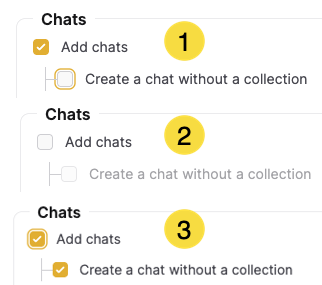
Permission dependencies enforce least-privilege boundaries. For example, a user must be able to add chats before they can create general (non-collection) chats. Without these dependencies, the system would accept inconsistent permission grants.
Some permissions have declared dependencies. When you assign a dependent permission, the base permission is also required:
| Permission | Depends on |
|---|---|
h2ogpte/chat/create_general | h2ogpte/chat/add |
h2ogpte/api_key/create_global | h2ogpte/api_key/create |
Groups
Groups let you organize users into teams and assign roles at the group level. Every user in a group automatically inherits the roles assigned to that group, which simplifies access management for large teams without requiring individual role assignments.
Create a group
Create a named group to organize users for bulk role assignment:
curl -X POST "https://<YOUR_DOMAIN>/api/v1/groups" \
  -H "Authorization: Bearer <API_KEY>" \
  -H "Content-Type: application/json" \
  -d '{"name": "data-science-team"}'
Assign a role to a group
Assign a role to all users in a group by group ID and role name:
curl -X PUT "https://<YOUR_DOMAIN>/api/v1/groups/{group_id}/roles/analyst" \
  -H "Authorization: Bearer <API_KEY>"
Per-role configuration overrides
Settings marked as Overridable in System Settings can be set at the role level. This lets you give specific roles different resource limits or experience settings compared to the system-wide default. The effective value a user receives follows this hierarchy: user override > role override > system default.
If the user has a per-user override for the setting, that value applies. Otherwise, if the user's role has an override, the role override value applies. If neither exists, the system default value applies.
The following settings support per-role overrides:
| Setting | Description | Recommended range |
|---|---|---|
collection_limit_per_user | Maximum collections per user. | 10–1,000 |
document_limit_per_user | Maximum documents per user. | 100–10,000 |
agents_document_limit_per_user | Maximum agent-created documents per user. | 1,000–100,000 |
max_llm_cost_per_user_per_24h | Rolling 24-hour LLM cost cap (in cost units). | 1–100 |
max_llm_cost_per_user | Lifetime LLM cost cap (in cost units). | 10–1,000 |
max_llm_cost_per_guest | LLM cost cap for guest users (in cost units). | 1–10 |
api_rate_limit_per_hour | Maximum API requests per user per hour. Set to -1 to disable. | 100–10,000 |
ws_rate_limit_per_hour | Maximum WebSocket messages per user per hour. Set to -1 to disable. | 100–10,000 |
default_long_job_timeout_sec | Timeout in seconds for long-running jobs. | 300–7,200 |
default_short_job_timeout_sec | Timeout in seconds for short-running jobs. | 60–600 |
company_logo_url | URL for the company logo displayed in the header. | Organization logo URL |
chat_logo_url | URL for the logo displayed in the chat interface. | Organization chat logo URL |
runtime_product_name | Product name displayed in the UI. | Organization product name |
runtime_company_name | Company name displayed in the UI. | Organization name |
show_ai_assistants | Enable the AI Assistants feature and Assistant Forums for the role. | true or false |
scheduled_task_user_gmail_enabled | Allow users to configure Gmail SMTP for notifications. | true or false |
user_notification_gmail_email | User's Gmail address for email notifications. | Valid Gmail address |
user_notification_gmail_app_password | User's Gmail app password for email notifications. | Valid app password |
Set a per-role override
Override a setting for a specific role by role ID and setting key:
curl -X PUT "https://<YOUR_DOMAIN>/api/v1/roles/{role_id}/configurations/{key_name}" \
  -H "Authorization: Bearer <API_KEY>" \
  -H "Content-Type: application/json" \
  -d '{"string_value": "<NEW_VALUE>"}'
List overrides for a role
Retrieve all configuration overrides currently set for a role:
curl -X GET "https://<YOUR_DOMAIN>/api/v1/roles/{role_id}/configurations" \
  -H "Authorization: Bearer <API_KEY>"
Reset an override to system default
Remove a per-role override and restore the system-wide default value for that setting:
curl -X DELETE "https://<YOUR_DOMAIN>/api/v1/roles/{role_id}/configurations/{key_name}" \
  -H "Authorization: Bearer <API_KEY>"
LLM grants
LLM access uses a separate mechanism from the permission categories and configuration overrides described in the preceding sections. Each role has its own LLM grants: a list of LLM display names, managed on the role's page in the System Dashboard or through the REST API and Python SDK. Viewing or changing a role's LLM grants requires the Manage roles permission (h2ogpte/roles/manage). Grants control more than chat: they also gate saving an assistant, a scheduled task, or an extractor pinned to a specific model.
Enterprise h2oGPTe grants a new LLM to every role except admin as soon as the LLM starts serving. A model saved with Save without testing gets no grants until its connection test passes. The admin role bypasses grants and always sees every LLM. You can't change the viewer role's grants, and it receives every new LLM automatically. The API rejects an attempt to change either role. You can edit the LLM grants of any other role, including custom roles.
The model list a user gets from the UI, the API, the OpenAI-compatible /v1/models endpoint, and MCP includes only the LLMs their roles grant. Two users with different roles can see different lists.
If a request passes a number for llm instead of a name, Enterprise h2oGPTe resolves the number against the list of models that caller can use. It isn't a position in the Models page table. The same number can select a different model for users with different grants. Pass the model name to pin a specific model.
A PUT replaces the role's LLM grants with exactly the names you send. Enterprise h2oGPTe saves only the names of models that are currently serving and ignores the rest. If none of the names match, the role ends up with no LLM grants, and users who have only that role can't use any LLM.
Deleting the last model with a given name resets its access. If you later add a model with that name, Enterprise h2oGPTe treats it as new and grants it to every eligible role again. Grant changes you made for the old model don't carry over.
If you revoke a role's grant for a model in use, requests using that model return The requested model is not found or unavailable. The error doesn't reveal that the model exists.
By default, a grant edit can take up to five minutes to apply for a user whose access was already cached, matching the propagation window for permission changes. Adding or removing an LLM always applies immediately.
Retrieve a role's LLM access by role ID. The response lists every LLM that's currently serving, each with a granted flag for this role:
curl -X GET "https://<YOUR_DOMAIN>/api/v1/roles/{role_id}/llm-registry-access" \
  -H "Authorization: Bearer <API_KEY>"
Replace a role's LLM grants (full replacement: the request body is the complete list of granted display names):
curl -X PUT "https://<YOUR_DOMAIN>/api/v1/roles/{role_id}/llm-registry-access" \
  -H "Authorization: Bearer <API_KEY>" \
  -H "Content-Type: application/json" \
  -d '{"names": ["gpt-4o", "claude-sonnet-4-5"]}'
Manage LLM grants with the Python SDK:
from h2ogpte import H2OGPTE

admin = H2OGPTE(address="https://<YOUR_DOMAIN>", api_key="<API_KEY>")

# List every LLM with whether this role is granted it
grants = admin.get_role_llm_access(role_id="<ROLE_ID>")

# Restrict a role to two models
admin.set_role_llm_access(role_id="<ROLE_ID>", names=["gpt-4o", "claude-sonnet-4-5"])
Manage roles with the REST API
Create a custom role
Create a role with a name and optional description:
curl -X POST "https://<YOUR_DOMAIN>/api/v1/roles" \
  -H "Authorization: Bearer <API_KEY>" \
  -H "Content-Type: application/json" \
  -d '{"name": "analyst", "description": "Data analyst with limited access"}'
Assign permissions to a role
Assign a list of permission identifiers to a role in a single request:
curl -X POST "https://<YOUR_DOMAIN>/api/v1/roles/{role_id}/permissions" \
  -H "Authorization: Bearer <API_KEY>" \
  -H "Content-Type: application/json" \
  -d '{"permissions": ["h2ogpte/collection/add", "h2ogpte/chat/add", "h2ogpte/document/add"]}'
Add a single permission
Add one permission identifier to a role without replacing existing permissions:
curl -X PUT "https://<YOUR_DOMAIN>/api/v1/roles/{role_id}/permissions/h2ogpte/collection/share" \
  -H "Authorization: Bearer <API_KEY>"
Remove a single permission
Remove one permission identifier from a role without affecting other assigned permissions:
curl -X DELETE "https://<YOUR_DOMAIN>/api/v1/roles/{role_id}/permissions/h2ogpte/collection/share" \
  -H "Authorization: Bearer <API_KEY>"
Assign a role to a user
Assign a named role to a specific user by their user ID:
curl -X PUT "https://<YOUR_DOMAIN>/api/v1/users/{user_id}/roles/analyst" \
  -H "Authorization: Bearer <API_KEY>"
Remove a role from a user
Remove a named role from a specific user by their user ID:
curl -X DELETE "https://<YOUR_DOMAIN>/api/v1/users/{user_id}/roles/analyst" \
  -H "Authorization: Bearer <API_KEY>"
Manage roles with the Python SDK
from h2ogpte import H2OGPTE

admin = H2OGPTE(address="https://<YOUR_DOMAIN>", api_key="<API_KEY>")

# List all roles
roles = admin.list_user_roles()

# Create a custom role
role = admin.create_user_role(name="analyst", description="Data analyst")

# Assign permissions
admin.assign_permissions_to_role(
    role_name=role.name,
    permission_names=["h2ogpte/collection/add", "h2ogpte/chat/add", "h2ogpte/document/add"]
)
Related topics
- Roles and Permissions - Manage roles through the System Dashboard UI
- System Settings - Manage global configuration parameters and per-role overrides
- Configure custom models - Add and manage the LLMs a role's LLM grants can reference
- Submit and view feedback for this page
- Send feedback about Enterprise h2oGPTe to cloud-feedback@h2o.ai