Using H2O-3 Secure on Hadoop
Running on Hadoop is part of H2O-3 Secure: the supported, production-grade path for production deployments. Contact enterprise@h2o.ai.
This guide describes how to launch H2O-3 Secure on a Hadoop cluster and configure the launch. H2O-3 Secure supports the following Hadoop distributions:
- CDH: 5.4, 5.5, 5.6, 5.7, 5.8, 5.9, 5.10, 5.13, 5.14, 5.15, 5.16, 6.0, 6.1, 6.2, 6.3
- CDP: 7.0, 7.1, 7.2
- MapR: 4.0, 5.0, 5.1, 5.2, 6.0, 6.1, 6.2, 7.0
- IOP: 4.2
- EMR: 6.10
Before you begin, note the following:
- The command used to launch H2O-3 Secure differs from previous versions. (Refer to the Walkthrough section.)
- H2O-3 Secure recommends at least 6 GB of memory per node.
- Each H2O-3 Secure node runs as a mapper.
- Run only one mapper per host.
- No combiners or reducers.
- Each H2O-3 Secure cluster must have a unique job name.
-mapperXmxand-nodesare required.- Root permissions are not required; unzip the H2O-3 Secure
.zipfile on any single node.
Prerequisite: open communication paths
H2O-3 Secure communicates using two communication paths. Verify these are open and available for use by H2O-3 Secure.
Path 1: mapper to driver
Optionally specify this port using the -driverport option in the hadoop jar command (see Hadoop launch parameters below). This port is opened on the driver host (the host where you entered the hadoop jar command). By default, this port is chosen randomly by the operating system. If you don't want to specify an exact port but you still wish to restrict the port to a certain range of ports, you can use the option -driverportrange.
Path 2: mapper to mapper
Optionally specify this port using the -baseport option in the hadoop jar command (refer to Hadoop launch parameters below). This port and the next subsequent port are opened on the mapper hosts (the Hadoop worker nodes) where the H2O-3 Secure mapper nodes are placed by the Resource Manager. By default, ports 54321 (TCP) and 54322 (TCP & UDP) are used.
The mapper port is adaptive: if 54321 and 54322 are not available, H2O-3 Secure will try 54323 and 54324 and so on. The mapper port is designed to be adaptive because sometimes if the YARN cluster is low on resources, YARN will place two H2O-3 Secure mappers for the same H2O-3 Secure cluster request on the same physical host. For this reason, open a range of more than two ports (20 ports is sufficient).
Walkthrough
The following steps show you how to download or build H2O-3 Secure with Hadoop and the parameters involved in launching H2O-3 Secure from the command line.
-
Contact enterprise@h2o.ai for the download link to the H2O-3 Secure release for your version of Hadoop.
-
Prepare the job input on the Hadoop Node by unzipping the build file and changing to the directory with the Hadoop and H2O-3 Secure's driver jar files.
unzip h2o-<version>-*.zipcd h2o-<version>-* -
To launch H2O-3 Secure nodes and form a cluster on the Hadoop cluster, run:
hadoop jar h2odriver.jar -nodes 1 -mapperXmx 6g -output hdfsOutputDirNameThis command launches a 6 GB node of H2O-3 Secure. Launch the cluster with at least four times the memory of your data file size.
- mapperXmx is the mapper size, or the amount of memory allocated to each node. H2O-3 Secure recommends at least 6 GB.
- nodes is the number of nodes requested to form the cluster.
- output is the name of the directory created each time an H2O-3 Secure cluster is created, so the name must be unique each time it is launched.
-
To monitor your job, direct your web browser to your standard job tracker web UI. To access H2O-3 Secure's web UI, direct your web browser to one of the launched instances. If you are unsure where your JVM is launched, review the output from your command after the nodes have clouded up and formed a cluster. Any of the nodes' IP addresses works, because there is no master node.
Determining driver host interface for mapper->driver callback...[Possible callback IP address: 172.16.2.181][Possible callback IP address: 127.0.0.1]...Waiting for H2O cluster to come up...H2O node 172.16.2.184:54321 requested flatfileSending flatfiles to nodes...[Sending flatfile to node 172.16.2.184:54321]H2O node 172.16.2.184:54321 reports H2O cluster size 1H2O cluster (1 nodes) is upBlocking until the H2O cluster shuts down...
Hadoop launch parameters
-
-h | -help: Display help -
-jobname <JobName>: Specify a job name for the Jobtracker to use; the default isH2O_nnnnn(where n is chosen randomly) -
-principal <kerberos principal> -keytab <keytab path> | -run_as_user <hadoop username>: Optionally specify a Kerberos principal and keytab or specify therun_as_userparameter to start clusters on behalf of the user/principal. Note that usingrun_as_userimplies that the Hadoop cluster does not have Kerberos. -
-driverif <IP address of mapper -> driver callback interface>: Specify the IP address for callback messages from the mapper to the driver. The-driverif,-driverport, and-driverportrangeflags apply only when the clouding method is set tofilesystem. -
-driverport <port of mapper -> callback interface>: Specify the port number for callback messages from the mapper to the driver. -
-driverportrange <range portX-portY of mapper-> callback interface>: Specify the allowed port range of the driver callback interface, eg. 50000-55000. -
-network <IPv4Network1>[,<IPv4Network2>]: Specify the IPv4 networks to bind to the H2O-3 Secure nodes; you can specify multiple networks to force H2O-3 Secure to use a specific host in the Hadoop cluster.10.1.2.0/24allows 256 possibilities. -
-timeout <seconds>: Specify the timeout duration (in seconds) to wait for the cluster to form before failing. Note: The default value is 120 seconds; if your cluster is busy, this may not provide enough time for the nodes to launch. If H2O-3 Secure does not launch, try increasing this value (for example,-timeout 600). -
-disown: Exit the driver after the cluster forms.Note: For Qubole users who include the
-disownflag, if your cluster is dying right after launch, add-Dmapred.jobclient.killjob.onexit=falseas a launch parameter. -
-notify <notification file name>: Specify a file to write when the cluster is up. The file contains the IP and port of the embedded web server for one of the nodes in the cluster. All mappers must start before the H2O-3 Secure cluster is considered up. -
-mapperXmx <per mapper Java Xmx heap size>: Specify the amount of memory to allocate to each H2O-3 Secure node. H2O-3 Secure recommends at least6g. -
-extramempercent <0-20>: Specify the extra memory for internal JVM use outside of the Java heap. This is a percentage ofmapperXmx. -
-n | -nodes <number of H2O nodes>: Specify the number of nodes. -
-nthreads <maximum number of CPUs>: Specify the number of CPUs to use. Enter-1to use all CPUs on the host, or enter a positive integer. -
-baseport <initialization port for H2O nodes>: Specify the initialization port for the H2O-3 Secure nodes. The default is54321. -
-ea: Enable assertions to verify boolean expressions for error detection. -
-verbose:gc: Include heap and garbage collection information in the logs. Deprecated in Java 9 and removed in Java 10; use-Xlog:gc=infoinstead. -
-XX:+PrintGCDetails: Include a short message after each garbage collection. Deprecated in Java 9 and removed in Java 10; use-Xlog:gc=infoinstead. -
-Xlog:gc=info: Include garbage collection information in the logs. Available in Java 9 and later. -
-license <license file name>: Specify the directory of local filesytem location and the license file name. -
-o | -output <HDFS output directory>: Specify the HDFS directory for the output. -
-flow_dir <Saved Flows directory>: Specify the directory for saved flows. By default, H2O-3 Secure will try to find the HDFS home directory to use as the directory for flows. If the HDFS home directory is not found, flows cannot be saved unless a directory is specified using-flow_dir.
Accessing S3 data from Hadoop
H2O-3 Secure launched on Hadoop can access S3 data in addition to HDFS. To enable access, follow the instructions below.
Edit Hadoop's core-site.xml, then set the HADOOP_CONF_DIR environment property to the directory containing the core-site.xml file. For an example core-site.xml file, refer to Core-site.xml example. Typically, the configuration directory for most Hadoop distributions is /etc/hadoop/conf.
You can also pass the S3 credentials when launching H2O-3 Secure with the Hadoop jar command. Use the -D flag to pass the credentials:
hadoop jar h2odriver.jar -Dfs.s3.awsAccessKeyId="${AWS_ACCESS_KEY}" -Dfs.s3n.awsSecretAccessKey="${AWS_SECRET_KEY}" -n 3 -mapperXmx 10g -output outputDirectory
where AWS_ACCESS_KEY represents your user name and AWS_SECRET_KEY represents your password.
Then import the data with the S3 URL path:
-
To import the data from the R API:
h2o.importFile(path = "s3n://bucket/path/to/file.csv") -
To import the data from the Python API:
h2o.import_file(path = "s3n://bucket/path/to/file.csv")
YARN best practices
YARN (Yet Another Resource Manager) is a resource management framework. H2O-3 Secure launches as an application on YARN, so running H2O-3 Secure on Hadoop means running H2O-3 Secure on YARN. If you don't already use YARN to manage your cluster resources, H2O-3 Secure strongly recommends it.
Using H2O-3 Secure with YARN
When you launch H2O-3 Secure on Hadoop using the hadoop jar command, YARN allocates the necessary resources to launch the requested number of nodes. H2O-3 Secure launches as a MapReduce (V2) task, where each mapper is an H2O-3 Secure node of the specified size.
hadoop jar h2odriver.jar -nodes 1 -mapperXmx 6g -output hdfsOutputDirName
Occasionally, YARN may reject a job request. This usually occurs because either there is not enough memory to launch the job or because of an incorrect configuration.
If YARN rejects the job request, try launching the job with less memory to see if that is the cause of the failure. Specify smaller values for -mapperXmx (a minimum of 2g) and -nodes (start with 1) to confirm that H2O-3 Secure can launch successfully.
To resolve configuration issues, adjust the maximum memory that YARN will allow when launching each mapper. If the cluster manager settings are configured for the default maximum memory size but the memory required for the request exceeds that amount, YARN will not launch and H2O-3 Secure will time out. If you are using the default configuration, change the configuration settings in your cluster manager to specify memory allocation when launching mapper tasks. To calculate the amount of memory required for a successful launch, use the following formula:
YARN container size (
mapreduce.map.memory.mb) =-mapperXmxvalue + (-mapperXmx*-extramempercent[default is 10%])
The mapreduce.map.memory.mb value must be less than the YARN memory configuration values for the launch to succeed.
Configuring YARN
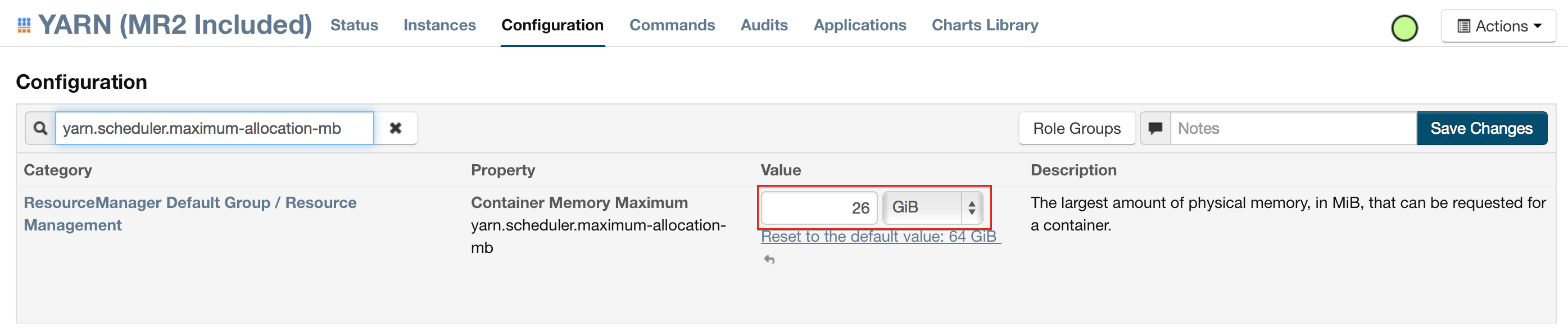
For Cloudera, configure the settings in Cloudera Manager. Depending on how the cluster is configured, you may need to change the settings for more than one role group.
-
Click Configuration and enter the following search term in quotes: yarn.nodemanager.resource.memory-mb.
-
Enter the amount of memory (in GB) to allocate in the Value field. If more than one group is listed, change the values for all listed groups.

-
Click the Save Changes button in the upper-right corner.
-
Enter the following search term in quotes: yarn.scheduler.maximum-allocation-mb
-
Change the value, click the Save Changes button in the upper-right corner, and redeploy.
For MapR:
- Edit the yarn-site.xml file for the node running the ResourceManager.
- Change the values for the
yarn.nodemanager.resource.memory-mbandyarn.scheduler.maximum-allocation-mbproperties. - Restart the ResourceManager and redeploy the cluster.
To verify the values were changed, check the values for the following properties:
- <name>yarn.nodemanager.resource.memory-mb</name>
- <name>yarn.scheduler.maximum-allocation-mb</name>
Limiting CPU usage
To limit the number of CPUs used by H2O-3 Secure, use the -nthreads option and specify the maximum number of CPUs for a single container to use. The following example limits the number of CPUs to four:
hadoop jar h2odriver.jar -nthreads 4 -nodes 1 -mapperXmx 6g -output hdfsOutputDirName
Note: By default, H2O-3 Secure uses all available CPUs (-1). If you set -nthreads, specify at least four; otherwise, the following error displays: ERROR: nthreads invalid (must be >= 4): <n>
Specifying queues
If you do not specify a queue when launching H2O-3 Secure, H2O-3 Secure jobs are submitted to the default queue. Jobs submitted to the default queue have a lower priority than jobs submitted to a specific queue.
To specify a queue with Hadoop, enter -Dmapreduce.job.queuename=<my-h2o-queue> (where <my-h2o-queue> is the name of the queue) when launching Hadoop.
For example,
hadoop jar h2odriver.jar -Dmapreduce.job.queuename=<my-h2o-queue> -nodes <num-nodes> -mapperXmx 6g -output hdfsOutputDirName
Specifying output directories
To prevent overwriting multiple users' files, each job must have a unique output directory name. Change the -output hdfsOutputDir argument (where hdfsOutputDir is the name of the directory).
Alternatively, you can delete the directory (manually or by using a script) instead of creating a unique directory each time you launch H2O-3 Secure.
Customizing YARN
Most of the configurable YARN variables are stored in yarn-site.xml. To prevent settings from being overridden, you can mark a config as "final." If you change any values in yarn-site.xml, you must restart YARN to confirm the changes.
Accessing logs
Access logs for a YARN job with the yarn logs -applicationId <application_id> command from a terminal. Run this command as the same user ID as the job owner, and only after the job has finished.
- Submit and view feedback for this page
- Send feedback about H2O-3 Secure to cloud-feedback@h2o.ai