Using H2O-3 Secure on Kubernetes
Running on Kubernetes is part of H2O-3 Secure: the supported, production-grade path for production deployments. Contact enterprise@h2o.ai.
On Kubernetes, H2O-3 Secure runs as a compute engine for a user or a job inside a namespace that your platform controls. The REST API on port 54321 is the control channel for the client code that drives the engine, not a public service. Before you deploy, read Deployment model and responsibilities.
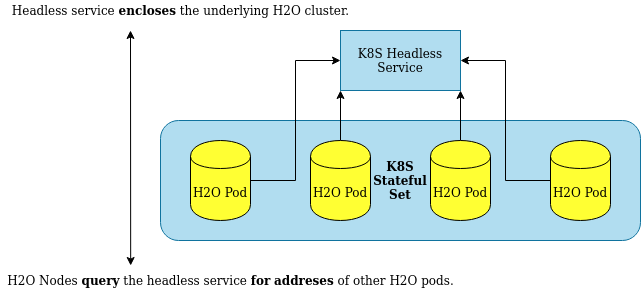
H2O-3 Secure is a stateful application: its nodes start and stop together as a single unit, and if one node stops, the whole cluster becomes unhealthy and must restart. Kubernetes must treat H2O-3 Secure nodes as stateful. A set of pods that share a common state is a StatefulSet. Tooling meant for stateless applications does not apply to H2O-3 Secure.
H2O-3 Secure pods deployed on Kubernetes need a headless service for node discovery. A headless service returns the addresses of all the underlying pods instead of load-balancing requests across them.
Requirements
To spawn an H2O-3 Secure cluster inside a Kubernetes cluster, you need the following:
- A Kubernetes cluster, either a local one for development (for example, k3s) or a managed one (for example, OpenShift).
- A container image with H2O-3 Secure inside.
- A Kubernetes deployment definition with a StatefulSet of H2O-3 Secure pods, a headless service, and a NetworkPolicy.
For reproducibility, set resource requests and limits to equal values.
Container image
For an H2O-3 Secure deployment, use the container image supplied with your enterprise distribution. Contact enterprise@h2o.ai for access.
The examples below reference the public H2O-3 image, h2oai/h2o-open-source-k8s, for illustration. See the H2O-3 Docker Hub page for details. The public image runs as root by default; the StatefulSet below overrides that with a pod security context.
Create the headless service
Create a headless service on Kubernetes:
apiVersion: v1
kind: Service
metadata:
  name: h2o-service
  namespace: default
spec:
  type: ClusterIP
  clusterIP: None
  selector:
    app: h2o-k8s
  ports:
  - protocol: TCP
    port: 54321
Where:
clusterIP: Nonedefines the service as headless.port: 54321is the default H2O-3 Secure control port. Client libraries use this port to talk to the H2O-3 Secure cluster.app: h2o-k8sselects the H2O-3 Secure pods. The name is arbitrary, but it must match the pod label in the StatefulSet.
Create the H2O-3 Secure deployment
Run H2O-3 Secure as a StatefulSet. Treating H2O-3 Secure nodes as stateful ensures the following:
- Kubernetes treats the nodes as a single unit and brings them up and down gracefully and together.
- A Kubernetes healthcheck does not try to restart individual H2O-3 Secure nodes on error.
- The cluster restarts as a whole when required.
- Persistent storage and volumes associated with the StatefulSet remain after the cluster shuts down.
apiVersion: apps/v1
kind: StatefulSet
metadata:
  name: h2o-stateful-set
  namespace: default
spec:
  serviceName: h2o-service
  podManagementPolicy: "Parallel"
  replicas: 3
  selector:
    matchLabels:
      app: h2o-k8s
  template:
    metadata:
      labels:
        app: h2o-k8s
    spec:
      terminationGracePeriodSeconds: 10
      automountServiceAccountToken: false
      securityContext:
        runAsNonRoot: true
        fsGroup: 10001
        seccompProfile:
          type: RuntimeDefault
      containers:
        - name: h2o-k8s
          image: 'h2oai/h2o-open-source-k8s:latest'
          resources:
            requests:
              memory: "4Gi"
              cpu: "2"
            limits:
              memory: "4Gi"
              cpu: "2"
          ports:
            - containerPort: 54321
              protocol: TCP
          securityContext:
            allowPrivilegeEscalation: false
            readOnlyRootFilesystem: true
            capabilities:
              drop: ["ALL"]
          volumeMounts:
            - name: tmp
              mountPath: /tmp
          readinessProbe:
            httpGet:
              path: /kubernetes/isLeaderNode
              port: 8081
            initialDelaySeconds: 5
            periodSeconds: 5
            failureThreshold: 1
          env:
          - name: H2O_KUBERNETES_SERVICE_DNS
            value: h2o-service.default.svc.cluster.local
          - name: H2O_NODE_LOOKUP_TIMEOUT
            value: '180'
          - name: H2O_NODE_EXPECTED_COUNT
            value: '3'
          - name: H2O_KUBERNETES_API_PORT
            value: '8081'
      volumes:
        - name: tmp
          emptyDir: {}
Pay attention to these settings:
app: h2o-k8smust match the name expected by the headless service so that node discovery works.containerPort: 54321is the control port that client code connects to.podManagementPolicy: "Parallel"makes Kubernetes spawn all H2O-3 Secure nodes at once. Without it, Kubernetes starts the pods one after another, which prolongs startup.- The pod and container
securityContextrun H2O-3 Secure as an unprivileged user with a read-only root filesystem. TheemptyDirvolume at/tmpgives the engine a writable location for temporary and spill files (ice_root). The published image already runs as a non-root user (UID 852; the Chainguard-based images use 65532), so leaverunAsUserunset unless your image differs — arunAsUserthat doesn't exist in the image leaves the process without a home directory. automountServiceAccountToken: falsekeeps a Kubernetes API token out of the engine's pods. H2O-3 Secure discovers its peers through DNS and doesn't need one.
The environment variables control node discovery:
H2O_KUBERNETES_SERVICE_DNS(required): Required for clustering to work. The format follows the<service-name>.<project-namespace>.svc.cluster.localpattern. This enables H2O-3 Secure node discovery through DNS. Change it to match the headless service you created, and match the rest of the address to your Kubernetes implementation.H2O_NODE_LOOKUP_TIMEOUT(optional): Node lookup constraint. The time before node lookup times out.H2O_NODE_EXPECTED_COUNT(optional): Node lookup constraint. The expected number of H2O-3 Secure pods to discover. Set it equal to the number of replicas.H2O_KUBERNETES_API_PORT(optional): Port for Kubernetes API checks and probes to listen on. Defaults to8080.
If you don't set any of the optional lookup constraints, H2O-3 Secure uses a default node lookup timeout of three minutes. If you set any constraint, node lookup ends on whichever condition occurs first.
In this example, h2oai/h2o-open-source-k8s:latest retrieves the latest build of the public H2O-3 OSS Docker image. For the nightly development build, replace latest with nightly.
Restrict network access
Limit who can reach the engine with a NetworkPolicy. The following policy allows the control port only from pods labeled h2o-client: "true" in the same namespace (for example, the notebook or job that drives the engine), and allows node-to-node traffic only between the H2O-3 Secure pods.
apiVersion: networking.k8s.io/v1
kind: NetworkPolicy
metadata:
  name: h2o-restrict
  namespace: default
spec:
  podSelector:
    matchLabels:
      app: h2o-k8s
  policyTypes:
    - Ingress
  ingress:
    # Control port: only the client that drives this engine
    - from:
        - podSelector:
            matchLabels:
              h2o-client: "true"
      ports:
        - protocol: TCP
          port: 54321
    # Node-to-node traffic between H2O-3 pods
    - from:
        - podSelector:
            matchLabels:
              app: h2o-k8s
      ports:
        - protocol: TCP
          port: 54321
        - protocol: TCP
          port: 54322
        - protocol: UDP
          port: 54322
Probe traffic from the kubelet usually isn't subject to NetworkPolicy, but this depends on your network plugin. If readiness checks fail after you apply the policy, allow port 8081 from the node network.
Connect to the cluster
H2O-3 Secure routes requests to the leader node. After the cluster forms and elects a leader, the readinessProbe on /kubernetes/isLeaderNode marks every node except the leader as not ready, so the service resolves only to the leader.
Client code running inside the cluster connects through the service:
import h2o
h2o.connect(url="http://h2o-service.default.svc.cluster.local:54321")
Keep the control port cluster-internal. Don't publish it through a public Ingress, Route, or load balancer. If users outside the cluster must reach the engine, put it behind your platform's authenticating proxy with TLS, and enable H2O-3 Secure authentication as well. See Security.
Reproducibility
Three requirements make actions invoked on H2O-3 Secure reproducible:
- The same amount of memory on every node.
- The same number of CPUs on every node.
- The client sends requests only to the H2O-3 Secure leader node.
A common mistake is to set different requests and limits for a pod. If the JVM inside the container uses a percentage of the available memory, that amount can differ every time H2O-3 Secure starts, because Kubernetes might allocate a different amount of memory each time. The same applies to CPU requests and limits. Without the readinessProbe on /kubernetes/isLeaderNode, reproducibility is not guaranteed.
Install with Helm
You can use Helm to deploy H2O-3 Secure into a Kubernetes cluster. Helm requires you to set the KUBECONFIG environment variable or state the KUBECONFIG destination explicitly. Three steps install the H2O-3 Secure Helm chart:
- Add the H2O-3 Secure Helm chart repository.
- Install H2O-3 Secure to Kubernetes with
helm install. - (Optional) Test the installation.
helm repo add h2o https://charts.h2o.ai
helm install basic-h2o h2o/h2o
helm test basic-h2o
helm install basic-h2o h2o/h2o installs a minimal H2O-3 Secure cluster with few resources. To inspect the full list of configuration options, run helm show values h2o/h2o.
The most common settings are the number of H2O-3 Secure nodes (one pod per node) and the memory and CPU resources per node:
h2o:
  nodeCount: 3
resources:
  cpu: 12
  memory: 32Gi
ingress:
  enabled: false
Keep ingress.enabled: false so the control port stays cluster-internal, and apply the same security settings as the StatefulSet example: a non-root security context and a NetworkPolicy. Check helm show values h2o/h2o for the options your chart version supports.
Security
Kubernetes deployments should follow the deployment model:
- Run as non-root. The public image already runs as UID 852, but set
runAsNonRoot: trueso the cluster refuses to start the pod if that ever changes. Set a podsecurityContextas shown above, or use the H2O-3 Secure image. - Restrict network access. Apply a NetworkPolicy so only the launching client or platform reaches ports 54321 and 54322.
- Don't expose the control port publicly. No public Ingress, Route, or load balancer for port 54321.
- Enable authentication and TLS when traffic leaves a trusted network segment. Add the options described in Security to the container command.
- Run one engine per user or job, and delete the StatefulSet when the work is done.
The default command used in the Docker images is:
java -Djava.library.path=/opt/h2oai/h2o-3/xgb_lib_dir -XX:+UseContainerSupport -XX:MaxRAMPercentage=50 -jar /opt/h2oai/h2o-3/h2o.jar
To add security options, override the container command and append them. For example, to enable hash-file authentication with a realm.properties file stored in a Secret named h2o-auth, add the following to the StatefulSet pod template:
      containers:
        - name: h2o-k8s
          # ...image, resources, securityContext, probes, and env as above...
          command:
            - java
            - -Djava.library.path=/opt/h2oai/h2o-3/xgb_lib_dir
            - -XX:+UseContainerSupport
            - -XX:MaxRAMPercentage=50
            - -jar
            - /opt/h2oai/h2o-3/h2o.jar
            - -hash_login
            - -login_conf
            - /etc/h2o/realm.properties
          volumeMounts:
            - name: tmp
              mountPath: /tmp
            - name: h2o-auth
              mountPath: /etc/h2o
              readOnly: true
      volumes:
        - name: tmp
          emptyDir: {}
        - name: h2o-auth
          secret:
            secretName: h2o-auth
- Submit and view feedback for this page
- Send feedback about H2O-3 Secure to cloud-feedback@h2o.ai