Advanced configuration
Use the Advanced Configuration YAML editor at the bottom of the New Experiment page to set options that aren't shown elsewhere on the page. The schema below lists the most common settings and their defaults. Include only the keys you want to change. Everything else keeps its default.
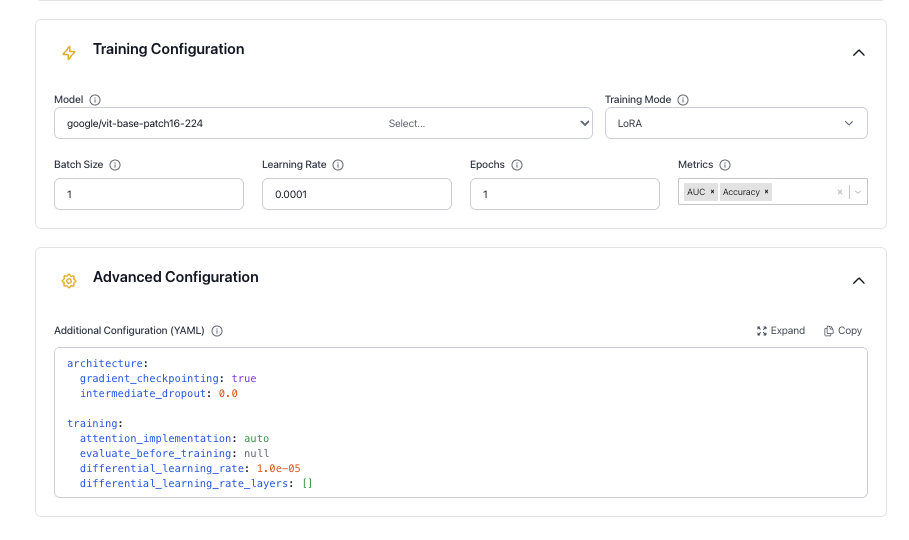
The YAML editor on the page starts with a few values that differ from the defaults below. For example, it sets prediction.max_length_inference to 256 and includes the reinforcement learning keys training.num_generations and training.grpo_beta.
Configuration schema
architecture:
  gradient_checkpointing: true
  intermediate_dropout: 0.0
  backbone_kwargs: "{}"

training:
  attention_implementation: auto
  evaluate_before_training: null
  differential_learning_rate: 1.0e-05
  differential_learning_rate_layers: []
  gradient_clip: 0.0
  weight_decay: 0.0
  warmup_epochs: 0.0
  min_learning_rate_ratio: 0.0
  grad_accumulation: 1
  evaluation_epochs: 0.5
  optimizer: "AdamW"
  schedule: "Cosine"
  train_validation_data: false
  use_length_based_sampler: true
  lora_rank: 4
  lora_alpha: 16
  lora_dropout: 0.05
  lora_target_modules: ""
  loss_function: null
  image_augmentation_pipeline: null
  image_resolution: null
  image_resize_mode: squash
  use_mixup: false
  use_cutmix: false

prediction:
  batch_size_inference: 0
  max_length_inference: 128
  min_length_inference: 2
  num_beams: 1
  repetition_penalty: 1.0
  temperature: 0.0
  top_k: 0
  top_p: 1.0

tokenizer:
  padding_quantile: 1.0
  tokenizer_kwargs: '{"use_fast": true, "add_prefix_space": false}'
  chat_template: null
  padding_side: null

dataset:
  system_column: null
  unroll_conversations: false

environment:
  find_unused_parameters: false
  mixed_precision: true
  trust_remote_code: false
  use_fsdp: false
  use_fsdp_cpu_offload: false
  seed: -1
  huggingface_branch: "main"
Architecture
Controls memory and regularization behavior for the model backbone.
Gradient checkpointing
When enabled, intermediate activations are recomputed on the backward pass rather than stored. This reduces peak GPU memory usage at the cost of slightly slower training.
YAML key: architecture.gradient_checkpointing | Default: true
Intermediate dropout
Dropout probability applied to intermediate layers to reduce overfitting.
YAML key: architecture.intermediate_dropout | Default: 0.0
Backbone kwargs
Additional keyword arguments passed as a JSON string to transformers.AutoConfig.from_pretrained() when the model backbone is loaded. Useful for overriding model-specific settings not exposed elsewhere.
YAML key: architecture.backbone_kwargs | Default: "{}"
Training
This section lists all training hyperparameters and adapter settings. Batch Size, Learning Rate, and Epochs are also on the page itself. See Training configuration.
Attention implementation
The attention backend used during training. When set to auto, the model uses the transformers default for its architecture. To use a specific backend, set it explicitly (for example, flash_attention_2 or sdpa).
YAML key: training.attention_implementation | Default: auto
Evaluate before training
When true, the model is evaluated on the validation set before training starts. Defaults to false for text_causal_language_modeling, multimodal_causal_language_modeling, and object_detection, and true for text_rl_causal_language_modeling, text_causal_classification_modeling, and image_classification.
YAML key: training.evaluate_before_training | Default: auto
Differential learning rate
A separate learning rate applied to the layers listed in differential_learning_rate_layers. Useful for fine-tuning specific parts of the model at a different rate.
YAML key: training.differential_learning_rate | Default: 1.0e-05
Differential learning rate layers
A list of layer names to apply the differential learning rate to (for example, [classification_head]). A layer matches if its name contains an entry from the list. When the list is empty, all layers train at the base rate.
YAML key: training.differential_learning_rate_layers | Default: []
Gradient clip
Maximum gradient norm. Gradients exceeding this value are rescaled to prevent training instability. Set to 0 to disable clipping.
YAML key: training.gradient_clip | Default: 0.0
Weight decay
The optimizer's weight decay. It pulls weights toward zero to help reduce overfitting. Normalization and bias parameters aren't affected.
YAML key: training.weight_decay | Default: 0.0
Warmup epochs
Number of epochs over which the learning rate ramps linearly from 0 to the base rate at the start of training. A small value such as 0.05 is typical.
YAML key: training.warmup_epochs | Default: 0.0
Minimum learning rate ratio
The floor of the learning rate schedule, expressed as a fraction of the base learning rate. For example, 0.1 means the rate decays no lower than 10% of the starting value.
YAML key: training.min_learning_rate_ratio | Default: 0.0
Gradient accumulation
Number of forward passes before a weight update is applied. Increasing this value simulates a larger batch size without requiring additional GPU memory.
YAML key: training.grad_accumulation | Default: 1
Evaluation epochs
How often the model is evaluated on the validation set, measured in epochs. Values below 1.0 trigger evaluation within an epoch (for example, 0.5 evaluates twice per epoch).
YAML key: training.evaluation_epochs | Default: 0.5
Optimizer
The optimization algorithm used for training.
YAML key: training.optimizer | Default: AdamW
Options: Adam, AdamW, SGD, RMSprop, Adadelta, AdamW8bit, AdamW4bit, AdamWFp8
Schedule
The learning rate schedule applied after warmup.
YAML key: training.schedule | Default: Cosine
Options: Cosine, Linear, Constant
Train on validation data
When enabled, the validation set is added to the training set before training starts. Validation still runs, but on data the model has already seen, so the validation metrics aren't meaningful. Use this only for final production runs.
YAML key: training.train_validation_data | Default: false
Use length-based sampler
When enabled, samples are sorted by length so that each GPU gets samples of similar length at each step. This balances the workload across GPUs, so it only has an effect when you train on more than one GPU.
YAML key: training.use_length_based_sampler | Default: true
LoRA rank
The inner dimension of the low-rank adapter matrices. Higher values give the adapter more capacity but increase memory usage. Only applies when Training Mode is LoRA or QLoRA.
YAML key: training.lora_rank | Default: 4
LoRA alpha
Scaling factor for the LoRA update. Higher values increase the influence of the adapter on the model output relative to the original weights.
YAML key: training.lora_alpha | Default: 16
LoRA dropout
Dropout probability applied to LoRA layers to reduce overfitting.
YAML key: training.lora_dropout | Default: 0.05
LoRA target modules
A comma-separated list of layer names to add LoRA to. A layer matches if its name contains an entry from the list. When empty, LoRA is added to all eligible linear and convolution layers, except the classification head and score layers.
YAML key: training.lora_target_modules | Default: "" (all eligible layers)
Loss function
Overrides the default loss function for the problem type. When null, the default loss is used.
YAML key: training.loss_function | Default: null
Options by problem type:
text_causal_language_modelingandmultimodal_causal_language_modeling:CrossEntropyLoss(default)text_causal_classification_modelingandimage_classification:ClassificationLoss(default, picks cross-entropy or binary cross-entropy based on the labels),CrossEntropyLoss,BinaryCrossEntropyLossobject_detection:DETRLoss
Image augmentation pipeline
The augmentation level applied to training images. Only applies to image_classification. Resize and normalization from the model's image processor are always applied regardless of this setting.
YAML key: training.image_augmentation_pipeline | Default: null
Options:
null: No augmentation beyond the model's default preprocessing.low: Horizontal flip only.medium: Flip, affine transform, and random erasing.high: Random resized crop, flip, affine transform, color jitter, and random erasing.
Image resolution
The input image resolution, in pixels. A single number gives a square resolution. For image_classification, you can also give a [height, width] pair to train on rectangular images, so tall or wide subjects aren't squeezed into a square:
training:
  image_resolution: [384, 128]
When null, the model's default resolution is used. object_detection resizes the shortest edge, so it accepts only a single number. Some models, such as dinov2 models, support square resolutions only.
You can also set this in the Image Size field on the page.
YAML key: training.image_resolution | Default: null
Image resize mode
Only applies to image_classification. Controls how images are fitted to the image_resolution. You can also set this in the Image Resize Mode field on the page.
squash: Resizes to the exact resolution. Keeps all content, but may stretch the image.pad: Keeps the aspect ratio and fills the empty border with a neutral color. No content is lost, but part of the image is padding.crop: Keeps the aspect ratio and crops the center of the image. Content near the edges is lost.
This setting only takes effect when image_resolution is set. Without it, images use the model's own preprocessing.
pad and crop need a timm/ model. Other models support squash only. The high augmentation pipeline resizes training images itself, so with pad or crop, the resize mode only affects validation images.
You can't continue training from a checkpoint that was trained at a rectangular resolution.
YAML key: training.image_resize_mode | Default: squash
Use mixup
When enabled, pairs of training images and their labels are linearly blended during training. Only applies to image_classification.
YAML key: training.use_mixup | Default: false
Use CutMix
When enabled, a rectangular region from one training image is replaced with a patch from another, and their labels are mixed proportionally. Only applies to image_classification.
YAML key: training.use_cutmix | Default: false
Prediction
Settings used during validation and inference. Inference batch size applies to all problem types. The generation settings apply to text_causal_language_modeling, text_rl_causal_language_modeling, and multimodal_causal_language_modeling.
Inference batch size
Batch size used during inference and validation. Set to 0 to use the same value as the training batch size.
YAML key: prediction.batch_size_inference | Default: 0
Max generation length
Maximum number of tokens the model generates per output.
YAML key: prediction.max_length_inference | Default: 128
Min generation length
Minimum number of tokens the model must generate before an end-of-sequence token is allowed.
YAML key: prediction.min_length_inference | Default: 2
Number of beams
Number of beams used in beam search. Set to 1 to use greedy or sampling-based decoding instead.
YAML key: prediction.num_beams | Default: 1
Repetition penalty
Reduces the probability of tokens that have already appeared in the output. A value of 1.0 applies no penalty. Values above 1.0 discourage repetition; values below 1.0 encourage it.
YAML key: prediction.repetition_penalty | Default: 1.0
Temperature
Controls randomness during sampling. Higher values produce more varied outputs; lower values produce more deterministic outputs. Set to 0.0 for greedy decoding (no sampling).
YAML key: prediction.temperature | Default: 0.0
Top-K
At each generation step, sampling is restricted to the k most probable tokens. Only active when temperature is greater than 0. Set to 0 to disable.
YAML key: prediction.top_k | Default: 0
Top-P
Nucleus sampling threshold. Sampling is restricted to the smallest set of tokens whose cumulative probability meets or exceeds this value. Only active when temperature is greater than 0. Set to 1.0 to disable.
YAML key: prediction.top_p | Default: 1.0
Tokenizer
Controls text tokenization before input is passed to the model. The defaults work well for most use cases.
Padding quantile
Sets the target padding length for a batch as a quantile of the sequence lengths in that batch. For example, 0.9 pads to the 90th-percentile length, reducing memory wasted on outlier-length sequences. Set to 1.0 to pad to the longest sequence in the batch. Set to 0.0 to disable dynamic padding.
YAML key: tokenizer.padding_quantile | Default: 1.0
Tokenizer kwargs
Additional keyword arguments passed as a JSON string to transformers.AutoTokenizer when the tokenizer is initialized.
YAML key: tokenizer.tokenizer_kwargs | Default: {"use_fast": true, "add_prefix_space": false}
Chat template
The Jinja2 template used to format conversation turns for generation problem types (text_causal_language_modeling, multimodal_causal_language_modeling). Set to "model" to use the model's built-in template from the Hugging Face Hub. Provide a custom Jinja2 string to override the template entirely. Leave as null to use the H2O default template.
YAML key: tokenizer.chat_template | Default: H2O default template
Padding side
The side on which padding tokens are added. Auto-configured per problem type: left for text_causal_language_modeling and multimodal_causal_language_modeling, and right for text_causal_classification_modeling and image_classification.
YAML key: tokenizer.padding_side | Default: auto
Dataset
Additional dataset settings. For all other dataset fields, see Dataset selection.
System column
The column containing the system prompt. If not set, no system prompt is used. Applies to text_causal_language_modeling, text_rl_causal_language_modeling, text_causal_classification_modeling, and multimodal_causal_language_modeling. You can also set this in the System Prompt Column field on the page.
YAML key: dataset.system_column | Default: null
Unroll conversations
When enabled, multi-turn conversations are split into separate training samples, each with a system prompt, a user turn, and an assistant answer. Only applies to text_causal_language_modeling. It only works when dataset.output_column is null and the input column holds a list of messages. Otherwise, it's ignored.
YAML key: dataset.unroll_conversations | Default: false
Environment
Controls distributed training, hardware, and runtime settings.
Find unused parameters
Distributed Data Parallel (DDP) flag that restricts backpropagation to parameters used in the forward pass. Automatically turned off when gradient checkpointing is on, because the two settings don't work together.
YAML key: environment.find_unused_parameters | Default: false
Mixed precision
When enabled, training uses bfloat16 (bf16) mixed precision, which reduces GPU memory usage and speeds up training on NVIDIA Ampere and later GPUs.
YAML key: environment.mixed_precision | Default: true
Trust remote code
When enabled, custom model code hosted on the Hugging Face Hub is executed locally. Only enable this for repositories you trust.
YAML key: environment.trust_remote_code | Default: false
Use FSDP
When enabled, training uses Fully Sharded Data Parallel (FSDP), which shards model parameters, gradients, and optimizer state across GPUs to reduce per-device memory usage. Not supported for image_classification, object_detection, or multimodal_causal_language_modeling. If you enable it for these problem types, clicking Start Training shows a Configuration Issues message. Don't use Proceed Anyway in this case.
YAML key: environment.use_fsdp | Default: false
Use FSDP CPU offload
When enabled, FSDP parameters and optimizer state are offloaded to CPU memory to further reduce GPU memory pressure. Requires use_fsdp to be enabled.
YAML key: environment.use_fsdp_cpu_offload | Default: false
Seed
Random seed for NumPy, Python's random module, PyTorch, and CUDA. Set to -1 to pick a random seed on each run. Set to a non-negative integer for reproducible results.
YAML key: environment.seed | Default: -1
Hugging Face branch
The branch, tag, or commit SHA of the Hugging Face model repository to download from. Change this when you need a specific revision of a model.
YAML key: environment.huggingface_branch | Default: "main"
- Submit and view feedback for this page
- Send feedback about H2O Cascade to cloud-feedback@h2o.ai