Image classification
Image classification trains a model to sort each image into one of a set of classes.
Dataset format
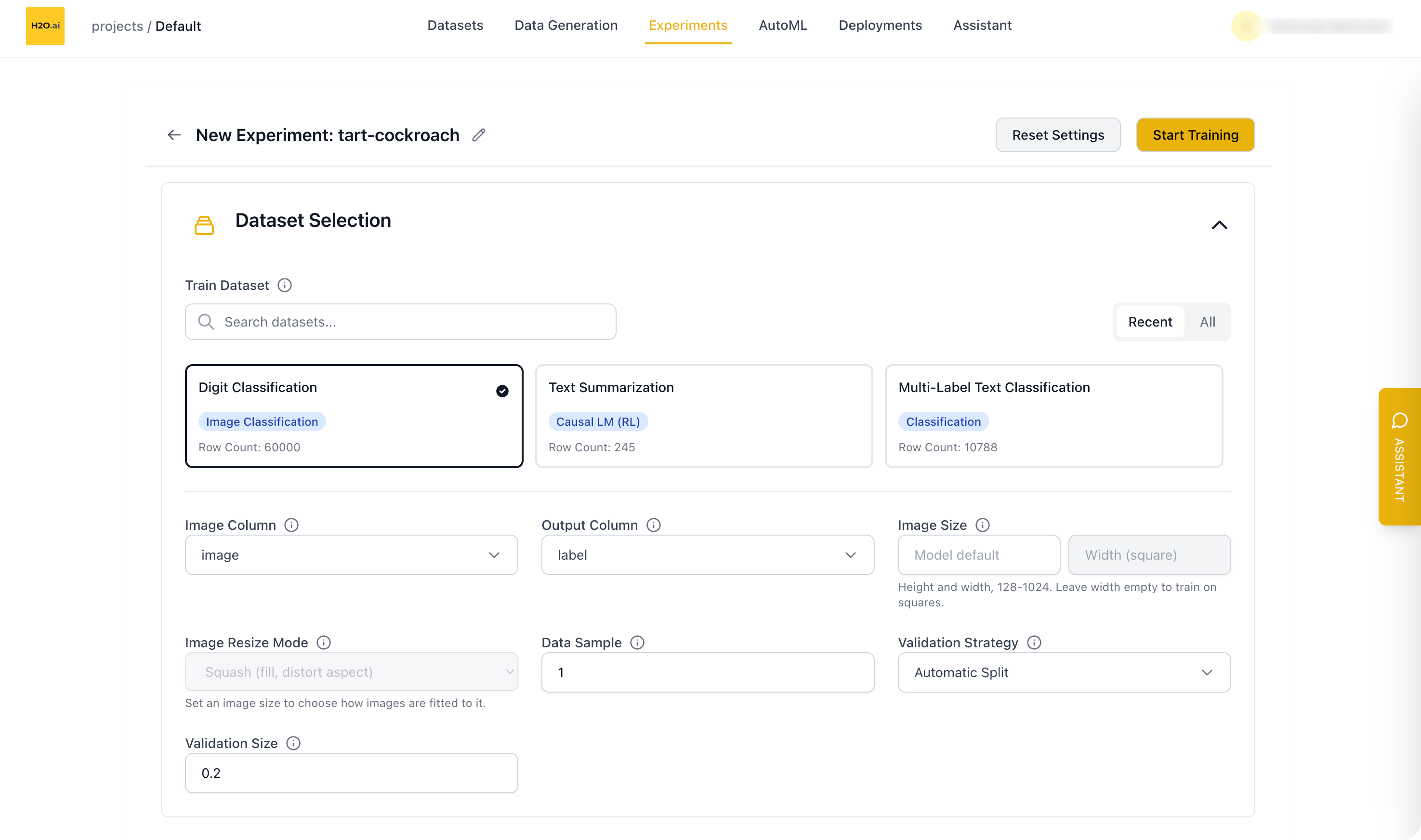
Your dataset must include:
- Image Column: A column containing image data (base64-encoded or binary)
- Output Column: A column containing the class label for each image
You can also set the Image Size and Image Resize Mode in the Dataset Selection section. See Image size and Image resize mode.
Supported models
Image classification uses vision classification backbones from Hugging Face:
google/vit-base-patch16-224(default)timm/models such astimm/efficientnet_b0.ra_in1k,timm/resnet18.a1_in1k,timm/resnet50.a1_in1k, andtimm/mobilenetv3_large_100.ra_in1k- Other models compatible with
AutoModelForImageClassification
Training modes
Image classification supports all experiment training modes:
- Full Model Training
- LoRA
- QLoRA
Metrics
Available metrics for image classification:
- AUC: Area Under the Curve
- Accuracy: Classification accuracy
- Log Loss: Classification log loss
- MAP@3: Mean Average Precision at 3
Known limitations
- Deployment: You can't deploy image classification models yet, because the vLLM inference engine used for deployments doesn't support them. To get predictions, use Predict or download the Validation Results.
Feedback
- Submit and view feedback for this page
- Send feedback about H2O Cascade to cloud-feedback@h2o.ai