Logins
The Logins page includes details of the members logged into the H2O AI Managed Cloud (HAMC) environment.
Click Logins on the left-navigation bar to open the Member logins page.
- The member login information updates twice daily.
- The dates and times of member logins are displayed in the member's particular time zone.
You can filter the data by selecting a start date and an end date.
The following member login insights are shown based on the selected date range:
- Total login count: The total number of logins from the start date to the end date.
- Unique user count: The number of unique users logged in to the environment from the start date to the end date.
- Most logged in user: The most frequently logged-in user from the total login count.
- Unique user domains: Unique user domains of the users logged in to the system from the start date to the end date.
- Most logged in user domain: The most frequently logged-in user domain.

Login activity heatmap
The login activity heatmap displays the total login count across all users for the selected date range. Login activity is grouped into 30-minute time blocks (0:00, 0:30, 1:00, ..., 24:00) and displayed as a horizontal bar.
Color intensity represents the total number of logins in each time block, darker colors indicate more logins.
Times in the heatmap are displayed in your browser's time zone.
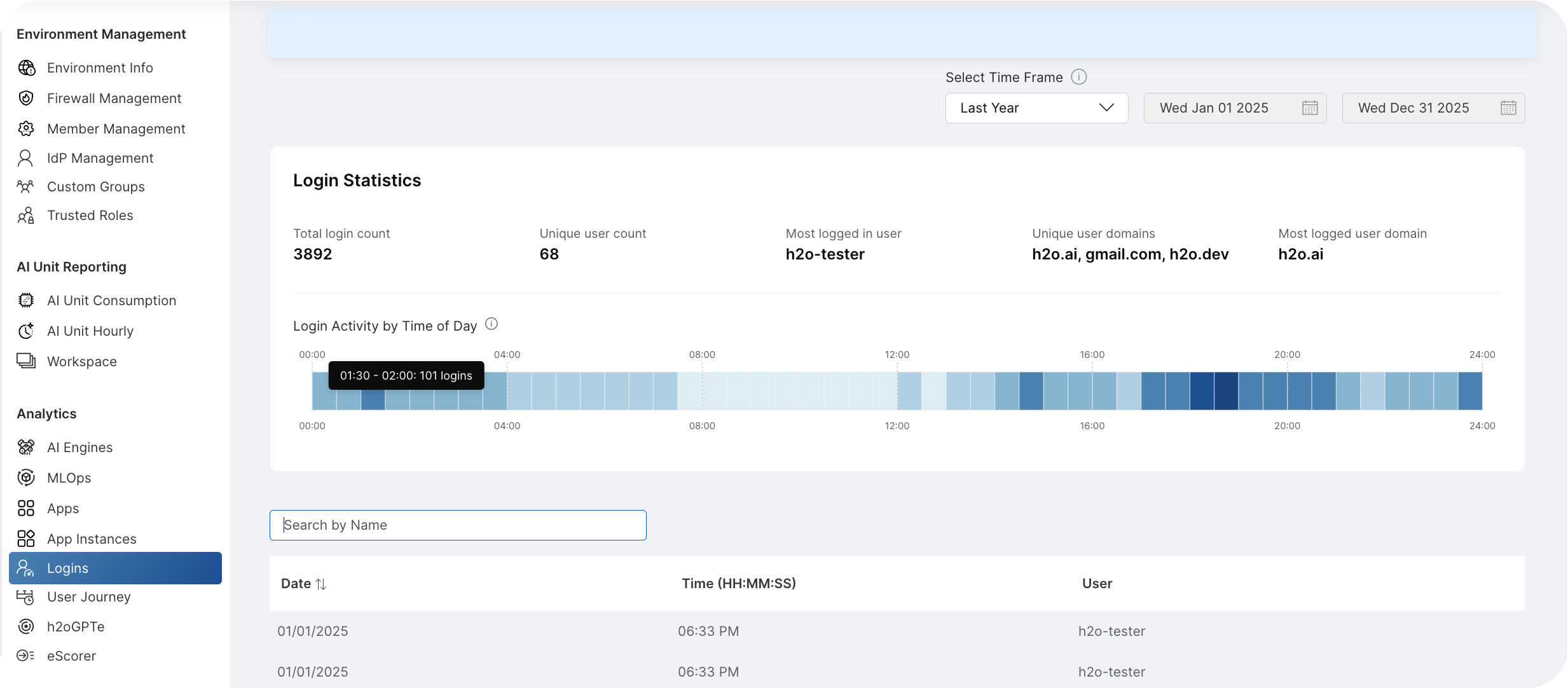
The table displays member login details, including User, Date, and Time, for the selected date range.
Use the Group by feature to organize login details by user.

- Submit and view feedback for this page
- Send feedback about H2O Admin Center to cloud-feedback@h2o.ai