MLflow scikit-learn example
This example demonstrates how you can upload and deploy an MLflow scikit-learn model using the MLOps Python client. It uploads an MLflow scikit-learn model to MLOps and analyzes it. It then sets its metadata and parameters and deploys it to the dev environment in MLOps.
- Install MLflow
- Install scikit-learn
- You will need the values for the following constants in order to successfully carry out the task. Contact your administrator to obtain deployment specific values.
| Constant | Value | Description |
|---|---|---|
MLOPS_API_URL | Usually: https://api.mlops.my.domain | Defines the URL for the MLOps Gateway component. You can verify the correct URL by navigating to the API URL in your browser. It should provide a page with a list of available routes. |
TOKEN_ENDPOINT_URL | https://mlops.keycloak.domain/auth/realms/[fill-in-realm-name]/protocol/openid-connect/token | Defines the token endpoint URL of the Identity Provider. This uses Keycloak as the Identity Provider. Keycloak Realm should be provided. |
REFRESH_TOKEN | <your-refresh-token> | Defines the user's refresh token |
CLIENT_ID | <your-client-id> | Sets the client id for authentication. This is the client you will be using to connect to MLOps. |
PROJECT_NAME | MLflow+Sklearn Upload And Deploy Example | Defines a project that the script will create for the MLflow model. |
EXPERIMENT_NAME | sklearn-mlflow-model | Defines the experiment display name. |
DEPLOYMENT_ENVIRONMENT | DEV | Defines the target deployment environment. |
REFRESH_STATUS_INTERVAL | 1.0 | Defines a refresh interval for the deployment health check. |
MAX_WAIT_TIME | 300 | Defines maximum waiting time for the deployment to become healthy. |
The following steps demonstrate how you can use MLOps Python client to upload and deploy an MLflow scikit-learn model in MLOps.
-
Change the values of the following constants in your
MLflowScikitLearnExample.pyfile as given in the preceding data table.- Format
- Sample
MLflowScikitLearnExample.py### ConstantsMLOPS_API_URL = <MLOPS_API_URL>TOKEN_ENDPOINT_URL = <TOKEN_ENDPOINT_URL>REFRESH_TOKEN = <REFRESH_TOKEN>CLIENT_ID = <CLIENT_ID>PROJECT_NAME = <PROJECT_NAME>EXPERIMENT_NAME = <EXPERIMENT_NAME>DEPLOYMENT_ENVIRONMENT = <DEPLOYMENT_ENVIRONMENT>REFRESH_STATUS_INTERVAL = <REFRESH_STATUS_INTERVAL>MAX_WAIT_TIME = <MAX_WAIT_TIME>MLflowScikitLearnExample.py### ConstantsMLOPS_API_URL = "https://api.mlops.my.domain"TOKEN_ENDPOINT_URL="https://mlops.keycloak.domain/auth/realms/[fill-in-realm-name]/protocol/openid-connect/token"REFRESH_TOKEN="<your-refresh-token>"CLIENT_ID="<your-mlops-client>"PROJECT_NAME = "MLflow+Sklearn Upload And Deploy Example"EXPERIMENT_NAME = "sklearn-mlflow-model"DEPLOYMENT_ENVIRONMENT = "DEV"REFRESH_STATUS_INTERVAL = 1.0MAX_WAIT_TIME = 300 -
Run the
MLflowScikitLearnExample.pyfile.- Execution
- Sample response
python3 MLflowScikitLearnExample.pyDeployment has become healthy -
Finally, navigate to MLOps and click the project name
MLflow+Sklearn Upload And Deploy Exampleunder Projects to view the deployed model.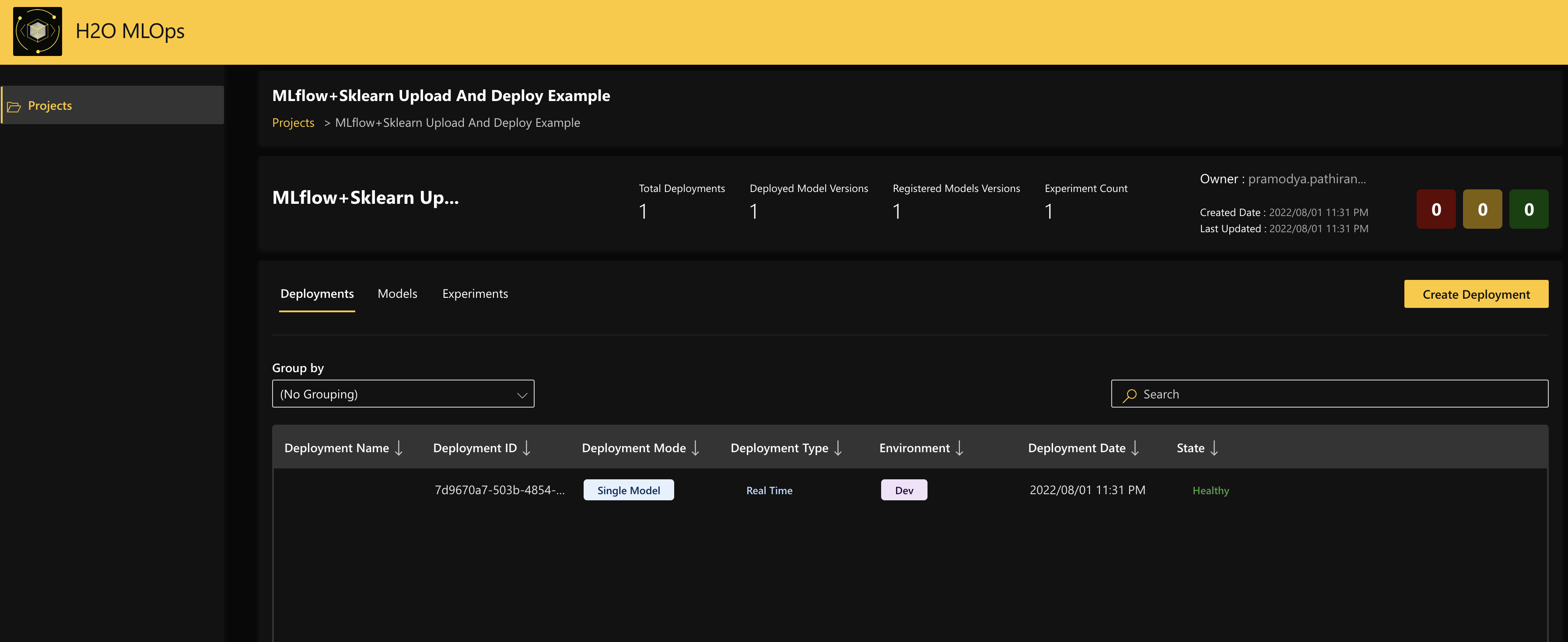 Note
NoteFor more information about model deployments in MLOps, see Understand deployments in MLOps.
Example walkthrough
This section provides a walkthrough of each of the sections in the MLflowScikitLearnExample.py file.
-
Include the Helper function, which waits for the deployment to be healthy.
-
Convert the extracted metadata into storage compatible value objects.
-
Train the scikit-learn model.
MLflowScikitLearnExample.py# Train sklearn model.X_train, y_train = sklearn.datasets.load_wine(return_X_y=True, as_frame=True)y_train = (y_train >= 7).astype(int)sklearn_model = ensemble.RandomForestClassifier(n_estimators=10)sklearn_model.fit(X_train, y_train)# Infering and setting model signature# Model signature is mandatory for models that are going to be loadable by the# server. Only ColSpec inputs and output are supported.model_signature = signature.infer_signature(X_train)model_signature.outputs = mlflow.types.Schema([mlflow.types.ColSpec(name="quality", type=mlflow.types.DataType.float)]) -
Create a project in MLOps and create an artifact in MLOps storage.
-
Store, zip, and upload the model.
MLflowScikitLearnExample.py# Storing, zipping and uploading the modelmodel_tmp = tempfile.TemporaryDirectory()try:model_dir_path = os.path.join(model_tmp.name, "wine_model")mlflow.sklearn.save_model(sklearn_model, model_dir_path, signature=model_signature)zip_path = shutil.make_archive(os.path.join(model_tmp.name, "artifact"), "zip", model_dir_path)with open(zip_path, mode="rb") as zipped:mlops_client.storage.artifact.upload_artifact(file=zipped, artifact_id=artifact.id)finally:model_tmp.cleanup() -
Customize the composition of the deployment and specify the deployment as a single deployment.
-
Finally, create the deployment and wait for the deployment to become healthy. This analyzes and sets the metadata and parameters of the model, and deploys it to the
DEVenvironment.
- Submit and view feedback for this page
- Send feedback about H2O MLOps to cloud-feedback@h2o.ai