Vector database
Enterprise h2oGPTe uses a vector database (the VEX service) to store document chunks and their embeddings for retrieval. VEX exposes a unified API and routes requests to a pluggable storage backend selected at deploy time.
Supported backends
VEX separates vector storage (for similarity search) from fulltext storage (for lexical search). They are configured independently:
| Backend | Vector store (vex.config.vectorDb) | Fulltext store (vex.config.fulltextDb) | Notes |
|---|---|---|---|
| PostgreSQL | postgres (uses pgvector) | postgres | Default. Shared with the application database. Scales horizontally with vex replicas. |
| Embedded HNSW | hnsw (uses hnswlib) | sqlite (uses SQLite FTS5) | Legacy in-pod storage. Single-pod only — indexes live on the pod's PVC. Performance degrades around 10M–50M entries per collection. |
| Elasticsearch | elastic_search | elastic_search | External cluster, experimental. |
| Milvus | milvus | n/a (use postgres or sqlite) | External cluster, experimental. |
| Qdrant | qdrant | qdrant | External cluster, experimental. |
| Redis | redis | redis | Single instance or cluster mode, experimental. |
A separate index is created per Collection, so per-backend limits apply at the Collection level. Connection settings for external backends (host, credentials, TLS) are documented in vex/README.md and are passed through to the vex pods via vex.extraEnv in the Helm chart.
Please contact us if your preferred vector database is not listed above — additional backends can be added based on customer interest.
Choosing a backend
- PostgreSQL (default) — recommended for most deployments. Uses the same database as the application, simplifies operations and backups, and lets you scale vex to multiple replicas. Requires the
pgvectorextension binaries to be present in the Postgres image; mux runsCREATE EXTENSIONautomatically on startup, but it will fail if the image does not shippgvector. - Embedded HNSW + SQLite — fastest option for small, single-node deployments. Limited to one vex pod; cannot be scaled horizontally because indexes live on the pod's local volume.
- External (Elasticsearch / Milvus / Qdrant / Redis) — for organizations that already operate one of these systems or need backend-specific features. Each vex pod becomes stateless; the external database is the source of truth.
Migrating between backends
There are two supported migration strategies — pick one based on your downtime tolerance.
Blocking migration (planned downtime)
mux:
  config:
    vexMigration:
      enabled: true
      sourceDb: "internal"
      destinationDb: "postgres"
      blocking: true
      overrideExistingCollections: false
      bulkSize: 1000
      collectionTimeoutSeconds: 600
      concurrency: 20
      continueOnError: false
Mux halts startup until every collection is copied from sourceDb to destinationDb, then resumes serving traffic with vex pointed at the new backend. Use this when you can schedule a maintenance window.
| Option | Meaning |
|---|---|
enabled | Master switch for the migration. When false, mux ignores every other field in this block. |
sourceDb | Backend collections are read from. Valid values: internal (hnsw+sqlite), postgres, milvus, elasticsearch, qdrant, redis. |
destinationDb | Backend collections are written to. Same valid values as sourceDb. Must match vex.config.vectorDb/fulltextDb. |
blocking | true halts mux startup until every collection is copied. false would run as a background loop (see the live strategy below). |
overrideExistingCollections | If true, collections already present on the destination are dropped and re-copied. Leave false to skip them and resume an interrupted migration. |
bulkSize | Rows copied per batch within a single collection. Higher values increase throughput at the cost of memory. |
collectionTimeoutSeconds | Per-collection deadline. A collection that exceeds it is marked failed (or aborts the run depending on continueOnError). |
concurrency | Number of collections migrated in parallel. Bound by destination-backend write capacity. |
continueOnError | false aborts the whole migration on the first per-collection failure (recommended for blocking runs so issues surface immediately). true skips the failure and continues. |
Live (non-blocking) migration with dual-backend (zero downtime)
Live migration must be paired with dual-backend. While the background copy is running, some collections still live on the source backend — vex needs per-collection routing to serve them. Configure both:
mux:
  config:
    vexMigration:
      enabled: true
      sourceDb: "internal"
      destinationDb: "postgres"
      blocking: false
      overrideExistingCollections: false
      bulkSize: 1000
      collectionTimeoutSeconds: 600
      concurrency: 20
      continueOnError: true
      pageSize: 500
      staleRecoverySeconds: 0
      staleRecoveryBatchSize: 500

vex:
  config:
    vectorDb: postgres
    fulltextDb: postgres
    dualBackend:
      enabled: true
      fallback: "internal"
      bulkSize: 1000
      cacheTtl: 10
      migrationTimeout: 600
How the two halves cooperate at runtime:
- Reads for collections still on the fallback backend are served by vex from there.
- Writes to a collection still on the fallback backend trigger an immediate on-demand migration via dual-backend, then complete on the target.
- Idle collections that are never written to are copied by mux's background loop. Without this, idle collections would stay on the source forever.
- Crash recovery: collections left in the
migratingstate by a pod that died mid-copy are healed automatically.
mux.config.vexMigration options behave the same as in the blocking configuration above, except:
| Option | Meaning |
|---|---|
blocking | false runs the migration as a background loop on every mux replica instead of halting startup. |
continueOnError | true is recommended for live migrations so one bad collection doesn't stop the background loop. Per-collection failures are still recorded and visible in the admin UI. |
pageSize | Page size for the live loop's keyset-paginated scan of the collection table. Lower values reduce per-pod memory at the cost of more round trips. |
staleRecoverySeconds | How long a collection can stay in the migrating state before recovery treats it as abandoned and retries it. Set this longer than collectionTimeoutSeconds, otherwise recovery may snatch a collection away from a peer that is still legitimately working on it. Leave 0 to use the built-in default of max(2× collectionTimeoutSeconds, 1200) seconds. |
staleRecoveryBatchSize | How many abandoned collections the recovery sweep handles per pass. Larger batches finish recovery sooner after a pod crash; smaller batches spread the work out. |
vex.config options:
| Option | Meaning |
|---|---|
vectorDb / fulltextDb | The target backend that new collections are created on and that mux's destinationDb must match. |
dualBackend.enabled | Master switch for per-collection backend routing. Required when running live migration. |
dualBackend.fallback | The source backend that pre-existing collections still live on. Must match mux.config.vexMigration.sourceDb. Valid values: internal, postgres, milvus, elasticsearch, qdrant, redis. |
dualBackend.bulkSize | Rows per batch for on-demand (write-triggered) migrations performed by vex. |
dualBackend.cacheTtl | Seconds vex caches each collection's vex_backend value before re-querying Postgres. Higher values reduce DB load; lower values pick up backend changes sooner. |
dualBackend.migrationTimeout | Upper bound (seconds) a writer waits for a peer pod's in-progress migration before timing out. Keep it aligned with mux.config.vexMigration.collectionTimeoutSeconds so writers don't give up before the migrator does. |
Running live vexMigration (blocking: false) without dualBackend.enabled: true is not a supported configuration. Vex would have no way to read collections still on the source backend while the background copy is in progress.
Monitoring migrations
Admins can monitor a migration from the VEX Migration page in the admin area.
How to open it: sign in as a user with the admin role, open the System Dashboard sidebar (the gear icon in the left rail), and under System overview click VEX Migration. Or go directly to /vex-migration.
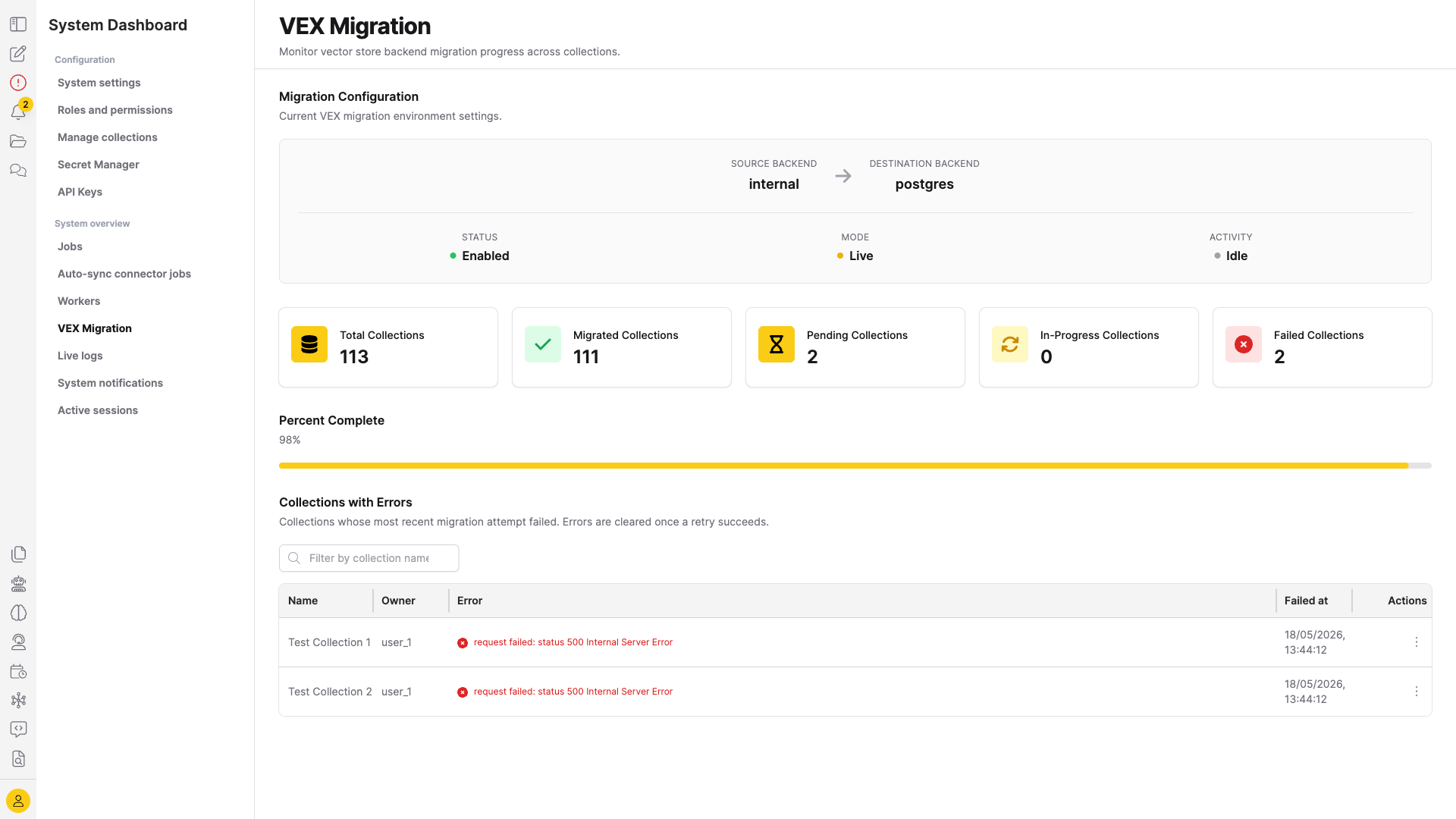
The page shows:
- Migration Configuration — the active migration's source/destination backends, blocking vs. live mode, and an activity indicator that pulses while the background sweep is running.
- Summary stat cards — total, migrated, pending, in-progress, and failed collection counts.
- Collections with Errors — paginated, name/owner-searchable table of collections whose most recent migration attempt failed. Each row exposes a per-collection retry action; errors are cleared once a retry succeeds.
The dashboard auto-refreshes every 30 seconds. Stats always refresh; the failed-collections table only refreshes when the user is on page 0 with no filter, so it doesn't clobber an active search.
- Submit and view feedback for this page
- Send feedback about Enterprise h2oGPTe to cloud-feedback@h2o.ai