Release notes
v0.11.2 | August 16, 2026
Fixes
- Member lookups and matching on the Member management page are now case-insensitive, so email addresses that differ only in case are treated as the same member.
- Removed the deprecated AI unit alerting service that powered the retired AI Unit Consumption page's consumption alerts. Usage alerting is now handled by the usage thresholds introduced in v0.11.1.
v0.11.1 | July 26, 2026
What's new
h2oGPTe Usage tab
The h2oGPTe insights page now includes a Usage tab alongside Summary and Events, providing a user-level breakdown of h2oGPTe activity. h2oGPTe activity is also now included as a category on the User Journey page.
Set custom AI unit usage thresholds
Admins can now configure custom AI unit usage thresholds directly from the AI Unit Hourly page. Each threshold has a percentage and severity level, and triggers an email alert when usage reaches it. By default, admins receive an alert at the 90% level even if no custom thresholds have been set.
Resource blocking
The Environment info page now includes a Resource Blocking setting. When enabled, new processes are automatically blocked for MLOps (experiments, deployments, and batch-scoring jobs), Driverless AI, and App Store once AI unit usage reaches 100% of the contract threshold. Already-running processes are not disrupted.
Configure allowed domains
Admins can now restrict which email domains are allowed to be invited as members from the new Configure domains option on the Member management page. Adding a domain does not automatically allow its subdomains, each subdomain must be added separately.
Changes
AI Unit Consumption page removed
The AI Unit Consumption page has been removed. AI unit calculation details previously documented there are now part of the AI Unit Hourly page.
Admin-only access
Access to H2O Admin Center is now restricted to users with administrator privileges. Non-admin users no longer have access to any part of the application.
v0.10.0 | April 26, 2026
What's new
DAI Connector Configuration page
Manage Driverless AI connector configuration files directly from the Admin Center with the new DAI Connector Configuration page under Environment Management. Upload, view, download, and delete connector configuration files yourself, without waiting on the Managed Cloud team to push files to your S3 bucket. On upload, the file is pushed to the S3 bucket and the related Kubernetes secrets and environment variables are updated automatically within seconds, and new Driverless AI engines pick up the change on the next spin-up.
The file list shows every file available to Driverless AI, with a Status column that distinguishes between files uploaded through the legacy flow (Direct upload to AWS) and files uploaded through the Admin Center UI (shown with the uploader's email address).
Changes
Firewall management redesign
The Firewall management page has been redesigned. The previous side-by-side tables for inbound IPs and outbound ports have been replaced with a stacked list view. Functionality is unchanged — you can still add and delete inbound IPs and outbound ports with real-time updates to the underlying security groups.
MLOps legend-based resource filtering
The MLOps analytics page no longer uses a dropdown to filter resources. Toggle individual gauge metric types (Dataset, Deployment, Experiment, Registered Model, Registered Model Version, and others) by clicking items in the chart legend at the bottom of the graph, matching the interaction model used on other analytics pages.
v0.9.0 | February 22, 2026
What's new
User Journey page
Monitor individual user activity across your environment with the new User Journey page under Analytics. Select a user to view their activity in Driverless AI, H2O3, Notebooks, MLOps, App Store, and Logins during a selected time frame. The page provides two visualizations:
- Scatter plot: View the same activity data as a scatter plot. Hover over each datapoint to see more details about each event.
- Event table: Browse a detailed table of all user events during the selected time period.
Date handling is timezone-aware, ensuring activity data reflects accurate timestamps.
Login analytics heatmap and statistics
The Logins page now includes an interactive heatmap and a card-based statistics dashboard:
- 24-hour heatmap: View total login counts from all users during the selected time period, grouped into 30-minute blocks and displayed in the browser's time zone. The heatmap uses theme-based color scales to highlight peak login periods.
- Statistics dashboard: Key login metrics are now displayed in a card-based layout for quick reference.
Changes
Unified Member management
The Member management page has been restructured. The previous tab-separated view for Users, Admins, and Custom Groups has been replaced with a single unified table. This consolidated view includes:
- Associated Groups column: A new editable column displays the Okta group(s) each user belongs to. Add or remove users from groups by selecting or deselecting groups from the dropdown.
- Bulk removal: Select multiple users from the table and click Remove to open a dialog where you can choose which group(s) each user should be removed from.
- Last Login column: A new column displays the last login time of each user to the environment.
- Sorting and grouping: The table is sortable by all columns and groupable by Status and Source columns.
- Multi-field search: Search across multiple member fields to quickly find specific users.
Improvements
AI Unit consumption and token usage
The AI Unit consumption and token usage views include several enhancements:
- All data is now displayed in the browser's local time zone.
- Added new name mappings and improved the dropdown UI with alphabetical sorting on the h2oGPTe page.
- Added RPC action mappings for workspace operations.
- Token usage fields now support larger values, preventing potential display issues for environments with high token consumption.
- Performance optimizations and UI improvements across the application, including tooltips, layout, and statistics display.
- Updated separators from "-" to ":" in the AI Unit Hourly and AI Unit Workspace pages.
Fixes
- Fixed an error that occurred when creating custom groups on the Custom Groups page.
- Fixed timezone conversion issues in charts and heatmap display on analytics pages.
- Fixed role deletion states and table group collapse on row click.
- Improved reliability of user lookup and last login data retrieval.
v0.8.1 | January 25, 2026
What's new
h2oGPTe insights page
Access detailed usage insights for h2oGPTe directly from H2O Admin Center. The h2oGPTe insights page provides two tabs:
- Summary: View token usage statistics (input and output tokens by LLM), API and RPC event counts, job-related events, and document-related events. Charts display the highest values with options to expand and see complete data.
- Events: Track event occurrences over time with line charts and detailed event tables that show dates and user information.
Both tabs support time period filtering to analyze usage patterns across a selected date range.
Workspace insights page
The Workspace insights page displays AI unit consumption organized by workspace. Select one or multiple workspaces from the dropdown menu and expand each workspace to see:
- A list of namespaces under each workspace.
- User-level consumption within each namespace.
- Detailed usage descriptions (click the view usage icon next to AI unit values).
This hierarchical view assists in tracking resource consumption at the workspace, namespace, and user levels.
eScorer insights page
Monitor eScorer performance and errors with the eScorer insights page. The page includes two tabs with filtering options by model, score mode, and time period:
- Latency: View average latency trends over time with line charts and detailed tables. Break down latency by date, model name, number of datapoints, and score mode.
- Errors: Track error occurrences with line charts that show datapoints versus errors, plus detailed error tables listing date, model name, score mode, total errors, and the last error message recorded.
Trusted Roles page
Manage IAM roles for your H2O AI Managed Cloud environment through the Trusted Roles page. This page accepts role ARNs (Amazon Resource Names) through the UI, which are reflected in the Resource of the role statement. Both Driverless AI and h2oGPTe have their own IAM roles that can be configured through this interface.
Custom Groups page
Custom group management is now available to all customers through the Custom Groups page under Environment management. Previously, this functionality was part of the IdP Management page and only visible to customers with external IdPs configured.
Changes
AI unit calculation update
Updated the GPU multiplier in AI unit calculations from 4x to 2x. This change affects data after November 1st, 2025.
IdP management page structure
Updated the IdP Management page structure. Custom group creation and management functionality moved to the Custom Groups page under Environment management.
v0.7.0 | November 23, 2025
What's new
Identity Provider (IdP) management
You can now manage user groups within your Identity Provider directly from H2O Admin Center. The new IdP Management page lets you configure and maintain user group settings for your identity provider.
Additionally, you can now create and manage custom groups within the IdP Management page:
- Create up to 30 custom groups by entering group names (comma-separated for multiple groups).
- Groups are synchronized across your identity provider and authentication systems to ensure consistent access control.
- Includes validation and retry support to ensure reliable creation and deletion of groups.
Component-wise cumulative data
AI Unit reporting now displays cumulative usage data organized by component. You can also view and filter reports by date range and threshold, making it easier to analyze resource consumption across different parts of your environment.
Improved user synchronization
When you remove a user from H2O Admin Center, the user is now automatically removed from Keycloak, ensuring consistent user management across both systems.
Improvements
- Improved page load times across the application by adding data caching.
v0.6.0 | Sept 21, 2025
What's new
Display profile source in the Users and Admins tables
The Users and Admins tables on the Member management page now display each user's profile source in the Source column. This makes it easier to identify whether a user was created directly or sourced from an Identity Provider (IdP).
Send password reset emails to users with expired passwords
The Resend emails option in the Users table now supports sending password reset emails to users whose passwords have expired (Password Expired status).
Integrated Audit trail service
All activities performed in H2O Admin Center are now recorded in the Audit trail. Users can search and filter this data by date and time, user, component, event source, and more.
Fixes
- Fixed a timeout issue when fetching user profile source.
- Refactored error messages displayed on the Firewall management and Member management pages.
- Removed temporary file usage in Firewall management and moved storage to S3.
v0.5.0 | July 27, 2025
What's new
Send password reset emails to active users
The Resend emails option in the Member management page’s Users table now supports sending password reset emails to users with the Active status.
Previously, this option was only available for users in the Staged or Pending user action stage to resend activation emails.
Fixes
Fixed an issue where AI Unit alerts were triggered twice at the scheduled time.
v0.4.0 | June 29, 2025
What's new
H2O Admin Center now available as a native app
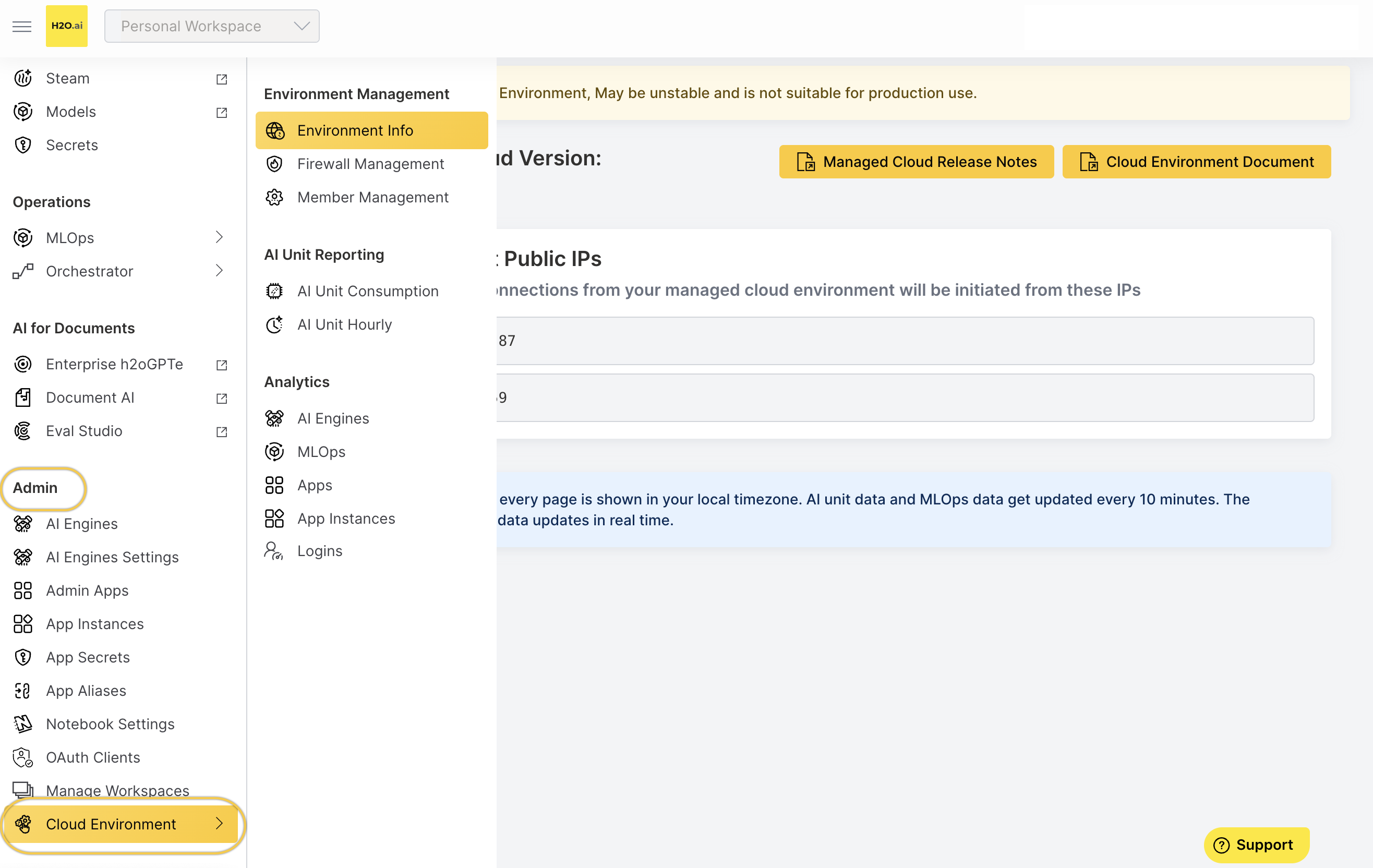
The Managed Cloud Admin Center Wave application has been converted into a native app. It is now available directly in the H2O AI App Store.
Click Cloud Environment under the Admin section in the navigation bar to open it. There’s no need to launch it separately anymore.
- Submit and view feedback for this page
- Send feedback about H2O Admin Center to cloud-feedback@h2o.ai