Run an Evaluator on a Collection
Overview
Enterprise h2oGPTe offers several Evaluators to assess a Collection's performance, reliability, security, fairness, and effectiveness. The available Evaluators for a Collection are based on the Evaluators in H2O Eval Studio. To learn about the available Evaluators for a Collection, see Collection Evaluators.
How models are selected for evaluation
When you evaluate a collection, the system automatically identifies which models to evaluate based on the chat history in that collection. The evaluation process works as follows:
- Models are automatically selected from the LLMs (Large Language Models) that were used in existing chat sessions within the collection
- Each unique model that appears in the collection's chat message history will be included in the evaluation
- No new queries are made—the evaluation tests existing chat question-answer pairs from those chat sessions
- The evaluator assesses the existing LLM responses from your chat history
- Each chat message runs through the evaluator, and success or failure results are aggregated at a per-model level
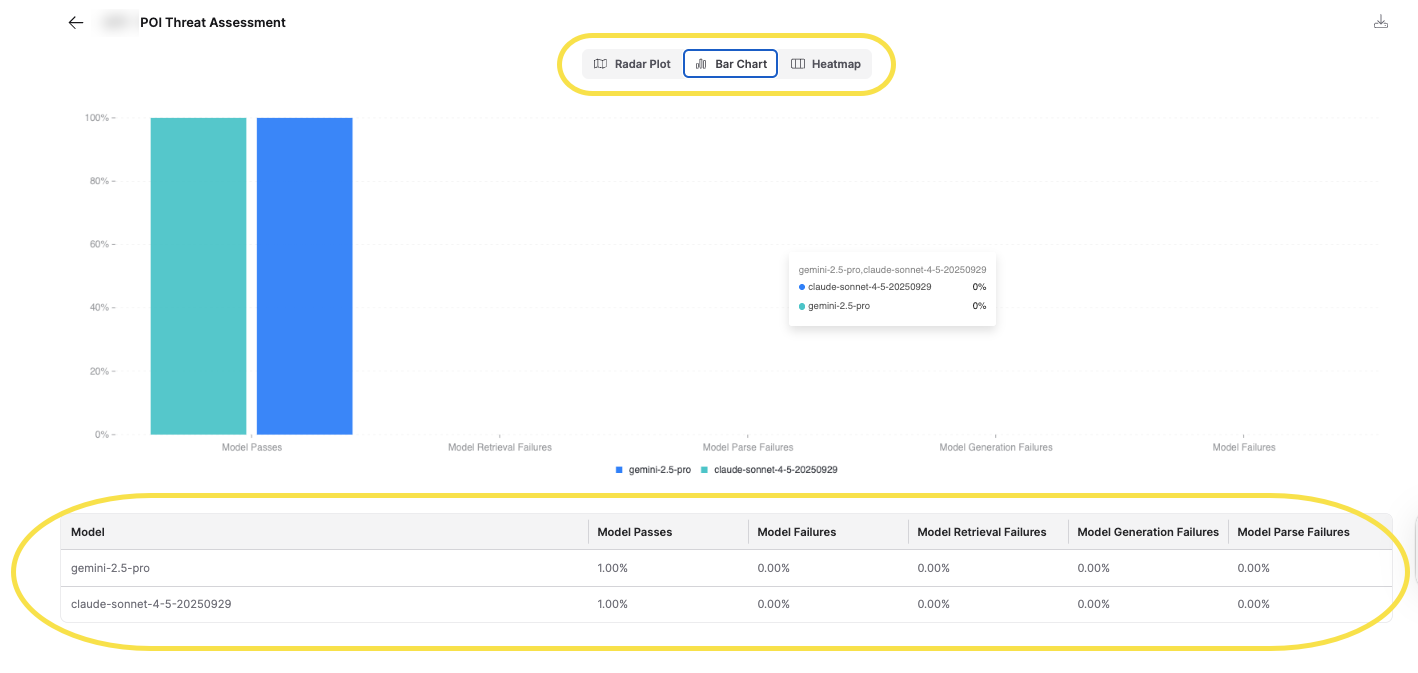
- The UI displays an overview of evaluation metrics in your collection, aggregated by model. The specific metrics shown depend on the evaluator used
If your collection shows only one model in the evaluation results, it means that only one model was used in the chat sessions within that collection. To evaluate multiple models, you need to have chat sessions that used different models in the collection.
This is different from Eval Studio, where you can generate new test cases and compare them across many models. Collection evaluation assesses the work you have already done in your collection's chat sessions, rather than running new tests.
If you want to explicitly test multiple models on the same set of questions, you can use Eval Studio, which allows you to configure that. To access Eval Studio:
- In the Enterprise h2oGPTe navigation menu, click Eval
- Click Open Eval Studio to open H2O Eval Studio in a new page
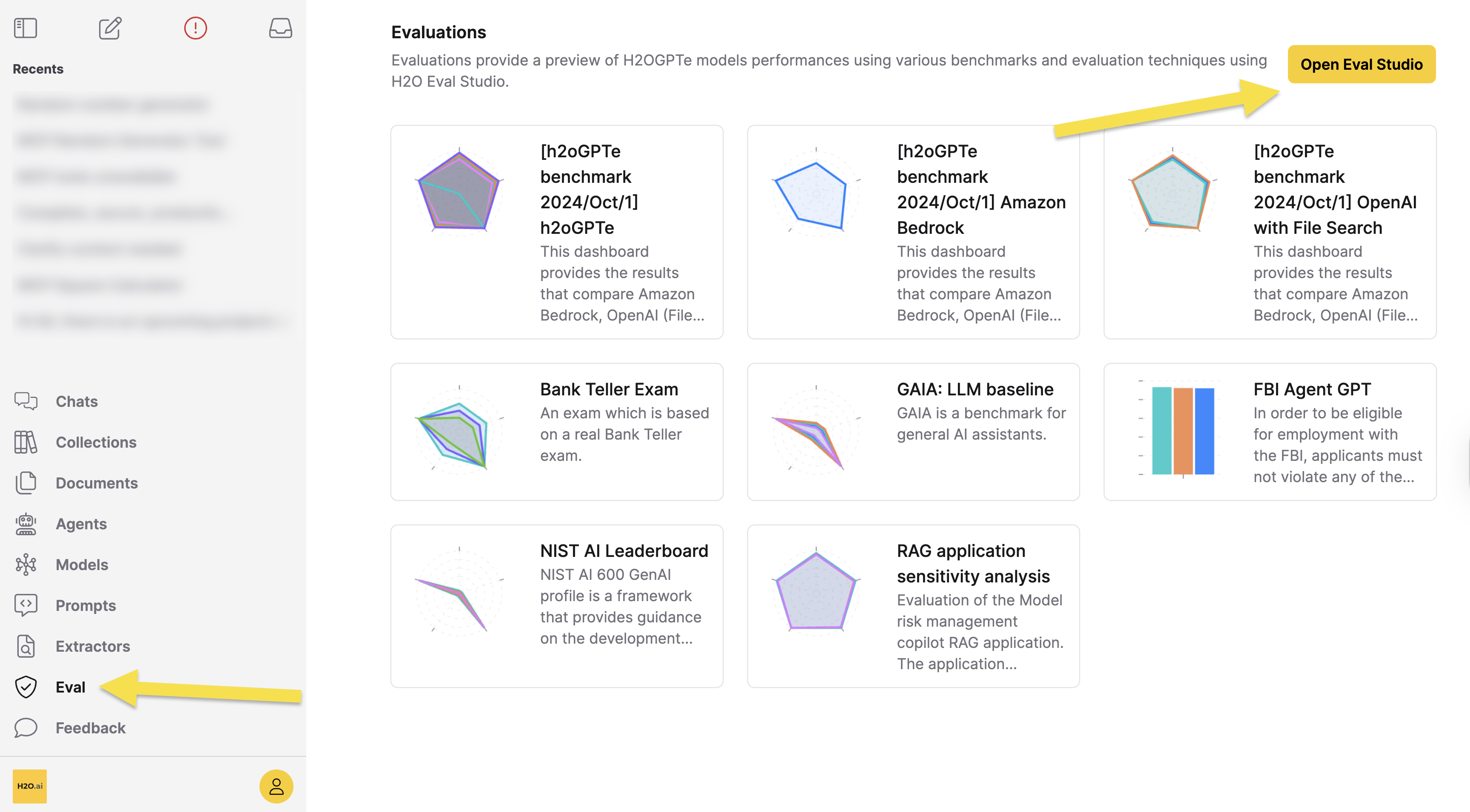
Alternatively, you can use a Python script that takes a list of models and a list of chat questions (potentially from your chat history) and submits them to all models. However, this approach is significantly slower than evaluating a collection.
Permissions Required to Evaluate Collection
If you do not see the evaluation option enabled or the Evaluations section is not visible, this is due to permission restrictions.
- Collection owners can always evaluate their own collections
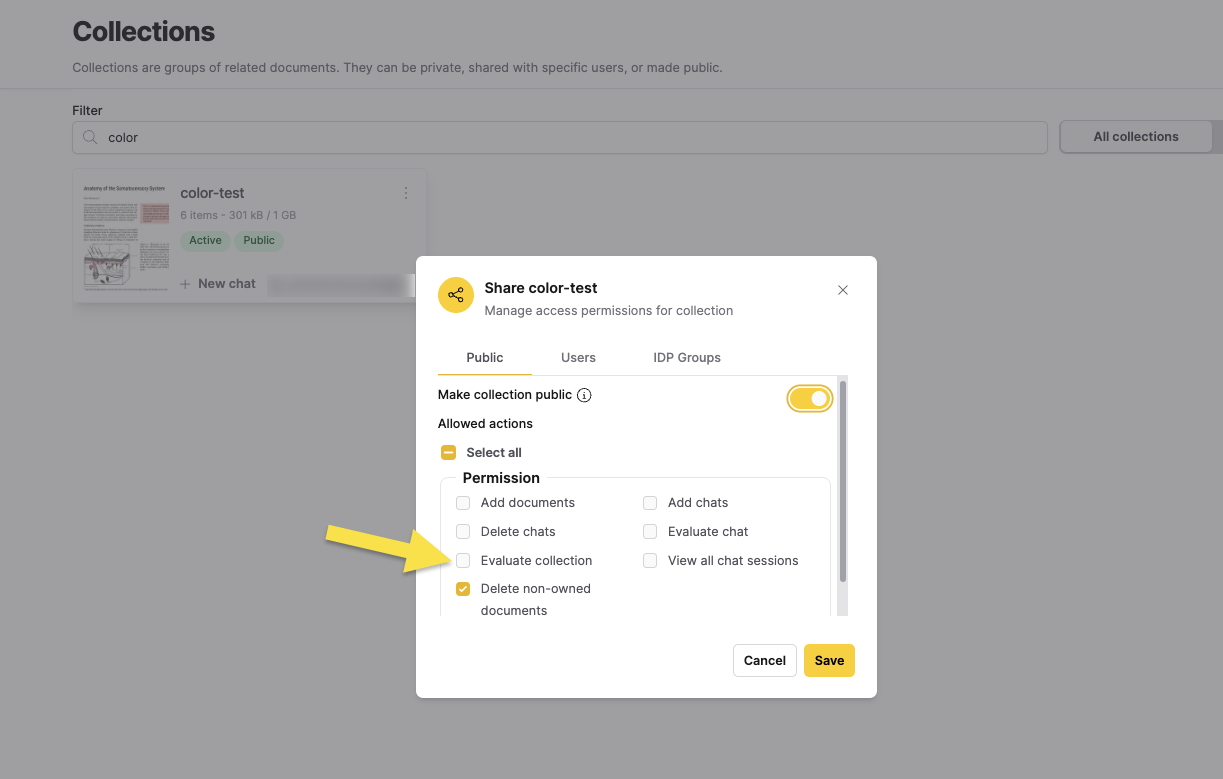
- Non-owners can only evaluate collections if they have been granted the Evaluate collection permission through collection sharing settings (user-specific, group-based, or public collection permissions)
To grant evaluation permissions, collection owners can share the collection and enable the Evaluate collection permission in the sharing settings. For more information about sharing collections, see Share a Collection. Contact your administrator or the collection owner to request evaluation permissions.
Run an Evaluator on a Collection
Instructions
To run an Evaluator on a Collection, consider the following steps:
- In the Enterprise h2oGPTe navigation menu, click Collections.
- From one of the following tabs, locate and select the Collection you want to evaluate.
- All collections
- My collections
- Shared
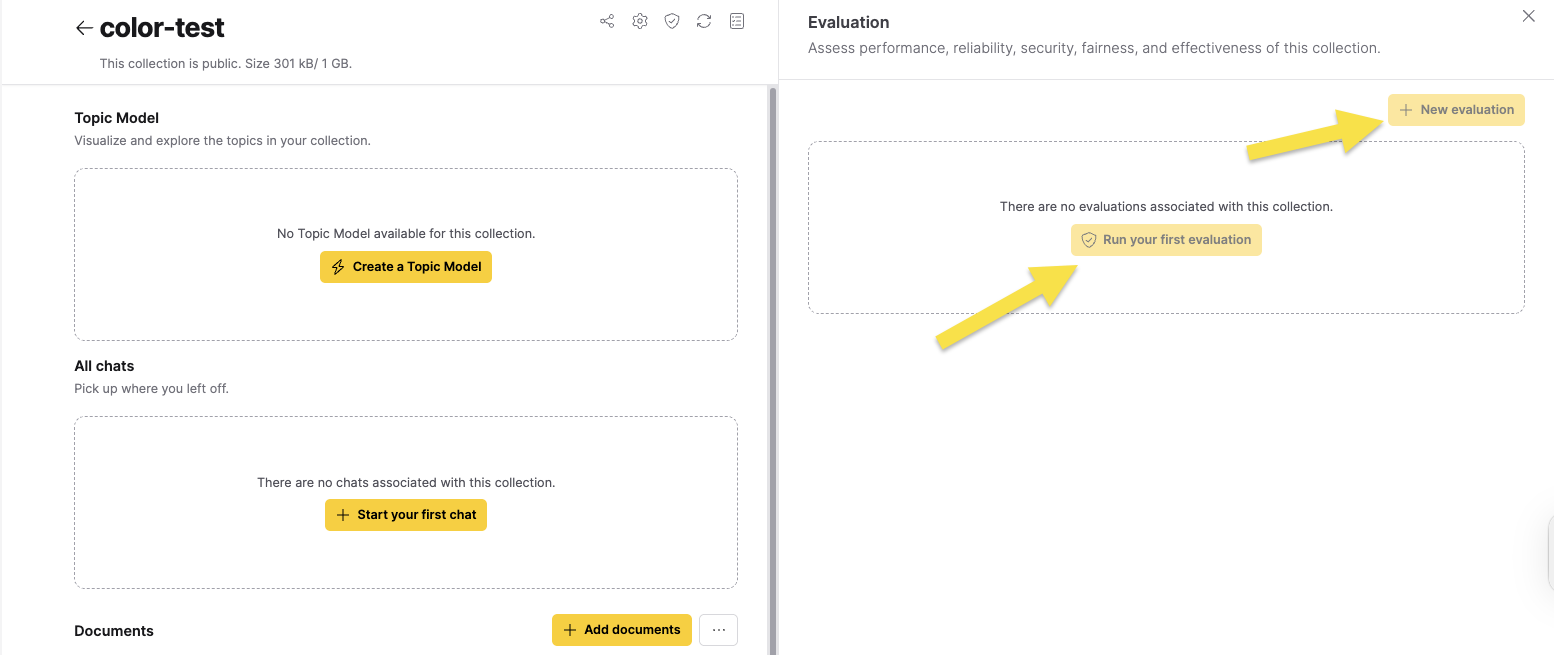
- Click Evaluations. The Evaluation side panel appears.
- Click Run your first evaluation/New evaluation.
The Evaluation dialog box appears.
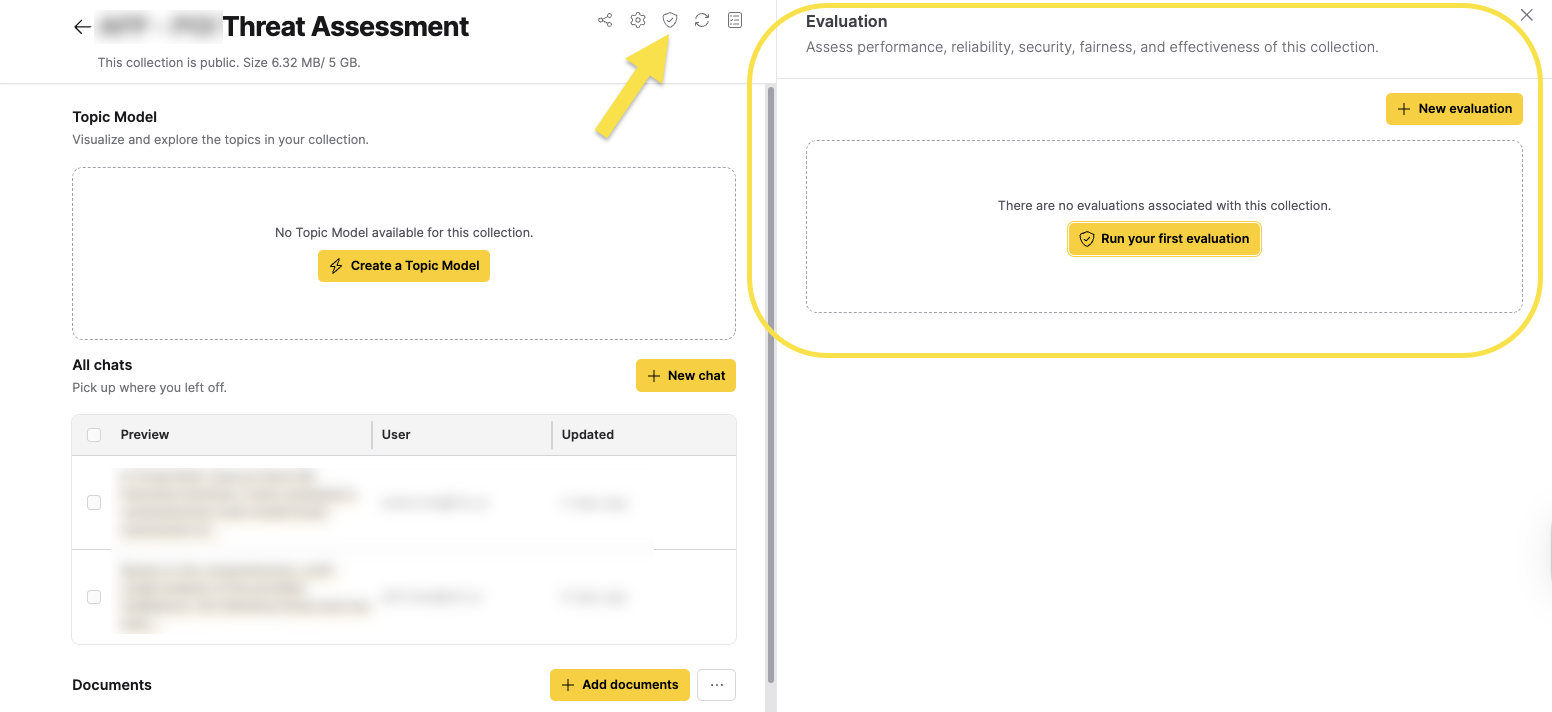
- In the Evaluator list, select an Evaluator. To learn about each available Evaluator for a Collection, see Collection Evaluators below.
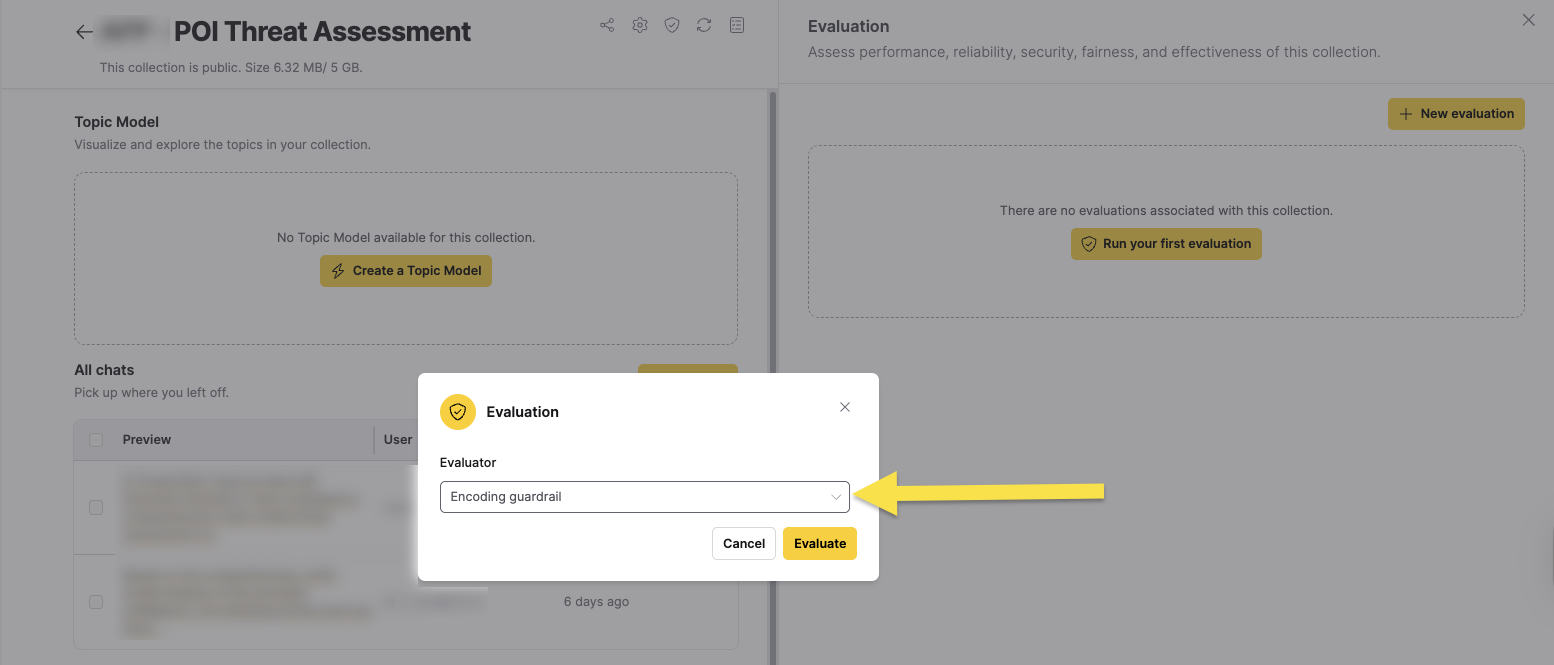
- Click Evaluate in the dialog.
The evaluation job starts running. You can monitor its progress in the jobs tray. The evaluation may take some time depending on the number of chat messages in your collection.
Viewing Evaluation Results
After the evaluation finishes, you can view the results by clicking on the evaluation in the Evaluations table. The table displays information about the status, creation time, and includes a link to download the results in a zip file.
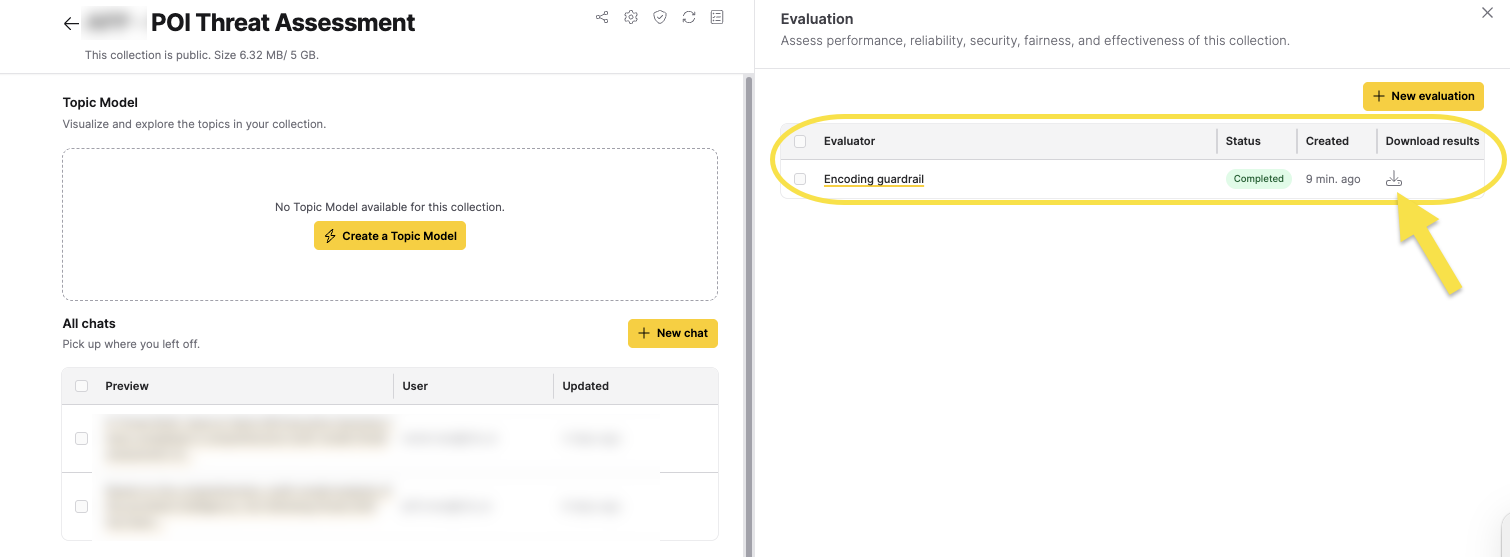
To download the full evaluation results, click the download icon in the Evaluations table. The downloaded file includes an interpretation.html file that shows each test case (chat message) with detailed information on insights, problems, and more.
Click on the Evaluator name to go to the results page, which displays a comprehensive evaluation dashboard. The dashboard includes visualization options and detailed metrics that vary depending on the evaluator used. The results are aggregated by model, allowing you to compare performance across different models used in your collection.
For detailed information on how to analyze results using the evaluation dashboard, see the H2O Eval Studio documentation.
Evaluation Status
Evaluations can have the following statuses:
- Running: The evaluation is currently in progress
- Completed: The evaluation has finished successfully
- Failed: The evaluation encountered an error
- Canceled: The evaluation was canceled before completion
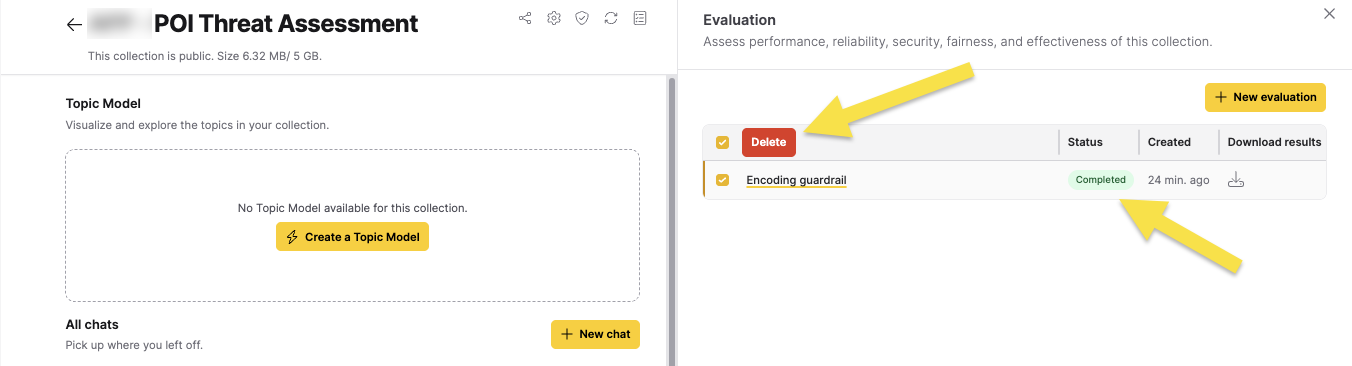
You can delete completed or failed evaluations by clicking the remove icon in the Evaluations table.
Collection evaluators
Not all evaluators are always available for every collection. Evaluator availability depends on the data in your collection's chat history:
- Evaluators requiring ground truth: Some evaluators require expected answers (ground truth) from users. If none of your chat messages include expected answers, these evaluators will not appear in the evaluator list.
- Evaluators requiring retrieved context: Some evaluators require retrieved context from documents. If there are no chat messages with retrieved context, these evaluators will be hidden.
For a complete list of all available evaluators and their specific requirements, see the H2O Eval Studio documentation. The below section lists some of the commonly available Evaluators for a Collection.
Contact information leakage (requires judge)
This Evaluator detects leakage of privacy-sensitive information like personal contact details in the Collection's LLM responses. This Evaluator requires a judge model to assess the responses. To learn more about this Evaluator, see Contact Information Evaluator.
Encoding guardrail
This Evaluator detects sensitive data leakage by encoding questions and answers to identify potential privacy or security issues in the Collection's LLM responses. To learn more about this Evaluator, see Encoding Guardrail Evaluator.
Fairness bias
This Evaluator assesses whether the Collection's LLM responses exhibit bias or unfair treatment based on gender, race, ethnicity, or other demographic factors, ensuring that the model's output is impartial and equitable. To learn more about this Evaluator, see Fairness Bias Evaluator.
Groundedness (semantic similarity)
This Evaluator evaluates actual answers by assessing their relevance to the retrieved context, ensuring that responses are well-grounded in the provided information. To learn more about this Evaluator, see Groundedness Evaluator.
Hallucination
This Evaluator identifies whether the Collection's LLM responses include fabricated or inaccurate information that doesn't align with the provided context or factual data. To learn more about this Evaluator, see Hallucination Evaluator.
Looping detection
This Evaluator detects looping in the generated answers, identifying when the LLM produces repetitive or circular responses that may indicate a problem with the model's output generation. To learn more about this Evaluator, see Looping Detection Evaluator.
Perplexity
This Evaluator evaluates coherence, fluency, and certainty of actual answers, measuring how well-formed and confident the LLM responses are. To learn more about this Evaluator, see Perplexity Evaluator.
Personally Identifiable Information (PII) leakage
This Evaluator checks if the Collection's LLM responses inadvertently reveal sensitive personal data, such as names, addresses, phone numbers, or other details that could be used to identify an individual. To learn more about this Evaluator, see PII Leakage Evaluator.
Sensitive data leakage
This Evaluator detects if the Collection's LLM discloses confidential or protected information, such as proprietary business data, medical records, or classified content, which could result in security or privacy breaches. To learn more about this Evaluator, see Sensitive Data Leakage Evaluator.
Sexism (requires judge)
This Evaluator assesses the answers for instances of gender stereotyping and sexist content in the Collection's LLM responses. This Evaluator requires a judge model to assess the responses. To learn more about this Evaluator, see Sexism Evaluator.
Step alignment and completeness
This Evaluator evaluates the steps in the answer for alignment and completeness, ensuring that multi-step responses follow a logical progression and include all necessary components. To learn more about this Evaluator, see Step Alignment and Completeness Evaluator.
Toxicity
At a high level, this Evaluator helps you determine if the Collection's LLM responses contain harmful, offensive, or abusive language that could negatively impact users or violate platform guidelines. To learn more about this Evaluator, see Toxicity Evaluator.
- Submit and view feedback for this page
- Send feedback about Enterprise h2oGPTe to cloud-feedback@h2o.ai