Import from File System
Overview
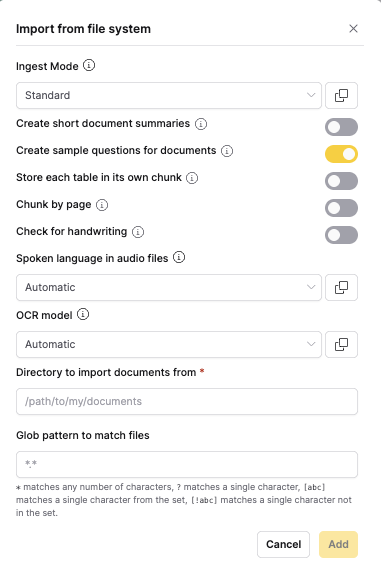
The Import from File System ingestion method allows you to import documents from directories on your local machine or network drives. This method supports glob patterns for flexible file selection and is ideal for bulk imports from organized directory structures.
When to use
- Bulk imports: When you have many documents in organized directories
- Network drives: For importing from shared network locations
- Automated workflows: When using consistent directory structures
- Large document sets: For importing hundreds or thousands of files
- Organized storage: When documents are already organized in folders
note
For document processing options, see the Shared Document Processing Options section in the main documentation.
Directory structure examples
- Simple directory
- Nested directory structure
- Mixed file types
/documents/
├── report1.pdf
├── report2.docx
└── presentation.pptx
Glob pattern: *.{pdf,docx,pptx}
/documents/
├── 2024/
│   ├── Q1/
│   │   ├── sales_report.pdf
│   │   └── marketing_data.xlsx
│   └── Q2/
│       ├── financial_summary.pdf
│       └── budget_analysis.docx
└── 2023/
  └── annual_report.pdf
Glob patterns:
- All PDFs:
**/*.pdf - 2024 documents only:
2024/**/* - Q1 documents:
2024/Q1/*
/reports/
├── sales/
│   ├── monthly_sales.pdf
│   ├── quarterly_summary.docx
│   └── data_export.csv
└── marketing/
   ├── campaign_results.pdf
   └── strategy_document.docx
Glob patterns:
- All documents:
**/*.{pdf,docx} - CSV files only:
**/*.csv - Sales documents:
sales/*
Feedback
- Submit and view feedback for this page
- Send feedback about Enterprise h2oGPTe to cloud-feedback@h2o.ai