Import from S3
Overview
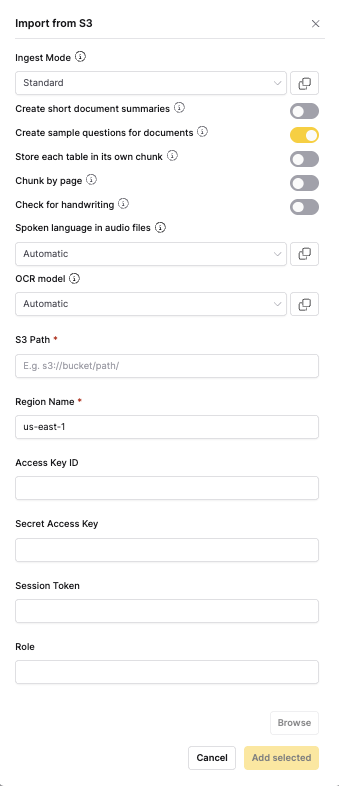
The Import from S3 ingestion method allows you to import documents directly from Amazon S3 buckets. This method supports various authentication methods and path patterns, making it ideal for cloud-based document storage and automated workflows.
When to use
- S3 storage integration: When your documents are stored in Amazon S3
- Cloud workflows: For automated document processing from cloud storage
- Scalable storage: When working with large document repositories
- AWS ecosystem: For organizations using AWS services
- Backup and archival: For importing documents from S3 backup storage
Configuration parameters
S3 connection
| Option | Default | Description | Use case |
|---|---|---|---|
| S3 Path | - (text input) | S3 bucket path (e.g., s3://bucket-name/path/to/documents) | Specify the S3 location to import from |
| Region Name | Auto-detect (dropdown) | AWS region for the S3 bucket | Specify the AWS region if auto-detection fails |
| Authentication Method | Access Keys (dropdown) | Choose authentication method | Select appropriate authentication for your setup |
Authentication options
| Option | Default | Description | Use case |
|---|---|---|---|
| Access Key ID | - (text input) | AWS access key for authentication | Required for access key authentication |
| Secret Access Key | - (password input) | AWS secret key for authentication | Required for access key authentication |
| Session Token | - (text input) | Temporary session token | Required for temporary credentials |
| IAM Role ARN | - (text input) | ARN of IAM role with S3 permissions | Required for IAM role authentication |
-
The S3 connector supports AWS IAM Roles for Service Accounts (IRSA) and role chaining for enhanced security and flexibility in Kubernetes environments.
-
For document processing options, see the Shared Document Processing Options section in the main documentation.
Auto-sync
This connector supports automatic scheduled synchronization. When enabled, h2oGPTe periodically checks for new or modified files and automatically imports them to your collection.
To learn more about setting up scheduled syncing, see Auto-Sync Connectors.
- Submit and view feedback for this page
- Send feedback about Enterprise h2oGPTe to cloud-feedback@h2o.ai